

編輯:關於 Android 程式設計
ListView 已經用了很多年,後來有了 RecyclerView,基本可以取代 ListView / GridView,還支援瀑布流模式,加上各種動畫效果,於是就試著用 RecyclerView 來替代 ListView。實際用過之後確實不錯,但也還是有一些問題(比如卡頓)。
如果 UI 的要求不嚴格,那麼有一個非常簡單的方案實現下拉刷新:SwipeRefreshLayout,基本上就可以開開心心收工了。
但如果你們的 UI 或產品說「我們要一個什麼什麼樣的效果」(反正就是不造輪子不行的需求),那只能自己動手。
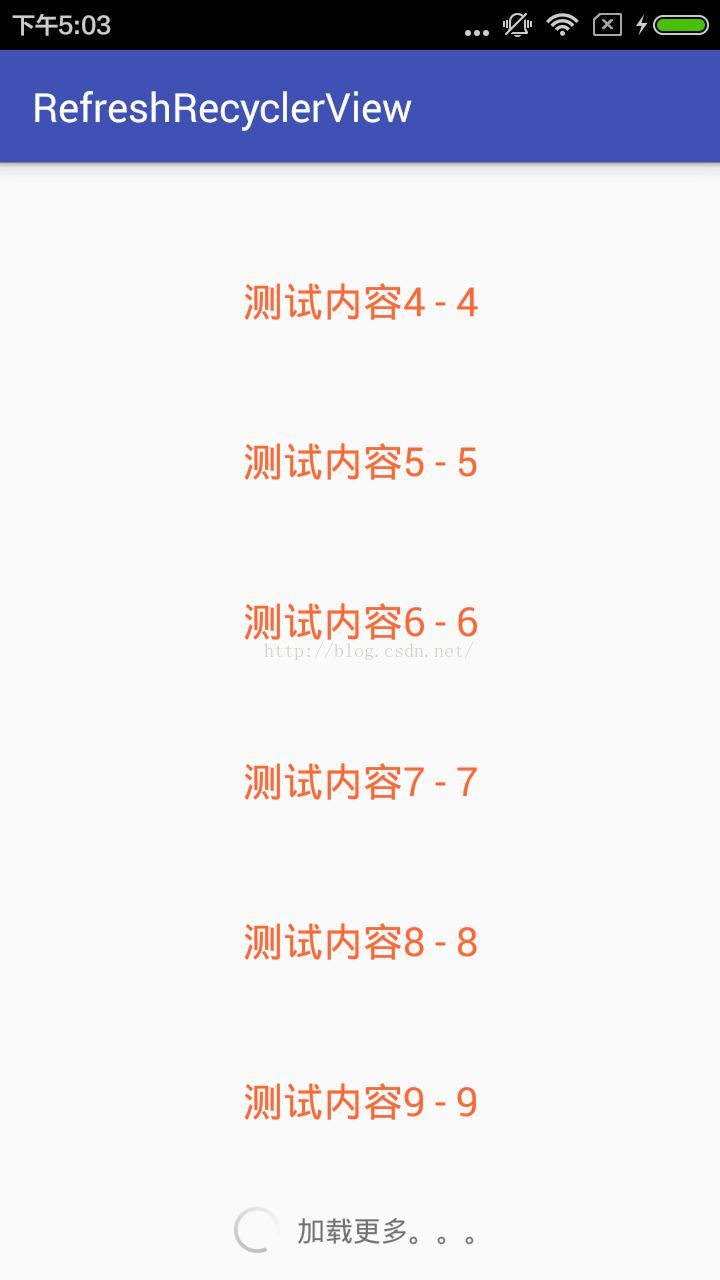
先看效果:
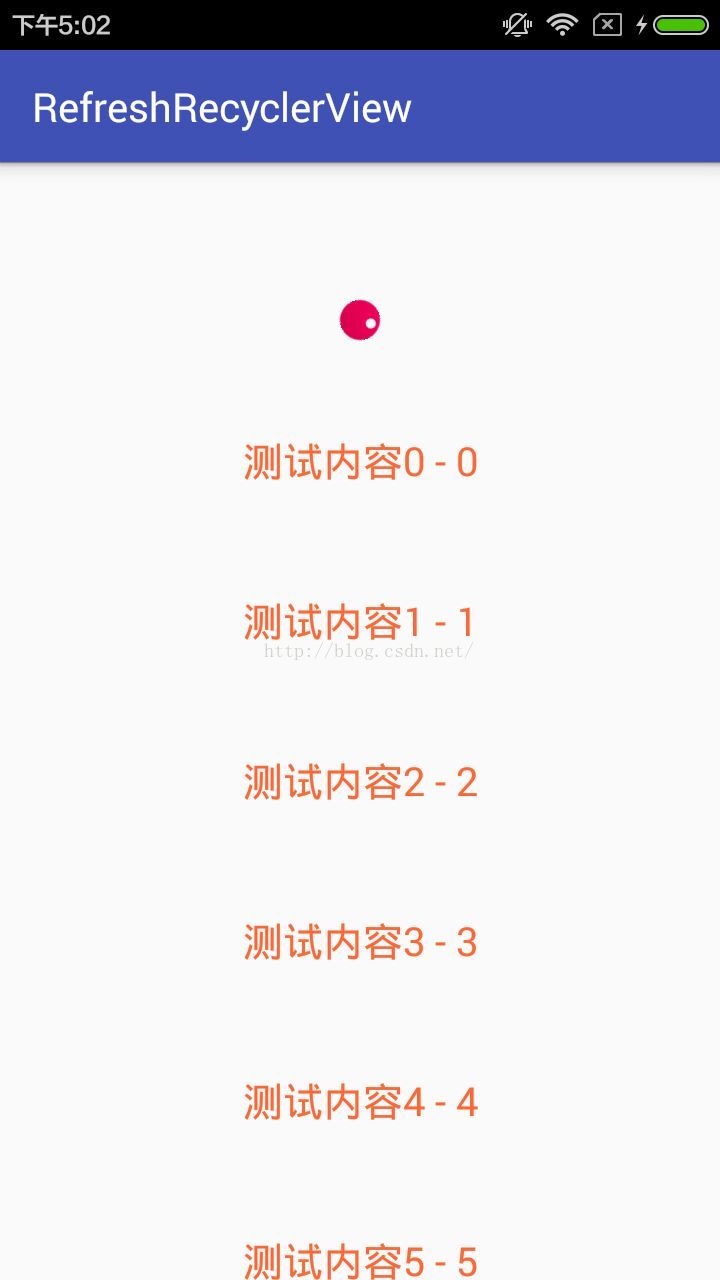
下拉刷新
載入更多
RecyclerView.Adapter。思路清楚之後,寫起來就簡單多了。
public class RefreshRecyclerView extends LinearLayout {

    // 用於判斷上次更新時間的時間常數
    public static final long ONE_MINUTE = 60 * 1000;
    public static final long ONE_HOUR   = 60 * ONE_MINUTE;
    public static final long ONE_DAY    = 24 * ONE_HOUR;
    public static final long ONE_MONTH  = 30 * ONE_DAY;
    public static final long ONE_YEAR   = 12 * ONE_MONTH;

    private String MYRECYCLERVIEW = "MyRecyclerView"; // 儲存用的 key 前綴
    private int id;                   // 用來區分不同頁面

    private LinearLayout headerView;  // 刷新頭部佈局
    public static final int SCROLL_SPEED = -10; // 下拉頭部回滾速度

    private int topPadding;           // 距離頂部的 padding 值
    private RecyclerView mRecyclerView;
    private LinearLayoutManager mLayoutManager;
    private int firstVisibleItemPostion;
    private int mHeaderHeight;

    private boolean hasMore;    // 是否有載入更多(由使用者設定)
    private boolean hasRefresh; // 是否有下拉刷新(由使用者設定)
    private boolean canRefresh; // 是否可以下拉刷新(邏輯判斷)
    private boolean isLoading;  // 列表是否正在刷新或載入更多中
    private boolean canScroll;  // 列表是否可以滾動(刷新/載入中禁止操作)

    private LoadLinsteners loadLinsteners;
    private ScrollLinsteners scrollLinsteners;
    private BaseAdapter mAdapter;

    // 頭部相關
    private TextView description, updated_at;
    private Long lastUpdateTime;
    private ImageView arrow;
    private ProgressBar progress_bar;
    private ImageView iv_head;
    private Context context;
    private int readCount; // 記錄當前列表最大滾動位置

    public RefreshRecyclerView(Context context) {
        this(context, null);
    }

    public RefreshRecyclerView(Context context, AttributeSet attrs) {
        super(context, attrs);
        this.context = context;
        initContents();
    }

    /** 初始化 */
    private void initContents() {
        // 預設可下拉刷新、無載入更多
        canRefresh = true;
        hasMore    = false;
        hasRefresh = true;
        isLoading  = false;
        canScroll  = true;

        // 頭部
        headerView = (LinearLayout) LayoutInflater.from(context)
                .inflate(R.layout.item_recyler_header, null);
        iv_head       = (ImageView)  headerView.findViewById(R.id.iv_head);
        description   = (TextView)   headerView.findViewById(R.id.description);
        updated_at    = (TextView)   headerView.findViewById(R.id.updated_at);
        arrow         = (ImageView)  headerView.findViewById(R.id.arrow);
        progress_bar  = (ProgressBar) headerView.findViewById(R.id.progress_bar);

        // 測量並取得頭部高度
        measureView(headerView);
        mHeaderHeight = headerView.getMeasuredHeight();

        // 列表
        mRecyclerView = new RecyclerView(context);
        mRecyclerView.setOverScrollMode(View.OVER_SCROLL_NEVER);
        mLayoutManager = new LinearLayoutManager(getContext());
        mRecyclerView.setLayoutManager(mLayoutManager);

        // 組裝佈局
        setOrientation(VERTICAL);
        addView(headerView, new LayoutParams(LayoutParams.MATCH_PARENT,
                                             LayoutParams.WRAP_CONTENT));
        addView(mRecyclerView, new LayoutParams(LayoutParams.MATCH_PARENT,
                ViewGroup.LayoutParams.WRAP_CONTENT, 1));

        // 隱藏頭部
        setTopPadding(-mHeaderHeight);

        setLinsteners();

        // 加上旋轉動畫
        Animation animation = AnimationUtils.loadAnimation(context, R.anim.anim_rotate_earth);
        LinearInterpolator lin = new LinearInterpolator();
        animation.setInterpolator(lin);
        iv_head.startAnimation(animation);
    }

    public void setmLayoutManager(LinearLayoutManager layoutManager) {
        this.mLayoutManager = layoutManager;
        mRecyclerView.setLayoutManager(mLayoutManager);
    }

    public RecyclerView.LayoutManager getmLayoutManager() {
        return mLayoutManager;
    }

    public void setAdapter(BaseAdapter mAdapter) {
        this.mAdapter = mAdapter;
        mRecyclerView.setAdapter(mAdapter);
    }

    public RecyclerView getmRecyclerView() {
        return mRecyclerView;
    }

    /** 載入監聽器 */
    public interface LoadLinsteners {
        void onLoadMore();
        void onRefresh();
    }

    public void setLoadLinsteners(LoadLinsteners loadLinsteners, int id) {
        this.loadLinsteners = loadLinsteners;
        this.id = id;
        refreshUpdatedAtValue();
    }

    public void setLoadLinsteners(LoadLinsteners loadLinsteners) {
        this.loadLinsteners = loadLinsteners;
        this.id = -1;
        refreshUpdatedAtValue();
    }

    /** 滾動監聽介面 */
    public interface ScrollLinsteners {
        void onScrolled(int firstVisibleItem, int dx, int dy);
    }

    public void setScrollLinsteners(ScrollLinsteners scrollLinsteners) {
        this.scrollLinsteners = scrollLinsteners;
    }

    public int getReadCount() {
        return readCount;
    }

    @Override
    public boolean onInterceptTouchEvent(MotionEvent ev) {
        // canScroll 為 false 時攔截事件,禁止列表操作
        if (!canScroll) {
            return true;
        }
        return false;
    }

    private float moveY, startY = -1, dY;

    private void setLinsteners() {
        /** 觸摸監聽,實現下拉效果 */
        mRecyclerView.setOnTouchListener(new OnTouchListener() {
            @Override
            public boolean onTouch(View v, MotionEvent event) {
                if (canRefresh && firstVisibleItemPostion == 0
                        && !isLoading && hasRefresh) {
                    switch (event.getAction()) {
                        case MotionEvent.ACTION_DOWN:
                            startY = -1;
                            break;

                        case MotionEvent.ACTION_MOVE:
                            moveY = event.getRawY();
                            if (startY == -1) {
                                startY = moveY;
                            }
                            dY = moveY - startY;
                            if (dY > 30) {
                                dY = dY - 30;
                                int maxLength = mHeaderHeight * 6;
                                if (dY < maxLength && dY >= 30) {
                                    description.setText(R.string.pull_to_refresh);
                                } else if (dY >= maxLength) {
                                    description.setText(R.string.release_to_refresh);
                                    dY = maxLength;
                                }
                                // 超過一個頭部高度後做阻尼,拉得越遠越費力
                                if (dY > mHeaderHeight) {
                                    dY = (dY + mHeaderHeight) / 2;
                                }
                                setTopPadding((int) (dY - mHeaderHeight));
                            } else {
                                setTopPadding(-mHeaderHeight);
                                return false;
                            }
                            break;

                        case MotionEvent.ACTION_UP:
                            if (dY > mHeaderHeight / 2) {
                                isLoading  = true;
                                canScroll  = false;
                                canRefresh = false;
                                description.setText(R.string.refreshing);
                                arrow.setVisibility(View.GONE);
                                progress_bar.setVisibility(View.VISIBLE);
                                new RefreshingTask().execute();
                                if (loadLinsteners != null) {
                                    loadLinsteners.onRefresh();
                                }
                            } else {
                                startY = -1;
                                new HideHeaderTask().execute();
                                return false;
                            }
                            dY = 0;
                            startY = -1;
                            moveY = 0;
                            break;
                    }
                    return true;
                }
                return false;
            }
        });

        /** 滾動監聽,判斷載入更多 */
        mRecyclerView.addOnScrollListener(new RecyclerView.OnScrollListener() {
            @Override
            public void onScrolled(RecyclerView recyclerView, int dx, int dy) {
                super.onScrolled(recyclerView, dx, dy);
                firstVisibleItemPostion = mLayoutManager.findFirstVisibleItemPosition();
                int lastVisibleItem  = mLayoutManager.findLastVisibleItemPosition();
                int totalItemCount   = mLayoutManager.getItemCount();

                if (readCount <= lastVisibleItem) {
                    readCount = lastVisibleItem;
                }

                // lastVisibleItem >= totalItemCount - 4 表示剩下 4 個 item 時自動載入
                // dy >= 0 表示向下滑動
                if (lastVisibleItem >= totalItemCount - 4 && dy >= 0) {
                    if (hasMore && !isLoading) {
                        isLoading = true;
                        canScroll = true;
                        if (loadLinsteners != null) {
                            loadLinsteners.onLoadMore();
                        }
                    }
                }

                // 如果列表回到頭部,允許再次下拉刷新
                if (firstVisibleItemPostion == 0
                        && mLayoutManager.getChildAt(0).getTop() == 0
                        && hasRefresh) {
                    canRefresh = true;
                    startY = -1;
                } else {
                    canRefresh = false;
                }

                if (scrollLinsteners != null) {
                    scrollLinsteners.onScrolled(firstVisibleItemPostion, dx, dy);
                }
            }

            @Override
            public void onScrollStateChanged(RecyclerView recyclerView, int newState) {
                super.onScrollStateChanged(recyclerView, newState);
            }
        });
    }

    /** 設定頂部 padding 值 */
    public void setTopPadding(int top) {
        topPadding = top;
        setPadding(0, top, 0, 0);
    }

    /** 停止下拉刷新 */
    public void onStopRefresh() {
        new HideHeaderTask().execute();
        canRefresh = true;
        isLoading  = false;
        canScroll  = true;
        arrow.setVisibility(View.GONE);
        progress_bar.setVisibility(View.GONE);
        saveTv_refresh_time();
    }

    /** 停止載入更多 */
    public void onStopMore() {
        isLoading = false;
    }

    /** 儲存刷新時間 */
    public void saveTv_refresh_time() {
        if (id == -1) return;
        saveSPLongData(MYRECYCLERVIEW + id, System.currentTimeMillis());
        refreshUpdatedAtValue();
    }

    public void setId(int id) {
        this.id = id;
    }

    /** 是否可以載入更多 */
    public void setHasMore(boolean hasMore) {
        this.hasMore = hasMore;
        if (mAdapter != null) {
            mAdapter.setHasMore(hasMore);
        }
    }

    /** 是否可以下拉刷新 */
    public void setHasRefresh(boolean hasRefresh) {
        this.hasRefresh = hasRefresh;
    }

    /** 測量佈局 */
    private void measureView(View child) {
        ViewGroup.LayoutParams params = child.getLayoutParams();
        if (params == null) {
            params = new ViewGroup.LayoutParams(
                    ViewGroup.LayoutParams.MATCH_PARENT,
                    ViewGroup.LayoutParams.WRAP_CONTENT);
        }
        int childWidthSpec = ViewGroup.getChildMeasureSpec(0, 0, params.width);
        int lpHeight = params.height;
        int childHeightSpec;
        if (lpHeight > 0) {
            childHeightSpec = MeasureSpec.makeMeasureSpec(lpHeight, MeasureSpec.EXACTLY);
        } else {
            childHeightSpec = MeasureSpec.makeMeasureSpec(0, MeasureSpec.UNSPECIFIED);
        }
        child.measure(childWidthSpec, childHeightSpec);
    }

    /** 刷新下拉頭中「上次更新時間」的文字描述 */
    private void refreshUpdatedAtValue() {
        if (id == -1) return;
        lastUpdateTime = getSPLongData(MYRECYCLERVIEW + id);
        long currentTime = System.currentTimeMillis();
        long timePassed  = currentTime - lastUpdateTime;
        long timeIntoFormat;
        String updateAtValue;

        if (lastUpdateTime == -1) {
            updateAtValue = getResources().getString(R.string.not_updated_yet);
        } else if (timePassed < 0) {
            updateAtValue = getResources().getString(R.string.time_error);
        } else if (timePassed < ONE_MINUTE) {
            updateAtValue = getResources().getString(R.string.updated_just_now);
        } else if (timePassed < ONE_HOUR) {
            timeIntoFormat = timePassed / ONE_MINUTE;
            updateAtValue = String.format(getResources().getString(R.string.updated_at),
                                          timeIntoFormat + "分鐘");
        } else if (timePassed < ONE_DAY) {
            timeIntoFormat = timePassed / ONE_HOUR;
            updateAtValue = String.format(getResources().getString(R.string.updated_at),
                                          timeIntoFormat + "小時");
        } else if (timePassed < ONE_MONTH) {
            timeIntoFormat = timePassed / ONE_DAY;
            updateAtValue = String.format(getResources().getString(R.string.updated_at),
                                          timeIntoFormat + "天");
        } else if (timePassed < ONE_YEAR) {
            timeIntoFormat = timePassed / ONE_MONTH;
            updateAtValue = String.format(getResources().getString(R.string.updated_at),
                                          timeIntoFormat + "個月");
        } else {
            timeIntoFormat = timePassed / ONE_YEAR;
            updateAtValue = String.format(getResources().getString(R.string.updated_at),
                                          timeIntoFormat + "年");
        }
        updated_at.setText(updateAtValue);
    }

    /** 正在刷新的任務:把下拉頭動畫捲回原位 */
    class RefreshingTask extends AsyncTask<Void, Integer, Integer> {
        @Override
        protected Integer doInBackground(Void... params) {
            int tp = topPadding;
            long curMills = System.currentTimeMillis();
            while (true) {
                long nowMills = System.currentTimeMillis();
                if (nowMills - curMills >= 10) {
                    curMills = nowMills;
                    tp = tp + SCROLL_SPEED * 2;
                    if (tp <= 0) {
                        tp = 0;
                        break;
                    }
                    publishProgress(tp);
                }
            }
            return tp;
        }

        @Override protected void onProgressUpdate(Integer... tp) { setTopPadding(tp[0]); }
        @Override protected void onPostExecute(Integer tp)     { setTopPadding(tp);    }
    }

    /** 隱藏下拉頭的任務 */
    class HideHeaderTask extends AsyncTask<Void, Integer, Integer> {
        @Override
        protected Integer doInBackground(Void... params) {
            int tp = topPadding;
            long curMills = System.currentTimeMillis();
            while (true) {
                long nowMills = System.currentTimeMillis();
                if (nowMills - curMills >= 10) {
                    curMills = nowMills;
                    tp = tp + SCROLL_SPEED;
                    if (tp <= -mHeaderHeight) {
                        tp = -mHeaderHeight;
                        break;
                    }
                    publishProgress(tp);
                }
            }
            return tp;
        }

        @Override protected void onProgressUpdate(Integer... tp) { setTopPadding(tp[0]); }
        @Override protected void onPostExecute(Integer tp)     { setTopPadding(tp);    }
    }

    private SharedPreferences getAccountSP() {
        return context.getSharedPreferences("account", Context.MODE_PRIVATE);
    }

    public void saveSPLongData(String key, long value) {
        getAccountSP().edit().putLong(key, value).commit();
    }

    public Long getSPLongData(String key) {
        return getAccountSP().getLong(key, -1);
    }
}
程式碼已經寫得相當詳細了,這裡有個需要注意的點:
dependencies {
    compile fileTree(dir: 'libs', include: ['*.jar'])
    testCompile 'junit:junit:4.12'
    compile 'com.android.support:appcompat-v7:23.3.0'
    compile 'com.android.support:design:23.2.0'
}
如果你把 appcompat-v7 也升到 23.3.0,會遇到問題(原因不明,其他版本未測試)。把 design 與 appcompat 的版本對齊、或統一降到 23.2.x 都是可行的解法。
核心是一個抽象 BaseAdapter,把「footer 開關」與「item 點擊」這些共通邏輯抽上去:
public abstract class BaseAdapter<T, K extends ViewHolder>
        extends Adapter<K> {

    protected final LayoutInflater layoutInflater;
    public List<T> mMessages;

    private static final int TYPE_FOOTER = -2;
    public boolean hasMore;
    public Context context;
    private int mResources;
    private ItemOnclickLinstener itemOnclickLinstener;

    public BaseAdapter(Context context, List<T> mMessages, int mResources) {
        this.mMessages  = mMessages;
        this.context    = context;
        this.mResources = mResources;
        layoutInflater  = LayoutInflater.from(context);
        hasMore = false;
    }

    @Override
    public K onCreateViewHolder(ViewGroup parent, int viewType) {
        // viewType == TYPE_FOOTER 時回傳 footerView
        if (viewType == TYPE_FOOTER) {
            View view = layoutInflater.inflate(R.layout.item_footer, null);
            view.setLayoutParams(new ViewGroup.LayoutParams(
                    ViewGroup.LayoutParams.MATCH_PARENT,
                    ViewGroup.LayoutParams.WRAP_CONTENT));
            return (K) new FooterViewHolder(view);
        } else {
            final K vh = createViewHolder(viewType, parent);
            vh.itemView.setOnClickListener(new View.OnClickListener() {
                @Override
                public void onClick(View v) {
                    if (itemOnclickLinstener != null) {
                        itemOnclickLinstener.setItemOnclickLinsteners(
                                v, vh.getLayoutPosition(), vh.getItemViewType());
                    }
                }
            });
            return vh;
        }
    }

    @Override
    public void onBindViewHolder(final K viewHolder, final int position) {
        // 最後一項是 footer,不綁定資料
        if (!(hasMore && position == getItemCount() - 1)) {
            setOnBindViewHolder(viewHolder, position);
        }
    }

    @Override
    public int getItemCount() {
        int size = 0;
        if (mMessages != null) {
            size = mMessages.size();
        }
        return hasMore ? size + 1 : size;
    }

    @Override
    public int getItemViewType(int position) {
        if (position + 1 == getItemCount() && hasMore) {
            return TYPE_FOOTER;
        } else {
            return setItemViewType(position);
        }
    }

    /** footer ViewHolder */
    class FooterViewHolder extends ViewHolder {
        public FooterViewHolder(View view) {
            super(view);
        }
    }

    /** 是否顯示載入更多 */
    public void setHasMore(boolean hasMore) {
        this.hasMore = hasMore;
    }

    /** 建立 ViewHolder */
    protected abstract K createViewHolder(int viewType, ViewGroup parent);

    /** 設定 ViewHolder 型別 */
    protected abstract int setItemViewType(int position);

    /** 資料填充 */
    protected abstract void setOnBindViewHolder(K viewHolder, int position);

    /** Item 點擊事件 */
    public void setItemOnClickLinsteners(ItemOnclickLinstener itemOnclickLinstener) {
        this.itemOnclickLinstener = itemOnclickLinstener;
    }

    public interface ItemOnclickLinstener {
        void setItemOnclickLinsteners(View v, int postion, int type);
    }

    protected View getView(int resource) {
        View view = layoutInflater.inflate(resource, null);
        view.setLayoutParams(new ViewGroup.LayoutParams(
                ViewGroup.LayoutParams.MATCH_PARENT,
                ViewGroup.LayoutParams.WRAP_CONTENT));
        return view;
    }

    protected View getView() {
        View view = layoutInflater.inflate(mResources, null);
        view.setLayoutParams(new ViewGroup.LayoutParams(
                ViewGroup.LayoutParams.MATCH_PARENT,
                ViewGroup.LayoutParams.WRAP_CONTENT));
        return view;
    }

    protected View getView(ViewGroup parent) {
        View view = layoutInflater.inflate(mResources, parent, false);
        view.setLayoutParams(new ViewGroup.LayoutParams(
                ViewGroup.LayoutParams.MATCH_PARENT,
                ViewGroup.LayoutParams.WRAP_CONTENT));
        return view;
    }
}
使用時只要繼承這個 BaseAdapter,實作三個抽象方法,就能直接獲得載入更多的能力。
這個寫法能跑,但有幾處值得改進,供你在自己專案中調整:
第一,AsyncTask 已不建議使用。它從 Android 5.0 起就被標記為不建議,在後續版本中行為也有變動。做逐幀滾動動畫,用 ValueAnimator 或 ObjectAnimator 會更合適,程式碼也更短。
第二,觸控邏輯放在 OnTouchListener 裡並回傳 true,會吃掉 RecyclerView 自身的滾動。這裡之所以還能正常滑動,是因為只有在 firstVisibleItemPostion == 0 且下拉時才會進入分支。更穩健的做法是繼承 RecyclerView.ItemDecoration 或直接覆寫 onInterceptTouchEvent,把下拉判斷交給事件分發機制處理。
第三,SharedPreferences.commit() 是同步寫檔,在主線程呼叫會造成輕微卡頓,建議改用 apply()。
原始碼下載:https://github.com/736791050/RefreshRecyclerView
最後提一句現實情況:如今 Jetpack 的 PullRefresh(Material 3) 與 Paging 3 已經把下拉刷新與分頁載入變成標準元件,新專案直接用官方方案即可。讀懂這篇手刻實作的價值,在於理解「padding 遮擋 + 手勢追蹤 + 滾動位置判斷」這套原理——換成任何框架,底層打的都是這幾张牌。
 Android 多螢幕適配完整指南:一次掌握尺寸、密度與資源策略
Android 多螢幕適配完整指南 Android 裝置的螢幕尺寸與像素密度差異很大。系統雖然會自動縮放,但開發者仍應針對不同配置進行優化,才能讓使用者感受到應用是為裝置
 仿微信語音聊天實作筆記:按住說話、上滑取消、波形動畫
先看成果 專案結構 整個功能拆成五個類:AudioManager 負責錄音與音量取樣、AudioRecorderButton 負責手勢與狀態、DialogManag
 Android 特效專輯(十二):仿支付寶「咻一咻」的波紋擴散效果
Android 特效專輯(十二)——仿「咻一咻」的波紋擴散動畫 先來看最終效果 這個效果是我在自己的 Only 專案裡加上的。老實說 Only 目前還只是個半成品,
 Android 跳轉系統通訊錄並取得姓名與手機號碼的實作方式
效果圖如下所示: 實作思路 這個需求可以拆成三個步驟:先由 App 跳轉到系統通訊錄,讓使用者挑選聯絡人;接著在回呼中取得選取的聯絡人資料;最後把姓名與電話回填到畫面上