

編輯:關於 Android 程式設計
這篇文章彙集了 Android 日常開發中反覆用到的實用工具方法與技巧,涵蓋記憶體讀取、單位換算、屏幕適配、異常捕獲等常見需求,方便隨時查閱。
AIDL 是什麼以及如何使用
① AIDL 是 Android Interface Definition Language 的縮寫,即 Android 接口定義語言。
② 使用 AIDL 可幫助我們發布並呼叫遠端服務,實現跨進程通信。
③ 將服務的 aidl 放到對應的 src 目錄,工程的 gen 目錄會生成相應的接口類。我們透過
bindService(Intent, ServiceConnect, int)綁定遠端服務,其中的 ServiceConnection 介面需覆寫onServiceConnected(ComponentName, IBinder),而該方法的第二個參數 IBinder 其實就是 aidl 中定義的接口,因此可將它強制轉型為 aidl 生成的接口類。這個由系統產生的代理物件,既能與本進程通信,也能與遠端進程通信,作為中間角色實現了進程間通信。
取得總記憶體與可用記憶體
private String getAvailMemory() { ActivityManager am = (ActivityManager) getSystemService(Context.ACTIVITY_SERVICE); MemoryInfo mi = new MemoryInfo(); am.getMemoryInfo(mi); return Formatter.formatFileSize(getBaseContext(), mi.availMem); } private String getTotalMemory() { String str1 = "/proc/meminfo"; String str2; String[] arrayOfString; long initial_memory = 0; try { FileReader localFileReader = new FileReader(str1); BufferedReader localBufferedReader = new BufferedReader(localFileReader, 8192); str2 = localBufferedReader.readLine(); arrayOfString = str2.split("\\s+"); initial_memory = Integer.valueOf(arrayOfString[1]).intValue() * 1024; localBufferedReader.close(); } catch (IOException e) { } return Formatter.formatFileSize(getBaseContext(), initial_memory); }
dp、px 互轉
public static int dip2px(Context context, float dpValue) { final float scale = context.getResources().getDisplayMetrics().density; return (int) (dpValue * scale + 0.5f); } public static int px2dip(Context context, float pxValue) { final float scale = context.getResources().getDisplayMetrics().density; return (int) (pxValue / scale + 0.5f); }
程式的安裝與卸載
// 安裝 Intent intent = new Intent(Intent.ACTION_VIEW); intent.setDataAndType(Uri.fromFile(new File("/sdcard/xxx.apk")), "application/vnd.android.package-archive"); MainActivity.this.startActivity(intent); // 卸載 Uri uri = Uri.parse("package:com.xxx.xxx"); Intent intent2 = new Intent(Intent.ACTION_DELETE, uri); MainActivity.this.startActivity(intent2);
根據 URI 取得真實路徑
public static String getRealFilePath(final Context context, final Uri uri) { if (null == uri) return null; final String scheme = uri.getScheme(); String data = null; if (scheme == null) data = uri.getPath(); else if (ContentResolver.SCHEME_FILE.equals(scheme)) { data = uri.getPath(); } else if (ContentResolver.SCHEME_CONTENT.equals(scheme)) { Cursor cursor = context.getContentResolver().query(uri, new String[] { ImageColumns.DATA }, null, null, null); if (null != cursor) { if (cursor.moveToFirst()) { int index = cursor.getColumnIndex(ImageColumns.DATA); if (index > -1) { data = cursor.getString(index); } } cursor.close(); } } return data; }
開啟/關閉網路
public static void setDataConnectionState(Context cxt, boolean state) { try { ConnectivityManager connectivityManager = (ConnectivityManager) cxt.getSystemService("connectivity"); Method method = connectivityManager.getClass().getMethod("setMobileDataEnabled", new Class[] { boolean.class }); method.invoke(connectivityManager, state); } catch (Exception e) { e.printStackTrace(); } }
還原短信
ContentValues values = new ContentValues(); values.put("address", "123456789"); values.put("body", "haha"); values.put("date", "135123000000"); getContentResolver().insert(Uri.parse("content://sms/sent"), values);
橫豎屏切換
// Manifest: android:configChanges="orientation|keyboardHidden" public void onConfigurationChanged(Configuration newConfig) { super.onConfigurationChanged(newConfig); if (this.getResources().getConfiguration().orientation == Configuration.ORIENTATION_LANDSCAPE) { // 橫屏處理 } else if (this.getResources().getConfiguration().orientation == Configuration.ORIENTATION_PORTRAIT) { // 豎屏處理 } }
取得 MAC 位址
// 需權限 ACCESS_WIFI_STATE private String getLocalMacAddress() { WifiManager wifi = (WifiManager) getSystemService(Context.WIFI_SERVICE); WifiInfo info = wifi.getConnectionInfo(); return info.getMacAddress(); }
取得 SD 卡狀態與空間資訊
File sdcardDir = Environment.getExternalStorageDirectory(); StatFs statFs = new StatFs(sdcardDir.getPath()); Long blockSize = statFs.getBlockSize(); Long totalBlocks = statFs.getBlockCount(); Long availableBlocks = statFs.getAvailableBlocks();
取得狀態欄與標題欄高度
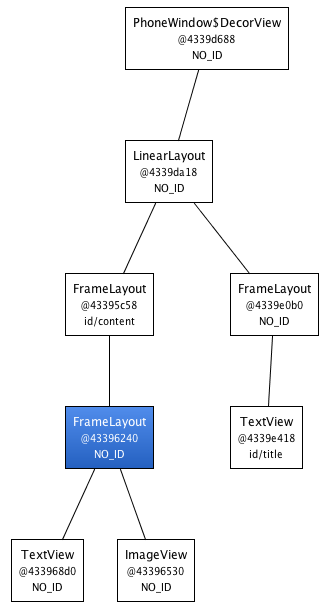
Rect frame = new Rect(); getWindow().getDecorView().getWindowVisibleDisplayFrame(frame); int statusBarHeight = frame.top; int contentTop = getWindow().findViewById(Window.ID_ANDROID_CONTENT).getTop(); int titleBarHeight = contentTop - statusBarHeight;
原理:decorView 是 window 中最頂層的 view,透過 getWindowVisibleDisplayFrame 可取得含標題欄但不含狀態欄的顯示區域,frame.top 即為狀態欄高度;再用 ID_ANDROID_CONTENT 取得不含標題欄的內容區頂部,兩相減即得標題欄高度。
取得螢幕寬高
getWindowManager().getDefaultDisplay().getMetrics(dm); int screenWidth = dm.widthPixels; int screenHeight = dm.heightPixels;
取得內外置存儲卡路徑
private static String getStoragePath(Context mContext, boolean is_removale) { StorageManager mStorageManager = (StorageManager) mContext.getSystemService(Context.STORAGE_SERVICE); try { Class storageVolumeClazz = Class.forName("android.os.storage.StorageVolume"); Method getVolumeList = mStorageManager.getClass().getMethod("getVolumeList"); Method getPath = storageVolumeClazz.getMethod("getPath"); Method isRemovable = storageVolumeClazz.getMethod("isRemovable"); Object result = getVolumeList.invoke(mStorageManager); final int length = Array.getLength(result); for (int i = 0; i < length; i++) { Object e = Array.get(result, i); String path = (String) getPath.invoke(e); boolean removable = (Boolean) isRemovable.invoke(e); if (is_removale == removable) { return path; } } } catch (Exception e) { e.printStackTrace(); } return null; }
透過反射使用被 SDK 隱藏的 StorageVolume,呼叫 getVolumeList() 取得所有存儲空間,再以 is_removable 過濾:false 得到內建卡路徑,true 則為外接卡路徑。API 23 之後,Environment 的 getExternalDirs() 本質相同,其回傳陣列的第一個元素即為內建路徑。
捕獲 Application 全域異常
做法是自訂一個 implements UncaughtExceptionHandler 的 CrashHandler,在 init 時透過 Thread.setDefaultUncaughtExceptionHandler(this) 接管未捕獲異常,於 uncaughtException 中收集設備資訊、把堆棧寫入 /sdcard/crash 下的日誌檔,再結束進程;並在自訂的 Application 的 onCreate 中初始化它。
public class CrashApplication extends Application { @Override public void onCreate() { super.onCreate(); CrashHandler crashHandler = CrashHandler.getInstance(); crashHandler.init(getApplicationContext()); } }
網路是否可用
public static boolean isNetworkAvailable(Context context) { ConnectivityManager mgr = (ConnectivityManager) context.getSystemService(Context.CONNECTIVITY_SERVICE); NetworkInfo[] info = mgr.getAllNetworkInfo(); if (info != null) { for (int i = 0; i < info.length; i++) { if (info[i].getState() == NetworkInfo.State.CONNECTED) { return true; } } } return false; }
禁止 Home 鍵
Home 鍵由系統監聽並自動處理,若想自行攔截,可先於 onAttachedToWindow 中把視窗設為 TYPE_KEYGUARD,再在 onKeyDown 攔截 KEYCODE_HOME,並加上 DISABLE_KEYGUARD 權限。
開機啟動
public class StartupReceiver extends BroadcastReceiver { @Override public void onReceive(Context context, Intent intent) { Intent i = new Intent(context, StrongTracks.class); i.addFlags(Intent.FLAG_ACTIVITY_NEW_TASK); context.startActivity(i); } } // Manifest 中註冊並監聽 BOOT_COMPLETED
控制對話框位置與透明度
Window window = dialog.getWindow(); WindowManager.LayoutParams wl = window.getAttributes(); wl.x = x; wl.y = y; wl.width = w; wl.height = h; wl.alpha = 0.6f;
隱藏/顯示軟鍵盤
// 隱藏 ((InputMethodManager)getSystemService(INPUT_METHOD_SERVICE)).hideSoftInputFromWindow(getCurrentFocus().getWindowToken(), InputMethodManager.HIDE_NOT_ALWAYS); // 顯示 ((InputMethodManager)getSystemService(INPUT_METHOD_SERVICE)).showSoftInput(view, 0);
Bitmap、Drawable、InputStream、byte[] 互轉
// Bitmap -> byte[] ByteArrayOutputStream stream = new ByteArrayOutputStream(); bitmap.compress(Bitmap.CompressFormat.JPEG, 100, stream); byte[] data = stream.toByteArray(); // byte[] -> Bitmap Bitmap bitmap = BitmapFactory.decodeByteArray(data, 0, data.length);
Drawable 轉 Bitmap
private Bitmap drawableToBitamp(Drawable drawable) { if (drawable instanceof BitmapDrawable) { return ((BitmapDrawable) drawable).getBitmap(); } int w = drawable.getIntrinsicWidth(); int h = drawable.getIntrinsicHeight(); Bitmap bitmap = Bitmap.createBitmap(w, h, Bitmap.Config.ARGB_8888); Canvas canvas = new Canvas(bitmap); drawable.setBounds(0, 0, w, h); drawable.draw(canvas); return bitmap; }
調節螢幕亮度
public void setBrightness(int level) { ContentResolver cr = getContentResolver(); Settings.System.putInt(cr, "screen_brightness", level); Window window = getWindow(); LayoutParams attributes = window.getAttributes(); attributes.screenBrightness = (float) level / 255; window.setAttributes(attributes); }
重啟(需 root)
Runtime.getRuntime().exec("su -c reboot");
拍照、錄音、錄像
分別以 MediaStore.ACTION_IMAGE_CAPTURE、ACTION_VIDEO_CAPTURE 與 ACTION_GET_CONTENT(type 為 audio/amr)啟動系統應用,於 onActivityResult 中透過 URI 查詢 _data 欄位取得檔案絕對路徑。
屏幕適配重點
常見密度與 dp/px 換算:ldpi 1dp=0.75px、mdpi 1dp=1.0px、hdpi 1dp=1.5px、xhdpi 1dp=2.0px、xxhdpi 1dp=3.0px。分辨率只是物理像素總數,與適配無直接關係;真正影響顯示的是 dpi(每英寸像素數)。適配方式包括:使用 dp 單位、values-分辨率 目錄放 dimens、不同 layout 目錄、Java 動態計算,以及最推薦的 layout_weight(線性佈局中,搭配 width/height 設為 0dp 可讓控件成正比顯示)。此外應善用 9-patch 圖,它能依內容自動拉伸收縮。
設定 APN
ContentValues values = new ContentValues(); values.put(NAME, "CMCC cmwap"); values.put(APN, "cmwap"); values.put(PROXY, "10.0.0.172"); values.put(PORT, "80"); values.put(MCC, "460"); values.put(MNC, "00"); values.put(NUMERIC, "46000"); getContentResolver().insert(Uri.parse("content://telephony/carriers"), values);
Android 目錄結構與常用指令
主要目錄:/data(app 用戶應用、system 系統配置)、/system(app 系統應用、bin 可執行檔、fonts 字體、lib 類庫、media 音效)、/mnt(掛載設備如 sdcard)、/proc(cpuinfo、meminfo 等狀態)、/sbin(系統二進制檔)。常用 Linux 指令包含 su、ls、cd、cat、mv、mkdir、rmdir、chmod、ps、kill、mount 等;Android 特有指令則有 am(ActivityManager)、pm(PackageManager)、monkey(自動點擊測試)等。
上傳程式碼到 GitHub
git config --global user.name "Lemoner" git config --global user.email "xxx@outlook.com" git clone https://github.com/Lemoner/demo.git git add . git commit -m "My First Commit" git push origin master
 Android 版面配置優化:ViewStub、include、merge 使用與源碼分析
一、include:讓共用版面配置可重複使用 在 Android 介面開發中,隨著畫面數量增加,重複的標題欄、返回按鈕、搜尋列或提示區塊也會變多。若每個版面配置都重新撰寫
 WeatherForecast 實戰:從零打造一款天氣預報 App
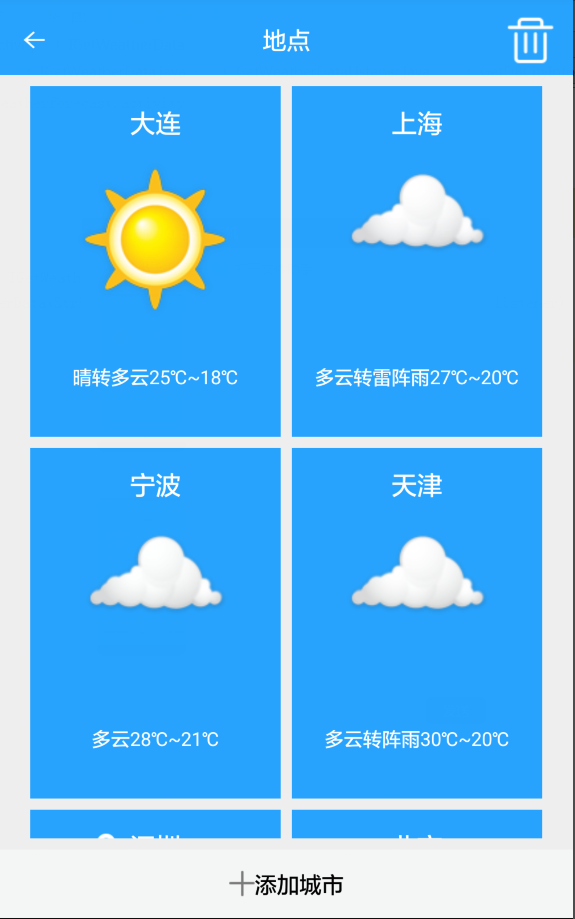
折騰了一段時間,WeatherForecast 的主要功能終於跑通了:城市的新增與刪除、基礎天氣概覽、詳細預報頁面,另外還接入了 ShareSDK 的意見反饋。使用體驗還
 微信允許陌生人看朋友圈十張照片怎麼設置
微信允許陌生人查看十張照片的設置方法 如果希望陌生人能看到部分朋友圈照片,可以開啟“允許陌生人查看十張照片”功能。 打開微信,進入“我”頁面,點擊設置。 進入隱私設置
 Android Studio Preview 常見問題與實用技巧大全
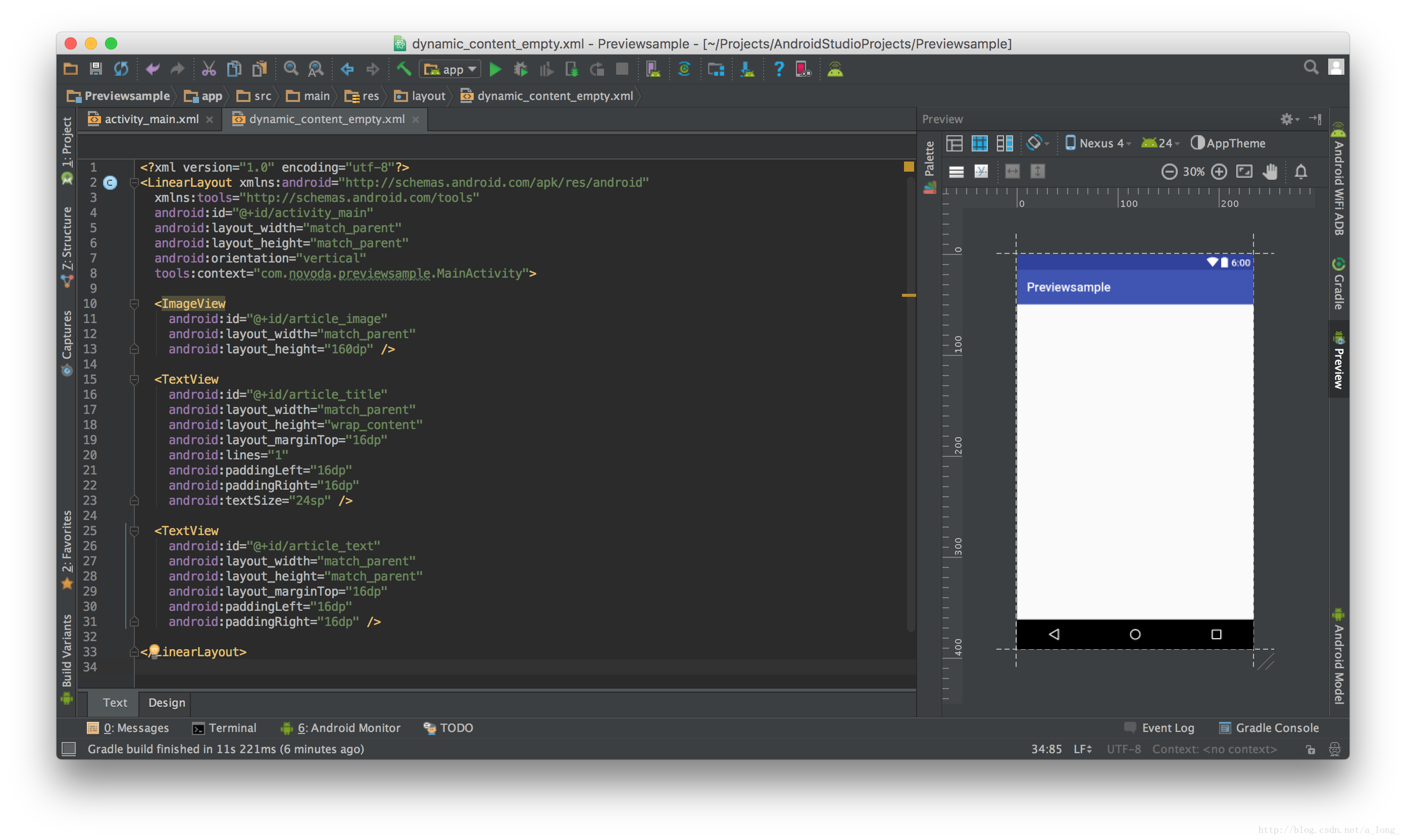
Android Studio 提供了一個強大的 Preview 工具,能幫助你預覽版面檔在用戶設備上的呈現效果。XML 版面可能是 Android 開發中最常用的資源,每