

編輯:關於 Android 程式設計
前言:
在行動端開發中,地理位置定位是極其關鍵的一環。有些時候,使用者會基於考量而限制 Web App 或 Android App 的權限;又或者因訊號不佳而拿不到準確的 GPS 位置;甚至為了省電,使用者對開啟 GPS 開關多少有些抗拒。但我們不能因為 GPS 的種種限制,就放棄對使用者位置的掌握。理想的做法是:善用一切能發出訊號的物體,盡可能準確地鎖定使用者位置。有時即便犧牲一些精度也無妨——對大數據與使用者地區分布分析而言,一個大體的位置已足以供分析人員使用;而繞開 GPS 的重重障礙,也為數據的完整性提供了可靠後盾。
開發背景:
有些專案經理反映,目前版本的 App 耗電量過大,狀態列的 GPS 標識一直在閃爍。於是為了降低耗電、同時保證定位的經緯度,並且不能僅依賴 GPS,我們需要在使用者不願意開啟 GPS 開關時,改用手機附近的基站、WiFi 熱點,甚至 IP 位址來定位。這對提升使用者體驗至關重要。(先前的取經緯度策略是:用 Android 提供的 API,開啟一個 IntentService,在 Service 中啟動一個死迴圈子線程,不停地抓取 GPS 位置。)
實現效果:
效果可以參考高德地圖——高德的使用體驗我認為相當不錯,甚至完全不必開啟 GPS 開關,就能準確定位到街道,誤差通常不超過 50 公尺。我猜測高德的實作無非也是 WiFi 加基站。我做過一次測試:在一個收不到 GPS 訊號的地下室(但附近有熱點與基站),在離線狀態下打開高德,它會先把我定位到上次成功的位置;當我開啟網路開關後,位置馬上八九不離十了。
定位原理:
原理其實很簡單。當 GPS 定位尚未成功時(GPS 通常最準確,擁有最高優先級),用手機掃描附近的基站,記錄下各基站的 mcc、lac、cid 等參數以識別該基站,再透過資料庫查到該基站的 GPS 位置,並以收到的訊號強度作為相對距離的依據。如果搜尋到的基站較多,就能以各基站位置為圓心、以訊號強度為半徑畫圓,多個圓圈重疊的部分便是當前最可能的位置。WiFi 熱點定位同理,只是把識別依據換成 MAC 位址,一樣用訊號強度表示距離。
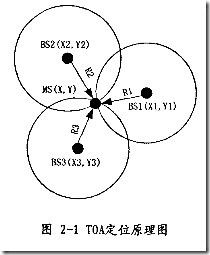
定位策略:
1、App 開啟時,先取系統中記錄的最近一次 GPS 定位位置。若精度差於 200m 就捨棄;若取得正常結果,就不必啟動位置監聽與基站、WiFi 定位了。不過在多數情況下這一步取不到(尤其剛開啟 GPS 開關沒多久時),此時可先從 SharedPreference 取出上次定位成功的地點頂上。
2、若上一步沒能馬上取得當前 GPS 位置,就開啟一個監聽持續追蹤位置變化。這個監聽是高靈敏度、高精度、高耗電的,此時狀態列的 GPS 標識會開始閃爍,直到取得第一次精確的 GPS 位置;同樣地,精度差於 200m 就捨棄。
3、在開啟監聽的同時,開始掃描手機附近的基站與 WiFi 熱點資訊,取得每個基站與熱點的訊號強度,透過資料庫查出各自的 GPS 資訊,再以相關數學演算法求出大致經緯度(本文中這些透過 Google 提供的 API 完成)。
4、監聽器成功取得當前 GPS 定位後,就關掉這個監聽器,改開啟一個策略不同的新監聽器。新監聽器的特點是低精度、低靈敏度、低耗電,此時狀態列的 GPS 閃爍停止,但定位精度大幅下降,可能會跑到好幾公里外。
5、為避免監聽器在後台偷跑電量、被當成耗電元兇,需在程式切到後台與關閉時關閉相應的監聽。
6、管道優先級:GPS > 基站 > WiFi 熱點 > IP。這只是大體安排,實際上在 GPS 訊號不佳的地方,WiFi 加基站的結果可能比 GPS 準得多,所以具體採用哪種方式,要看他們的 accuracy 值。
7、對於一些國產電信公司定制機(通常沒有安裝 Google 框架),使用 Google 原生框架獲取 GPS 位置;基站定位與 WiFi 熱點定位則維持不變。
能正常定位的情景:
1、使用者在開闊室外(GPS 開,WiFi 可開可關,SIM 卡可不插、可不聯網),且天氣晴朗,一般能收到良好的 GPS 訊號,此時定位結果應為 GPS 訊號。
2、使用者在封閉室內且收不到 GPS 訊號,此時手機必須聯網才能獲得定位,且下列條件需二選一:(1)手機插 SIM 卡且有訊號;(2)手機開啟 WiFi 且附近有熱點。若兩種訊號都收不到,則會依 IP 定位,且手機不能開啟 VPN 網路。
無法定位的情況:
1、使用者在封閉室內且未聯網——此時會改用 SharedPreference 中的記錄。
2、使用者在室外,遇大雨、大霧、陰天且未聯網;或已聯網但手機無訊號、附近也沒有 WiFi。
運行環境:
1、首先需要引入 Google Service gcm location SDK。引入它的原因是:省電,並避免狀態列的 GPS 標識一直閃爍。Google 官方文件說得很直白——不推薦使用 Android 原生介面,原文如下:
the Google Play services location APIs are preferred over the Android framework location APIs (android.location) as a way of adding location awareness to your app. If you are currently using the Android framework location APIs, you are strongly encouraged to switch to the Google Play services location APIs as soon as possible.
該 SDK 的官方文件:https://developer.android.com/training/location/index.html
引入該 SDK 需在 gradle 檔案中加入:
compile 'com.google.android.gms:play-services-location:8.4.0'
注意:許多國產手機,尤其是運營商定制機,往往沒有內建 Google 框架,此時表現為一直無法 connect GPS,這時就不能用 Google 的 SDK,而需改用 Android 原生 API。
2、開啟相關權限:
注意:相關權限一旦使用者未授予,或授予後又駁回,可能導致 crash。
主要對外方法:
void onCreateGPS(Application context)
用於開啟一次 GPS 位置抓取。程式會先取最近一次的 GPS 位置,若失敗就開啟 GPS 追蹤與基站、WiFi 定位。
void restartGPS(Application context)
在進入某些對 GPS 要求較高的頁面時,重新獲取當前準確位置的方法。本方法會先暫停目前的 GPS 追蹤,再重新抓取一遍位置。
void stopGPS()
退出 App 時,為了節電而徹底關閉 GPS 追蹤。
void pauseGPS()
當程式切到後台時,為防止後台耗電而停止 GPS 追蹤。
GPS 的後台省電:
要監聽 App 是否被切到後台,Android 系統並未提供相關介面或廣播,只能透過 Activity 的 Stop 與 Start 關係來判斷。一般來說,一個 Stop 後若緊接著一個 Start,就代表這是內部轉換;但若只 Stop 沒有 Start,那就很可能是被切到後台了。
第二種監聽方法,是在 Activity stop 時觀察本 Activity 是否仍在棧頂——若仍在棧頂,就能說明它被切到後台了。下面這段程式碼正是這個思路,程式裡用到的 Activity 基本都以這個 BaseActivity 為父類:
import android.app.Activity; import android.app.ActivityManager; import android.content.Context; import android.os.Bundle; import android.support.v4.app.FragmentActivity; import android.util.Log; import com.imaginato.qravedconsumer.service.AlxLocationManager; import com.imaginato.qravedconsumer.utils.JLogUtils; import java.util.List; public class BaseActivity extends FragmentActivity { @Override protected void onCreate(Bundle savedInstanceState) { super.onCreate(savedInstanceState); } @Override protected void onDestroy() { super.onDestroy(); } @Override protected void onPause() { super.onPause(); } @Override protected void onResume() { super.onResume(); } @Override protected void onStart() { super.onStart(); } @Override protected void onStop() { super.onStop(); if (!isAppOnForeground(this)) { //app 進入後台 JLogUtils.i("AlexLocation","程序進入後台運行"); //全局變量isActive = false 記錄當前已經進入後台 isRunningBackGround = true; AlxLocationManager.pauseGPS(); } } @Override protected void onRestart() { super.onRestart(); //從後台恢復,如果還沒有很好的獲得經緯度就繼續獲得 if(isRunningBackGround && AlxLocationManager.manager!=null && AlxLocationManager.manager.currentStatus!= AlxLocationManager.STATUS.TRYING_FIRST)AlxLocationManager.onCreateGPS(getApplication()); isRunningBackGround = false; } /** * 程序是否在前台運行 * * @return */ public static boolean isAppOnForeground(Activity activity) { // Returns a list of application processes that are running on the // device ActivityManager activityManager = (ActivityManager) activity.getApplicationContext().getSystemService(Context.ACTIVITY_SERVICE); String packageName = activity.getApplicationContext().getPackageName(); List appProcesses = activityManager .getRunningAppProcesses(); if (appProcesses == null) return false; for (ActivityManager.RunningAppProcessInfo appProcess : appProcesses) { // The name of the process that this object is associated with. if (appProcess.processName.equals(packageName) && appProcess.importance == ActivityManager.RunningAppProcessInfo.IMPORTANCE_FOREGROUND) { return true; } } return false; } }
Google API 相關:
Google 那裡幾乎擁有全世界所有基站的 GPS 位置,資料庫裡還存有全球許多 WiFi 熱點的 GPS 位置,以及 IP 的歸屬地。因此對於我目前支援東南亞國家的 App 來說,使用 Google 的資料庫再合適不過。
Google API 主頁:https://developers.google.com/maps/documentation/geolocation/intro
1、先申請一個密鑰,非常簡單——只要有 Google 帳號,點幾下「申請密鑰」就好。
2、使用 Postman 等測試工具,套用 Google 提供的 JSON 範例試試好不好用。
{ "homeMobileCountryCode": 310,//中國一般是460 "homeMobileNetworkCode": 260,//使用手機獲取 "radioType": "gsm",//這個填起來要特別小心,寧願不填,如果填錯了的話有可能無法獲得定位信息 "carrier": "T-Mobile",//運營商,作用不大 "cellTowers": [//基站列表 { "cellId": 39627456,//必填項,比較重要 "locationAreaCode": 40495, "mobileCountryCode": 310,//中國是460 "mobileNetworkCode": 260, "age": 0, "signalStrength": -95//相當於距離 } ], "wifiAccessPoints": [//wifi熱點 { "macAddress": "01:23:45:67:89:AB", "signalStrength": 8, "age": 0, "signalToNoiseRatio": -65, "channel": 8 }, { "macAddress": "01:23:45:67:89:AC", "signalStrength": 4, "age": 0 } ] }
POST 介面位址:
https://www.googleapis.com/geolocation/v1/geolocate?key=YOUR_API_KEY
這裡要注意:以前 Google 也提供過一個類似介面,但從 2012 年起就已棄用。很多老部落格裡還寫著這個過時介面,在江湖上流傳已久,騙了不少無辜群眾:https://www.google.com/loc/json
Postman 測試如圖(注意黃色部分):
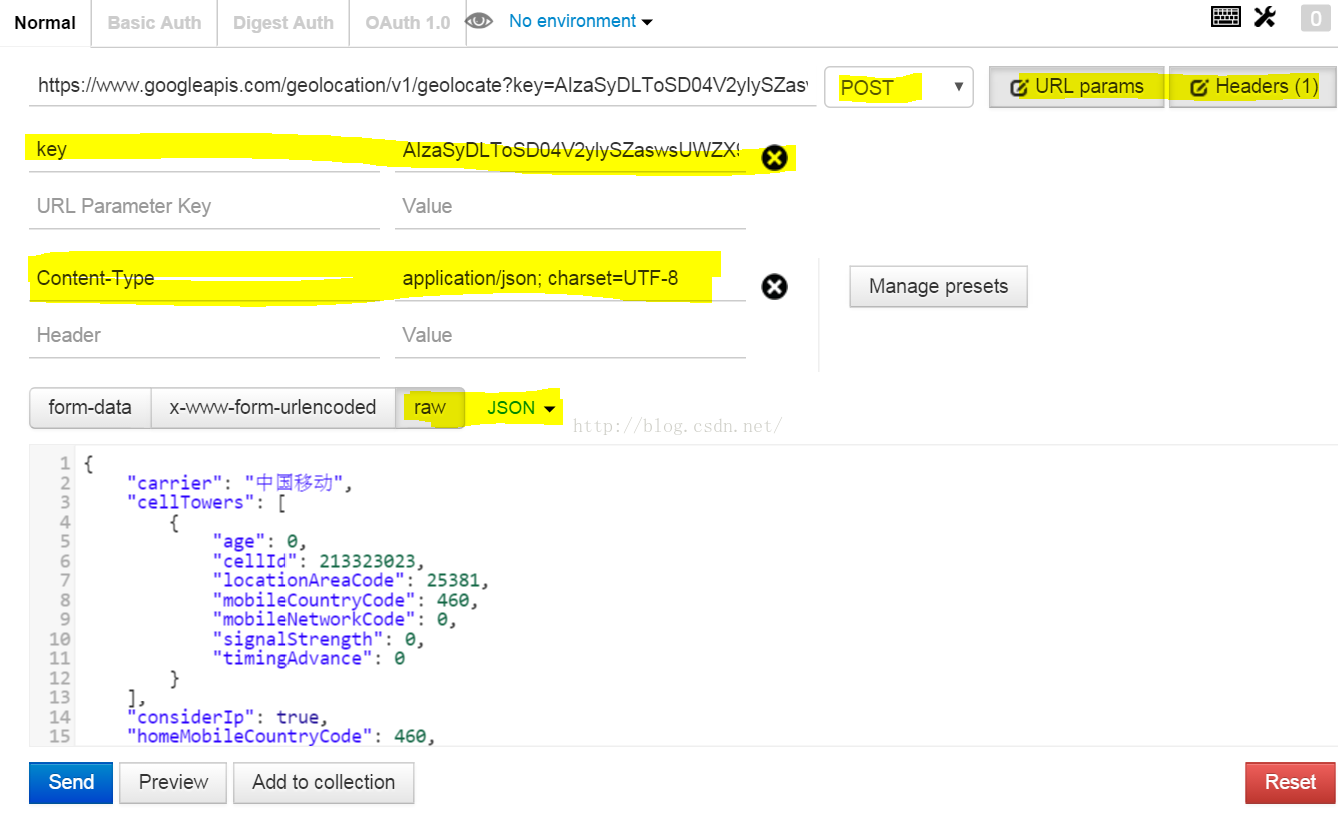
如果發送的數據格式有問題,Google 會回傳一些錯誤碼:
dailyLimitExceeded usageLimits 403 您已超出了您的每日限制。 keyInvalid usageLimits 400 您的 API 密鑰對於 Google Maps Geolocation API 無效。請確保您已加入了完整的密鑰,而且您已購買該 API 或已啟用收費和激活 API以獲得免費配額。 userRateLimitExceeded usageLimits 403 您已超出您在 API 控制台中配置的每個用戶每秒請求數限制。此限制應配置為防止單個或一小部分用戶耗盡您每天的配額,同時還允許所有用戶都能進行合理的訪問。 notFound geolocation 404 請求有效,但未返回任何結果。 parseError global 400 請求正文不是有效的 JSON。請參閱請求正文部分以了解每個字段的詳情。
開發中遇到的幾個大坑:
1、Google 的 API 介面只接收 JSON 數據,這對 Android 端的發送造成不少麻煩。一開始我用 httpClient,經常碰到 415 異常;後來改用 xUtils 的 HttpUtil 發 JSON,又常收到 404 錯誤。後來才明白:415 異常多半是 JSON 放的位置不對;404 異常並非 POST 請求本身的問題,而是依當前基站、WiFi 資訊查不到符合條件的地理位置,並非找不到伺服器。
2、當我興高采烈地把程式發給客戶看,客戶卻說定位太不準,偏移了 15 公里。經過一番檢查才發現,透過 GPS 取到的位置 accuracy 太大,經常是 2000——我一直以為 GPS 訊號準確無比,後來才知道這也要對比精度。最關鍵的是,我在第一次取得精確經緯度後開啟了一個省電策略,而這個省電策略取得的經緯度精度非常差,我卻拿它當當前經緯度來用,這種策略顯然行不通。省電模式要慎用!!
3、測試定位時發現,無論如何都會偏移一塊位置。我是在這個網站上依經緯度查看地圖座標:https://www.gpsspg.com/maps.htm。後來我發現換一下輸入的經緯度類型就好了,如下圖黃色部分:
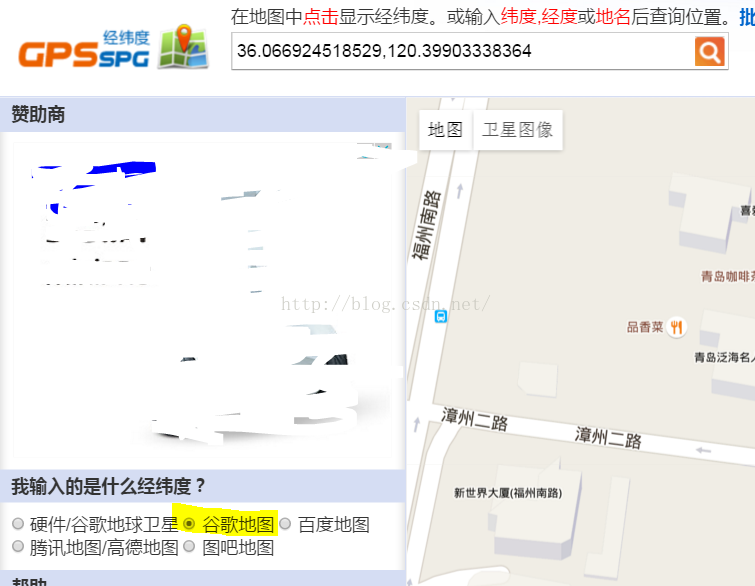
後來我才發現,GPS 取得的經緯度所用座標系,與 Google 地圖、百度地圖上的座標系並不相同。GPS 硬體取得的經緯度是 WGS-84 標準,國際通用,可視為正常的 GPS 位置;Google Earth 上所有座標、Google 地圖上除中國以外的座標均為此標準,但 Google 地圖的中國座標使用的是 GCJ-02 標準,是在 WGS-84 基礎上加入隨機偏差加密後的一種經緯度,會隨機偏移約一公里,這才導致無論如何定位總是顯示不對。而百度地圖又在 GCJ-02 上加入自己的加密演算法,變成 BD-09 標準,此外還有許多地圖各有加密方式。這些都是硬體取得的經緯度在地圖上指示不對的原因。網上有免費的轉換網站,推薦一個:https://map.yanue.net/gps.html——若發現 GPS 定位結果總有誤差,可以用它轉換一下。
關於 GPS 隨意偏移,找到一篇不錯的文章,有興趣的朋友可以看看:https://yanue.net/post-121.html。關於這幾種座標系的轉換,網上除了有免費 API 外還有一些公開演算法,基於法律原因這裡不多談,有需要的朋友可以自行搜尋。
4、最大的一個坑是:google gcm service,也就是 com.google.android.gms:play-services-location:8.4.0 這個 library,是 Google 推薦用來替換 Android 原生的 GPS 方案,但這個 SDK 實在是太糟了!!!本來 Android 原生 API 可以支援 network passive GPS 定位(也就是沒開 GPS 開關也能依附近網路狀況定位,準確度很高),但這個庫引入後卻只能依 GPS 定位,而且很慢!!最坑的是:不準確!!!感覺它對監測到的經緯度加了偏移,不如 Android 原生準確,總會偏移出去約 100m,真讓人頭疼。總之,這個庫還是不用為好。
主要程式碼:
下面是定位主要的實作程式碼,註解已相當詳盡,這裡不再多贅述。
import android.app.Application; import android.content.Context; import android.content.Intent; import android.content.SharedPreferences; import android.location.Location; import android.net.ConnectivityManager; import android.net.Network; import android.net.NetworkInfo; import android.net.wifi.ScanResult; import android.net.wifi.WifiInfo; import android.net.wifi.WifiManager; import android.os.AsyncTask; import android.os.Build; import android.os.Bundle; import android.os.Handler; import android.support.annotation.NonNull; import android.support.annotation.Nullable; import android.telephony.CellIdentityCdma; import android.telephony.CellIdentityGsm; import android.telephony.CellIdentityLte; import android.telephony.CellIdentityWcdma; import android.telephony.CellInfo; import android.telephony.CellInfoCdma; import android.telephony.CellInfoGsm; import android.telephony.CellInfoLte; import android.telephony.CellInfoWcdma; import android.telephony.CellLocation; import android.telephony.NeighboringCellInfo; import android.telephony.TelephonyManager; import android.telephony.cdma.CdmaCellLocation; import android.telephony.gsm.GsmCellLocation; import android.util.Log; import com.google.android.gms.common.ConnectionResult; import com.google.android.gms.common.api.GoogleApiClient; import com.google.android.gms.location.LocationListener; import com.google.android.gms.location.LocationRequest; import com.google.android.gms.location.LocationServices; import com.imaginato.location.IMGLocationUpdateService; import com.imaginato.qravedconsumer.application.QravedApplication; import com.imaginato.qravedconsumer.utils.JViewUtils; import com.lidroid.xutils.HttpUtils; import com.lidroid.xutils.exception.HttpException; import com.lidroid.xutils.http.RequestParams; import com.lidroid.xutils.http.ResponseInfo; import com.lidroid.xutils.http.callback.RequestCallBack; import com.lidroid.xutils.http.client.HttpRequest; import com.qraved.app.R; import org.apache.http.entity.StringEntity; import org.json.JSONArray; import org.json.JSONException; import org.json.JSONObject; import java.io.UnsupportedEncodingException; import java.util.ArrayList; import java.util.List; /** * Created by AlexLocation on 2016/6/6. */ public class AlxLocationManager implements GoogleApiClient.ConnectionCallbacks,GoogleApiClient.OnConnectionFailedListener,LocationListener { //下面這三個是沒拿到第一次經緯度的時候耗電抓取經緯度的策略 private static final int MAX_deviation = 100; private static final int FAST_UPDATE_INTERVAL = 10000; // 10 sec 平均更新時間 private static final int FATEST_INTERVAL = 5000; // 5 sec 最短更新時間 private static final int FAST_DISPLACEMENT = 1; // 1 meters 為最小偵聽距離 //下面這個是省電抓取經緯度的策略 private static final int SLOW_UPDATE_INTERVAL = 60000; // 60 sec 平均更新時間 private static final int SLOW_INTERVAL = 30000; // 30 sec 最短更新時間 private static final int SLOW_DISPLACEMENT = 500; // 500 meters 為最小偵聽距離 private Application context;//防止內存洩漏,不使用activity的引用 private GoogleApiClient mGoogleApiClient; public static AlxLocationManager manager;//單例模式 public STATUS currentStatus = STATUS.NOT_CONNECT; public float accuracy = 99999;//沒有獲得精度的時候是-1 public double lastLatitude; public double lastLongitude; public enum STATUS{ NOT_CONNECT,//沒有連接相關硬件成功 TRYING_FIRST,//第一次獲取地理位置,此時gps指示圖標閃爍,耗電量大 LOW_POWER,//開啟app拿到精確度的GPS之後,開啟省電模式 NOT_TRACK//當前沒有開啟跟蹤模式 } public final static boolean isDebugging = true;//調試模式開關 /** * 注冊gps監聽服務 * @param context */ public static void onCreateGPS(final Application context){ if(manager!=null && manager.mGoogleApiClient!=null)return; Log.i("AlexLocation","准備開啟gps"); manager = new AlxLocationManager(); manager.context = context; manager.mGoogleApiClient = new GoogleApiClient.Builder(context) .addConnectionCallbacks(manager) .addOnConnectionFailedListener(manager) .addApi(LocationServices.API) .build(); manager.mGoogleApiClient.connect(); new Handler().postDelayed(new Runnable() { @Override public void run() { if(manager!=null && manager.currentStatus!=STATUS.NOT_CONNECT)return;//如果連接GPS硬件到現在還沒成功 Log.i("AlexLocation","該手機沒有安裝谷歌框架服務,准備啟動舊版service"); manager.context.startService(new Intent(manager.context, IMGLocationUpdateService.class));//使用安卓原生API獲取地理位置 new AsyncTask(){//在子線程中獲取附近的基站和wifi信息 @Override protected String doInBackground(Void... params) { GeoLocationAPI geoLocationAPI = null; try { geoLocationAPI = getCellInfo(manager.context);//得到基站信息,通過基站進行定位 }catch (Exception e){ Log.i("AlexLocation","獲取附近基站信息出現異常",e); } if(geoLocationAPI ==null){ Log.i("AlexLocation","獲取基站信息失敗"); return "{}"; } getWifiInfo(manager.context, geoLocationAPI); String json = geoLocationAPI.toJson();//這裡使用gson.toJson()會被混淆,推薦使用手動拼json Log.i("AlexLocation","准備發給goggle的json是"+json); return json; } @Override protected void onPostExecute(String json) { super.onPostExecute(json); //開啟子線程請求網絡 if(manager!=null && context!=null)manager.sendJsonByPost(json,"https://www.googleapis.com/geolocation/v1/geolocate?key="+context.getString(R.string.google_location)); } }.execute(); } },9000); } /** * 進入某些頁面,重新刷GPS * @param context */ public static void restartGPS(Application context){ stopGPS();//先停止當前的GPS onCreateGPS(context);//重啟GPS } /** * 停止gps服務,用來省電 */ public static void stopGPS(){ if(manager==null)return; pauseGPS(); manager.mGoogleApiClient = null; manager = null; } /** * 當app被放到後台時,暫停GPS */ public static void pauseGPS(){ Log.i("Alex","准備暫停GPS"); if(manager==null || manager.mGoogleApiClient==null || manager.currentStatus==STATUS.NOT_CONNECT || manager.currentStatus == STATUS.NOT_TRACK)return; try { LocationServices.FusedLocationApi.removeLocationUpdates(manager.mGoogleApiClient, manager); manager.currentStatus = STATUS.NOT_CONNECT; if (manager.mGoogleApiClient.isConnected() || manager.mGoogleApiClient.isConnecting()) manager.mGoogleApiClient.disconnect(); manager.mGoogleApiClient = null; }catch (Exception e) { Log.i("AlexLocation","暫停GPS出現異常",e); } } @Override public void onConnected(@Nullable Bundle bundle) { Log.i("AlexLocation","connect gps成功"); if(currentStatus != STATUS.NOT_CONNECT)return;//有些手機會多次連接成功 currentStatus = STATUS.TRYING_FIRST; if(!getCurrentLocation()) {//得到當前gps並記錄 //如果沒有成功拿到當前經緯度,那麼就通過實時位置監聽去不斷的拿,直到拿到為止 //如果沒有拿到經緯度,就一直監聽 LocationServices.FusedLocationApi.requestLocationUpdates(mGoogleApiClient, createFastLocationRequest(), this);//創建位置監聽 new AsyncTask(){//在子線程中獲取附近的基站和wifi信息 @Override protected String doInBackground(Void... params) { GeoLocationAPI geoLocationAPI = null; try { geoLocationAPI = getCellInfo(context);//得到基站信息,通過基站進行定位 }catch (Exception e){ Log.i("AlexLocation","獲取附近基站信息出現異常",e); } if(geoLocationAPI ==null){ Log.i("AlexLocation","獲取基站信息失敗"); return "{}"; } getWifiInfo(context, geoLocationAPI); String json = geoLocationAPI.toJson();//這裡使用gson.toJson()會被混淆,推薦使用手動拼json Log.i("AlexLocation","准備發給goggle的json是"+json); return json; } @Override protected void onPostExecute(String json) { super.onPostExecute(json); //發送json數據到谷歌,等待谷歌返回結果 sendJsonByPost(json,"https://www.googleapis.com/geolocation/v1/geolocate?key="+context.getString(R.string.google_location)); } }.execute(); }else {//獲取了最後一次硬件記錄的經緯度,不進行追蹤 currentStatus = STATUS.NOT_TRACK; } } /** * 拿到最近一次的硬件經緯度記錄,只用精確度足夠高的時候才會采用這種定位 * @return */ public boolean getCurrentLocation(){ Location mLastLocation = LocationServices.FusedLocationApi.getLastLocation(mGoogleApiClient); Log.i("AlexLocation","得到last Location的gps是=="+mLastLocation); if (mLastLocation == null) return false;//在少數情況下這裡有可能是null double latitude = mLastLocation.getLatitude();//緯度 double longitude = mLastLocation.getLongitude();//經度 double altitude = mLastLocation.getAltitude();//海拔 float last_accuracy = mLastLocation.getAccuracy();//精度 Log.i("AlexLocation","last Location的精度是"+last_accuracy); String provider = mLastLocation.getProvider();//傳感器 float bearing = mLastLocation.getBearing(); float speed = mLastLocation.getSpeed();//速度 if(isDebugging)JViewUtils.showToast(context,"獲取到last location經緯度","緯度"+latitude+" 經度"+longitude+ "精確度"+last_accuracy); Log.i("AlexLocation","獲取last location成功,緯度=="+latitude+" 經度"+longitude+" 海拔"+altitude+" 傳感器"+provider+" 速度"+speed+ "精確度"+last_accuracy); if(last_accuracy300)){//精度如果太小就放棄,如果精度提高或者移動的距離超過300m也更新 recordLocation(context,location.getLatitude(),location.getLongitude(),location.getAccuracy()); this.accuracy = location.getAccuracy(); }else { Log.i("Alex","精確度太低,准備放棄最新的位置"); } if(location.getAccuracy()>50 || currentStatus!=STATUS.TRYING_FIRST)return;//如果現在是高電量模式,那麼就停止當前監聽,采用低電量監聽 LocationServices.FusedLocationApi.removeLocationUpdates(mGoogleApiClient,this);//成功獲取到之後就降低頻率來省電 Log.i("AlexLocation","准備開啟省電策略"); currentStatus = STATUS.LOW_POWER; LocationServices.FusedLocationApi.requestLocationUpdates(mGoogleApiClient, createLowPowerLocationRequest(), this);//創建位置監聽 } @Override public void onConnectionFailed(@NonNull ConnectionResult connectionResult) { } /** * 當手機移動後通過回調獲得移動後的經緯度,在這個函數裡配置相應的刷新頻率 * 建立一個耗電的,盡快的拿到當前經緯度的策略 */ private static LocationRequest createFastLocationRequest() { LocationRequest mLocationRequest = LocationRequest.create(); mLocationRequest.setInterval(FAST_UPDATE_INTERVAL); mLocationRequest.setFastestInterval(FATEST_INTERVAL); mLocationRequest.setPriority(LocationRequest.PRIORITY_HIGH_ACCURACY);//耗電模式 mLocationRequest.setSmallestDisplacement(FAST_DISPLACEMENT); return mLocationRequest; } /** * 建立一個省電的跟蹤經緯度的策略 * 注意此方法要慎用,使用了低電量模式以後,精確度會大幅下降 * @return */ private static LocationRequest createLowPowerLocationRequest() { LocationRequest mLocationRequest = LocationRequest.create(); mLocationRequest.setInterval(SLOW_UPDATE_INTERVAL); mLocationRequest.setFastestInterval(SLOW_INTERVAL); mLocationRequest.setPriority(LocationRequest.PRIORITY_BALANCED_POWER_ACCURACY);//省電模式,PRIORITY_LOW_POWER要慎用,會導致定位精確度大幅下降,能偏到好幾十公裡以外去 mLocationRequest.setSmallestDisplacement(SLOW_DISPLACEMENT); return mLocationRequest; } /** * 將獲取到的經緯度記錄在本地 * @param context */ public static void recordLocation(Context context, double latitude, double longitude,float accuracy){ SharedPreferences sharedPreferences = context.getSharedPreferences("QravedApplicationSetting", Context.MODE_PRIVATE); SharedPreferences.Editor editor = sharedPreferences.edit(); editor.putString("latitude", String.valueOf(latitude)); editor.putString("longitude", String.valueOf(longitude)); editor.putFloat("accuracy",accuracy); editor.apply(); QravedApplication.getPhoneConfiguration().getLocation().latitude = latitude; QravedApplication.getPhoneConfiguration().getLocation().longitude = longitude; if(manager==null)return; manager.lastLatitude = latitude; manager.lastLongitude = longitude; } /** * 從sharedPreference中獲取上次開啟app時候的地理位置,前面的是緯度,後面的是經度 * @return */ public static double[] getOldLocation(Context context){ SharedPreferences sharedPreferences = context.getSharedPreferences("QravedApplicationSetting", Context.MODE_PRIVATE); String latitudeStr = sharedPreferences.getString("latitude",""); String longitudeStr = sharedPreferences.getString("longitude",""); float accuracy = sharedPreferences.getFloat("accuracy",9999); Log.i("AlexLocation","SP裡的精確度"+accuracy); if(latitudeStr.length()==0 || longitudeStr.length()==0)return null; double[] latlng = {-1,-1}; try { latlng[0] = new Double(latitudeStr); latlng[1] = new Double(longitudeStr); }catch (Exception e){ Log.i("AlexLocation","解析經緯度出現異常",e); } return latlng; } /** * 得到附近的基站信息,准備傳給谷歌 */ public static GeoLocationAPI getCellInfo(Context context){ //通過TelephonyManager 獲取lac:mcc:mnc:cell-id GeoLocationAPI cellInfo = new GeoLocationAPI(); TelephonyManager mTelephonyManager = (TelephonyManager) context.getSystemService(Context.TELEPHONY_SERVICE); if(mTelephonyManager==null)return cellInfo; // 返回值MCC + MNC /*# MCC,Mobile Country Code,移動國家代碼(中國的為460); * # MNC,Mobile Network Code,移動網絡號碼(中國移動為0,中國聯通為1,中國電信為2); * # LAC,Location Area Code,位置區域碼; * # CID,Cell Identity,基站編號; * # BSSS,Base station signal strength,基站信號強度。 */ String operator = mTelephonyManager.getNetworkOperator(); Log.i("AlexLocation","獲取的基站信息是"+operator); if(operator==null || operator.length()<5){ Log.i("AlexLocation","獲取基站信息有問題,可能是手機沒插sim卡"); return cellInfo; } int mcc = Integer.parseInt(operator.substring(0, 3)); int mnc = Integer.parseInt(operator.substring(3)); int lac; int cellId; // 中國移動和中國聯通獲取LAC、CID的方式 CellLocation cellLocation = mTelephonyManager.getCellLocation(); if(cellLocation==null){ Log.i("AlexLocation","手機沒插sim卡吧"); return cellInfo; } if(mTelephonyManager.getPhoneType() == TelephonyManager.PHONE_TYPE_GSM) { Log.i("AlexLocation","當前是gsm基站"); GsmCellLocation location = (GsmCellLocation)cellLocation; lac = location.getLac(); cellId = location.getCid(); //這些東西非常重要,是根據基站獲得定位的重要依據 Log.i("AlexLocation", " MCC移動國家代碼 = " + mcc + "\t MNC移動網絡號碼 = " + mnc + "\t LAC位置區域碼 = " + lac + "\t CID基站編號 = " + cellId); }else if(mTelephonyManager.getPhoneType() == TelephonyManager.PHONE_TYPE_CDMA) { // 中國電信獲取LAC、CID的方式 Log.i("AlexLocation","現在是cdma基站"); CdmaCellLocation location1 = (CdmaCellLocation) mTelephonyManager.getCellLocation(); lac = location1.getNetworkId(); cellId = location1.getBaseStationId(); cellId /= 16; }else { Log.i("AlexLocation","現在不知道是什麼基站"); return cellInfo; } cellInfo.radioType = determine2g3g4g(context);//這裡填要慎重,要是填的不對就會報404 notFound cellInfo.homeMobileCountryCode = mcc; cellInfo.homeMobileNetworkCode = mnc; cellInfo.carrier = getCarrier(operator); cellInfo.considerIp = considerIP(context);//這裡要判斷是否采用了vpn,在wifi的時候可以用ip輔助定位,但是如果是用的2g3g4g信號那就只能用基站,ip會不准 ArrayListtowers = new ArrayList<>(1); GoogleCellTower bigTower = new GoogleCellTower();//這個塔是當前連接的塔,只有一個,但是對定位有決定性的作用 bigTower.cellId = cellId; bigTower.mobileCountryCode = mcc; bigTower.mobileNetworkCode = mnc; bigTower.locationAreaCode = lac; bigTower.signalStrength = 0; towers.add(bigTower); cellInfo.cellTowers = towers; // 獲取鄰區基站信息 if(Build.VERSION.SDK_INT<17) {//低版的android系統使用getNeighboringCellInfo方法 List infos = mTelephonyManager.getNeighboringCellInfo(); if(infos==null){ Log.i("AlexLocation","手機型號不支持基站定位1"); return cellInfo; } if(infos.size()==0)return cellInfo;//附近沒有基站 towers = new ArrayList<>(infos.size()); StringBuffer sb = new StringBuffer("附近基站總數 : " + infos.size() + "\n"); for (NeighboringCellInfo info1 : infos) { // 根據鄰區總數進行循環 GoogleCellTower tower = new GoogleCellTower(); sb.append(" LAC : " + info1.getLac()); // 取出當前鄰區的LAC tower.locationAreaCode = info1.getLac(); tower.mobileCountryCode = mcc; tower.mobileNetworkCode = mnc; tower.signalStrength = info1.getRssi(); sb.append(" CID : " + info1.getCid()); // 取出當前鄰區的CID tower.cellId = info1.getCid(); sb.append(" BSSS : " + (-113 + 2 * info1.getRssi()) + "\n"); // 獲取鄰區基站信號強度 towers.add(tower); } Log.i("AlexLocation","基站信息是"+sb); }else {//高版android系統使用getAllCellInfo方法,並且對基站的類型加以區分 List infos = mTelephonyManager.getAllCellInfo(); if(infos!=null) { if(infos.size()==0)return cellInfo; towers = new ArrayList<>(infos.size()); for (CellInfo i : infos) { // 根據鄰區總數進行循環 Log.i("AlexLocation", "附近基站信息是" + i.toString()); GoogleCellTower tower = new GoogleCellTower(); if(i instanceof CellInfoGsm){//這裡的塔分為好幾種類型 Log.i("AlexLocation","現在是gsm基站"); CellIdentityGsm cellIdentityGsm = ((CellInfoGsm)i).getCellIdentity();//從這個類裡面可以取出好多有用的東西 if(cellIdentityGsm==null)continue; tower.locationAreaCode = cellIdentityGsm.getLac(); tower.mobileCountryCode = cellIdentityGsm.getMcc(); tower.mobileNetworkCode = cellIdentityGsm.getMnc(); tower.signalStrength = 0; tower.cellId = cellIdentityGsm.getCid(); }else if(i instanceof CellInfoCdma){ Log.i("AlexLocation","現在是cdma基站"); CellIdentityCdma cellIdentityCdma = ((CellInfoCdma)i).getCellIdentity(); if(cellIdentityCdma==null)continue; tower.locationAreaCode = lac; tower.mobileCountryCode = mcc; tower.mobileNetworkCode = cellIdentityCdma.getSystemId();//cdma用sid,是系統識別碼,每個地級市只有一個sid,是唯一的。 tower.signalStrength = 0; cellIdentityCdma.getNetworkId();//NID是網絡識別碼,由各本地網管理,也就是由地級分公司分配。每個地級市可能有1到3個nid。 tower.cellId = cellIdentityCdma.getBasestationId();//cdma用bid,表示的是網絡中的某一個小區,可以理解為基站。 }else if(i instanceof CellInfoLte) { Log.i("AlexLocation", "現在是lte基站"); CellIdentityLte cellIdentityLte = ((CellInfoLte) i).getCellIdentity(); if(cellIdentityLte==null)continue; tower.locationAreaCode = lac; tower.mobileCountryCode = cellIdentityLte.getMcc(); tower.mobileNetworkCode = cellIdentityLte.getMnc(); tower.cellId = cellIdentityLte.getCi(); tower.signalStrength = 0; }else if(i instanceof CellInfoWcdma && Build.VERSION.SDK_INT>=18){ Log.i("AlexLocation","現在是wcdma基站"); CellIdentityWcdma cellIdentityWcdma = ((CellInfoWcdma)i).getCellIdentity(); if(cellIdentityWcdma==null)continue; tower.locationAreaCode = cellIdentityWcdma.getLac(); tower.mobileCountryCode = cellIdentityWcdma.getMcc(); tower.mobileNetworkCode = cellIdentityWcdma.getMnc(); tower.cellId = cellIdentityWcdma.getCid(); tower.signalStrength = 0; }else { Log.i("AlexLocation","不知道現在是啥基站"); } towers.add(tower); } }else {//有些手機拿不到的話,就用廢棄的方法,有時候即使手機支持,getNeighboringCellInfo的返回結果也常常是null Log.i("AlexLocation","通過高版本SDK無法拿到基站信息,准備用低版本的方法"); List infos2 = mTelephonyManager.getNeighboringCellInfo(); if(infos2==null || infos2.size()==0){ Log.i("AlexLocation","該手機確實不支持基站定位,已經無能為力了"); return cellInfo; } towers = new ArrayList<>(infos2.size()); StringBuffer sb = new StringBuffer("附近基站總數 : " + infos2.size() + "\n"); for (NeighboringCellInfo i : infos2) { // 根據鄰區總數進行循環 GoogleCellTower tower = new GoogleCellTower(); sb.append(" LAC : " + i.getLac()); // 取出當前鄰區的LAC tower.age = 0; tower.locationAreaCode = i.getLac(); tower.mobileCountryCode = mcc; tower.mobileNetworkCode = mnc; sb.append(" CID : " + i.getCid()); // 取出當前鄰區的CID tower.cellId = i.getCid(); sb.append(" BSSS : " + (-113 + 2 * i.getRssi()) + "\n"); // 獲取鄰區基站信號強度 towers.add(tower); } Log.i("AlexLocation","基站信息是"+sb); } } cellInfo.cellTowers = towers; return cellInfo; } /** * 看看現在用wifi流量還是手機流量,如果是wifi返回true * @param context * @return */ public static boolean isWifiEnvironment(Context context){ ConnectivityManager connectivityManager = (ConnectivityManager) context.getSystemService(Context.CONNECTIVITY_SERVICE); NetworkInfo networkInfo = connectivityManager.getActiveNetworkInfo(); if(networkInfo==null){ Log.i("AlexLocation","現在沒有聯網"); return false; } int netType = networkInfo.getType(); switch (netType){ case ConnectivityManager.TYPE_WIFI: Log.i("AlexLocation","現在是wifi網絡,可以用ip定位"); return true; case ConnectivityManager.TYPE_VPN://這個基本沒用 Log.i("AlexLocation","現在是VPN網絡"); break; case ConnectivityManager.TYPE_MOBILE: Log.i("AlexLocation","現在是移動網絡,不能用ip定位"); int subType = networkInfo.getSubtype(); Log.i("AlexLocation","移動網絡子類是"+subType+" "+networkInfo.getSubtypeName());//能判斷是2g/3g/4g網絡 break; default: Log.i("AlexLocation","不知道現在是什麼網絡"); break; } return false; } /** * 看看現在是wifi聯網還是用的流量,如果是wifi返回true,因為wifi的時候可以用ip定位,但如果這時候是vpn,那就不能用ip定位 * @param context */ public static boolean considerIP(Context context){ boolean considerIP = true;//默認是考慮 ConnectivityManager connectivityManager = (ConnectivityManager) context.getSystemService(Context.CONNECTIVITY_SERVICE); if(connectivityManager==null)return true; if(!isWifiEnvironment(context))return false;//如果現在不是wifi網絡,就不能用ip定位 if(Build.VERSION.SDK_INT<21) {//舊版本安卓獲取網絡狀態 NetworkInfo[] networkInfos = connectivityManager.getAllNetworkInfo(); if(networkInfos==null)return true; for(NetworkInfo i:networkInfos){ if(i==null)continue; Log.i("AlexLocation","現在的網絡是"+i.getTypeName()+i.getType()+" "+i.getSubtypeName());//WIFI,VPN,MOBILE+LTE if(i.getType()==ConnectivityManager.TYPE_VPN){ Log.i("AlexLocation","現在用的是VPN網絡,不能用ip定位"); considerIP = false; break; } } }else {//新版 Network[] networks = connectivityManager.getAllNetworks(); if(networks==null)return true; for(Network n:networks){ if(n==null)continue; NetworkInfo networkInfo = connectivityManager.getNetworkInfo(n); if(networkInfo==null)continue; Log.i("AlexLocation","現在的網絡是"+networkInfo.getTypeName()+networkInfo.getType()+" "+networkInfo.getSubtypeName());//WIFI,VPN,MOBILE+LTE if(networkInfo.getType()==ConnectivityManager.TYPE_VPN){ Log.i("AlexLocation","現在用的是VPN網絡,不能用ip定位"); considerIP = false; break; } } } return considerIP; } /** * 判斷當前手機在2g,3g,還是4g,用於發給谷歌 */ public static String determine2g3g4g(Context context){ ConnectivityManager connectivityManager = (ConnectivityManager) context.getSystemService(Context.CONNECTIVITY_SERVICE); if(connectivityManager==null)return null; if(Build.VERSION.SDK_INT<21) {//舊版本安卓獲取網絡狀態 NetworkInfo[] networkInfos = connectivityManager.getAllNetworkInfo(); if(networkInfos==null)return null; for(NetworkInfo i:networkInfos){ if(i==null)continue; Log.i("AlexLocation","正在查看當前網絡的制式"+i.getTypeName()+i.getType()+" "+i.getSubtypeName());//WIFI,VPN,MOBILE+LTE if(i.getType()!=ConnectivityManager.TYPE_MOBILE)continue;//只看流量 else Log.i("AlexLocation","現在是移動網絡"); return determine2g3g4g(i); } }else {//新版 Network[] networks = connectivityManager.getAllNetworks(); if(networks==null)return null; for(Network n:networks){ if(n==null)continue; NetworkInfo networkInfo = connectivityManager.getNetworkInfo(n); if(networkInfo==null)continue; Log.i("AlexLocation","正在查看當前網絡的制式"+networkInfo.getTypeName()+networkInfo.getType()+" "+networkInfo.getSubtypeName());//WIFI,VPN,MOBILE+LTE if(networkInfo.getType()!=ConnectivityManager.TYPE_MOBILE) continue;//只看流量 return determine2g3g4g(networkInfo); } } return null; } /** * 看看現在用的是幾g,什麼網絡制式 * @param info * @return */ public static String determine2g3g4g(NetworkInfo info){ if(info==null)return null; switch (info.getSubtype()){ case TelephonyManager.NETWORK_TYPE_LTE: Log.i("AlexLocation","手機制式是lte"); return "lte"; case TelephonyManager.NETWORK_TYPE_EDGE: Log.i("AlexLocation","手機制式是edge"); break; case TelephonyManager.NETWORK_TYPE_CDMA: return "cdma"; case TelephonyManager.NETWORK_TYPE_GPRS: break; case TelephonyManager.NETWORK_TYPE_HSDPA: break; case TelephonyManager.NETWORK_TYPE_HSPA: break; case TelephonyManager.NETWORK_TYPE_HSPAP: break; case TelephonyManager.NETWORK_TYPE_HSUPA: break; case TelephonyManager.NETWORK_TYPE_EVDO_0: break; case TelephonyManager.NETWORK_TYPE_EVDO_A: break; case TelephonyManager.NETWORK_TYPE_EVDO_B: break; case TelephonyManager.NETWORK_TYPE_IDEN: break; case TelephonyManager.NETWORK_TYPE_UMTS: break; case TelephonyManager.NETWORK_TYPE_EHRPD: break; case TelephonyManager.NETWORK_TYPE_1xRTT: break; case TelephonyManager.NETWORK_TYPE_UNKNOWN: break; } return null; } /** * 得到附近的wifi信息,准備傳給谷歌 * @param context * @param geoLocationAPI * @return */ public static GeoLocationAPI getWifiInfo(Context context, GeoLocationAPI geoLocationAPI){ WifiManager wifiManager = (WifiManager) context.getSystemService(Context.WIFI_SERVICE); if(wifiManager == null)return geoLocationAPI; Log.i("AlexLocation","准備開始掃描附近wifi"); wifiManager.startScan(); //准備所有附近wifi放到wifi列表裡,包括現在正連著的wifi ArrayList lsAllWIFI = new ArrayList(); List lsScanResult = wifiManager.getScanResults();//記錄所有附近wifi的搜索結果 if(lsScanResult == null){ Log.i("AlexLocation","搜索附近wifi熱點失敗"); return geoLocationAPI; } for (ScanResult result : lsScanResult) { Log.i("AlexLocation","發現一個附近的wifi::"+result.SSID+" mac地址是"+result.BSSID+" 信號強度是"+result.level); if(result == null)continue; AlxScanWifi scanWIFI = new AlxScanWifi(result); lsAllWIFI.add(scanWIFI);//防止重復 } ArrayList wifiInfos = new ArrayList<>(lsAllWIFI.size()); for (AlxScanWifi w:lsAllWIFI){ if(w == null)continue; GoogleWifiInfo wifiInfo = new GoogleWifiInfo(); wifiInfo.macAddress = w.mac.toUpperCase();//記錄附近每個wifi路由器的mac地址 wifiInfo.signalStrength = w.dBm;//通過信號強度來判斷距離 wifiInfo.channel = w.channel;//通過信道來判斷ssid是否為同一個 wifiInfos.add(wifiInfo); } geoLocationAPI.wifiAccessPoints = wifiInfos; return geoLocationAPI; } /** * 掃描附近wifi之後,記錄wifi節點信息的類 */ public static class AlxScanWifi implements Comparable { public final int dBm; public final String ssid; public final String mac; public short channel; public AlxScanWifi(ScanResult scanresult) { dBm = scanresult.level; ssid = scanresult.SSID; mac = scanresult.BSSID;//BSSID就是傳說中的mac channel = getChannelByFrequency(scanresult.frequency); } public AlxScanWifi(String s, int i, String s1,String imac) { dBm = i; ssid = s1; mac = imac; } /** * 根據信號強度進行排序 * @param wifiinfo * @return */ public int compareTo(AlxScanWifi wifiinfo) { int i = wifiinfo.dBm; int j = dBm; return i - j; } /** * 為了防止添加wifi的列表重復,復寫equals方法 * @param obj * @return */ public boolean equals(Object obj) { boolean flag = false; if (obj == this) { flag = true; return flag; } else { if (obj instanceof AlxScanWifi) { AlxScanWifi wifiinfo = (AlxScanWifi) obj; int i = wifiinfo.dBm; int j = dBm; if (i == j) { String s = wifiinfo.mac; String s1 = this.mac; if (s.equals(s1)) { flag = true; return flag; } } flag = false; } else { flag = false; } } return flag; } public int hashCode() { int i = dBm; int j = mac.hashCode(); return i ^ j; } } /** * 根據頻率獲得信道 * * @param frequency * @return */ public static short getChannelByFrequency(int frequency) { short channel = -1; switch (frequency) { case 2412: channel = 1; break; case 2417: channel = 2; break; case 2422: channel = 3; break; case 2427: channel = 4; break; case 2432: channel = 5; break; case 2437: channel = 6; break; case 2442: channel = 7; break; case 2447: channel = 8; break; case 2452: channel = 9; break; case 2457: channel = 10; break; case 2462: channel = 11; break; case 2467: channel = 12; break; case 2472: channel = 13; break; case 2484: channel = 14; break; case 5745: channel = 149; break; case 5765: channel = 153; break; case 5785: channel = 157; break; case 5805: channel = 161; break; case 5825: channel = 165; break; } Log.i("AlexLocation","信道是"+channel); return channel; } /** * 根據國家代碼獲取通信運營商名字 * @param operatorString * @return */ public static String getCarrier(String operatorString){ if(operatorString == null) { return "0"; } if(operatorString.equals("46000") || operatorString.equals("46002")) { //中國移動 return "中國移動"; } else if(operatorString.equals("46001")) { //中國聯通 return "中國聯通"; } else if(operatorString.equals("46003")) { //中國電信 return "中國電信"; } //error return "未知"; } /** * 用於向谷歌根據基站請求經緯度的封裝基站信息的類 */ public static class GeoLocationAPI { /** * homeMobileCountryCode : 310 移動國家代碼(中國的為460); * homeMobileNetworkCode : 410 和基站有關 * radioType : gsm * carrier : Vodafone 運營商名稱 * considerIp : true * cellTowers : [] * wifiAccessPoints : [] */ public int homeMobileCountryCode;//設備的家庭網絡的移動國家代碼 (MCC) public int homeMobileNetworkCode;//設備的家庭網絡的移動網絡代碼 (MNC)。 public String radioType;//radioType:移動無線網絡類型。支持的值有 lte、gsm、cdma 和 wcdma。雖然此字段是可選的,但如果提供了相應的值,就應該將此字段包括在內,以獲得更精確的結果。 public String carrier;//運營商名稱。 public boolean considerIp;//指定當 Wi-Fi 和移動電話基站的信號不可用時,是否回退到 IP 地理位置。請注意,請求頭中的 IP 地址不能是設備的 IP 地址。默認為 true。將 considerIp 設置為 false 以禁用回退。 public List cellTowers; public List wifiAccessPoints; public String toJson(){ JSONObject jsonObject = new JSONObject(); try { jsonObject.put("homeMobileCountryCode",homeMobileCountryCode); jsonObject.put("homeMobileNetworkCode",homeMobileNetworkCode); jsonObject.put("radioType",radioType); jsonObject.put("carrier",carrier); jsonObject.put("considerIp",considerIp); if(cellTowers!=null){ JSONArray jsonArray = new JSONArray(); for (GoogleCellTower t:cellTowers) jsonArray.put(t.toJson()); jsonObject.put("cellTowers",jsonArray); } if(wifiAccessPoints!=null){ JSONArray jsonArray = new JSONArray(); for (GoogleWifiInfo w:wifiAccessPoints) jsonArray.put(w.toJson()); jsonObject.put("wifiAccessPoints",jsonArray); } } catch (JSONException e) { e.printStackTrace(); } return jsonObject.toString(); } } /** * 封裝和基站有關的數據,准備發給谷歌 */ public static class GoogleCellTower { /* GSM: { "cellTowers": [ { "cellId": 42, "locationAreaCode": 415, "mobileCountryCode": 310, "mobileNetworkCode": 410, "age": 0, "signalStrength": -60, "timingAdvance": 15 } ] } WCDMA { "cellTowers": [ { "cellId": 21532831, "locationAreaCode": 2862, "mobileCountryCode": 214, "mobileNetworkCode": 7 } ] } */ //下面的是必填 int cellId;//(必填):小區的唯一標識符。在 GSM 上,這就是小區 ID (CID);CDMA 網絡使用的是基站 ID (BID)。WCDMA 網絡使用 UTRAN/GERAN 小區標識 (UC-Id),這是一個 32 位的值,由無線網絡控制器 (RNC) 和小區 ID 連接而成。在 WCDMA 網絡中,如果只指定 16 位的小區 ID 值,返回的結果可能會不准確。 int locationAreaCode;//(必填):GSM 和 WCDMA 網絡的位置區域代碼 (LAC)。CDMA 網絡的網絡 ID (NID)。 int mobileCountryCode;//(必填):移動電話基站的移動國家代碼 (MCC)。 int mobileNetworkCode;//(必填):移動電話基站的移動網絡代碼。對於 GSM 和 WCDMA,這就是 MNC;CDMA 使用的是系統 ID (SID)。 int signalStrength;//測量到的無線信號強度(以 dBm 為單位)。 //下面的是選填 int age;//自從此小區成為主小區後經過的毫秒數。如果 age 為 0,cellId 就表示當前的測量值。 int timingAdvance;//時間提前值。 public JSONObject toJson(){ JSONObject jsonObject = new JSONObject(); try { jsonObject.put("cellId",cellId); jsonObject.put("locationAreaCode",locationAreaCode); jsonObject.put("mobileCountryCode",mobileCountryCode); jsonObject.put("mobileNetworkCode",mobileNetworkCode); jsonObject.put("signalStrength",signalStrength); jsonObject.put("age",age); jsonObject.put("timingAdvance",timingAdvance); } catch (JSONException e) { e.printStackTrace(); } return jsonObject; } } /** * 向谷歌服務器根據附近wifi請求位置的json */ public static class GoogleWifiInfo { /** * macAddress : 01:23:45:67:89:AB * signalStrength : -65 * age : 0 * channel : 11 * signalToNoiseRatio : 40 */ public String macAddress;//(必填)Wi-Fi 節點的 MAC 地址。分隔符必須是 :(冒號),並且十六進制數字必須使用大寫字母。 public int signalStrength;//測量到的當前信號強度(以 dBm 為單位)。 public int age;//自從檢測到此接入點後經過的毫秒數。 public short channel;//客戶端與接入點進行通信的信道 public int signalToNoiseRatio;//測量到的當前信噪比(以 dB 為單位)。 public JSONObject toJson(){ JSONObject jsonObject = new JSONObject(); try { jsonObject.put("signalStrength",signalStrength); jsonObject.put("age",age); jsonObject.put("macAddress",macAddress); jsonObject.put("channel",channel); jsonObject.put("signalToNoiseRatio",signalToNoiseRatio); } catch (JSONException e) { e.printStackTrace(); } return jsonObject; } } /** * 使用httpclient發送一個post的json請求 * @param url * @return */ public void sendJsonByPost(String json,String url){ final HttpUtils httpUtils=new HttpUtils(); RequestParams params = new RequestParams(); try { params.setBodyEntity(new StringEntity(json,"UTF-8")); } catch (UnsupportedEncodingException e) { e.printStackTrace(); } params.setContentType("application/json"); httpUtils.send(HttpRequest.HttpMethod.POST, url, params, new RequestCallBack() { @Override public void onFailure(HttpException arg0, String arg1) { if(arg0==null)return; //這裡如果報404異常的話,一般是根據當前的基站cid無法查到相關信息 //如果返回值是 400 Bad Request,說明有的必填項沒有填 Log.i("AlexLocation","失敗了"+arg1+" "+arg0.getExceptionCode()+" "+arg0.getMessage(),arg0.getCause()); if(arg0.getExceptionCode()==0)Log.i("AlexLocation","谷歌沒有根據現有條件查詢到經緯度"); if(isDebugging)JViewUtils.showToast(context,"谷歌查詢失敗",arg1); } @Override public void onSuccess(ResponseInfo arg0) { /* 谷歌返回的json如下 { "location": { "lat": 1.3553794, "lng": 103.86774439999999 }, "accuracy": 16432.0 } */ if(arg0==null || context==null)return; String result = arg0.result; Log.i("AlexLocation","成功"+arg0.result+" "+arg0.statusCode); if(isDebugging)JViewUtils.showToast(context,"","谷歌返回的經緯度是"+latitude+" : "+longitute+" 精度是"+google_accuracy); if(currentStatus==STATUS.NOT_CONNECT || google_accuracy
附錄資料:
行動設備網路代碼(英語:Mobile Network Code,MNC)是與行動設備國家代碼(Mobile Country Code,MCC)(也稱為“MCC / MNC”)相結合,用來表示唯一一個行動設備的網路運營商。這些運營商可以是使用 GSM/LTE、CDMA、iDEN、TETRA 和通用行動通訊系統的公共陸基行動網,亦或是衛星網路。
 OpenGL ES 2.0 系列(八):紋理貼圖——把圖片貼到三角形上
前面幾篇我們用 OpenGL ES 2.0 畫過各種規則形體,也介紹了 GLSL。但真實的 OpenGL 應用與遊戲,畫面裡從來不是只有方圓三角——是無數不規則的模型,每
 Android 5.x Notification 解析:普通、折疊與懸掛式通知
很難想像沒有 Notification 的手機生活:QQ、微信、各種 App 都靠它主動提醒我們,否則每分鐘都得自己解鎖檢查有沒有新訊息。以下介紹三種通知形式,以及 An
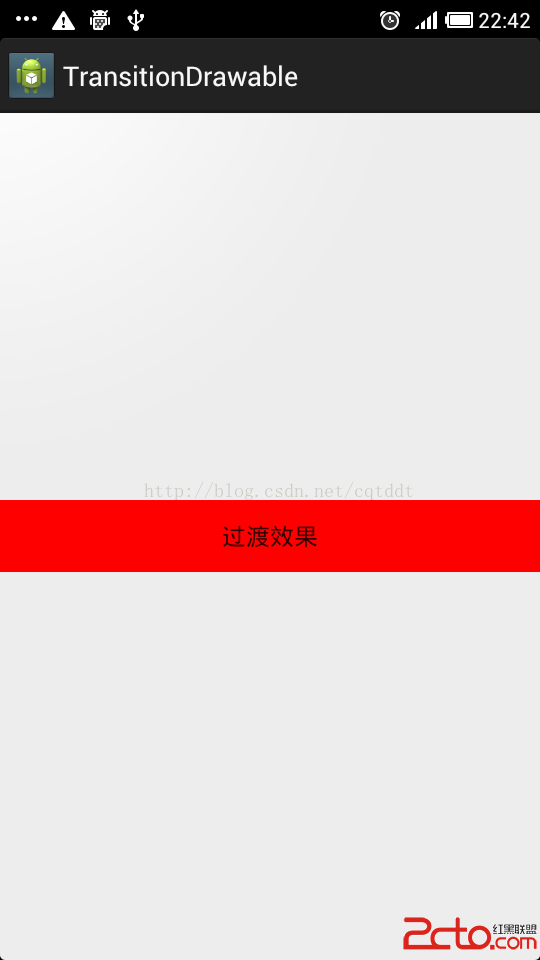 TransitionDrawable 圖片過渡效果實例
效果說明TransitionDrawable 可用於兩張圖片或兩種顏色之間的淡入淡出過渡動畫。適合按鈕背景、圖片切換或狀態提示。建立 TransitionDrawable
 Android Fragment 嵌套使用常見錯誤
在 Activity 中嵌套 Fragment 時,常會遇到子 Fragment 無法顯示、覆蓋範圍錯誤或切換異常等問題。以下整理常見原因與解法。 子 Fragment