

編輯:關於 Android 程式設計
經過上一篇的實驗,我們只分析了 View 的事件傳遞,但還有個更厲害的角色——ViewGroup 一定要說一下。
從視圖層級來看,一邊是 View、一邊是 ViewGroup,而 ViewGroup 中又可以放入 View 和 ViewGroup。我們都知道 ViewGroup 可以擁有孩子,也能對孩子進行「拜訪」,而 View 沒有這些特性。那麼,它的事件傳遞機制與 View 究竟有何不同?下面分享筆者的實驗結果。
在 ViewGroup 中,事件傳遞多了一個方法:onInterceptTouchEvent(MotionEvent ev)。它的作用是讓 ViewGroup 攔截訊息。預設情況下,onInterceptTouchEvent 回傳 false,也就是不攔截;若回傳 true,事件就會被父控件攔截,不再向子 View 傳遞。
以下是我所做的測試代碼。
XML 佈局:
 <relativelayout xmlns:android="https://schemas.android.com/apk/res/android"
    android:layout_width="match_parent" android:layout_height="match_parent">
    <com.chaoli_chen.ontouchdemo.myrelativelayout
        android:layout_height="match_parent" android:layout_width="match_parent"
        android:id="@+id/mrll">
        <com.chaoli_chen.ontouchdemo.mybutton
            android:id="@+id/bt" android:onclick="bt_click"
            android:layout_height="wrap_content" android:layout_width="wrap_content"
            android:text="實驗按鈕">
        </com.chaoli_chen.ontouchdemo.mybutton>
    </com.chaoli_chen.ontouchdemo.myrelativelayout>
</relativelayout>
自定義的 MyRelativeLayout,覆寫 dispatchTouchEvent、onInterceptTouchEvent、onTouchEvent 三個方法:
 public class MyRelativeLayout extends RelativeLayout {
    @Override public boolean dispatchTouchEvent(MotionEvent ev) {
        // 輸出 ACTION_DOWN / ACTION_UP
        return super.dispatchTouchEvent(ev);
    }
    @Override public boolean onInterceptTouchEvent(MotionEvent ev) {
        // 輸出 ACTION_DOWN / ACTION_UP
        return super.onInterceptTouchEvent(ev);
    }
    @Override public boolean onTouchEvent(MotionEvent event) {
        // 輸出 ACTION_DOWN / ACTION_UP
        return super.onTouchEvent(event);
    }
}
自定義的 MyButton 則覆寫 dispatchTouchEvent 與 onTouchEvent:
 public class Mybutton extends Button {
    @Override public boolean dispatchTouchEvent(MotionEvent event) {
        // 輸出 ACTION_DOWN / ACTION_UP
        return super.dispatchTouchEvent(event);
    }
    @Override public boolean onTouchEvent(MotionEvent event) {
        // 輸出 ACTION_DOWN / ACTION_UP
        return super.onTouchEvent(event);
    }
}
結果如下:
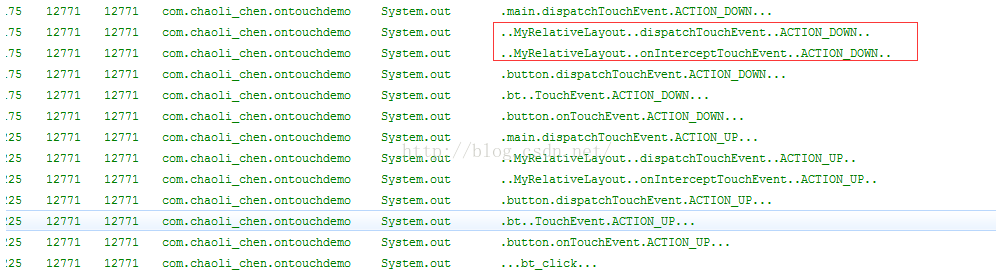
由結果分析可以看到:事件仍從 Activity 的 dispatchTouchEvent 進入,接著在自定義的 MyRelativeLayout 中先進行事件分發,然後執行是否攔截的判斷。查看 onInterceptTouchEvent 的預設 super 實現:
public boolean onInterceptTouchEvent(MotionEvent ev) { return false; }
回傳 false,代表預設不攔截。最後事件傳遞到自定義的 Button 進行分發,再傳給 setOnTouchListener 方法,最終呼叫 onClick() 執行點擊事件。
有沒有發現,自定義的 MyRelativeLayout 並沒有觸發 setOnTouchListener?那是因為它把事件傳遞給了 Button,並未進行攔截。
接著看 onInterceptTouchEvent 回傳 true 的情況:
 @Override public boolean onInterceptTouchEvent(MotionEvent ev) {
    // 輸出 ACTION_DOWN / ACTION_UP
    return true;
}
測試結果:
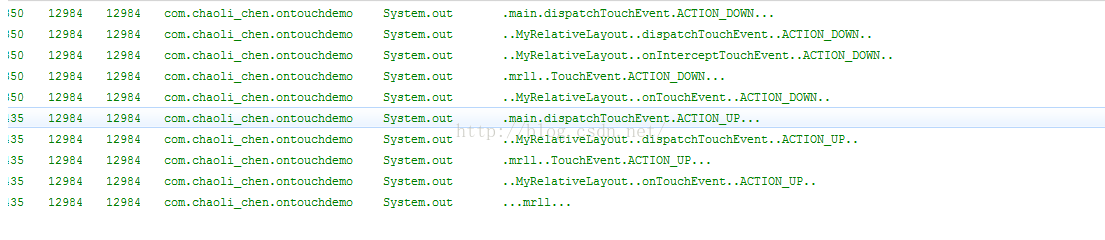
是不是徹底明白了?當自定義的 MyRelativeLayout 進行事件攔截時,其內部的子 View 便不會響應事件,反而是 MyRelativeLayout 自己響應了 setOnTouchListener 與 setOnClickListener。至此,ViewGroup 事件傳遞的測試就完成了。
 Android 如何保存用戶設定?以實體類為媒介存入內部儲存與 SD 卡
本次實例要做的,是把用戶的設定資訊,以實體類為媒介,保存到內部儲存或 SD 卡的檔案裡。再次打開應用時,程式會自動讀取檔案中的實體類,並對設定資訊進行套用,使其恢復到用戶
 風格 style 與主題 theme(一):釐清兩者關係與用法
第 1 節 概述 主題(theme)與風格(style)是兩個相當接近的概念,人們常把它們混著稱呼。它們都定義在 XML 檔中,也都使用 <style> 標籤
 Android ListView 上下拉刷新與 Tab 滑動切換實作
需求情境 這個範例要做出兩個 Tab 的列表頁,兩頁共用頂部描述區域,列表可上下拉動刷新。頁面上方有一個 Tab 切換列,當列表向上滑動時,Tab 會固定在頂部;向下滑動
 AndBase 框架實戰(一):打造多功能標題欄
本文是 AndBase 框架學習筆記的第一篇。AndBase 內部提供了許多方式,讓我們能動態設置一個更美觀的標題欄,而不是把界面寫死。整體思路就是動態獲取布局,再透過對