

編輯:關於 Android 程式設計
網上實現 Android 通訊錄的方式層出不窮,但真正借助數據庫來打造的卻並不多見。這裡我就帶大家從零動手,做一個功能完整、便於學習的通訊錄小 App。
先看一眼成品效果圖(文末附有完整源碼):

打開 App 後,首先會呈現一段全屏的閃屏歡迎畫面:
//全屏顯示 welcome 畫面
requestWindowFeature(Window.FEATURE_NO_TITLE);
getWindow().setFlags(WindowManager.LayoutParams.FLAG_FULLSCREEN,
WindowManager.LayoutParams.FLAG_FULLSCREEN);
setContentView(R.layout.start);
//延遲一秒後執行 run 方法中的頁面跳轉
new Handler().postDelayed(new Runnable() {
@Override
public void run() {
Intent intent = new Intent(TongXunLuActivity.this, List.class);
startActivity(intent);
TongXunLuActivity.this.finish();
}
}, 1000);
接下來是整個 App 的核心——數據庫的管理與操作。
StudentDAO.java
package com.abc.sqlite;

import java.util.ArrayList;
import java.util.List;
import com.abc.entity.Student;
import android.content.ContentValues;
import android.content.Context;
import android.database.Cursor;
import android.database.sqlite.SQLiteDatabase;
import android.database.sqlite.SQLiteOpenHelper;

public class StudentDAO {
    /** 對數據庫的增刪改查 */
    private DBOpenHelper helper; //SQLiteOpenHelper 實例對象
    private SQLiteDatabase db;   //數據庫實例對象

    public StudentDAO(Context context) {
        helper = new DBOpenHelper(context);
    }

    public void add(Student student) {
        // 增刪改查
        db = helper.getWritableDatabase(); // 鏈接數據庫
        db.execSQL("insert into tb_student values(?,?,?,?)", new String[] {
            student.getId(), student.getName(), student.getSpeciality(), student.getQq()
        });
        db.close();
    }

    /** 添加數據 */
    public void addContentValues(Student student) {
        db = helper.getWritableDatabase();
        ContentValues cv = new ContentValues();
        // ContentValues 和 HashTable 類似都是一種存儲的機制,但兩者最大的區別在於,
        // ContentValues 只能存儲基本類型的數據(如 String、int),不能存儲對象;而 HashTable 卻可以存儲對象。
        cv.put("Id", student.getId());
        cv.put("Name", student.getName());
        cv.put("Speciality", student.getSpeciality());
        cv.put("Qq", student.getQq());
        db.insert("tb_student", null, cv);
        db.close();
    }

    /** 1、查詢所有 student 數據 rawQuery 方法 */
    public List<Student> quereyTable() {
        List<Student> listStudents = new ArrayList<Student>();
        db = helper.getReadableDatabase();
        Cursor cursor = db.rawQuery("select * from tb_student", null);
        while (cursor.moveToNext()) {
            Student student = new Student();
            student.setId(cursor.getString(0));
            student.setName(cursor.getString(1));
            student.setSpeciality(cursor.getString(2));
            student.setQq(cursor.getString(3));
            listStudents.add(student);
        }
        db.close();
        return listStudents;
    }

    /** 查詢單個 student 數據 */
    public Student quereyStudentRaw(Student student) {
        db = helper.getReadableDatabase();
        Cursor cursor = db.rawQuery("select * from tb_student where Id=?", new String[] { student.getId() });
        // 要創建一個 Cursor(游標),必須執行一個查詢,通過 rawQuery() 或 query() 方法,而不能使用 execSQL()。
        while (cursor.moveToNext()) {
            student.setId(cursor.getString(cursor.getColumnIndex("id"))); // 返回指定列的名稱,如果不存在返回 -1
            student.setName(cursor.getString(1));
            student.setSpeciality(cursor.getString(2));
            student.setQq(cursor.getString(3));
            db.close();
        }
        return student;
    }

    /** 2、查詢所有 student 數據 query 方法 */
    public List<Student> queryAll(Student student) {
        List<Student> sList = new ArrayList<Student>();
        db = helper.getWritableDatabase();
        Cursor cursor = db.query("tb_student", null, null, null, null, null, null);
        while (cursor.moveToNext()) {
            Student student1 = new Student(cursor.getString(0), cursor.getString(1), cursor.getString(2), cursor.getString(3));
            sList.add(student1);
        }
        return sList;
    }

    /** 2、查詢單個 student 數據 query 方法 */
    public Student quereyStuden(Student student) {
        db = helper.getReadableDatabase();
        Cursor cursor = db.query("tb_student", null, "id=?", new String[] { student.getId() }, null, null, null);
        while (cursor.moveToNext()) {
            student.setId(cursor.getString(cursor.getColumnIndex("id")));
            student.setName(cursor.getString(1));
            student.setSpeciality(cursor.getString(2));
            student.setQq(cursor.getString(3));
            db.close();
        }
        return student;
    }

    public int getCount() {
        return 0;
    }

    /** 修改數據庫方法一 */
    public void upDate(Student student) {
        db = helper.getWritableDatabase();
        db.execSQL("update tb_student set Name=?,Speciality=?,Qq=? where Id=?",
            new String[] { student.getName(), student.getSpeciality(), student.getQq(), student.getId() });
        db.close();
    }

    public int delete(String id) {
        db = helper.getWritableDatabase();
        Student student = new Student();
        int count = db.delete("tb_student", "Id=?", new String[] { student.getId() });
        db.close();
        return count;
    }
}
再來看看如何解析每條 student 數據的內容。
Service.java
package com.abc.sqlite;

import java.io.IOException;
import java.io.InputStream;
import java.util.ArrayList;
import java.util.List;
import org.xmlpull.v1.XmlPullParser;
import org.xmlpull.v1.XmlPullParserException;
import android.content.Context;
import android.content.res.AssetManager;
import android.util.Log;
import android.util.Xml;
import com.abc.entity.Student;

public class Service {
    /** 對每個 student 數據內容的解析現實 */
    private Context context;

    public Service(Context context) {
        super();
        this.context = context;
    }

    public List<Student> parserXml(String filesName) throws IOException, XmlPullParserException {
        List<Student> students = new ArrayList<Student>();
        Student student = null; // 初始化一個對象
        AssetManager aManage = context.getAssets();
        InputStream is = null;  // 1、獲取解析文本
        XmlPullParser parser = null;
        is = aManage.open(filesName);
        parser = Xml.newPullParser(); // 2、創建一個解析器對象
        parser.setInput(is, "utf-8"); // 設置輸入字節流與編碼格式
        int event = parser.getEventType(); // 3、取得事件類型
        while (event != XmlPullParser.END_DOCUMENT) {
            switch (event) {
                case XmlPullParser.START_TAG:
                    if ("student".equalsIgnoreCase(parser.getName())) {
                        student = new Student();
                        student.setId(parser.getAttributeValue(0)); // 獲取 student 的第一個屬性
                        break;
                    }
                    if (student != null) {
                        if ("name".equalsIgnoreCase(parser.getName())) {
                            student.setName(parser.nextText());
                        }
                        if ("speciality".equalsIgnoreCase(parser.getName())) {
                            student.setSpeciality(parser.nextText());
                        }
                        if ("qq".equalsIgnoreCase(parser.getName())) {
                            student.setQq(parser.nextText());
                        }
                    }
                    break;
                case XmlPullParser.END_TAG:
                    if ("student".equalsIgnoreCase(parser.getName())) {
                        students.add(student); // 將解析的一個 student 對象添加到集合中去
                        student = null;        // student 置空
                    }
                    break;
                default:
                    break;
            }
            event = parser.next(); // 獲取下一個事件類型
        }
        if (is != null) {
            is.close();
        }
        return students;
    }
}
接下來是數據內容位置的填充,並為增刪改查綁定監聽事件。這裡的刪除功能曾出現無法生效的問題,若你有更好的思路,歡迎一起交流。
StudentDetile.java
package com.abc.entity;

import com.abc.sqlite.StudentDAO;
import com.abc.tong.List;
import com.abc.tong.R;
import android.app.Activity;
import android.app.AlertDialog.Builder;
import android.content.Context;
import android.content.DialogInterface;
import android.content.Intent;
import android.net.Uri;
import android.os.Bundle;
import android.view.View;
import android.view.View.OnClickListener;
import android.widget.Button;
import android.widget.EditText;

public class StudentDetile extends Activity implements OnClickListener {
    private EditText nameText, Idn;
    private EditText qqText;
    private EditText specialityText;
    private Button saveButton;
    private Button backButton;
    private Button cancelButton;
    private Button callButton;

    StudentDAO studentDAO = new StudentDAO(this); // 2 創建對象
    String qq;
    String id;
    StudentDAO studentDao = new StudentDAO(StudentDetile.this);
    private Context context;
    private java.util.List<Student> students;
    Student student;

    protected void onCreate(Bundle savedInstanceState) {
        super.onCreate(savedInstanceState);
        setContentView(R.layout.student_detile);
        Intent intent = getIntent();
        Bundle bundle = intent.getBundleExtra("bundle");
        String name = bundle.getString("strName");
        qq = bundle.getString("strQq");
        String speciality = bundle.getString("strSpeciality");
        id = bundle.getString("strId");
        nameText = (EditText) findViewById(R.id.EditName);
        qqText = (EditText) findViewById(R.id.EditQq);
        specialityText = (EditText) findViewById(R.id.EditSpeciality);
        Idn = (EditText) findViewById(R.id.EditId);
        saveButton = (Button) findViewById(R.id.update);
        cancelButton = (Button) findViewById(R.id.delete);
        backButton = (Button) findViewById(R.id.call);
        callButton = (Button) findViewById(R.id.back);
        saveButton.setOnClickListener(this);
        cancelButton.setOnClickListener(this);
        backButton.setOnClickListener(this);
        callButton.setOnClickListener(this);
        Idn.setText(id);
        nameText.setText(name);
        qqText.setText(qq);
        specialityText.setText(speciality);
    }

    public void onClick(View v) {
        Intent intent = new Intent(StudentDetile.this, List.class);
        switch (v.getId()) {
            case R.id.update:
                android.content.DialogInterface.OnClickListener listener = new DialogInterface.OnClickListener() {
                    @Override
                    public void onClick(DialogInterface dialog, int which) {
                        student = new Student(id, nameText.getText().toString().trim(),
                            qqText.getText().toString().trim(), specialityText.getText().toString().trim());
                        updateStudent(student);
                        Intent intent = new Intent(StudentDetile.this, List.class);
                        startActivity(intent);
                    }
                };
                Builder builder = new Builder(this);
                builder.setTitle("確定要修改嗎?");
                builder.setPositiveButton("確定", listener);
                builder.setNegativeButton("取消", null);
                builder.show();
                break;
            case R.id.delete:
                android.content.DialogInterface.OnClickListener listener1 = new DialogInterface.OnClickListener() {
                    @Override
                    public void onClick(DialogInterface dialog, int which) {
                        student = new Student(Idn.getText().toString(), nameText.getText().toString().trim(),
                            qqText.getText().toString().trim(), specialityText.getText().toString().trim());
                        studentDao.delete(student.getId()); // 從數據庫中刪除
                        Intent intent = new Intent(StudentDetile.this, List.class);
                        startActivity(intent);
                    }
                };
                Builder builder1 = new Builder(this);
                builder1.setTitle("確定要刪除嗎?");
                builder1.setPositiveButton("確定", listener1);
                builder1.setNegativeButton("取消", null);
                builder1.show();
                break;
            case R.id.back:
                startActivity(intent);
                break;
            case R.id.call:
                Intent it = new Intent(Intent.ACTION_DIAL, Uri.parse("tel:" + qq));
                startActivity(it);
                break;
            default:
                break;
        }
    }

    private void updateStudent(Student student) {
        studentDao.upDate(student);
    }
}
接著自定義一個適配器,完成界面數據的綁定,並在 List 頁面中實現,這裡為列表項加了一個長按事件——打電話。
CustomAdapter.java
package com.abc.adapter;

import java.util.List;
import com.abc.entity.Student;
import com.abc.tong.R;
import android.content.Context;
import android.view.View;
import android.view.ViewGroup;
import android.widget.BaseAdapter;
import android.widget.ImageView;
import android.widget.TextView;

public class CustomAdapter extends BaseAdapter {
    private List<Student> sList;
    private Context context;

    public CustomAdapter(List<Student> sList, Context context) {
        super();
        this.sList = sList;
        this.context = context;
    }

    @Override
    public int getCount() {
        return sList.size();
    }

    @Override
    public Object getItem(int position) {
        return sList.get(position);
    }

    @Override
    public long getItemId(int position) {
        return position;
    }

    @Override
    public View getView(int position, View convertView, ViewGroup parent) {
        // 特別注意此時 context 不能寫 this,因為此時的上下文是 List.java
        View view = View.inflate(context, R.layout.list_item, null);
        TextView nameText = (TextView) view.findViewById(R.id.text_name);
        TextView qqText = (TextView) view.findViewById(R.id.text_qq);
        TextView specialityText = (TextView) view.findViewById(R.id.text_speciality);
        nameText.setText((CharSequence) sList.get(position).getName());
        qqText.setText((CharSequence) sList.get(position).getQq());
        specialityText.setText((CharSequence) sList.get(position).getSpeciality());
        ImageView imageView = (ImageView) view.findViewById(R.id.imageView);
        return view;
    }
}
List.java
package com.abc.tong;

import java.io.IOException;
import org.xmlpull.v1.XmlPullParserException;
import com.abc.adapter.CustomAdapter;
import com.abc.entity.Student;
import com.abc.entity.StudentDetile;
import com.abc.sqlite.Service;
import com.abc.sqlite.StudentDAO;
import android.app.Activity;
import android.app.AlertDialog;
import android.app.AlertDialog.Builder;
import android.content.DialogInterface;
import android.content.Intent;
import android.net.Uri;
import android.os.Bundle;
import android.view.KeyEvent;
import android.view.View;
import android.widget.AdapterView;
import android.widget.AdapterView.OnItemClickListener;
import android.widget.ListView;

public class List extends Activity implements AdapterView.OnItemLongClickListener {
    private java.util.List<Student> sList = null;
    private java.util.List<Student> sListQuery = null;
    private ListView listv;
    String strQq;

    @Override
    public boolean onKeyDown(int keyCode, KeyEvent event) {
        if (keyCode == KeyEvent.KEYCODE_BACK) {
            showExitGameAlert();
        }
        return super.onKeyDown(keyCode, event);
    }

    private void showExitGameAlert() {
        Builder a = new AlertDialog.Builder(List.this);
        a.setMessage("確定退出通訊錄嗎")
            .setPositiveButton("確定", new DialogInterface.OnClickListener() {
                @Override
                public void onClick(DialogInterface dialog, int which) {
                    System.exit(0);
                }
            })
            .setNegativeButton("取消", new DialogInterface.OnClickListener() {
                @Override
                public void onClick(DialogInterface dialog, int which) {
                    dialog.cancel();
                }
            }).show();
    }

    protected void onCreate(Bundle savedInstanceState) {
        super.onCreate(savedInstanceState);
        setContentView(R.layout.list_contacts);
        listv = (ListView) findViewById(R.id.list);
        Service service = new Service(this); // 1 創建對象
        try {
            sList = service.parserXml("text.xml");
        } catch (IOException e) {
            e.printStackTrace();
        } catch (XmlPullParserException e) {
            e.printStackTrace();
        }
        StudentDAO studentDAO = new StudentDAO(this); // 2 創建對象
        for (Student student : sList) {
            studentDAO.addContentValues(student); // 將每一個 student 添加到 studentDAO
        }
        sListQuery = studentDAO.quereyTable();
        CustomAdapter adapter = new CustomAdapter(sListQuery, getApplicationContext());
        listv.setAdapter(adapter);
        listv.setOnItemLongClickListener(this);
        listv.setOnItemClickListener(new OnItemClickListener() {
            @Override
            public void onItemClick(AdapterView<?> parent, View view, int position, long id) {
                String strId = sListQuery.get(position).getId();
                String strName = sListQuery.get(position).getName();
                String strSpeciality = sListQuery.get(position).getSpeciality();
                strQq = sListQuery.get(position).getQq();
                Intent intent = new Intent(List.this, StudentDetile.class);
                Bundle bundle = new Bundle();
                bundle.putString("strId", strId);
                bundle.putString("strQq", strQq);
                bundle.putString("strName", strName);
                bundle.putString("strSpeciality", strSpeciality);
                intent.putExtra("bundle", bundle);
                startActivity(intent);
            }
        });
    }

    public boolean onItemLongClick(AdapterView<?> arg0, View view, int position, long arg3) {
        strQq = sListQuery.get(position).getQq();
        Intent it = new Intent(Intent.ACTION_DIAL, Uri.parse("tel:" + strQq));
        List.this.startActivity(it);
        return true; // 為了區分點擊事件和長按事件,長按事件裡的 return 改為 true 即可
    }
}
一些簡單的代碼與布局文件這裡就不一一貼出了,剩下的交給大家動手實踐。水滴石穿,量的積累終將帶來質的飛躍。
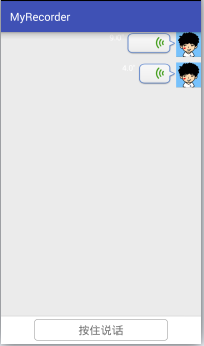 Android 仿微信錄製音頻並發送的完整實現
MyRecorder(仿微信,錄製音頻並發送功能)① 布局實現(activity_main.xml)整體採用線性布局,上方是一個 ListView,下方是一個自定義 Bu
 Android Context 與 Application:全局對象的數據共享實踐
Interface to global information about an application environment. This is an abstrac
 Android 自訂切換控制項 SwitchView 完整實作
1. 示意圖 2. 核心程式碼 這個自訂 SwitchView 繼承自 View,透過三張圖片(開啟背景、關閉背景、滑塊)搭配手勢判斷,實作出帶滑動動畫的開關控制項,
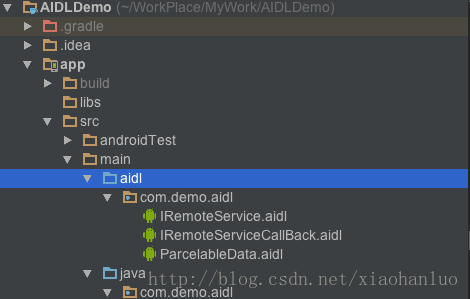 Android Messenger 與 AIDL 進程通信實戰解析
在 Android 中,Service 與客戶端元件若要跨進程溝通,常見方案有 Messenger 與 AIDL。兩者都基於 Binder 機制,但使用方式與適用情境不同