

編輯:關於 Android 程式設計
出於安全性、穩定性以及記憶體管理的多重考量,Android 將應用程式與系統服務分別運行在相互獨立的行程之中。然而這些行程彼此之間又必須交換資料、協同運作,於是跨行程通訊(IPC)就成了繞不開的課題。相比傳統的 System V IPC,Binder 在效能與功能上都更具優勢,也能有效規避服務被拒絕等問題。
Binder 為開發者帶來了幾項實用能力:它引入了對物件參照的引用計數機制,並具備銷毀提醒功能——當某個 Binder 服務不再被任何一端參照時,其擁有者能被自動通知並相應地清理自身資源。同時,Binder 會透過 UID/PID 來辨識通訊雙方,這對安全驗證至關重要。
當然,Binder 也有其局限:它並不支援 RPC,僅能以訊息為基礎在用戶端與伺服器端之間溝通;它不適合資料流傳輸,也不完全符合 POSIX 標準。
當用戶端需要使用某項服務時,由於行程之間無法直接溝通,所有互動都得透過 Binder 驅動來完成。
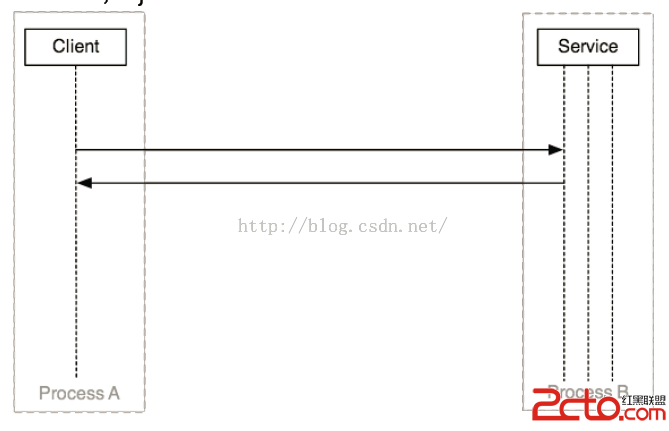
行程之間無法直接通訊,因此必須借助 Binder 驅動作為中轉。
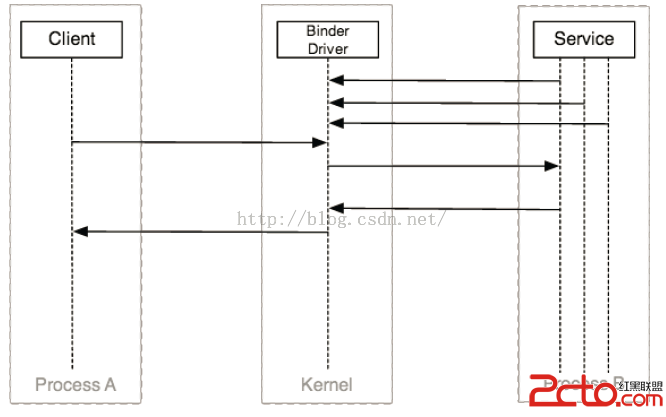
用戶端與伺服器端無須理解底層的 Binder 協議,這一切都由代理(Proxy)與存根(Stub)代為處理。
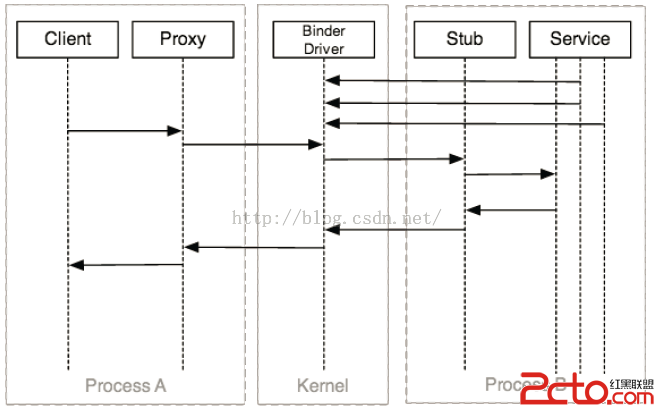
用戶端甚至不必察覺自己正在使用 IPC,也無須理會 Binder 與代理的存在,因此還需要一層管理物件來完成抽象。
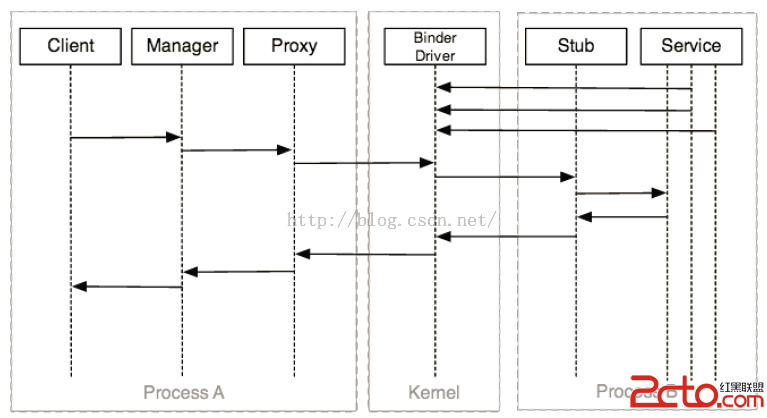
那麼用戶端如何取得欲通訊服務的 handle 呢?答案很簡單——只需向 ServiceManager(Context Manager)查詢該服務是否已完成註冊即可。
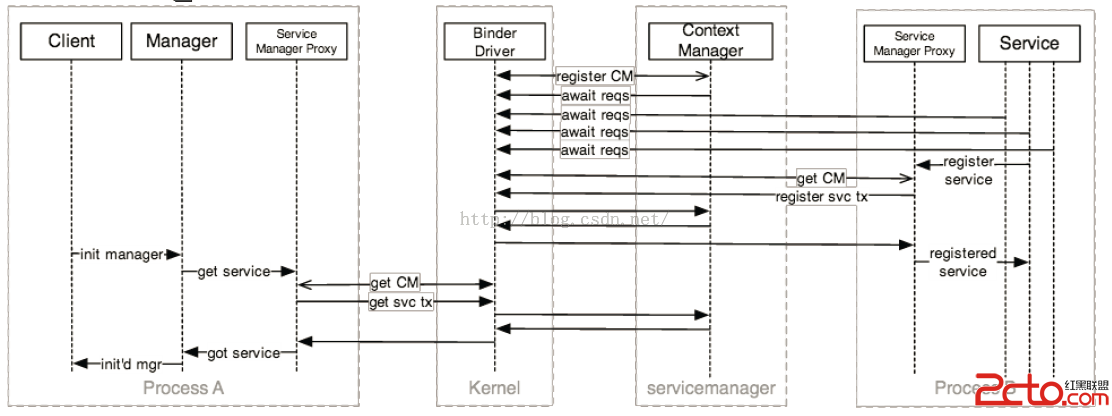
最後,我們來一窺整體架構的全貌。
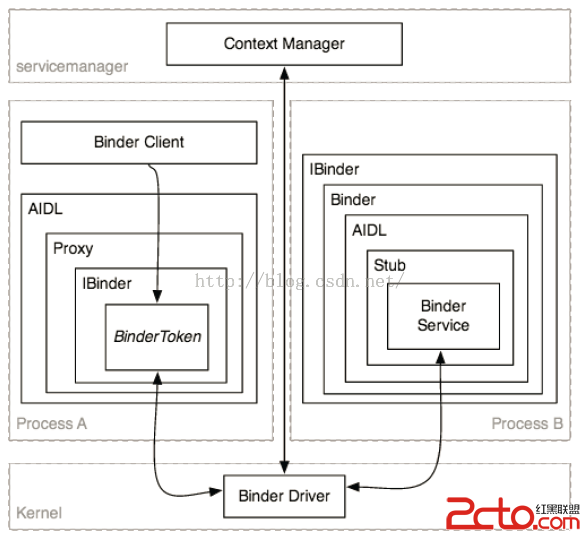
接下來,我們透過 AIDL 來實現一個跨行程的加減法計算。
新建 Android 專案,建立套件 com.realize.calc.aidl,並新增檔案 ICalcAIDL.aidl,內容如下:
package com.realize.calc.aidl; interface ICalcAIDL { int add(int x , int y); int min(int x , int y ); }
接著建立套件 com.realize.lizijun.binder_server,新增 CalcService.java,內容如下:
package com.realize.lizijun.binder_server; import com.realize.calc.aidl.ICalcAIDL; import android.app.Service; import android.content.Intent; import android.os.IBinder; import android.os.RemoteException; import android.util.Log; public class CalcService extends Service { private static final String TAG = "server"; public void onCreate() { Log.e(TAG, "onCreate"); } public IBinder onBind(Intent t) { Log.e(TAG, "onBind"); return mBinder; } public void onDestroy() { Log.e(TAG, "onDestroy"); super.onDestroy(); } public boolean onUnbind(Intent intent) { Log.e(TAG, "onUnbind"); return super.onUnbind(intent); } public void onRebind(Intent intent) { Log.e(TAG, "onRebind"); super.onRebind(intent); } private final ICalcAIDL.Stub mBinder = new ICalcAIDL.Stub() { @Override public int add(int x, int y) throws RemoteException { return x + y; } @Override public int min(int x, int y) throws RemoteException { return x - y; } }; }
別忘了在 AndroidManifest.xml 中註冊服務:
<service android:name="com.realize.lizijun.binder_server.CalcService"> <intent-filter> <action android:name="com.realize.calc.aidl"> <category android:name="android.intent.category.DEFAULT"> </category></action></intent-filter> </service>
新建另一個 Android 專案,同樣建立套件 com.realize.calc.aidl 並新增 ICalcAIDL.aidl(內容與服務端完全一致):
package com.realize.calc.aidl; interface ICalcAIDL { int add(int x , int y); int min(int x , int y ); }
主 Activity 的內容如下:
package com.realize.lizijun.binder_client; import android.app.Activity; import android.content.ComponentName; import android.content.Context; import android.content.Intent; import android.content.ServiceConnection; import android.os.Bundle; import android.os.IBinder; import android.util.Log; import android.view.View; import android.widget.Toast; import com.realize.calc.aidl.ICalcAIDL; public class MainActivity extends Activity { private static final String TAG = "client"; private ICalcAIDL mCalcAidl; private ServiceConnection mServiceConn = new ServiceConnection() { @Override public void onServiceDisconnected(ComponentName name) { Log.e(TAG, "onServiceDisconnected"); mCalcAidl = null; } @Override public void onServiceConnected(ComponentName name, IBinder service) { Log.e(TAG, "onServiceConnected"); mCalcAidl = ICalcAIDL.Stub.asInterface(service); } }; @Override protected void onCreate(Bundle savedInstanceState) { super.onCreate(savedInstanceState); setContentView(R.layout.activity_main); } /** * 點擊BindService按鈕時調用 * @param view */ public void bindService(View view) { Intent intent = new Intent(); intent.setAction("com.realize.calc.aidl"); bindService(intent, mServiceConn, Context.BIND_AUTO_CREATE); } /** * 點擊unBindService按鈕時調用 * @param view */ public void unbindService(View view) { unbindService(mServiceConn); } /** * 點擊12+12按鈕時調用 * @param view */ public void addInvoked(View view) throws Exception { if (mCalcAidl != null) { int addRes = mCalcAidl.add(12, 12); Toast.makeText(this, addRes + "", Toast.LENGTH_SHORT).show(); } else { Toast.makeText(this, "服務器被異常殺死,請重新綁定服務端", Toast.LENGTH_SHORT) .show(); } } /** * 點擊50-12按鈕時調用 * @param view */ public void minInvoked(View view) throws Exception { if (mCalcAidl != null) { int addRes = mCalcAidl.min(50, 12); Toast.makeText(this, addRes + "", Toast.LENGTH_SHORT).show(); } else { Toast.makeText(this, "服務器未綁定或被異常殺死,請重新綁定服務端", Toast.LENGTH_SHORT) .show(); } } }
介面如下:
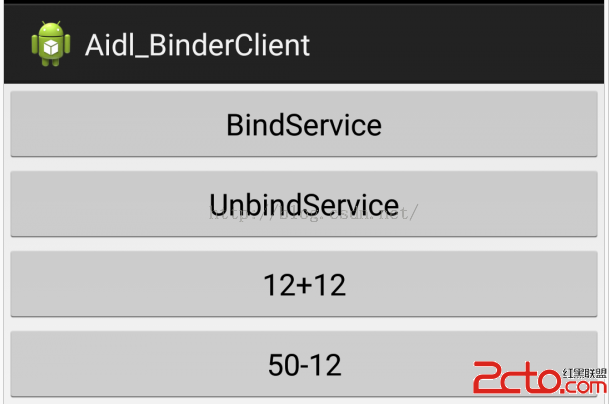
點擊 BindService 之後,服務端依序執行了 onCreate 與 onBind,用戶端則觸發 onServiceConnected。此時點擊「12+12」與「50-12」,都能成功呼叫服務端程式碼並回傳正確結果。
接著點擊 unBindService,服務端觸發 onUnbind 與 onDestroy;但再次點擊計算按鈕,仍能取得正確結果,這說明用戶端與服務端之間的連線其實還持續存在。而當我們透過後台強制停止服務後,便能看到 onServiceDisconnected 被呼叫,此時再點擊計算按鈕就取不到任何結果了。
建立 ICalcAIDL.aidl 之後,gen 目錄下會產生 ICalcAIDL.java,這個檔案同時實現了用戶端與服務端的代理(proxy)與存根(stub)。

服務端程式碼中呼叫的是 ICalcAIDL.Stub:
private final ICalcAIDL.Stub mBinder = new ICalcAIDL.Stub() { @Override public int add(int x, int y) throws RemoteException { return x + y; } @Override public int min(int x, int y) throws RemoteException { return x - y; } };
而在 CalcService.java 中我們可以明顯看到,Stub 其實就是 Binder 的子類:
public static abstract class Stub extends android.os.Binder implements com.realize.calc.aidl.ICalcAIDL
再來看 Stub 底下的 onTransact 方法,加減法的實際操作正是在這裡完成的:
@Override public boolean onTransact(int code, android.os.Parcel data, android.os.Parcel reply, int flags) throws android.os.RemoteException { switch (code) { case INTERFACE_TRANSACTION: { reply.writeString(DESCRIPTOR); return true; } case TRANSACTION_add: { data.enforceInterface(DESCRIPTOR); int _arg0; _arg0 = data.readInt(); int _arg1; _arg1 = data.readInt(); int _result = this.add(_arg0, _arg1); reply.writeNoException(); reply.writeInt(_result); return true; } case TRANSACTION_min: { data.enforceInterface(DESCRIPTOR); int _arg0; _arg0 = data.readInt(); int _arg1; _arg1 = data.readInt(); int _result = this.min(_arg0, _arg1); reply.writeNoException(); reply.writeInt(_result); return true; } } return super.onTransact(code, data, reply, flags); }
服務端會根據用戶端送來的訊息觸發 onTransact 方法,該方法共有四個參數:
code 是唯一辨識用的整數,用來區分要執行哪個方法;data 是用戶端傳入的參數;reply 是伺服器要回傳的值;flags 則標示是否有回傳值,0 代表有(雙向),1 代表沒有(單向)。
用戶端程式碼中呼叫的是 ICalcAIDL.Stub.asInterface:
private ServiceConnection mServiceConn = new ServiceConnection() { @Override public void onServiceDisconnected(ComponentName name) { Log.e(TAG, "onServiceDisconnected"); mCalcAidl = null; } @Override public void onServiceConnected(ComponentName name, IBinder service) { Log.e(TAG, "onServiceConnected"); mCalcAidl = ICalcAIDL.Stub.asInterface(service); } };
而在 ICalcAIDL.java 中,asInterface 最終會呼叫到 Proxy:
public static com.realize.calc.aidl.ICalcAIDL asInterface(android.os.IBinder obj) { if ((obj==null)) { return null; } android.os.IInterface iin = obj.queryLocalInterface(DESCRIPTOR); if (((iin!=null)&&(iin instanceof com.realize.calc.aidl.ICalcAIDL))) { return ((com.realize.calc.aidl.ICalcAIDL)iin); } return new com.realize.calc.aidl.ICalcAIDL.Stub.Proxy(obj); }
於是我們來看看 Proxy 的 add 方法:
@Override public int add(int x, int y) throws android.os.RemoteException { android.os.Parcel _data = android.os.Parcel.obtain(); android.os.Parcel _reply = android.os.Parcel.obtain(); int _result; try { _data.writeInterfaceToken(DESCRIPTOR); _data.writeInt(x); _data.writeInt(y); mRemote.transact(Stub.TRANSACTION_add, _data, _reply, 0); _reply.readException(); _result = _reply.readInt(); } finally { _reply.recycle(); _data.recycle(); } return _result; }
這裡宣告了兩個 android.os.Parcel 物件,_data 負責傳遞資料,_reply 則用來接收回傳結果。最後呼叫 transact 方法,與服務端完成通訊。
那麼,如何在不透過 AIDL 檔案的情況下實現跨行程通訊呢?從前面的分析不難推導:既然 AIDL 只是自動產生了那些介面程式碼,那麼我們只要手動實作出相同的介面功能即可。下面我們以跨行程的乘法與除法為例。
建立專案並實作 CalcService.java,程式碼如下:
package com.realize.lizijun.noaidl_binder_server; import android.app.Service; import android.content.Intent; import android.os.Binder; import android.os.IBinder; import android.os.Parcel; import android.os.RemoteException; import android.util.Log; public class CalcService extends Service { private static final String DESCRIPTOR = "CalcService"; private static final String TAG = "server"; public void onCreate() { Log.e(TAG, "onCreate"); } @Override public int onStartCommand(Intent intent, int flags, int startId) { Log.e(TAG, "onStartCommand"); return super.onStartCommand(intent, flags, startId); } public IBinder onBind(Intent t) { Log.e(TAG, "onBind"); return mBinder; } public void onDestroy() { Log.e(TAG, "onDestroy"); super.onDestroy(); } public boolean onUnbind(Intent intent) { Log.e(TAG, "onUnbind"); return super.onUnbind(intent); } public void onRebind(Intent intent) { Log.e(TAG, "onRebind"); super.onRebind(intent); } private MyBinder mBinder = new MyBinder(); private class MyBinder extends Binder { @Override protected boolean onTransact(int code, Parcel data, Parcel reply, int flags) throws RemoteException { switch (code) { case 0x110: { Log.e(TAG, "0x110"); data.enforceInterface(DESCRIPTOR); int _arg0; _arg0 = data.readInt(); int _arg1; _arg1 = data.readInt(); int _result = _arg0 * _arg1; reply.writeNoException(); reply.writeInt(_result); return true; } case 0x111: { Log.e(TAG, "0x111"); data.enforceInterface(DESCRIPTOR); int _arg0; _arg0 = data.readInt(); int _arg1; _arg1 = data.readInt(); int _result = _arg0 / _arg1; reply.writeNoException(); reply.writeInt(_result); return true; } } return super.onTransact(code, data, reply, flags); } }; }
這裡自訂了一個 Binder 子類,並覆寫了它的 onTransact 方法。接著在 AndroidManifest.xml 中註冊服務:
<service android:name="com.realize.lizijun.noaidl_binder_server.CalcService"> <intent-filter> <action android:name="com.realize.noaidl.calc"> <category android:name="android.intent.category.DEFAULT"> </category></action></intent-filter> </service>
建立專案,主 Activity 內容如下:
package com.realize.lizijun.noaidl_binder_client; import android.app.Activity; import android.content.ComponentName; import android.content.Context; import android.content.Intent; import android.content.ServiceConnection; import android.os.Bundle; import android.os.IBinder; import android.os.RemoteException; import android.util.Log; import android.view.View; import android.widget.Toast; public class MainActivity extends Activity { private static final String TAG = "client"; private IBinder mPlusBinder = null; private ServiceConnection mServiceConnPlus = new ServiceConnection() { // 只有當service異常退出時,系統才會調用onServiceDisconnected() @Override public void onServiceDisconnected(ComponentName name) { Log.e(TAG, "mServiceConnPlus onServiceDisconnected"); mPlusBinder = null; } @Override public void onServiceConnected(ComponentName name, IBinder service) { Log.e(TAG, " mServiceConnPlus onServiceConnected"); mPlusBinder = service; } }; @Override protected void onCreate(Bundle savedInstanceState) { super.onCreate(savedInstanceState); setContentView(R.layout.activity_main); } public void bindService(View view) { Intent intentPlus = new Intent(); intentPlus.setAction("com.realize.noaidl.calc"); boolean result = bindService(intentPlus, mServiceConnPlus, Context.BIND_AUTO_CREATE); Log.e(TAG, result + ""); } public void unbindService(View view) { if (mServiceConnPlus != null) { Log.e(TAG, "unbindService"); unbindService(mServiceConnPlus); //mServiceConnPlus = null; } } public void mulInvoked(View view) { if (mPlusBinder == null) { Toast.makeText(this, "未連接服務端或服務端被異常殺死", Toast.LENGTH_SHORT).show(); } else { android.os.Parcel _data = android.os.Parcel.obtain(); android.os.Parcel _reply = android.os.Parcel.obtain(); int _result = 0; try { _data.writeInterfaceToken("CalcService"); _data.writeInt(50); _data.writeInt(12); mPlusBinder.transact(0x110, _data, _reply, 0); _reply.readException(); _result = _reply.readInt(); Toast.makeText(this, _result + "", Toast.LENGTH_SHORT).show(); } catch (RemoteException e) { e.printStackTrace(); } finally { _reply.recycle(); _data.recycle(); } } } public void divInvoked(View view) { if (mPlusBinder == null) { Toast.makeText(this, "未連接服務端或服務端被異常殺死", Toast.LENGTH_SHORT).show(); } else { android.os.Parcel _data = android.os.Parcel.obtain(); android.os.Parcel _reply = android.os.Parcel.obtain(); int _result = 0; try { _data.writeInterfaceToken("CalcService"); _data.writeInt(36); _data.writeInt(12); mPlusBinder.transact(0x111, _data, _reply, 0); _reply.readException(); _result = _reply.readInt(); Toast.makeText(this, _result + "", Toast.LENGTH_SHORT).show(); } catch (RemoteException e) { e.printStackTrace(); } finally { _reply.recycle(); _data.recycle(); } } } }
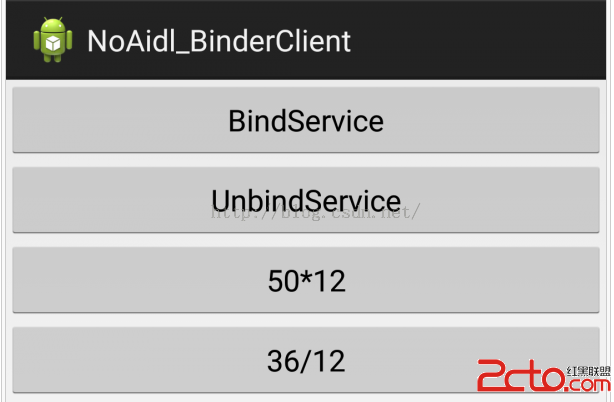
介面如下:
 Android 資料儲存(三):SQLite 資料庫儲存完整指南
SQLite 是 Android 系統內建的資料庫,屬於輕量級關聯式資料庫。它運算速度快、佔用資源少,非常適合行動裝置;不僅支援標準 SQL 語法,也遵循資料庫的 ACI
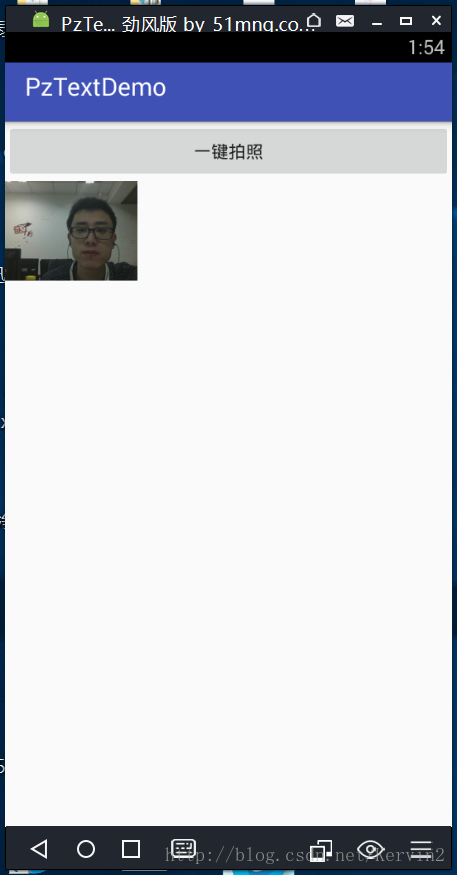 用系統相機實作一鍵拍照:Intent 呼叫與結果接收
拍照功能其實不必自己寫 Camera2,直接借用系統相機即可,幾行 Intent 就能搞定。 public class MainActivity extends App
 Android 項目部署之 Nexus 私服搭建與應用
一、概述 Nexus 是一個基於 Maven 的倉庫管理社區項目,最典型的用場就是在局域網搭建一個 Maven 私服,用來部署第三方公共構件,或作為遠程倉庫在該局域網的代
 Android 基礎再學習:Activity 的生命週期全解
關於 Activity 的生命週期,需要掌握的知識點有四項:1. 各個生命週期方法的執行順序;2. 每個方法應該做什麼樣的處理(每個方法保留的時間多久、哪個方法是活動阻塞