

編輯:關於 Android 程式設計
幾乎每個 App 都有版本更新功能。這個流程拆開來其實不複雜,但需要串起接口、策略判斷、下載服務與通知欄,程式碼量自然不少。
服務端只要提供一個 JSON 接口即可(本文用 Tomcat):
public static final String UPDATE_URL = "https://192.168.1.103:8080/update.json";回傳的資料格式:
{
    "appname": "愛新聞1.1",           // 應用名稱
    "serverVersion": "2",           // 服務端版本號
    "serverFlag": "1",              // 升級策略標誌
    "lastForce": "1",               // 強制升級的起始版本
    "updateurl": "https://192.168.1.103:8080/36Kr.apk",  // apk 下載位址
    "upgradeinfo": "V1.1 版本更新,你要不要試一下哈!!!"  // 更新說明
}// 對應 JSON 的 model(getter/setter 略)
private String appname; // 應用名稱
private String serverVersion; // 服務端版本
private String serverFlag; // 服務端標誌
private String lastForce; // 強制升級起始版本
private String updateurl; // 最新版本下載位址
private String upgradeinfo; // 更新說明再準備一個輔助類暫存狀態:
public class UpdateInformation {
    public static String appname = MyApplication.getInstance()
            .getResources().getString(R.string.app_name);
    public static int localVersion = 1;    // 本地版本
    public static String versionName = ""; // 本地版本名
    public static int serverVersion = 1;   // 服務端版本
    public static int serverFlag = 0;      // 服務端標誌
    public static int lastForce = 0;       // 強制升級起始版本
    public static String updateurl = "";   // 升級包位址
    public static String upgradeinfo = ""; // 升級資訊
    public static String downloadDir = "wuyinlei";  // 下載目錄
}在 MainActivity 的 onCreate() 中拉取接口,解析後發送廣播:
OkhttpManager.getAsync(Config.UPDATE_URL, new OkhttpManager.DataCallBack() {
    @Override
    public void requestFailure(Request request, Exception e) { }

    @Override
    public void requestSuccess(String result) {
        try {
            JSONObject object = new JSONObject(result);
            UpdateInfoModel model = new UpdateInfoModel();
            model.setAppname(object.getString("appname"));
            model.setLastForce(object.getString("lastForce"));
            model.setServerFlag(object.getString("serverFlag"));
            model.setServerVersion(object.getString("serverVersion"));
            model.setUpdateurl(object.getString("updateurl"));
            model.setUpgradeinfo(object.getString("upgradeinfo"));

            tmpMap.put(DeliverConsts.KEY_APP_UPDATE, model);
        } catch (JSONException e) {
            e.printStackTrace();
        }
        // 通知接收者處理升級邏輯
        sendBroadcast(new Intent(UpdateReceiver.UPDATE_ACTION));
    }
});
記得註冊與反註冊廣播:
private void registerBroadcast() {
    mUpdateReceiver = new UpdateReceiver(false);
    mIntentFilter = new IntentFilter(UpdateReceiver.UPDATE_ACTION);
    this.registerReceiver(mUpdateReceiver, mIntentFilter);
}

private void unRegisterBroadcast() {
    try {
        this.unregisterReceiver(mUpdateReceiver);
    } catch (Exception e) {
        e.printStackTrace();
    }
}public class UpdateReceiver extends BroadcastReceiver {
public static final String UPDATE_ACTION = "wuyinlei_aixinwen";
private AlertDialog.Builder mDialog;
private SharedPreferencesHelper mSharedPreferencesHelper;
private boolean isShowDialog;
public UpdateReceiver() {}
public UpdateReceiver(boolean isShowDialog) {
this.isShowDialog = isShowDialog;
}
@Override
public void onReceive(Context context, Intent intent) {
mSharedPreferencesHelper =
mSharedPreferencesHelper.getInstance(MyApplication.getInstance());
HashMap<String, Object> tempMap = MyApplication.getInstance().getTempMap();
UpdateInfoModel model = (UpdateInfoModel) tempMap.get(DeliverConsts.KEY_APP_UPDATE);
try {
// 本地版本
UpdateInformation.localVersion = MyApplication.getInstance()
.getPackageManager()
.getPackageInfo(MyApplication.getInstance().getPackageName(), 0)
.versionCode;
UpdateInformation.versionName = MyApplication.getInstance()
.getPackageManager()
.getPackageInfo(MyApplication.getInstance().getPackageName(), 0)
.versionName;
} catch (Exception e) {
e.printStackTrace();
}
UpdateInformation.appname = MyApplication.getInstance()
.getResources().getString(R.string.app_name);
UpdateInformation.serverVersion = Integer.parseInt(model.getServerVersion());
UpdateInformation.serverFlag = Integer.parseInt(model.getServerFlag());
UpdateInformation.lastForce = Integer.parseInt(model.getLastForce());
UpdateInformation.updateurl = model.getUpdateurl();
UpdateInformation.upgradeinfo = model.getUpgradeinfo();
checkVersion(context);
}
public void checkVersion(Context context) {
if (UpdateInformation.localVersion < UpdateInformation.serverVersion) {
mSharedPreferencesHelper.putIntValue(SharedPreferencesTag.IS_HAVE_NEW_VERSION, 1);
update(context);
} else {
mSharedPreferencesHelper.putIntValue(SharedPreferencesTag.IS_HAVE_NEW_VERSION, 0);
if (isShowDialog) noNewVersion(context);
clearUpateFile(context); // 已是最新,順手清掉舊升級包
}
}
/** serverFlag == 1:官方推薦升級;== 2:官方強制升級 */
private void update(Context context) {
if (UpdateInformation.serverFlag == 1) {
if (UpdateInformation.localVersion < UpdateInformation.lastForce) {
forceUpdate(context);
} else {
normalUpdate(context);
}
} else if (UpdateInformation.serverFlag == 2) {
forceUpdate(context);
}
}
private void noNewVersion(final Context context) {
mDialog = new AlertDialog.Builder(context);
mDialog.setTitle("版本更新");
mDialog.setMessage("當前為最新版本");
mDialog.setNegativeButton("確定", new DialogInterface.OnClickListener() {
@Override
public void onClick(DialogInterface dialog, int which) {
dialog.dismiss();
}
}).create().show();
}
/** 強制升級:不更新就退出 */
private void forceUpdate(final Context context) {
mDialog = new AlertDialog.Builder(context);
mDialog.setTitle("版本更新");
mDialog.setMessage(UpdateInformation.upgradeinfo);
mDialog.setPositiveButton("確定", new DialogInterface.OnClickListener() {
@Override
public void onClick(DialogInterface dialog, int which) {
Intent mIntent = new Intent(context, UpdateService.class);
mIntent.addFlags(Intent.FLAG_ACTIVITY_NEW_TASK);
mIntent.putExtra("appname", UpdateInformation.appname);
mIntent.putExtra("appurl", UpdateInformation.updateurl);
context.startService(mIntent);
}
}).setNegativeButton("退出", new DialogInterface.OnClickListener() {
@Override
public void onClick(DialogInterface dialog, int which) {
System.exit(0);
}
}).setCancelable(false).create().show();
}
/** 普通升級:可取消 */
private void normalUpdate(final Context context) {
mDialog = new AlertDialog.Builder(context);
mDialog.setTitle("版本更新");
mDialog.setMessage(UpdateInformation.upgradeinfo);
mDialog.setPositiveButton("確定", new DialogInterface.OnClickListener() {
@Override
public void onClick(DialogInterface dialog, int which) {
Intent mIntent = new Intent(context, UpdateService.class);
mIntent.addFlags(Intent.FLAG_ACTIVITY_NEW_TASK);
mIntent.putExtra("appname", UpdateInformation.appname);
mIntent.putExtra("appurl", UpdateInformation.updateurl);
context.startService(mIntent);
}
}).setNegativeButton("取消", new DialogInterface.OnClickListener() {
@Override
public void onClick(DialogInterface dialog, int which) {
dialog.dismiss();
}
}).create().show();
}
private void clearUpateFile(final Context context) {
File updateDir;
File updateFile;
if (Environment.MEDIA_MOUNTED.equals(Environment.getExternalStorageState())) {
updateDir = new File(Environment.getExternalStorageDirectory(),
UpdateInformation.downloadDir);
} else {
updateDir = context.getFilesDir();
}
updateFile = new File(updateDir.getPath(),
context.getResources().getString(R.string.app_name) + ".apk");
if (updateFile.exists()) updateFile.delete();
}
}public class UpdateService extends Service {
private static final float SIZE_BT = 1024L;
private static final float SIZE_KB = SIZE_BT * 1024.0f;
private static final float SIZE_MB = SIZE_KB * 1024.0f;
private final static int DOWNLOAD_COMPLETE = 1;
private final static int DOWNLOAD_NOMEMORY = -1;
private final static int DOWNLOAD_FAIL = -2;
private String appName;
private String appUrl;
private File updateDir;
private File updateFile;
private NotificationManager updateNotificationManager;
private Notification updateNotification;
private Intent updateIntent;
private PendingIntent updatePendingIntent;
@Override
public IBinder onBind(Intent arg0) {
return null;
}
@Override
public void onStart(Intent intent, int startId) {
super.onStart(intent, startId);
appName = intent.getStringExtra("appname");
appUrl = intent.getStringExtra("appurl");
updateNotificationManager =
(NotificationManager) getSystemService(NOTIFICATION_SERVICE);
updateNotification = new Notification();
updateNotification.icon = R.mipmap.head;
updateNotification.tickerText = "正在下載 " + appName;
updateNotification.when = System.currentTimeMillis();
updateIntent = new Intent(this, MyApplication.class);
updatePendingIntent = PendingIntent.getActivity(this, 0, updateIntent, 0);
updateNotification.contentIntent = updatePendingIntent;
updateNotification.contentIntent.cancel();
// 自訂通知佈局:一個圖標 + 名稱 + 進度
updateNotification.contentView =
new RemoteViews(getPackageName(), R.layout.download_notification);
updateNotification.contentView.setTextViewText(
R.id.download_notice_name_tv, appName + " 正在下載");
updateNotification.contentView.setTextViewText(
R.id.download_notice_speed_tv, "0MB (0%)");
updateNotificationManager.notify(0, updateNotification);
new UpdateThread().execute();
}
class UpdateThread extends AsyncTask<Void, Integer> {
@Override
protected Integer doInBackground(Void... params) {
return downloadUpdateFile(appUrl);
}
@Override
protected void onPostExecute(Integer result) {
super.onPostExecute(result);
if (result == DOWNLOAD_COMPLETE) {
String cmd = "chmod 777 " + updateFile.getPath();
try {
Runtime.getRuntime().exec(cmd);
} catch (IOException e) {
e.printStackTrace();
}
Uri uri = Uri.fromFile(updateFile);
Intent installIntent = new Intent(Intent.ACTION_VIEW);
installIntent.addFlags(Intent.FLAG_ACTIVITY_NEW_TASK);
installIntent.setDataAndType(uri, "application/vnd.android.package-archive");
updatePendingIntent = PendingIntent.getActivity(
UpdateService.this, 0, installIntent, 0);
updateNotification.contentIntent = updatePendingIntent;
updateNotification.contentView.setTextViewText(
R.id.download_notice_speed_tv, getString(R.string.update_notice_finish));
updateNotification.tickerText = appName + " 下載完成";
updateNotification.when = System.currentTimeMillis();
updateNotification.defaults = Notification.DEFAULT_SOUND;
updateNotification.flags |= Notification.FLAG_AUTO_CANCEL;
updateNotificationManager.notify(0, updateNotification);
startActivity(installIntent);
stopSelf();
} else if (result == DOWNLOAD_NOMEMORY) {
updateNotification.tickerText = appName + " 下載失敗";
updateNotification.when = System.currentTimeMillis();
updateNotification.contentView.setTextViewText(
R.id.download_notice_speed_tv,
getString(R.string.update_notice_nomemory));
updateNotification.flags |= Notification.FLAG_AUTO_CANCEL;
updateNotification.defaults = Notification.DEFAULT_SOUND;
updateNotificationManager.notify(0, updateNotification);
stopSelf();
} else if (result == DOWNLOAD_FAIL) {
updateNotification.tickerText = appName + " 下載失敗";
updateNotification.when = System.currentTimeMillis();
updateNotification.contentView.setTextViewText(
R.id.download_notice_speed_tv,
getString(R.string.update_notice_error));
updateNotification.flags |= Notification.FLAG_AUTO_CANCEL;
updateNotification.defaults = Notification.DEFAULT_SOUND;
updateNotificationManager.notify(0, updateNotification);
stopSelf();
}
}
}
/** 下載更新檔,並定時刷新通知欄進度 */
private int downloadUpdateFile(String downloadUrl) {
int count = 0;
long totalSize = 0;
long downloadSize = 0;
HttpGet httpGet = null;
try {
httpGet = new HttpGet(new URI(downloadUrl));
} catch (URISyntaxException e) {
httpGet = new HttpGet(downloadUrl.replace(' ', '+'));
e.printStackTrace();
}
HttpClient httpClient = new DefaultHttpClient();
HttpResponse httpResponse = null;
FileOutputStream fos = null;
InputStream is = null;
try {
httpResponse = httpClient.execute(httpGet);
if (httpResponse != null
&& httpResponse.getStatusLine().getStatusCode() == HttpStatus.SC_OK) {
HttpEntity entity = httpResponse.getEntity();
if (entity != null) {
totalSize = entity.getContentLength();
if (!MemoryAvailable(totalSize)) {
if (httpGet != null) httpGet.abort();
return DOWNLOAD_NOMEMORY;
}
is = entity.getContent();
if (is != null) {
fos = new FileOutputStream(updateFile, false);
byte buffer[] = new byte[4096];
int readsize;
while ((readsize = is.read(buffer)) > 0) {
fos.write(buffer, 0, readsize);
downloadSize += readsize;
// 每 5% 刷新一次通知,避免過度更新
if ((count == 0)
|| (int) (downloadSize * 100 / totalSize) >= count) {
count += 5;
updateNotification.contentView.setTextViewText(
R.id.download_notice_speed_tv,
getMsgSpeed(downloadSize, totalSize));
updateNotificationManager.notify(0, updateNotification);
}
}
fos.flush();
return totalSize >= downloadSize ? DOWNLOAD_COMPLETE : DOWNLOAD_FAIL;
}
}
}
} catch (Exception e) {
e.printStackTrace();
} finally {
try {
if (fos != null) fos.close();
if (is != null) is.close();
} catch (IOException e) {
e.printStackTrace();
}
if (httpClient != null) httpClient.getConnectionManager().shutdown();
}
return DOWNLOAD_FAIL;
}
/** 下載前先確認空間夠不夠,不夠就換位置或失敗 */
private boolean MemoryAvailable(long fileSize) {
fileSize += (1024 << 10); // 留一點餘裕
if (MemoryStatus.externalMemoryAvailable()) {
if (MemoryStatus.getAvailableExternalMemorySize() <= fileSize) {
if (MemoryStatus.getAvailableInternalMemorySize() > fileSize) {
createFile(false);
return true;
}
return false;
}
createFile(true);
return true;
}
if (MemoryStatus.getAvailableInternalMemorySize() <= fileSize) return false;
createFile(false);
return true;
}
public static String getMsgSpeed(long downSize, long allSize) {
StringBuffer sBuf = new StringBuffer();
sBuf.append(getSize(downSize)).append("/").append(getSize(allSize)).append(" ");
sBuf.append(getPercentSize(downSize, allSize));
return sBuf.toString();
}
public static String getSize(long size) {
if (size >= 0 && size < SIZE_BT) {
return (double) (Math.round(size * 10) / 10.0) + "B";
} else if (size >= SIZE_BT && size < SIZE_KB) {
return (double) (Math.round((size / SIZE_BT) * 10) / 10.0) + "KB";
} else if (size >= SIZE_KB && size < SIZE_MB) {
return (double) (Math.round((size / SIZE_KB) * 10) / 10.0) + "MB";
}
return "";
}
public static String getPercentSize(long downSize, long allSize) {
String percent = (allSize == 0 ? "0.0"
: new DecimalFormat("0.0").format((double) downSize / allSize * 100));
return "(" + percent + "%)";
}
private void createFile(boolean sd_available) {
if (sd_available) {
updateDir = new File(Environment.getExternalStorageDirectory(),
UpdateInformation.downloadDir);
} else {
updateDir = getFilesDir();
}
updateFile = new File(updateDir.getPath(), appName + ".apk");
if (!updateDir.exists()) updateDir.mkdirs();
if (updateFile.exists()) updateFile.delete();
try {
updateFile.createNewFile();
} catch (IOException e) {
e.printStackTrace();
}
}
}這段看起來長,邏輯其實只有三塊:通知欄展示、下載與進度刷新、完成後觸發安裝。其中「成功/記憶體不足/失敗」三種結果各自要更新一次通知,是程式碼膨脹的主因(想精簡也可以只處理成功與失敗兩種)。另外空間檢查、進度格式化、檔案建立這幾個方法本該抽成工具類;下載部分也可以直接換成成熟的三方框架。
別忘了在 AndroidManifest 註冊這個 Service,並補上網路與寫入外部儲存空間的權限。
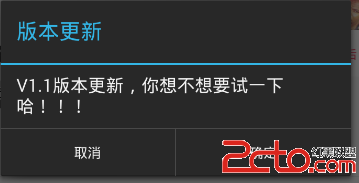
提示更新:
下載中通知:

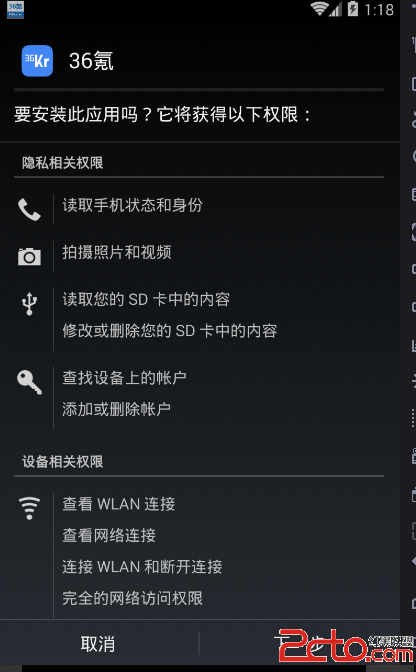
下載完成後的安裝畫面:
安裝完成後的新版主界面:

目前版本每次進入都會檢查並彈窗。實務上通常還會加一個「自動更新」開關:關閉時不請求版本接口,開啟時才去比對,避免打擾使用者。
另外提醒兩點相容性問題:高於 Android 7.0 若要安裝 apk,必須透過 FileProvider 而非 Uri.fromFile,並在清單中申請 REQUEST_INSTALL_PACKAGES 權限;下載也建議改用 DownloadManager 或現成框架,能省下不少維護成本。
 微信怎麼定時開啟消息勿擾模式
有時候只想安靜休息,微信卻響個不停——尤其是一些群聊,消息一條接一條地刷,自己又沒空去看。這種情況下,把勿擾模式用起來會舒服很多。 微信怎麼定時設置消息勿打擾? 1. 打
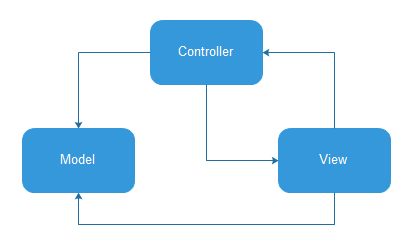 深入解析 Android 開發中的 MVP 架構模式
MVP 是 MVC 在 Android 平台上的一種衍變形態。要真正理解 MVP,得先回頭看看 MVC。在傳統 MVC 裡,Activity 名義上屬於 View 層,實
 Android 自定義控件實現拼圖小遊戲
先看效果: 玩法是把一張圖切成多份打亂,點擊兩塊交換位置,拼回完整圖案。關卡設計也很靈活,3×3、4×4、5×5、6×6 一路遞進即可。加上交換的切換動畫後,手感相當不
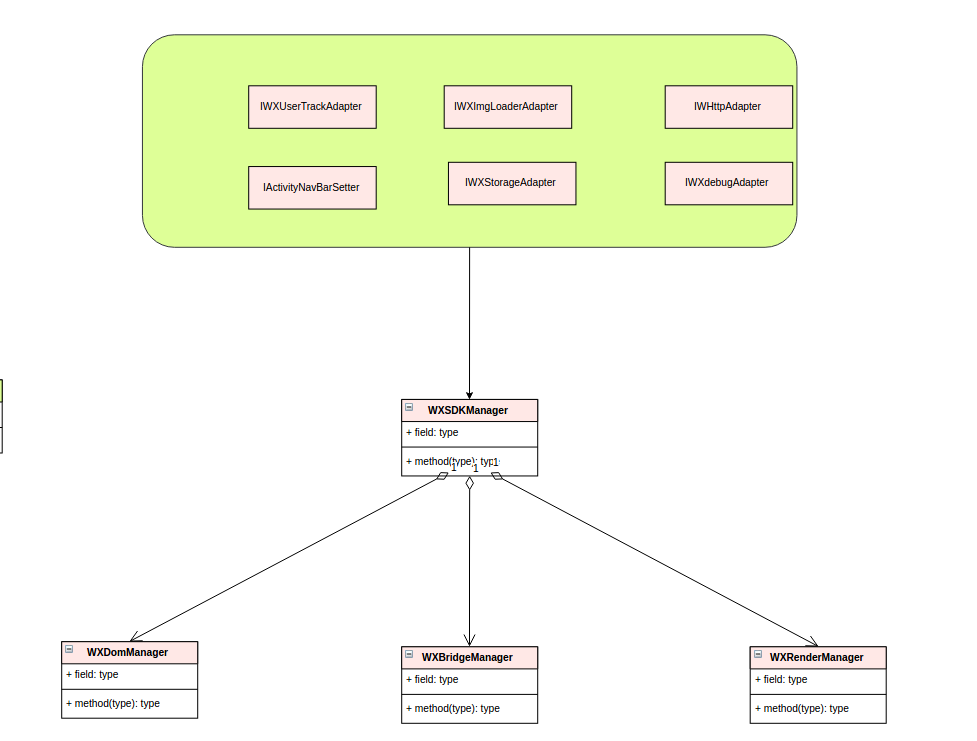 Weex Android 端原理與實踐分析(一)
近幾年,動態化與跨端框架成為 App 開發的重要方向。Weex 以 Vue 風格的語法降低前端門檻,同時又能輸出原生頁面。本文從 Android 端原始碼切入,整理 We