

編輯:關於 Android 程式設計
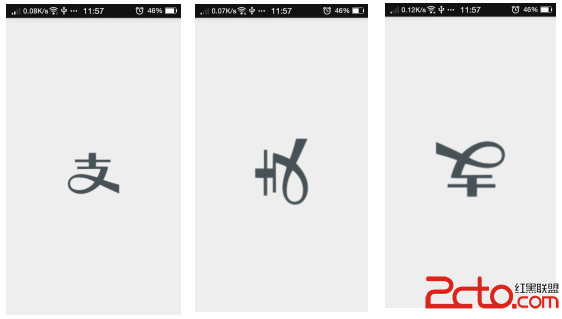
之前因為專案需求,用到了圖片的單擊顯示/取消以及平移縮放功能,前幾天突然想再加個旋轉功能,看了網上不少例子,卻沒找到能同時滿足我所有需求的。我的需求是:(1)圖片經過平移、縮放、旋轉等操作後,需要自動居中顯示;(2)圖片旋轉後自動水平或垂直顯示;(3)放大縮小的同時也能旋轉。
public class MainActivity extends Activity implements View.OnTouchListener {
    private ImageView mImageView;
    private PointF point0 = new PointF();
    private PointF pointM = new PointF();
    private final int NONE = 0;
    private final int DRAG = 1;   // 平移
    private final int ZOOM = 2;   // 旋轉、縮放
    private int mode = NONE;
    private Matrix matrix = new Matrix();
    private Matrix savedMatrix = new Matrix();
    private Matrix matrix1 = new Matrix();
    private int displayHeight;
    private int displayWidth;
    protected float minScale = 1f;
    protected float maxScale = 3f;
    protected float currentScale = 1f;
    private float oldDist;
    private float oldRotation = 0;
    protected float rotation = 0;
    private int imgWidth;
    private int imgHeight;
    protected final int MOVE_MAX = 2;
    private int fingerNumMove = 0;
    private Bitmap bm;
    private float matrixScale = 1;

    @Override protected void onCreate(Bundle savedInstanceState) {
        super.onCreate(savedInstanceState);
        setContentView(R.layout.activity_main);
        initData();
    }

    public void initData() {
        bm = BitmapFactory.decodeResource(getResources(), R.drawable.alipay);
        DisplayMetrics dm = getResources().getDisplayMetrics();
        displayWidth = dm.widthPixels;
        displayHeight = dm.heightPixels;
        mImageView = (ImageView) findViewById(R.id.image_view);
        mImageView.setOnTouchListener(this);
        showImage();
    }

    @Override public boolean onTouch(View view, MotionEvent event) {
        ImageView imageView = (ImageView) view;
        switch (event.getAction() & MotionEvent.ACTION_MASK) {
            case MotionEvent.ACTION_DOWN:
                savedMatrix.set(matrix);
                point0.set(event.getX(), event.getY());
                mode = DRAG;
                break;
            case MotionEvent.ACTION_POINTER_DOWN:
                oldDist = spacing(event);
                oldRotation = rotation(event);
                savedMatrix.set(matrix);
                setMidPoint(pointM, event);
                mode = ZOOM;
                break;
            case MotionEvent.ACTION_UP:
                if (mode == DRAG && (fingerNumMove <= MOVE_MAX)) {
                    MainActivity.this.finish();
                }
                checkView();
                centerAndRotate();
                imageView.setImageMatrix(matrix);
                fingerNumMove = 0;
                break;
            case MotionEvent.ACTION_POINTER_UP:
                mode = NONE;
                break;
            case MotionEvent.ACTION_MOVE:
                operateMove(event);
                imageView.setImageMatrix(matrix1);
                fingerNumMove++;
                break;
        }
        return true;
    }

    @Override protected void onDestroy() {
        super.onDestroy();
        if (bm != null && !bm.isRecycled()) {
            bm.recycle();
            System.gc();
        }
    }

    private void showImage() {
        imgWidth = bm.getWidth();
        imgHeight = bm.getHeight();
        mImageView.setImageBitmap(bm);
        matrix.setScale(1, 1);
        centerAndRotate();
        mImageView.setImageMatrix(matrix);
    }

    private void operateMove(MotionEvent event) {
        matrix1.set(savedMatrix);
        switch (mode) {
            case DRAG:
                matrix1.postTranslate(event.getX() - point0.x, event.getY() - point0.y);
                break;
            case ZOOM:
                rotation = rotation(event) - oldRotation;
                float newDist = spacing(event);
                float scale = newDist / oldDist;
                currentScale = (scale > 3.5f) ? 3.5f : scale;
                matrix1.postScale(currentScale, currentScale, pointM.x, pointM.y);
                matrix1.postRotate(rotation, displayWidth / 2, displayHeight / 2);
                break;
        }
    }

    private float spacing(MotionEvent event) {
        float x = event.getX(0) - event.getX(1);
        float y = event.getY(0) - event.getY(1);
        return (float) Math.sqrt(x * x + y * y);
    }

    private float rotation(MotionEvent event) {
        double delta_x = (event.getX(0) - event.getX(1));
        double delta_y = (event.getY(0) - event.getY(1));
        double radians = Math.atan2(delta_y, delta_x);
        return (float) Math.toDegrees(radians);
    }

    private void setMidPoint(PointF pointM, MotionEvent event) {
        float x = event.getX(0) + event.getX(1);
        float y = event.getY(0) + event.getY(1);
        pointM.set(x / 2, y / 2);
    }

    private void checkView() {
        if (currentScale > 1) {
            if (currentScale * matrixScale > maxScale) {
                matrix.postScale(maxScale / matrixScale, maxScale / matrixScale, pointM.x, pointM.y);
                matrixScale = maxScale;
            } else {
                matrix.postScale(currentScale, currentScale, pointM.x, pointM.y);
                matrixScale *= currentScale;
            }
        } else {
            if (currentScale * matrixScale < minScale) {
                matrix.postScale(minScale / matrixScale, minScale / matrixScale, pointM.x, pointM.y);
                matrixScale = minScale;
            } else {
                matrix.postScale(currentScale, currentScale, pointM.x, pointM.y);
                matrixScale *= currentScale;
            }
        }
    }

    private void centerAndRotate() {
        RectF rect = new RectF(0, 0, imgWidth, imgHeight);
        matrix.mapRect(rect);
        float width = rect.width();
        float height = rect.height();
        float dx = 0;
        float dy = 0;
        if (width < displayWidth) {
            dx = displayWidth / 2 - width / 2 - rect.left;
        } else if (rect.left > 0) {
            dx = -rect.left;
        } else if (rect.right < displayWidth) {
            dx = displayWidth - rect.right;
        }
        if (height < displayHeight) {
            dy = displayHeight / 2 - height / 2 - rect.top;
        } else if (rect.top > 0) {
            dy = -rect.top;
        } else if (rect.bottom < displayHeight) {
            dy = displayHeight - rect.bottom;
        }
        matrix.postTranslate(dx, dy);
        if (rotation != 0) {
            int rotationNum = (int) (rotation / 90);
            float rotationAvai = new BigDecimal(rotation % 90).setScale(1, BigDecimal.ROUND_HALF_UP).floatValue();
            float realRotation = 0;
            if (rotation > 0) {
                realRotation = rotationAvai > 45 ? (rotationNum + 1) * 90 : rotationNum * 90;
            } else if (rotation < 0) {
                realRotation = rotationAvai < -45 ? (rotationNum - 1) * 90 : rotationNum * 90;
            }
            matrix.postRotate(realRotation, displayWidth / 2, displayHeight / 2);
            rotation = 0;
        }
    }
}
CustomEventBus.java:
public class CustomEventBus {
    public EventType type;
    public Object obj;
    public CustomEventBus(EventType type, Object obj) {
        this.type = type;
        this.obj = obj;
    }
    enum EventType { SHOW_PICTURE }
}
整體思路是透過 Matrix 追蹤平移、縮放與旋轉,並在 ACTION_UP 時透過 checkView 約束縮放倍數、透過 centerAndRotate 把圖片拉回居中並對旋轉角度做 90 度吸附,從而同時滿足平移、縮放、旋轉與自動居中的需求。
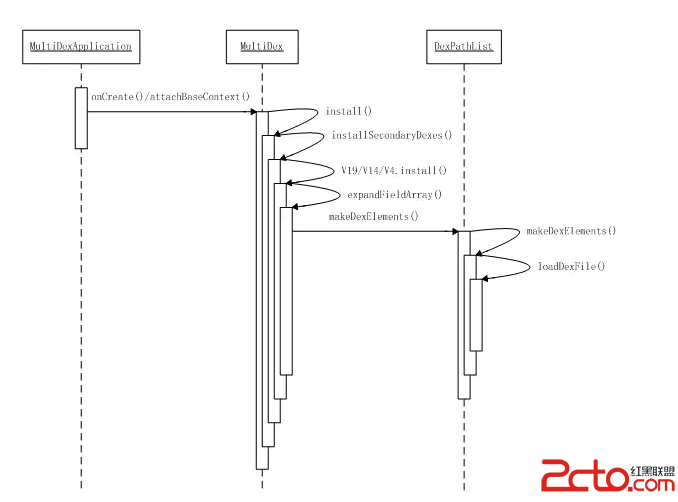 Android 插件化(一):改進 MultiDex 動態加載 assets 中的 apk
為了繞開 65535 方法數上限,Google 提供了 MultiDex 方案來加載 classes2.dex、classes3.dex 等額外 dex,其基本思路是在運
 Qt for Android 部署流程分析
今天為了測試一個用 Qt Creator 3.0.0 開發的純 C 專案,我利用了先前在 Windows 下透過 Qt 5.2 for Android 開發入門所建立的
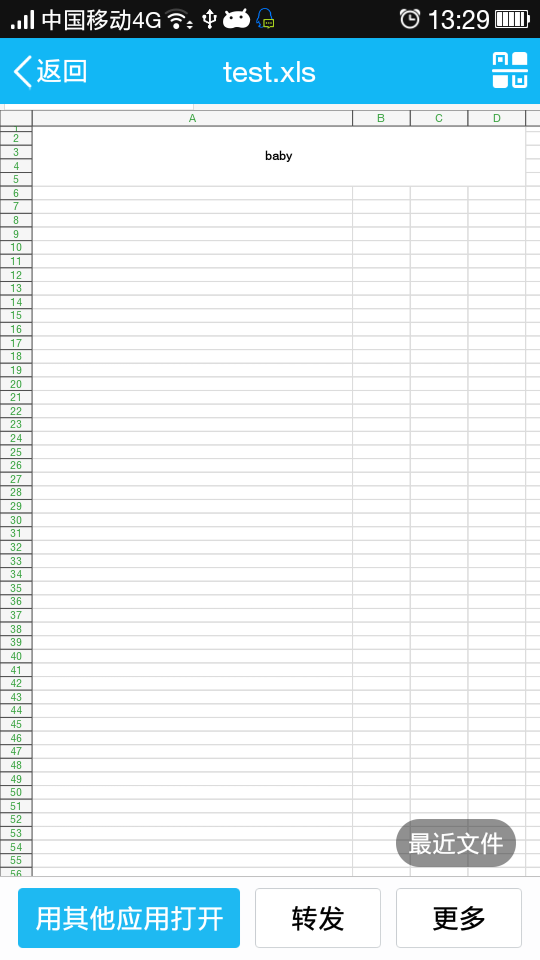 在 Android 中運用 jxl 組件操作 Excel 文件
1. jxl 支持 Excel 95-2000 的所有版本,能生成 Excel 2000 標準格式,涵蓋字體、數字、日期等操作,還能修飾單元格屬性、支持圖像與圖表。最關鍵
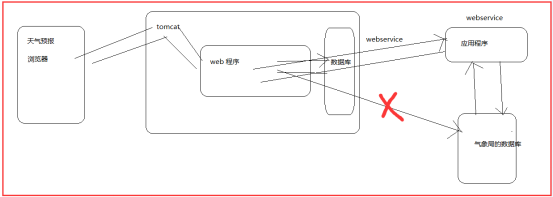 Android 與 WebService:概念、調用與 WSDL 解析
WebService 基本概念 WebService 可以視為一種透過網路提供服務的應用程式介面。它讓不同系統或不同平台之間可以進行遠端呼叫,而不必受限於相同的程式語言或