

編輯:關於 Android 程式設計
Android 本身就整合了程式碼混淆能力,相關工具位於 Android SDK 的 tools/proguard 目錄下。我們只需在專案中做簡單設定即可啟用。
初始的設定檔名為 proguard.cfg,ADT 升級之後改為 proguard-project.txt,因此下面分兩種方式說明。
建立 Android 專案後,根目錄會有一個 proguard.cfg,裡面就是混淆規則:
-optimizationpasses 5
-dontusemixedcaseclassnames
-dontskipnonpubliclibraryclasses
-dontpreverify
-verbose
-optimizations !code/simplification/arithmetic,!field/*,!class/merging/*

-keep public class * extends android.app.Activity
-keep public class * extends android.app.Application
-keep public class * extends android.app.Service
-keep public class * extends android.content.BroadcastReceiver
-keep public class * extends android.content.ContentProvider
-keep public class * extends android.app.backup.BackupAgentHelper
-keep public class * extends android.preference.Preference
-keep public class com.android.vending.licensing.ILicensingService

-keepclasseswithmembernames class * {
    native <methods>;
}

-keepclasseswithmembers class * {
    public <init>(android.content.Context, android.util.AttributeSet);
}

-keepclasseswithmembers class * {
    public <init>(android.content.Context, android.util.AttributeSet, int);
}

-keepclassmembers class * extends android.app.Activity {
    public void *(android.view.View);
}

-keepclassmembers enum * {
    public static **[] values();
    public static ** valueOf(java.lang.String);
}

-keep class * implements android.os.Parcelable {
    public static final android.os.Parcelable$Creator *;
}
這些規則並非隨意寫的,每一條都對應一個實際需求:
(Context, AttributeSet) 這個建構子來實例化的。android:onClick="xxx" 指定的方法名稱必須保留,否則點擊時會拋出 NoSuchMethodException。在專案中加入一行即可啟用:
proguard.config=proguard.cfg
這樣就完成了混淆設定。
新版專案產出的是 proguard-project.txt,預設內容為:
# To enable ProGuard in your project, edit project.properties
# to define the proguard.config property as described in that file.
#
# Add project specific ProGuard rules here.
# By default, the flags in this file are appended to flags specified
# in ${sdk.dir}/tools/proguard/proguard-android.txt
# You can edit the include path and order by changing the ProGuard
# include property in project.properties.
#
# For more details, see
# https://developer.android.com/guide/developing/tools/proguard.html

# Add any project specific keep options here:

# If your project uses WebView with JS, uncomment the following
# and specify the fully qualified class name to the JavaScript interface class:
#-keepclassmembers class fqcn.of.javascript.interface.for.webview {
#   public *;
#}
這裡有個重要差異:新版做法把通用規則放在 SDK 的 proguard-android.txt 中,專案檔只需寫「專案特有的規則」,兩者會自動合併。這比舊版把幾十行規則全塞進專案檔要乾淨得多。
註解中提到的 WebView 那段尤其值得注意:如果 App 使用 WebView 並透過 addJavascriptInterface() 讓網頁呼叫 Java 方法,那段規則就必須取消註解並填入實際類別名稱,否則混淆後 JS 介面會失效。
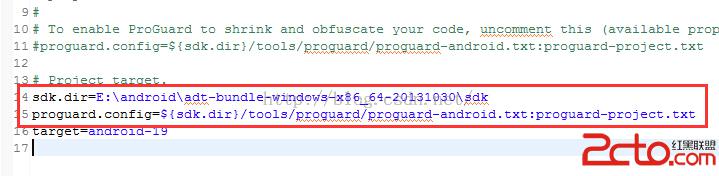
需要指定 SDK 路徑與混淆設定檔:
sdk.dir=E:\\android\\adt-bundle-windows-x86_64-20131030\\sdk
proguard.config=${sdk.dir}/tools/proguard/proguard-android.txt:proguard-project.txt
這裡的冒號在 Windows 上是分隔符,用來串接多個規則檔:前者是 SDK 提供的通用規則,後者是你的專案規則。
兩種方式本質相同,都是透過設定 project.properties 來啟用混淆,差別只在規則檔的組織方式。
簽名檔要對應。混淆只影響 release 建置,debug 版通常不啟用。上線時務必確認使用的是正式簽名憑證。
務必測試 release 版。混淆最容易出問題的時機就是 release 打包後。常見症狀包括:畫面空白(布局中的自訂檢視被改名)、點擊無反應(onClick 方法被移除)、Gson 解析出空物件(資料模型的欄位名稱被改掉)、JNI 找不到函數。因此上線前一定要跑完整的 release 版測試,不能只測 debug。
序列化類別要保留欄位名。使用 Gson、Jackson 等依賴欄位名稱做映射的函式庫時,資料模型類別需加上 -keepclassmembers 規則保留欄位,或改用 @SerializedName 註解明確指定名稱。
新版工具鏈的寫法不同。上面示範的是舊的 Eclipse ADT 流程。目前 Android Studio 專案在 build.gradle 的 release 區塊中設定 minifyEnabled true 即可啟用 R8(ProGuard 的後繼者),規則則寫在 proguard-rules.pro 中。R8 在保留相容性的同時壓縮效果更好、速度更快,是新專案的預設選擇。
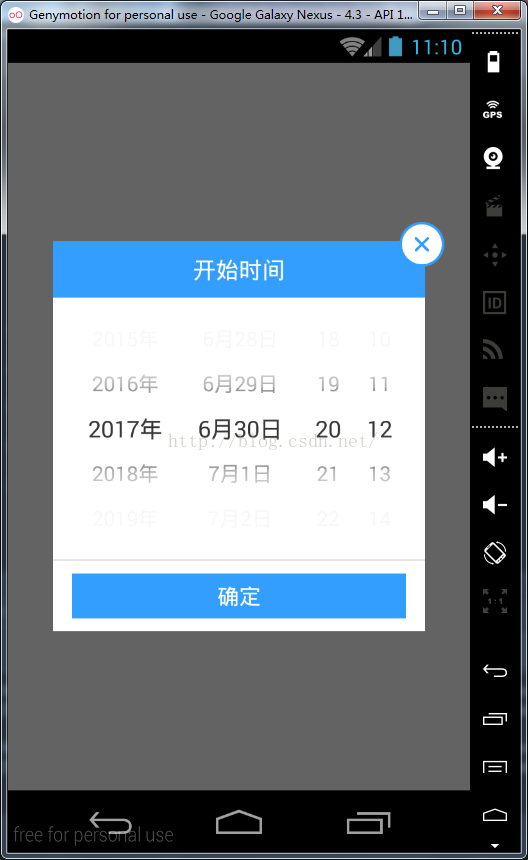 Android 滾輪時間選擇器:可擴充的日期與時間 Dialog
系統內建的日期選擇器未必符合所有產品需求,因此可嘗試以 WheelView 打造滾輪式時間選擇器。這類控制項可自訂標題、顯示欄位與是否開啟長期選項,適合日期、時間與證件有
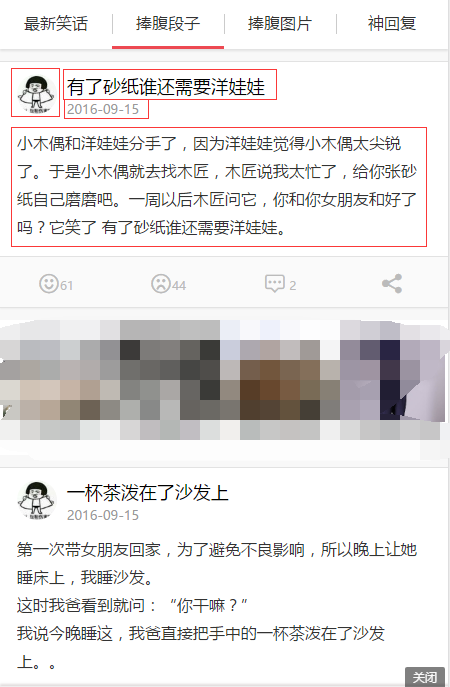 Android 實戰:捧腹網 App 開發(一)網頁結構與 Jsoup 資料解析
捧腹網頁面結構捧腹網 M 站主要提供最新笑話、捧腹段子、趣圖與神回復。內容形式包含純文字段子、靜態圖片與 GIF 動圖,趣圖通常還會帶有標籤。網頁源碼與資料結構從網頁源碼
 Android 用 GridView 打造完整日曆元件(附完整程式碼)
自製日曆是很能磨基本功的題目,牽涉到日期推算、閏年判斷、農曆轉換與手勢翻頁。先看一眼成果: 一、主版面配置 上方是月份切換列,中間是星期標頭,下方用 7 欄的 Gri
 Android FrameAnimation 幀動畫實作
Frame Animation 又稱幀動畫,做法是依序播放多張預先準備好的圖片,效果類似電影膠卷。Android 中可使用 AnimationDrawable 來定義與播