

編輯:關於 Android 程式設計
想在自己的 App 裡顯示手機的硬體與系統資訊嗎?本文以「關於手機」頁面為例,示範如何透過程式碼取得手機型號、Android 版本、處理器、內核與基帶等資料。
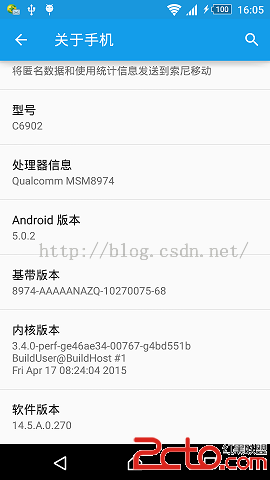
這些資訊的取得方式其實各有不同:
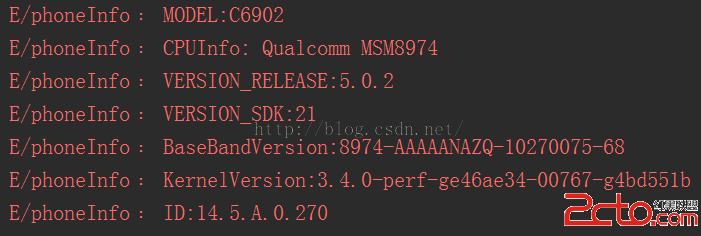
手機型號、Android 版本與軟體版本可透過系統的 Build 類別直接讀取;處理器與內核版本則需要讀取系統檔案;至於基帶版本,得靠反射呼叫系統隱藏方法才能取得。
package com.example.shen.phoneinfo; import android.app.Activity; import android.support.v7.app.ActionBarActivity; import android.os.Bundle; import android.util.Log; import android.view.Menu; import android.view.MenuItem; import java.io.BufferedReader; import java.io.FileNotFoundException; import java.io.FileReader; import java.io.IOException; import java.io.InputStream; import java.io.InputStreamReader; import java.lang.reflect.Method; public class MainActivity extends Activity { @Override protected void onCreate(Bundle savedInstanceState) { super.onCreate(savedInstanceState); setContentView(R.layout.activity_main); Log.e(phoneInfo, MODEL: + android.os.Build.MODEL); Log.e(phoneInfo, CPUInfo:+getCPUInfo()); Log.e(phoneInfo, VERSION_RELEASE:+android.os.Build.VERSION.RELEASE); Log.e(phoneInfo, VERSION_SDK:+android.os.Build.VERSION.SDK_INT + ); Log.e(phoneInfo, BaseBandVersion:+getBaseBandVersion()); Log.e(phoneInfo, KernelVersion:+getKernelVersion()); Log.e(phoneInfo, ID: + android.os.Build.ID); } /** * 獲得處理器信息 * @return String */ public String getCPUInfo() { try { FileReader fileReader = new FileReader(/proc/cpuinfo); BufferedReader bufferedReader = new BufferedReader(fileReader); String info; while ((info = bufferedReader.readLine()) != null) { String[] array = info.split(:); if(array[0].trim().equals(Hardware)) { return array[1]; } } } catch (FileNotFoundException e) { e.printStackTrace(); } catch (IOException e) { e.printStackTrace(); } return null; } /** *獲得基帶版本 * @return String */ public String getBaseBandVersion() { String version = ; try { Class clazz= Class.forName(android.os.SystemProperties); Object object = clazz.newInstance(); Method method = clazz.getMethod(get, new Class[]{String.class, String.class}); Object result = method.invoke(object, new Object[]{gsm.version.baseband, no message}); version = (String) result; } catch (Exception e) { } return version; } /** * 獲得內核版本 * @return String */ public String getKernelVersion() { Process process = null; String kernelVersion = ; try { process = Runtime.getRuntime().exec(cat /proc/version); } catch (IOException e) { e.printStackTrace(); } InputStream inputStream = process.getInputStream(); InputStreamReader inputStreamReader = new InputStreamReader(inputStream); BufferedReader bufferedReader = new BufferedReader(inputStreamReader, 8 * 1024); String result = ; String info; try { while ((info = bufferedReader.readLine()) != null) { result += info; } } catch (IOException e) { e.printStackTrace(); } try { if (result != ) { String keyword = version ; int index = result.indexOf(keyword); info = result.substring(index + keyword.length()); index = info.indexOf( ); kernelVersion = info.substring(0, index); } } catch (IndexOutOfBoundsException e) { e.printStackTrace(); } return kernelVersion; } }
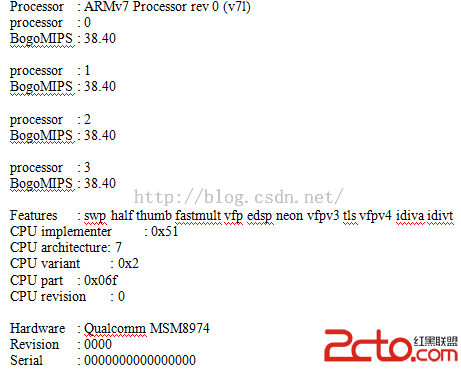
以下是 /proc/cpuinfo 檔案的內容截圖:
以及 /proc/version 檔案的內容截圖:

透過上述三種途徑,就能完整收集到裝置的各項系統資訊,適合用於裝置診斷、版本判斷或問題回報等情境。
 Android TextView 呈現 HTML 樣式文字
在 Android 介面開發中,常會遇到同一段文字需要呈現不同顏色、字級或樣式的需求。若只使用單一 TextView 屬性,往往難以同時處理姓名、數字與一般說明文字的多樣
 微信傳圖不再受限!繞過9張限制的實用方法
微信傳圖一次最多9張,容易漏傳或重傳。可改用手機相簿分享功能,一次選擇更多照片後分享給微信好友。若相簿沒有分享功能,也可安裝第三方相簿。 此外,若想增加好友,可到微信設定
 Android 日誌機制:從內核 printk 到應用層 Log
日誌是除錯與運行記錄的重要工具。Android 的日誌體系可以分成內核空間與用戶空間兩部分。內核部分沿用 Linux 的 printk,並提供多種等級;用戶空間則可透過
 智能廚房重構筆記(二):用 MVP 架構馴服失控的 Activity
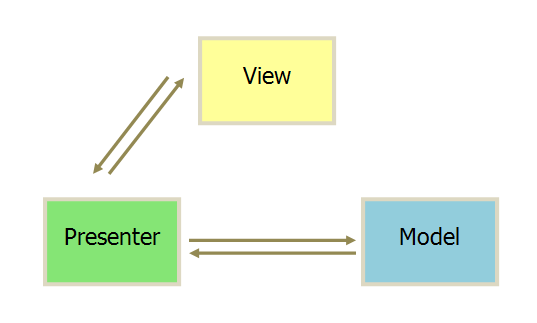
上一篇介紹了專案的分包結構,這篇來談 MVP 架構在專案中的實際落地。 MVP 可以視為 MVC 的一種升級。在 MVP 普及之前大家都寫 MVC,但那套做法有個致命缺點