

編輯:關於 Android 程式設計
透過前面《AIDL 小結》與《AIDL 深入》兩篇文章,相信各位對 Android 的 AIDL 機制已經有了基本認識。這次我們就來動手實作一個實用的功能——自動掛斷電話。廢話不多說,直接進入主題。
掛斷電話所需的 AIDL 檔其實是 Android 系統自帶的,我們可以從原始碼中找到這兩個檔案,分別是 NeighboringCellInfo.aidl 和 ITelephony.aidl。
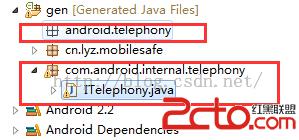
這裡我把 NeighboringCellInfo.aidl 放在專案的 android.telephony 套件下,並把 ITelephony.aidl 放在 com.android.internal.telephony 套件下。
NeighboringCellInfo.aidl 的內容如下:
/* //device/java/android/android/content/Intent.aidl ** ** Copyright 2007, The Android Open Source Project ** ** Licensed under the Apache License, Version 2.0 (the License); ** you may not use this file except in compliance with the License. ** You may obtain a copy of the License at ** ** https://www.apache.org/licenses/LICENSE-2.0 ** ** Unless required by applicable law or agreed to in writing, software ** distributed under the License is distributed on an AS IS BASIS, ** WITHOUT WARRANTIES OR CONDITIONS OF ANY KIND, either express or implied. ** See the License for the specific language governing permissions and ** limitations under the License. */ package android.telephony; parcelable NeighboringCellInfo;
ITelephony.aidl 的內容如下:
/* * Copyright (C) 2007 The Android Open Source Project * * Licensed under the Apache License, Version 2.0 (the License); * you may not use this file except in compliance with the License. * You may obtain a copy of the License at * * https://www.apache.org/licenses/LICENSE-2.0 * * Unless required by applicable law or agreed to in writing, software * distributed under the License is distributed on an AS IS BASIS, * WITHOUT WARRANTIES OR CONDITIONS OF ANY KIND, either express or implied. * See the License for the specific language governing permissions and * limitations under the License. */ package com.android.internal.telephony; import android.os.Bundle; import java.util.List; import android.telephony.NeighboringCellInfo; /** * Interface used to interact with the phone. Mostly this is used by the * TelephonyManager class. A few places are still using this directly. * Please clean them up if possible and use TelephonyManager insteadl. * * {@hide} */ interface ITelephony { /** * Dial a number. This doesn't place the call. It displays * the Dialer screen. * @param number the number to be dialed. If null, this * would display the Dialer screen with no number pre-filled. */ void dial(String number); /** * Place a call to the specified number. * @param number the number to be called. */ void call(String number); /** * If there is currently a call in progress, show the call screen. * The DTMF dialpad may or may not be visible initially, depending on * whether it was up when the user last exited the InCallScreen. * * @return true if the call screen was shown. */ boolean showCallScreen(); /** * Variation of showCallScreen() that also specifies whether the * DTMF dialpad should be initially visible when the InCallScreen * comes up. * * @param showDialpad if true, make the dialpad visible initially, * otherwise hide the dialpad initially. * @return true if the call screen was shown. * * @see showCallScreen */ boolean showCallScreenWithDialpad(boolean showDialpad); /** * End call or go to the Home screen * * @return whether it hung up */ boolean endCall(); /** * Answer the currently-ringing call. * * If there's already a current active call, that call will be * automatically put on hold. If both lines are currently in use, the * current active call will be ended. * * TODO: provide a flag to let the caller specify what policy to use * if both lines are in use. (The current behavior is hardwired to * answer incoming, end ongoing, which is how the CALL button * is specced to behave.) * * TODO: this should be a oneway call (especially since it's called * directly from the key queue thread). */ void answerRingingCall(); /** * Silence the ringer if an incoming call is currently ringing. * (If vibrating, stop the vibrator also.) * * It's safe to call this if the ringer has already been silenced, or * even if there's no incoming call. (If so, this method will do nothing.) * * TODO: this should be a oneway call too (see above). * (Actually *all* the methods here that return void can * probably be oneway.) */ void silenceRinger(); /** * Check if we are in either an active or holding call * @return true if the phone state is OFFHOOK. */ boolean isOffhook(); /** * Check if an incoming phone call is ringing or call waiting. * @return true if the phone state is RINGING. */ boolean isRinging(); /** * Check if the phone is idle. * @return true if the phone state is IDLE. */ boolean isIdle(); /** * Check to see if the radio is on or not * @return returns true if the radio is on. */ boolean isRadioOn(); /** * Check if the SIM pin lock is enabled. * @return true if the SIM pin lock is enabled. */ boolean isSimPinEnabled(); /** * Cancels the missed calls notification. */ void cancelMissedCallsNotification(); /** * Supply a pin to unlock the SIM. Blocks until a result is determined. * @param pin The pin to check. * @return whether the operation was a success. */ boolean supplyPin(String pin); /** * Handles PIN MMI commands (PIN/PIN2/PUK/PUK2), which are initiated * without SEND (so dial is not appropriate). * * @param dialString the MMI command to be executed. * @return true if MMI command is executed. */ boolean handlePinMmi(String dialString); /** * Toggles the radio on or off. */ void toggleRadioOnOff(); /** * Set the radio to on or off */ boolean setRadio(boolean turnOn); /** * Request to update location information in service state */ void updateServiceLocation(); /** * Enable location update notifications. */ void enableLocationUpdates(); /** * Disable location update notifications. */ void disableLocationUpdates(); /** * Enable a specific APN type. */ int enableApnType(String type); /** * Disable a specific APN type. */ int disableApnType(String type); /** * Allow mobile data connections. */ boolean enableDataConnectivity(); /** * Disallow mobile data connections. */ boolean disableDataConnectivity(); /** * Report whether data connectivity is possible. */ boolean isDataConnectivityPossible(); Bundle getCellLocation(); /** * Returns the neighboring cell information of the device. */ List getNeighboringCellInfo(); int getCallState(); int getDataActivity(); int getDataState(); /** * Returns the current active phone type as integer. * Returns TelephonyManager.PHONE_TYPE_CDMA if RILConstants.CDMA_PHONE * and TelephonyManager.PHONE_TYPE_GSM if RILConstants.GSM_PHONE */ int getActivePhoneType(); /** * Returns the CDMA ERI icon index to display */ int getCdmaEriIconIndex(); /** * Returns the CDMA ERI icon mode, * 0 - ON * 1 - FLASHING */ int getCdmaEriIconMode(); /** * Returns the CDMA ERI text, */ String getCdmaEriText(); /** * Returns true if CDMA provisioning needs to run. */ boolean getCdmaNeedsProvisioning(); /** * Returns the unread count of voicemails */ int getVoiceMessageCount(); /** * Returns the network type */ int getNetworkType(); /** * Return true if an ICC card is present */ boolean hasIccCard(); }
準備好這兩個檔案後,系統會在專案的 gen 目錄下自動產生對應套件的 ITelephony.java 檔,如下圖所示:
這個方法就是掛斷電話的核心,具體實作如下:
//掛斷電話 public void endCall(String incomingNumber){ try { Class clazz = Class.forName(android.os.ServiceManager); Method method = clazz.getMethod(getService, String.class); IBinder ibinder = (IBinder) method.invoke(null, Context.TELEPHONY_SERVICE); ITelephony iTelephony = ITelephony.Stub.asInterface(ibinder); iTelephony.endCall(); }catch(Exception e){ e.printStrackTrace(); } }
最後別忘了在 AndroidManifest.xml 中註冊相應的權限,否則功能無法正常運作。
 Android TableLayout 常用屬性介紹
collapseColumnscollapseColumns 可依列索引隱藏指定欄位。若不設定此屬性,表格會完整顯示。若設定為 0,2,則第 0 與第 2 欄會被隱藏。s
 Android 常用控件入門:CheckBox、ImageView、TimePicker 與 ProgressBar
Android 控件介紹 多選按鈕(CheckBox) CheckBox 有兩個常用的事件:OnClickListener 事件和 OnCheckedChangeList
 Android 四大圖片緩存庫原理剖析與特性對比
本文整理自我在 MDCC 上的分享內容(略有調整),也是源碼解析系列在首期發布時提到的後續規劃之一。接下來我會從整體架構與底層原理兩個維度,對幾款主流的圖片緩存庫做橫向對
 Android 網路連線處理方式整理
在 Android 中,常見的網路連線方式包括使用 URLConnection 或 HttpURLConnection、使用 HttpClient,以及透過 WebVie