

編輯:關於 Android 程式設計
SeekBar 允許用戶拖動以進行調節,常用於音量、亮度等場景。通過 android:thumb 可以設置表示拖動滑塊的 drawable;通過 setOnSeekBarChangeListener() 可以監聽 SeekBar 的變化。
下面用 SeekBar 來控制一張圖片的透明度,滑塊取值 0~255 對應 alpha:
public class MainActivity extends Activity {
    private ImageView image;
    private SeekBar seekBar;

    @Override
    protected void onCreate(Bundle savedInstanceState) {
        super.onCreate(savedInstanceState);
        setContentView(R.layout.activity_main);
        image = (ImageView) findViewById(R.id.image);
        seekBar = (SeekBar) findViewById(R.id.seekBar);
        seekBar.setOnSeekBarChangeListener(new SeekBar.OnSeekBarChangeListener() {
            @Override
            public void onProgressChanged(SeekBar seekBar, int progress, boolean fromUser) {
                image.setAlpha(progress);
            }
            @Override public void onStartTrackingTouch(SeekBar seekBar) { }
            @Override public void onStopTrackingTouch(SeekBar seekBar) { }
        });
    }
}<LinearLayout xmlns:android="https://schemas.android.com/apk/res/android"
android:layout_width="match_parent"
android:layout_height="match_parent"
android:orientation="vertical">
<ImageView
android:id="@+id/image"
android:layout_width="fill_parent"
android:layout_height="240px"
android:scaleType="fitXY"
android:src="@drawable/ic_launcher" />
<SeekBar
android:id="@+id/seekBar"
android:layout_width="fill_parent"
android:layout_height="wrap_content"
android:max="255"
android:progress="255" />
</LinearLayout>
RatingBar 是一個星級評分條,它與 SeekBar 擁有共同的父類 AbsSeekBar,因此許多屬性頗為相似。

用 RatingBar 打分來控制圖片透明度(滿分 5 星,映射到 0~255):
public class MainActivity extends Activity {
    private ImageView image;
    private RatingBar ratingBar;

    @Override
    protected void onCreate(Bundle savedInstanceState) {
        super.onCreate(savedInstanceState);
        setContentView(R.layout.activity_main);
        image = (ImageView) findViewById(R.id.image);
        ratingBar = (RatingBar) findViewById(R.id.ratingBar);
        ratingBar.setOnRatingBarChangeListener(new RatingBar.OnRatingBarChangeListener() {
            @Override
            public void onRatingChanged(RatingBar ratingBar, float rating, boolean fromUser) {
                image.setAlpha(rating * 255 / 5);
            }
        });
    }
}
<LinearLayout xmlns:android="https://schemas.android.com/apk/res/android"
android:layout_width="match_parent"
android:layout_height="match_parent"
android:orientation="vertical">
<ImageView
android:id="@+id/image"
android:layout_width="fill_parent"
android:layout_height="240px"
android:scaleType="fitXY"
android:src="@drawable/ic_launcher" />
<RatingBar
android:id="@+id/ratingBar"
android:layout_width="wrap_content"
android:layout_height="wrap_content"
android:numStars="5"
android:stepSize="0.5" />
</LinearLayout>
可以看到,無論是 SeekBar 還是 RatingBar,都能即時響應用戶操作並驅動界面變化。其中 RatingBar 的 numStars 決定星級數量,stepSize 決定每次打分的步長,開發時可按需調整。
 Android 自訂圓形按鈕:點擊時顯示進度
先來看看效果: 這其實是一個託管在 GitHub 上的開源控制項——一個圓形的按鈕 View,同時能顯示進度。 使用方式很簡單:把專案從 GitHub 下載下來匯入
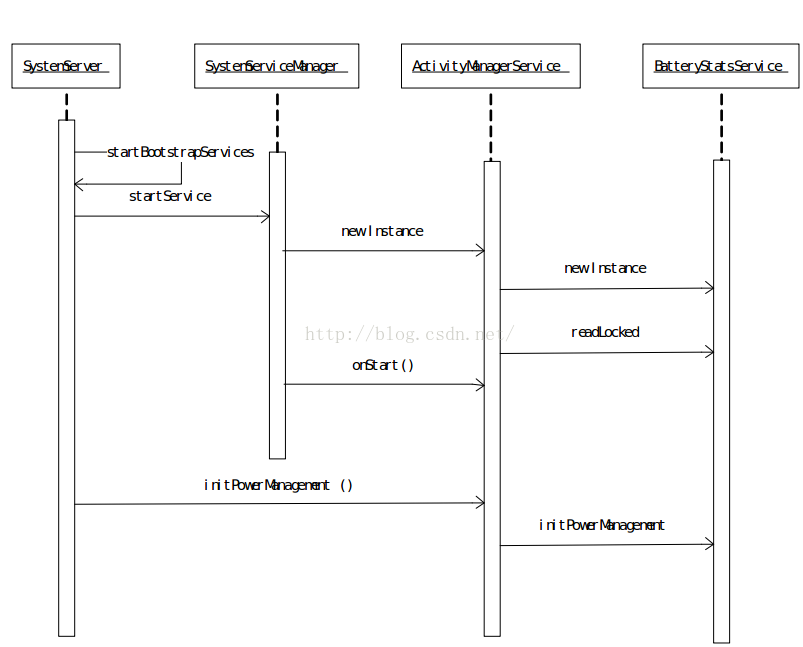 BatteryStatsService 電池電量統計服務源碼剖析
BatteryStatsService 主要負責電池電量的統計。本文先從它的啟動過程說起,再逐步深入到電量的收集、存儲與計算。 BatteryStatsService 啟
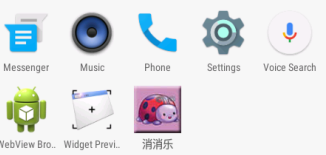 [Android] 開心消消樂入門實作(簡易版)
緣起與成品定位 這篇文章記錄的是一個 Android 初學者以「開心消消樂」為主題所做的練習作品。作者在開始實作前,並沒有完整學習過 Java 物件導向,也缺乏 Andr
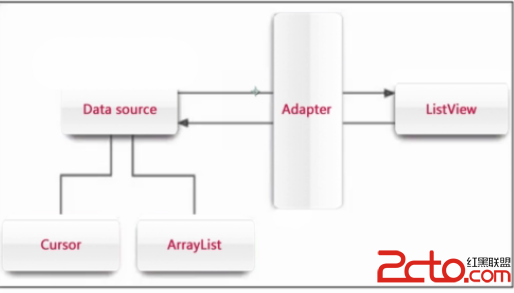 ListView 緩存機制與 BaseAdapter 的三重境界
ListView 的樣式是固定的,資料來源卻千變萬化,這中間需要一層適配器把資料轉換成列表能渲染的形式——BaseAdapter 就是為此而生。 ListView 與