

編輯:關於 Android 程式設計
Volley 的學習接近尾聲。之所以拆成多篇來寫、細節講得比較碎,是因為後面還要接觸幾個 Android 網絡框架——把 Volley 真正吃透,再去看它們會輕鬆很多。本篇聚焦圖片請求與緩存,這兩個話題在實際開發中出現頻率最高。
文章結構如下:
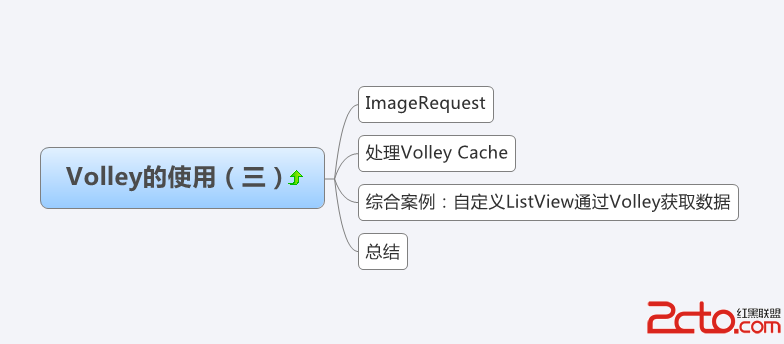
為方便使用,我們在 ApplicationController 中封裝一個 ImageLoader,並指定一組緩存實現:
public class ApplicationController extends Application {

    private RequestQueue reqQueue;
    private ImageLoader imageLoader;

    public ImageLoader getImageLoader() {
        getRequestQueue();
        // 第二個參數是圖片緩存實現
        if (imageLoader == null) {
            imageLoader = new ImageLoader(this.reqQueue, new LruBitmapCache());
        }
        return this.imageLoader;
    }
}
緩存類基於 LruCache 實現 ImageCache 接口,按可用內存的八分之一分配容量:
public class LruBitmapCache extends LruCache<String, Bitmap> implements ImageCache {

    public static int getDefaultLruCacheSize() {
        final int maxMemory = (int) (Runtime.getRuntime().maxMemory / 1024);
        return maxMemory / 8;
    }

    public LruBitmapCache() {
        this(getDefaultLruCacheSize());
    }

    public LruBitmapCache(int sizeInKiloBytes) {
        super(sizeInKiloBytes);
    }

    @Override
    protected int sizeOf(String key, Bitmap value) {
        return value.getRowBytes() * value.getHeight() / 1024;
    }

    @Override
    public Bitmap getBitmap(String url) {
        return get(url);
    }

    @Override
    public void putBitmap(String url, Bitmap bitmap) {
        put(url, bitmap);
    }
}
使用時先拿到 ImageLoader 實例:
ImageLoader imageLoader = ApplicationController.getInstance().getImageLoader();
方式一:使用 Volley 自帶的 NetworkImageView
幾行代碼就能搞定,內部已處理請求取消與視圖複用:
// 布局中放置 NetworkImageView
NetworkImageView imageView = (NetworkImageView) findViewById(R.id.networkimageview);
imageView.setImageUrl(url, imageLoader);
方式二:直接加載到普通 ImageView
ImageLoader imageLoader = ApplicationController.getInstance().getImageLoader();
imageLoader.get(url, new ImageListener() {
    @Override
    public void onResponse(ImageContainer response, boolean isImmediate) {
        if (response.getBitmap() != null) {
            imageView.setImageBitmap(response.getBitmap());
        }
    }

    @Override
    public void onErrorResponse(VolleyError error) {
        Log.e(TAG, "Image Error: " + error.getMessage());
    }
});
Volley 有完善的緩存體系,能顯著減少不必要的網絡消耗與等待時間。幾個常用操作如下。
先讀緩存,未命中再請求網絡
Cache cache = ApplicationController.getRequestQueue().getCache();
Cache.Entry entry = cache.get(url);
if (entry != null) {
    try {
        String data = new String(entry.data, "UTF-8");
        // 把 data 解析為 JSON、XML 或 Bitmap
    } catch (UnsupportedEncodingException e) {
        e.printStackTrace();
    }
} else {
    // 緩存未命中,發起網絡請求
}
讓緩存失效
注意失效並不等於刪除。Volley 仍會優先使用舊緩存,直到服務器返回新數據並自動覆蓋:
ApplicationController.getInstance().getRequestQueue().getCache().invalidate(url, true);
對特定請求關閉緩存
StringRequest req = new StringRequest(...);
req.setShouldCache(false);
刪除指定 url 的緩存
ApplicationController.getInstance().getRequestQueue().getCache().remove(url);
清空全部緩存
ApplicationController.getInstance().getRequestQueue().getCache().clear();
受限於篇幅,這部分放到下一篇單獨展開。
至此 Volley 的核心用法基本梳理完成。實際項目中遇到的問題往往更具體,除了查閱資料,最有效的途徑還是閱讀官方文檔——Volley 的文檔雖然不長,但把請求流程、取消機制與緩存策略講得很清楚,基本上能覆蓋我們日常會碰到的所有場景。
另外需要提醒:Volley 目前處於維護狀態,官方更推薦新的網絡層方案;但它的設計思想(請求隊列、優先級、緩存分層)依然值得學習。
 微信公眾平台開發入門教程(SAE 方倍工作室出品,從零到天氣預報)
本系列教程以微信公眾帳號「方倍工作室」為示範對象,帶你從零開始走完整個開發流程。完成後你將學會:建立新浪雲計算平台應用、啟用微信公眾平台開發模式、掌握基礎接口的消息與事件
 Android Volley 網路框架全面解析與原始碼剖析
Volley 簡介平時開發 Android 應用時,幾乎都離不開網路技術,而大多數情況下應用都會採用 HTTP 協定來傳送和接收資料。Android 系統主要提供了 Ht
 RecyclerView 進階:ItemTouchHelper 實作拖曳排序與側滑刪除
前言 RecyclerView 的應用越來越廣,不同場景往往需要不同的互動。比如很多論壇首頁的側滑刪除,或是長按某個項目後拖曳與其他項目交換位置。RecyclerView
 Android 隨機驗證碼實作:用 Canvas 畫出帶干擾的驗證碼圖片
在 Android 客戶端開發中,驗證碼有兩種用途,目的完全不同:簡訊驗證碼用於身分認證,主要透過 HTTP 等通訊協議向伺服器索取並校驗;圖形隨機驗證碼則多用於「限制或