

編輯:關於 Android 程式設計
本系列教程以微信公眾帳號「方倍工作室」為示範對象,帶你從零開始走完整個開發流程。完成後你將學會:建立新浪雲計算平台應用、啟用微信公眾平台開發模式、掌握基礎接口的消息與事件、使用 PHP SDK、理解開發模式背後的原理,並最終動手做出天氣預報功能。
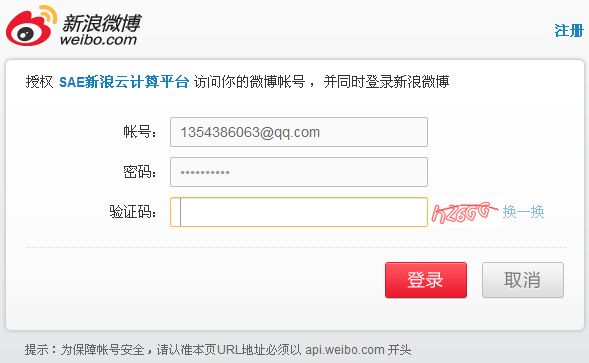
我們選用 SAE 新浪雲計算平台作為服務器,並申請 PHP 環境 + MySQL 資料庫作為運行環境。申請網址:https://sae.sina.com.cn/ ,可直接用新浪微博帳號登入,登入後 SAE 會贈送 500 個免費雲豆。
建立新應用
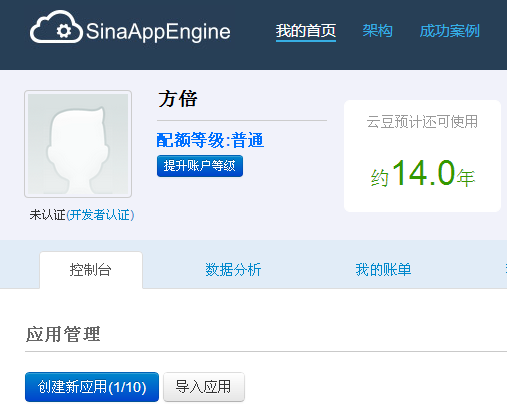
登入後點擊頂部「我的首頁」,再點下側的「建立新應用」。此時會跳出禁止放置違法違規內容的提示,點擊繼續建立即可。
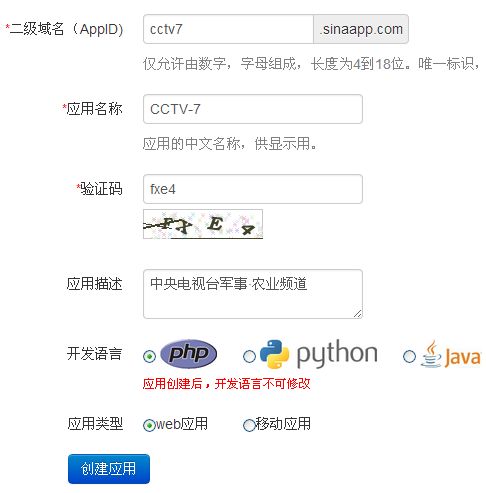
選擇一個尚未被使用的 AppID(若不知取什麼好,用你的 QQ 號或手機號也行),填寫二級域名 AppID、應用名稱、驗證碼,開發語言選 PHP,應用類型選 Web 應用,然後點擊建立。
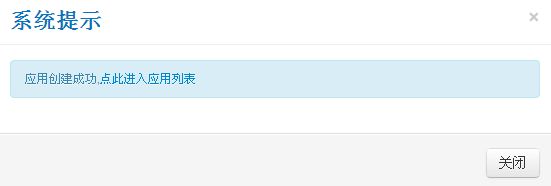
應用建立成功後會自動跳轉到應用列表,此時就能看到剛建立的應用了。
建立版本
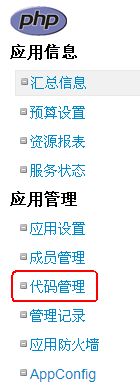
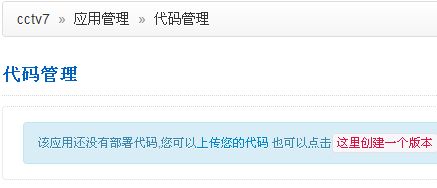
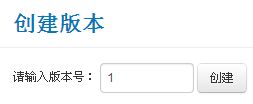
在應用右側「應用管理」下選擇「代碼管理」,跳轉到代碼管理頁面,點擊右側的建立版本圖示,版本號預設為 1,點擊建立即可。

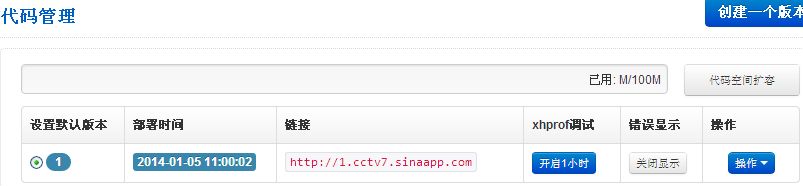
到這裡,你就成功建立了一個網域 URL 為 https://cctv7.sinaapp.com/ 的應用。
上傳代碼
將以下程式碼另存為 index.php。請務必使用專業的開發編輯器(如 Notepad++),切勿使用 Windows 自帶的記事本,以免編碼出錯。
複製程式碼 程式碼如下:
<?php
/*
方倍工作室 https://www.cnblogs.com/txw1958/
CopyRight 2013 www.doucube.com All Rights Reserved
*/
define("TOKEN", "weixin");
$wechatObj = new wechatCallbackapiTest();
if (isset($_GET['echostr'])) {
$wechatObj->valid();
}else{
$wechatObj->responseMsg();
}
class wechatCallbackapiTest
{
public function valid()
{
$echoStr = $_GET["echostr"];
if($this->checkSignature()){
echo $echoStr;
exit;
}
}
private function checkSignature()
{
$signature = $_GET["signature"];
$timestamp = $_GET["timestamp"];
$nonce = $_GET["nonce"];
$token = TOKEN;
$tmpArr = array($token, $timestamp, $nonce);
sort($tmpArr);
$tmpStr = implode( $tmpArr );
$tmpStr = sha1( $tmpStr );
if( $tmpStr == $signature ){
return true;
}else{
return false;
}
}
public function responseMsg()
{
$postStr = $GLOBALS["HTTP_RAW_POST_DATA"];
if (!empty($postStr)){
$postObj = simplexml_load_string($postStr, 'SimpleXMLElement', LIBXML_NOCDATA);
$fromUsername = $postObj->FromUserName;
$toUsername = $postObj->ToUserName;
$keyword = trim($postObj->Content);
$time = time();
$textTpl = "<xml>
<ToUserName><![CDATA[%s]]></ToUserName>
<FromUserName><![CDATA[%s]]></FromUserName>
<CreateTime>%s</CreateTime>
<MsgType><![CDATA[%s]]></MsgType>
<Content><![CDATA[%s]]></Content>
<FuncFlag>0</FuncFlag>
</xml>";
if($keyword == "?" || $keyword == "?")
{
$msgType = "text";
$contentStr = date("Y-m-d H:i:s",time());
$resultStr = sprintf($textTpl, $fromUsername, $toUsername, $time, $msgType, $contentStr);
echo $resultStr;
}
}else{
echo "";
exit;
}
}
}
?>
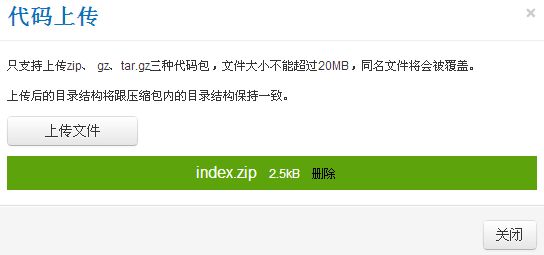
接著把 index.php 壓縮成 ZIP 格式(注意不能用 RAR),生成 index.zip。
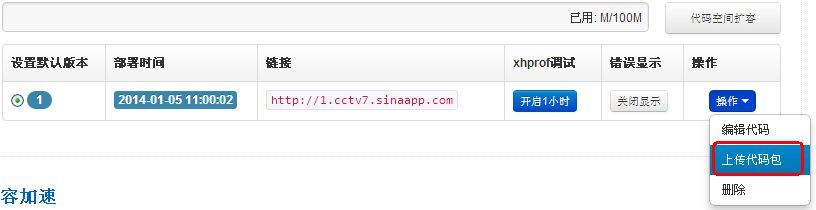
在代碼管理頁面選擇「操作」按鈕,再選「上傳代碼包」,點擊上傳檔案並選擇剛才壓好的 index.zip。上傳成功後如下圖;若上傳異常,建議改用 Chrome 瀏覽器重試。
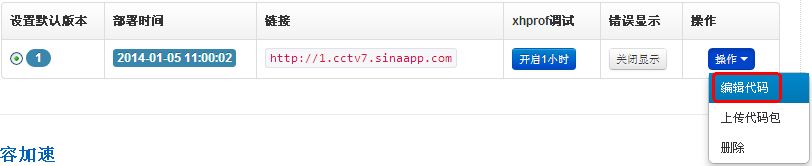
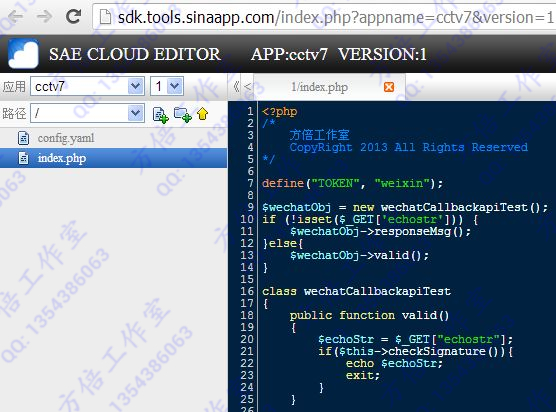
點擊操作按鈕下的「代碼編輯」,雙擊即可查看並編輯上傳的 index.php。至此,新浪雲應用的建立就完成了。
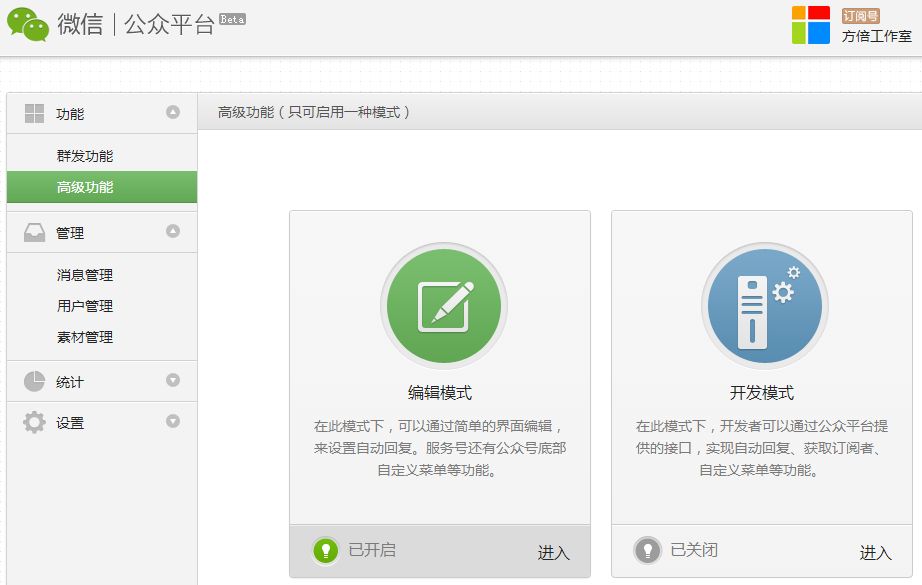
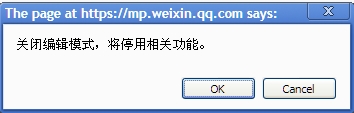
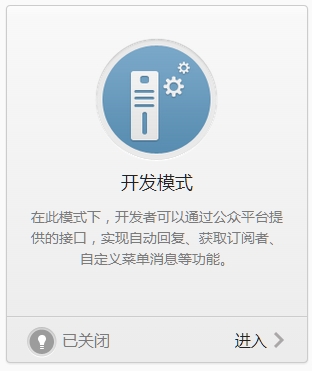
登入微信公眾平台後台(https://mp.weixin.qq.com ),選擇「高級功能」,即可看到編輯模式與開發模式兩種。我們需要先關閉編輯模式,再進入開發模式。

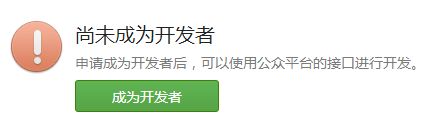
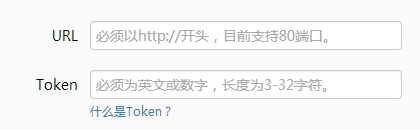
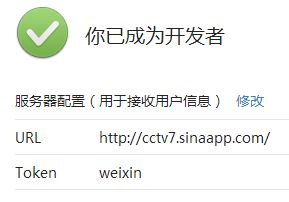
進入開發模式後點擊「成為開發者」,在彈出的視窗中填寫 URL(即上一章建立的雲應用網域)與 Token(在 index.php 中定義為 weixin),提交後即提示已成為開發者,再滑動右上角啟用按鈕即可。
自動回覆
在上面的範例中,我們實作了一個「發送 ? 就回覆當前時間」的功能,效果如下。至此,你的公眾帳號已經具備自動回覆能力了。
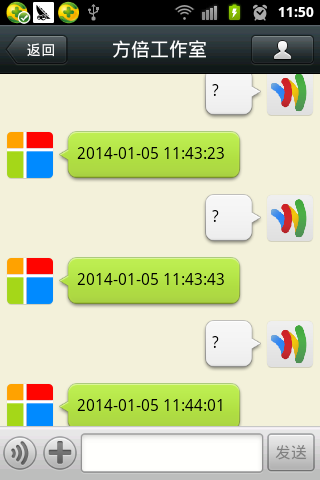
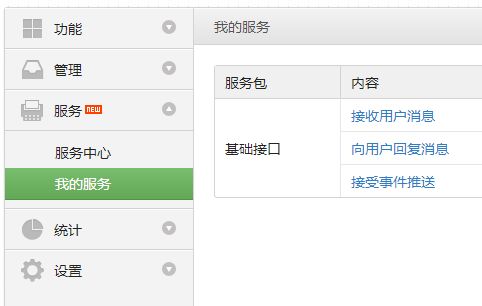
所有帳號在申請後都會獲得基礎接口權限,包含接收用戶消息、向用戶回覆消息、接收事件推送三種服務。
接收用戶消息
普通用戶能向公眾帳號推送六種格式的消息:文本(含表情)、圖片、語音、視頻、位置、鏈接。
1. 文本(含表情)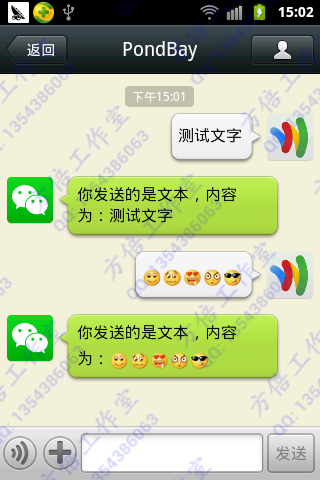
2. 圖片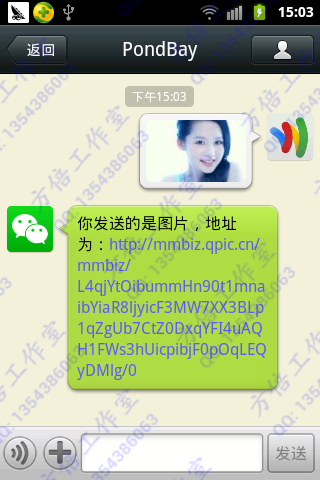
3. 語音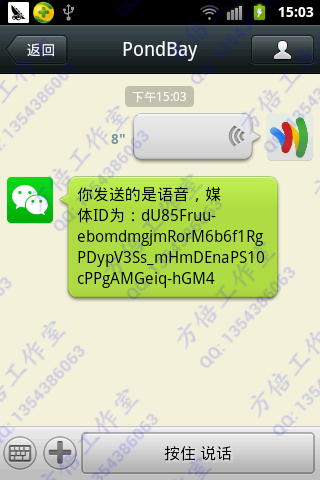
4. 視頻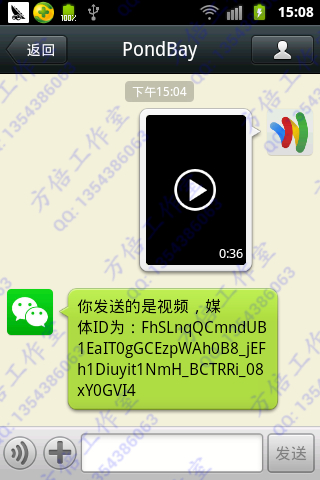
5. 位置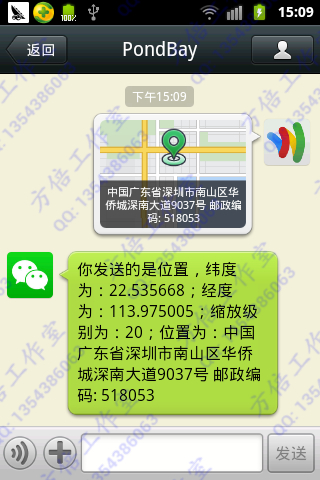
6. 鏈接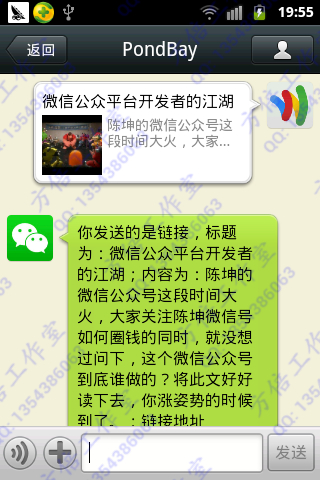
向用戶回覆消息
普通公眾帳號能推送六種格式:文本、圖文、音樂、圖片、語音、視頻。其中圖文又分單條與多條,展示方式略有不同。(圖片、語音、視頻因涉及高級接口的 media_id,此處暫不討論。)
1. 文本消息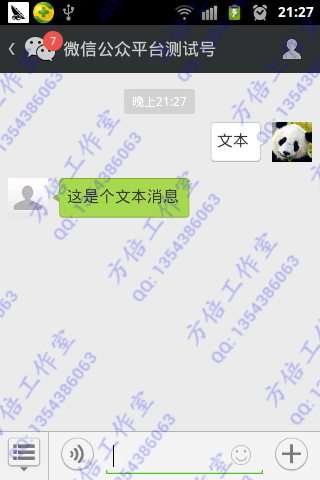
2. 圖文消息(單條)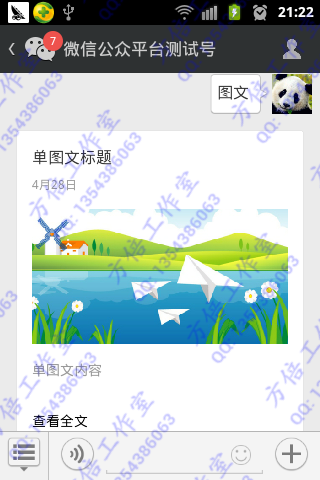
2. 圖文消息(多條)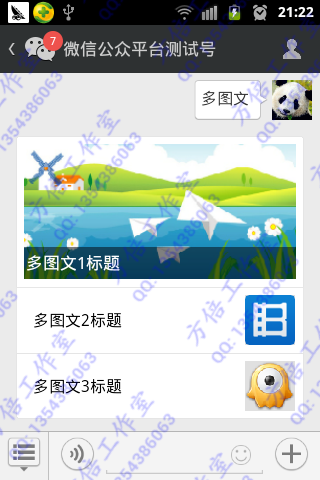
3. 音樂消息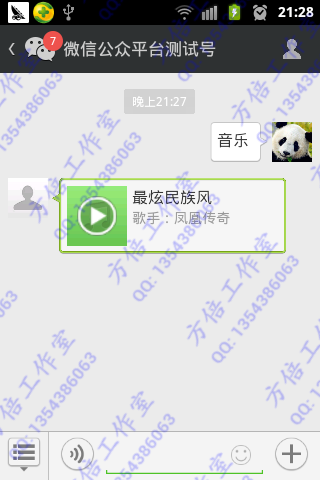
接收事件推送
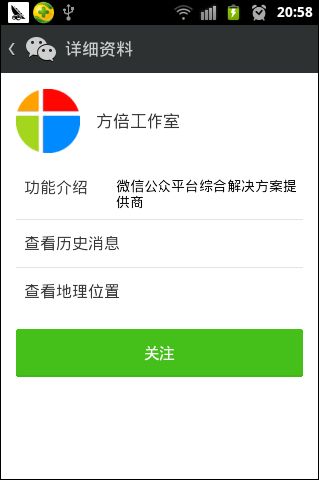
當用戶關注、取消關注或點擊菜單時,平台會自動推送事件消息,例如關注事件:
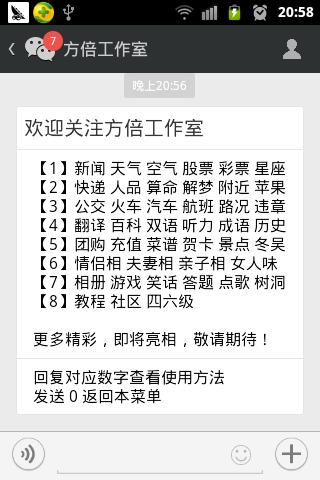
方倍工作室開發的這份 PHP SDK,整合了目前所有消息與事件的接收與發送,程式碼如下(與前章一致,此處為完整增強版,含日誌記錄、各類消息與事件處理):
複製程式碼 程式碼如下:
<?php
/*
方倍工作室
https://www.cnblogs.com/txw1958/
CopyRight 2014 All Rights Reserved
*/
define("TOKEN", "weixin");
$wechatObj = new wechatCallbackapiTest();
if (!isset($_GET['echostr'])) {
$wechatObj->responseMsg();
}else{
$wechatObj->valid();
}
class wechatCallbackapiTest
{
//驗證消息
public function valid()
{
$echoStr = $_GET["echostr"];
if($this->checkSignature()){
echo $echoStr;
exit;
}
}
//檢查簽名
private function checkSignature()
{
$signature = $_GET["signature"];
$timestamp = $_GET["timestamp"];
$nonce = $_GET["nonce"];
$token = TOKEN;
$tmpArr = array($token, $timestamp, $nonce);
sort($tmpArr, SORT_STRING);
$tmpStr = implode($tmpArr);
$tmpStr = sha1($tmpStr);
if($tmpStr == $signature){
return true;
}else{
return false;
}
}
//響應消息
public function responseMsg()
{
$postStr = $GLOBALS["HTTP_RAW_POST_DATA"];
if (!empty($postStr)){
$this->logger("R ".$postStr);
$postObj = simplexml_load_string($postStr, 'SimpleXMLElement', LIBXML_NOCDATA);
$RX_TYPE = trim($postObj->MsgType);
switch ($RX_TYPE)
{
case "event":
$result = $this->receiveEvent($postObj);
break;
case "text":
$result = $this->receiveText($postObj);
break;
case "image":
$result = $this->receiveImage($postObj);
break;
case "location":
$result = $this->receiveLocation($postObj);
break;
case "voice":
$result = $this->receiveVoice($postObj);
break;
case "video":
$result = $this->receiveVideo($postObj);
break;
case "link":
$result = $this->receiveLink($postObj);
break;
default:
$result = "unknown msg type: ".$RX_TYPE;
break;
}
$this->logger("T ".$result);
echo $result;
}else {
echo "";
exit;
}
}
//接收事件消息
private function receiveEvent($object)
{
$content = "";
switch ($object->Event)
{
case "subscribe":
$content = "歡迎關注方倍工作室 ";
$content .= (!empty($object->EventKey))?("\n來自二維碼場景 ".str_replace("qrscene_","",$object->EventKey)):"";
break;
case "unsubscribe":
$content = "取消關注";
break;
case "SCAN":
$content = "掃描場景 ".$object->EventKey;
break;
case "CLICK":
switch ($object->EventKey)
{
case "COMPANY":
$content = "方倍工作室提供互聯網相關產品與服務。";
break;
default:
$content = "點擊菜單:".$object->EventKey;
break;
}
break;
case "LOCATION":
$content = "上傳位置:緯度 ".$object->Latitude.";經度 ".$object->Longitude;
break;
case "VIEW":
$content = "跳轉鏈接 ".$object->EventKey;
break;
default:
$content = "receive a new event: ".$object->Event;
break;
}
$result = $this->transmitText($object, $content);
return $result;
}
//接收文本消息
private function receiveText($object)
{
switch ($object->Content)
{
case "文本":
$content = "這是個文本消息";
break;
case "圖文":
case "單圖文":
$content = array();
$content[] = array("Title"=>"單圖文標題", "Description"=>"單圖文內容", "PicUrl"=>"https://discuz.comli.com/weixin/weather/icon/cartoon.jpg", "Url" =>"https://m.cnblogs.com/?u=txw1958");
break;
case "多圖文":
$content = array();
$content[] = array("Title"=>"多圖文1標題", "Description"=>"", "PicUrl"=>"https://discuz.comli.com/weixin/weather/icon/cartoon.jpg", "Url" =>"https://m.cnblogs.com/?u=txw1958");
$content[] = array("Title"=>"多圖文2標題", "Description"=>"", "PicUrl"=>"https://d.hiphotos.bdimg.com/wisegame/pic/item/f3529822720e0cf3ac9f1ada0846f21fbe09aaa3.jpg", "Url" =>"https://m.cnblogs.com/?u=txw1958");
$content[] = array("Title"=>"多圖文3標題", "Description"=>"", "PicUrl"=>"https://g.hiphotos.bdimg.com/wisegame/pic/item/18cb0a46f21fbe090d338acc6a600c338644adfd.jpg", "Url" =>"https://m.cnblogs.com/?u=txw1958");
break;
case "音樂":
$content = array("Title"=>"最炫民族風", "Description"=>"歌手:鳳凰傳奇", "MusicUrl"=>"https://121.199.4.61/music/zxmzf.mp3", "HQMusicUrl"=>"https://121.199.4.61/music/zxmzf.mp3");
break;
default:
$content = date("Y-m-d H:i:s",time());
break;
}
if(is_array($content)){
if (isset($content[0]['PicUrl'])){
$result = $this->transmitNews($object, $content);
}else if (isset($content['MusicUrl'])){
$result = $this->transmitMusic($object, $content);
}
}else{
$result = $this->transmitText($object, $content);
}
return $result;
}
//接收圖片消息
private function receiveImage($object)
{
$content = array("MediaId"=>$object->MediaId);
$result = $this->transmitImage($object, $content);
return $result;
}
//接收位置消息
private function receiveLocation($object)
{
$content = "你發送的是位置,緯度為:".$object->Location_X.";經度為:".$object->Location_Y.";縮放級別為:".$object->Scale.";位置為:".$object->Label;
$result = $this->transmitText($object, $content);
return $result;
}
//接收語音消息
private function receiveVoice($object)
{
if (isset($object->Recognition) && !empty($object->Recognition)){
$content = "你剛才說的是:".$object->Recognition;
$result = $this->transmitText($object, $content);
}else{
$content = array("MediaId"=>$object->MediaId);
$result = $this->transmitVoice($object, $content);
}
return $result;
}
//接收視頻消息
private function receiveVideo($object)
{
$content = array("MediaId"=>$object->MediaId, "ThumbMediaId"=>$object->ThumbMediaId, "Title"=>"", "Description"=>"");
$result = $this->transmitVideo($object, $content);
return $result;
}
//接收鏈接消息
private function receiveLink($object)
{
$content = "你發送的是鏈接,標題為:".$object->Title.";內容為:".$object->Description.";鏈接地址為:".$object->Url;
$result = $this->transmitText($object, $content);
return $result;
}
//回復文本消息
private function transmitText($object, $content)
{
$textTpl = "<xml>
<ToUserName><![CDATA[%s]]></ToUserName>
<FromUserName><![CDATA[%s]]></FromUserName>
<CreateTime>%s</CreateTime>
<MsgType><![CDATA[text]]></MsgType>
<Content><![CDATA[%s]]></Content>
</xml>";
$result = sprintf($textTpl, $object->FromUserName, $object->ToUserName, time(), $content);
return $result;
}
//回復圖片消息
private function transmitImage($object, $imageArray)
{
$itemTpl = "<Image>
<MediaId><![CDATA[%s]]></MediaId>
</Image>";
$item_str = sprintf($itemTpl, $imageArray['MediaId']);
$textTpl = "<xml>
<ToUserName><![CDATA[%s]]></ToUserName>
<FromUserName><![CDATA[%s]]></FromUserName>
<CreateTime>%s</CreateTime>
<MsgType><![CDATA[image]]></MsgType>
$item_str
</xml>";
$result = sprintf($textTpl, $object->FromUserName, $object->ToUserName, time());
return $result;
}
//回復語音消息
private function transmitVoice($object, $voiceArray)
{
$itemTpl = "<Voice>
<MediaId><![CDATA[%s]]></MediaId>
</Voice>";
$item_str = sprintf($itemTpl, $voiceArray['MediaId']);
$textTpl = "<xml>
<ToUserName><![CDATA[%s]]></ToUserName>
<FromUserName><![CDATA[%s]]></FromUserName>
<CreateTime>%s</CreateTime>
<MsgType><![CDATA[voice]]></MsgType>
$item_str
</xml>";
$result = sprintf($textTpl, $object->FromUserName, $object->ToUserName, time());
return $result;
}
//回復視頻消息
private function transmitVideo($object, $videoArray)
{
$itemTpl = "<Video>
<MediaId><![CDATA[%s]]></MediaId>
<ThumbMediaId><![CDATA[%s]]></ThumbMediaId>
<Title><![CDATA[%s]]></Title>
<Description><![CDATA[%s]]></Description>
</Video>";
$item_str = sprintf($itemTpl, $videoArray['MediaId'], $videoArray['ThumbMediaId'], $videoArray['Title'], $videoArray['Description']);
$textTpl = "<xml>
<ToUserName><![CDATA[%s]]></ToUserName>
<FromUserName><![CDATA[%s]]></FromUserName>
<CreateTime>%s</CreateTime>
<MsgType><![CDATA[video]]></MsgType>
$item_str
</xml>";
$result = sprintf($textTpl, $object->FromUserName, $object->ToUserName, time());
return $result;
}
//回復圖文消息
private function transmitNews($object, $newsArray)
{
if(!is_array($newsArray)){
return;
}
$itemTpl = " <item>
<Title><![CDATA[%s]]></Title>
<Description><![CDATA[%s]]></Description>
<PicUrl><![CDATA[%s]]></PicUrl>
<Url><![CDATA[%s]]></Url>
</item>
";
$item_str = "";
foreach ($newsArray as $item){
$item_str .= sprintf($itemTpl, $item['Title'], $item['Description'], $item['PicUrl'], $item['Url']);
}
$newsTpl = "<xml>
<ToUserName><![CDATA[%s]]></ToUserName>
<FromUserName><![CDATA[%s]]></FromUserName>
<CreateTime>%s</CreateTime>
<MsgType><![CDATA[news]]></MsgType>
<Content><![CDATA[]]></Content>
<ArticleCount>%s</ArticleCount>
<Articles>
$item_str</Articles>
</xml>";
$result = sprintf($newsTpl, $object->FromUserName, $object->ToUserName, time(), count($newsArray));
return $result;
}
//回復音樂消息
private function transmitMusic($object, $musicArray)
{
$itemTpl = "<Music>
<Title><![CDATA[%s]]></Title>
<Description><![CDATA[%s]]></Description>
<MusicUrl><![CDATA[%s]]></MusicUrl>
<HQMusicUrl><![CDATA[%s]]></HQMusicUrl>
</Music>";
$item_str = sprintf($itemTpl, $musicArray['Title'], $musicArray['Description'], $musicArray['MusicUrl'], $musicArray['HQMusicUrl']);
$textTpl = "<xml>
<ToUserName><![CDATA[%s]]></ToUserName>
<FromUserName><![CDATA[%s]]></FromUserName>
<CreateTime>%s</CreateTime>
<MsgType><![CDATA[music]]></MsgType>
$item_str
</xml>";
$result = sprintf($textTpl, $object->FromUserName, $object->ToUserName, time());
return $result;
}
//日誌記錄
private function logger($log_content)
{
if(isset($_SERVER['HTTP_APPNAME'])){ //SAE
sae_set_display_errors(false);
sae_debug($log_content);
sae_set_display_errors(true);
}else if($_SERVER['REMOTE_ADDR'] != "127.0.0.1"){ //LOCAL
$max_size = 10000;
$log_filename = "log.xml";
if(file_exists($log_filename) and (abs(filesize($log_filename)) > $max_size)){unlink($log_filename);}
file_put_contents($log_filename, date('H:i:s')." ".$log_content."\r\n", FILE_APPEND);
}
}
}
?>
用第一章相同的方法,將上述程式碼另存為 index.php,壓縮成 index.zip 上傳到 SAE,你的公眾帳號就能接收並回覆所有消息類型與事件通知了。在帳號中回覆「文本」「圖文」「多圖文」「音樂」「時間」等文字,即可獲得對應回覆;也可以嘗試發送圖片、語音、視頻、位置或收藏中的鏈接,體驗其他消息類型。
前面我們「知其然」,這一章來談「知其所以然」,深入說明微信公眾平台的收發消息機制與原理。
成為開發者時的消息校驗
首次提交驗證時,微信伺服器會向填寫的 URL 發送 GET 請求,並帶上 signature、timestamp、nonce、echostr 四個參數。開發者透過對簽名(signature)的校驗判斷消息真偽;此後每次接收用戶消息,微信也都會帶上前三個參數再次訪問,校驗方式一致。
參數說明:signature 為微信加密簽名(結合 token、timestamp、nonce);timestamp 為時間戳;nonce 為隨機數;echostr 為隨機字串。若確認請求來自微信伺服器,需原樣返回 echostr,接入才會生效。
加密/校驗流程:①將 token、timestamp、nonce 三個參數按字典序排序;②拼接成一個字串做 sha1 加密;③將加密結果與 signature 比對即可。這一流程由程式碼中的 checkSignature() 函數實現。
成為開發者後的收發原理
當用戶發送「?」,系統回覆時間,其消息流程如下圖。用戶發送「?」後,微信伺服器會組裝消息發送到了我們的伺服器,我們回覆時間並按規則組裝,再回覆給公眾帳號,帳號最終回覆給用戶。這一過程中,發送方與接收方進行了調換(ToUserName 與 FromUserName 互換),收發皆以 XML 格式在後台傳輸。
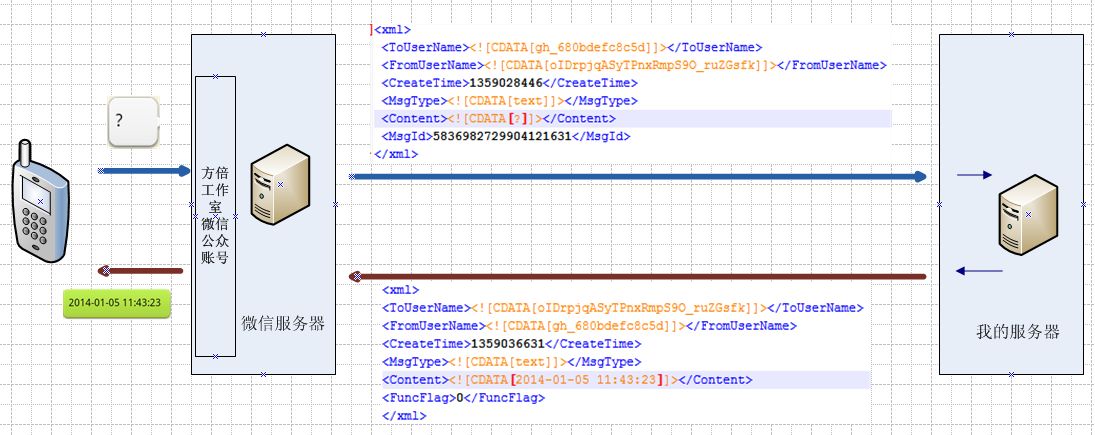
所以,掌握各類消息的收發,就是微信公眾平台開發的基礎!下面逐一解析各消息類型的 XML 數據包格式。
1. 文本(含表情),文字與表情的 MsgType 均為 text:
複製程式碼 程式碼如下:
<xml>
<ToUserName><![CDATA[gh_680bdefc8c5d]]></ToUserName>
<FromUserName><![CDATA[oIDrpjqASyTPnxRmpS9O_ruZGsfk]]></FromUserName>
<CreateTime>1359028446</CreateTime>
<MsgType><![CDATA[text]]></MsgType>
<Content><![CDATA[測試文字]]></Content>
<MsgId>5836982729904121631</MsgId>
</xml>
ToUserName 為接收方微信號(一般為公眾帳號),FromUserName 為發送方微信號,CreateTime 為創建時間,MsgType 為消息類型(文本為 text),Content 為消息內容,MsgId 為消息 ID。
2. 圖片,MsgType 為 image:
複製程式碼 程式碼如下:
<xml><ToUserName><![CDATA[gh_680bdefc8c5d]]></ToUserName>
<FromUserName><![CDATA[oIDrpjqASyTPnxRmpS9O_ruZGsfk]]></FromUserName>
<CreateTime>1359028479</CreateTime>
<MsgType><![CDATA[image]]></MsgType>
<PicUrl><![CDATA[https://mmbiz.qpic.cn/mmbiz/L4qjYtOibummHn90t1mnaibYiaR8ljyicF3MW7XX3BLp1qZgUb7CtZ0DxqYFI4uAQH1FWs3hUicpibjF0pOqLEQyDMlg/0]]></PicUrl>
<MsgId>5836982871638042400</MsgId>
<MediaId><![CDATA[PGKsO3LAgbVTsFYO7FGu51KUYa07D0C_Nozz2fn1z6VYtHOsF59PTFl0vagGxkVH]]></MediaId>
</xml>
其中 PicUrl 為圖片鏈接地址,可用 HTTP GET 獲取;MediaId 為媒體 ID。
3. 語音,MsgType 為 voice,含 MediaId、Format(此處為 amr)等欄位。附:AMR(Adaptive Multi-Rate)主要用於移動設備音頻,壓縮比大,多用於人聲、通話,效果不錯。
4. 視頻,MsgType 為 video,含 MediaId 與 ThumbMediaId(縮略圖媒體 ID)等欄位。
5. 位置,MsgType 為 location:
複製程式碼 程式碼如下:
<xml>
<ToUserName><![CDATA[gh_680bdefc8c5d]]></ToUserName>
<FromUserName><![CDATA[oIDrpjqASyTPnxRmpS9O_ruZGsfk]]></FromUserName>
<CreateTime>1359036619</CreateTime>
<MsgType><![CDATA[location]]></MsgType>
<Location_X>22.539968</Location_X>
<Location_Y>113.954980</Location_Y>
<Scale>16</Scale>
<Label><![CDATA[中國廣東省深圳市南山區華僑城深南大道9789號 郵政編碼: 518057]]></Label>
<MsgId>5837017832671832047</MsgId>
</xml>
Location_X 為緯度、Location_Y 為經度、Scale 為地圖縮放大小、Label 為地理位置資訊。
6. 鏈接,MsgType 為 link,含 Title(標題)、Description(描述)、Url(點擊跳轉鏈接)等欄位。
1. 文本消息,MsgType 必填 text,Content 大小限制在 2048 字節,為空則屬不合法請求:
複製程式碼 程式碼如下:
<xml>
<ToUserName><![CDATA[oIDrpjqASyTPnxRmpS9O_ruZGsfk]]></ToUserName>
<FromUserName><![CDATA[gh_680bdefc8c5d]]></FromUserName>
<CreateTime>1359036631</CreateTime>
<MsgType><![CDATA[text]]></MsgType>
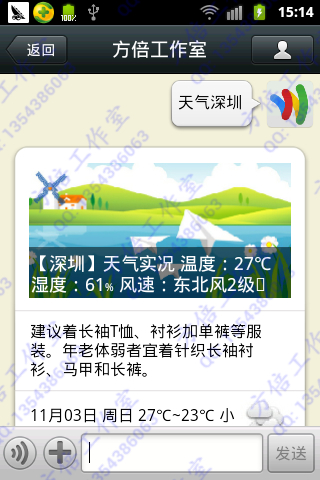
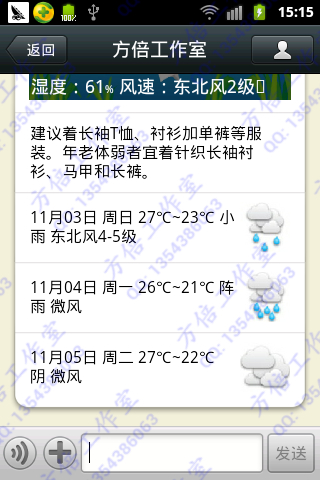
<Content><![CDATA[【深圳】天氣實況 溫度:27℃ 濕度:59% 風速:東北風3級]]></Content>
<FuncFlag>0</FuncFlag>
</xml>
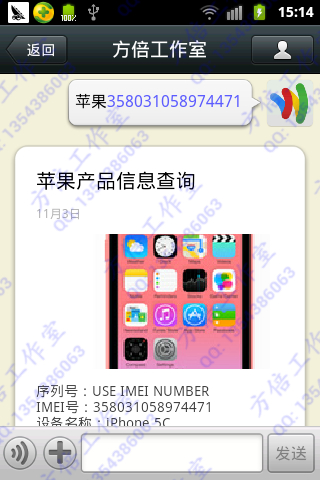
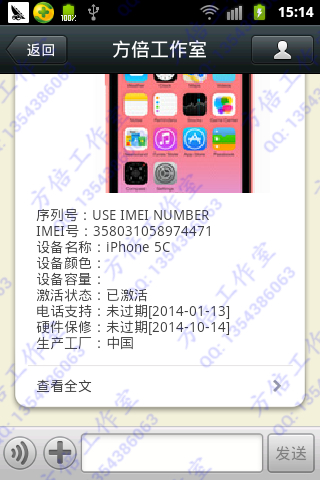
2. 圖文消息,MsgType 必填 news,ArticleCount 限制在 10 條以內,預設第一個 item 為大圖;PicUrl 支援 JPG、PNG,較佳效果為大圖 640×320、小圖 80×80。單條與多條的展示方式略有差異。
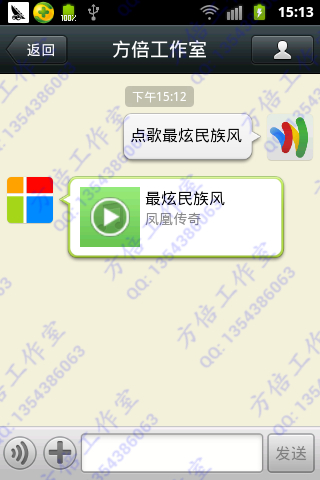
3. 音樂消息,MsgType 為 music,含 Title、Description、MusicUrl 及 HQMusicUrl(高品質鏈接,WiFi 環境優先使用)。
用戶在關注、取消關注及點擊菜單時會觸發事件推送,MsgType 為 event,Event 常見值有 subscribe(訂閱)、unsubscribe(取消訂閱)、CLICK(自定義菜單點擊),EventKey 對應菜單 KEY 值。
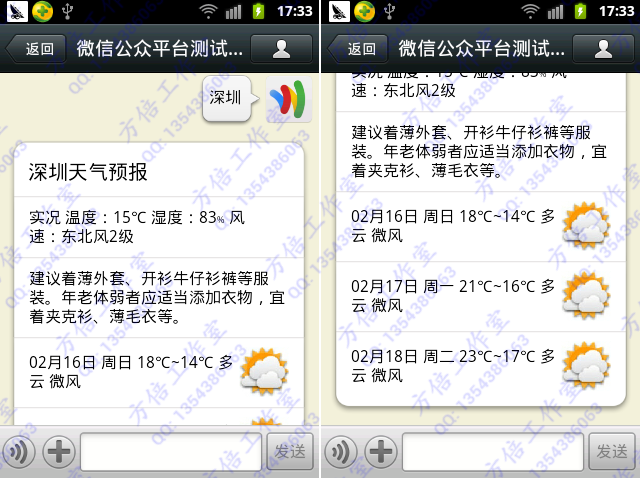
這一章我們動手做天氣預報功能,採用方倍工作室的介面來實現。核心思路是在 receiveText 中,把用戶輸入的關鍵字作為城市名,拼接請求 URL 取得 JSON 資料,再以圖文消息回覆。關鍵程式碼如下:
複製程式碼 程式碼如下:
private function receiveText($object)
{
$keyword = trim($object->Content);
$url = "https://apix.sinaapp.com/weather/?appkey=".$object->ToUserName."&city=".urlencode($keyword);
$output = file_get_contents($url);
$content = json_decode($output, true);
$result = $this->transmitNews($object, $content);
return $result;
}
(完整檔案還包含 valid、checkSignature、responseMsg、receiveEvent、transmitText、transmitNews、logger 等方法,與前幾章一致,此處不再重複貼出。)使用時在公眾帳號中發送城市名稱(如「深圳」),即可查詢該城市天氣,效果如下:
透過本教程,你將收穫:一個免費的雲計算空間;成功啟用開發模式並實現時間自動回覆;快速體驗了各種消息的接收與發送;理解了微信公眾平台的開發原理,熟悉了各消息收發的來龍去脈;並運用方倍工作室的介面,完成了你的第一個功能——天氣預報。
接下來,建議繼續學習一些基礎常用功能的開發。延伸閱讀可參考方倍工作室編寫、機械工業出版社出版的《微信公眾平台開發最佳實踐》,書中涵蓋大量 PHP 開發技巧、資料庫應用,以及近 30 項實用功能與技術。
 Android OkHttp 實戰(二):接口請求、文件上傳與下載
上一篇《Android OkHttp(一)初識》最後提供了一個封裝 OkHttp 請求的工具類,今天就來看看它在項目中的實際用法。 一、簡單的接口請求。 接口請求需要一個
 Android 實作自動播放的 Banner 圖片輪播
Banner 輪播是首頁最常見的元件之一。本文示範一個自訂的 BannerView,以 ViewPager 為基礎,支援本地圖片、網路圖片以及兩者混用,並在無人操作時自動
 Android Studio 多渠道路徑打包與工程定制實作(上)
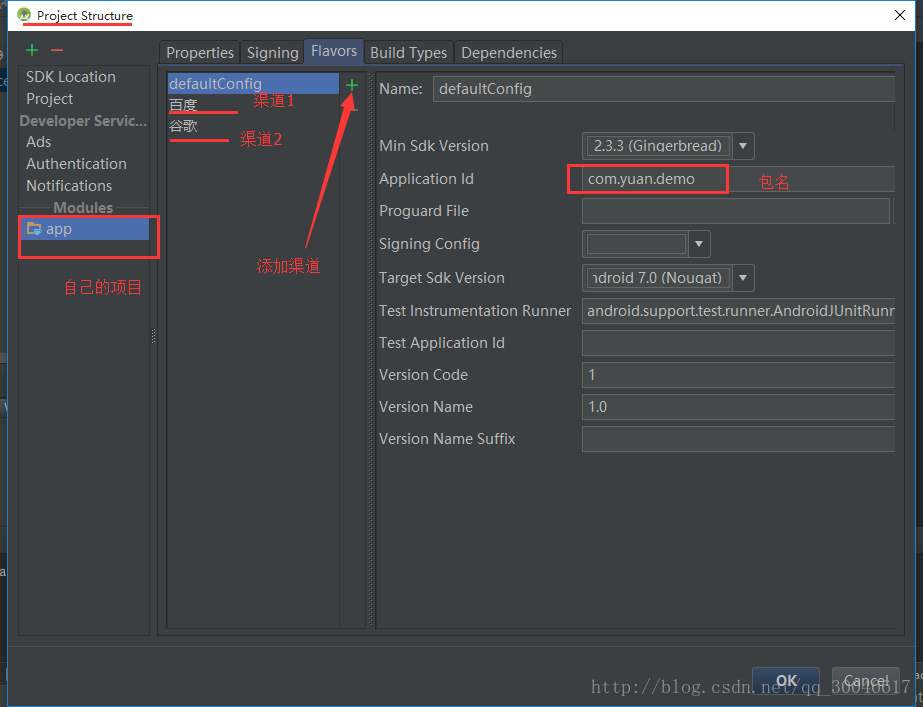
同一份源碼要產出多個 apk,每個包的包名與圖示還不一樣——這種需求很常見,而 Android Studio 的 productFlavors 就是為它準備的。設定一次,
 Android評論功能實作:列表、輸入框與鍵盤處理
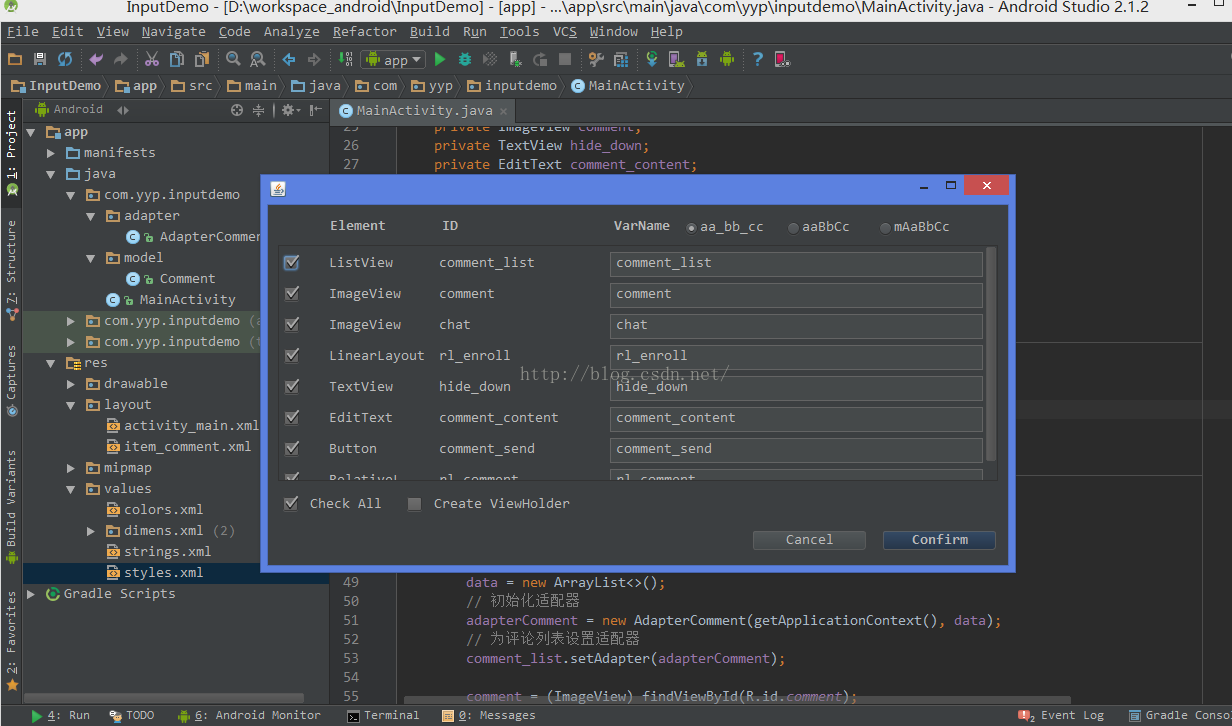
需求說明 許多社群或照片分享應用都會提供評論功能。本文實作一個簡單的評論列表,包含評論顯示、輸入框切換、送出評論與鍵盤處理。 版面配置 主畫面通常包含一個ListView