

編輯:關於 Android 程式設計
本文示範如何把 HTTP 請求抽象成介面、再用 Service 統一調度任務、最後透過 Handler 把結果送回 UI。目標不是重造一個 Apache HttpClient,而是把分層思路走一遍。
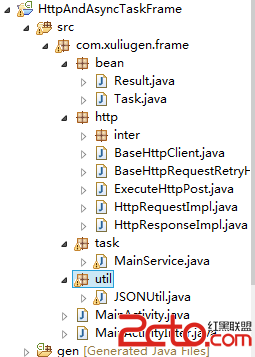
HTTP 只有 request 與 response 兩個主要角色,封裝結構 accordingly 分成兩組介面:
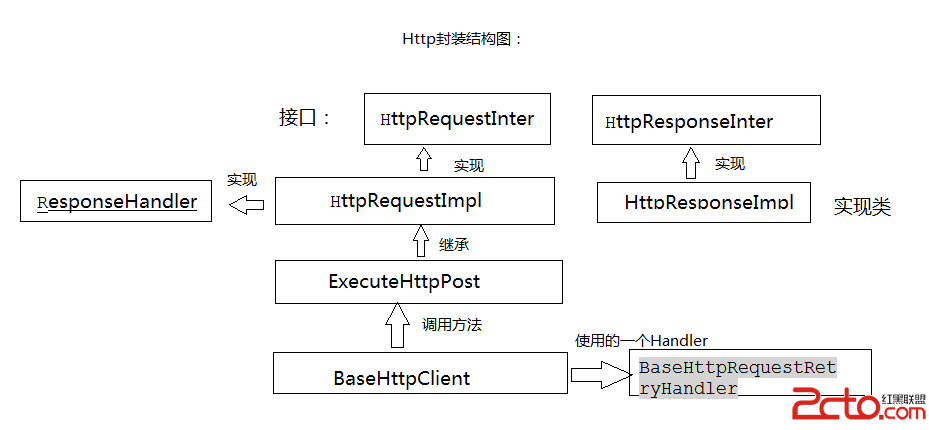
HttpRequestInter:請求端至少要能拿到底層的 HttpUriRequest、請求的 URL,並提供一個 request() 方法把結果包成 response。
public interface HttpRequestInter {
    HttpUriRequest getHttpRequest();          // 取得底層請求物件
    String getRequestURL();                   // 取得請求的 URL
    HttpResponseInter request() throws Exception;  // 送出請求並取得回應
}
HttpResponseInter:回應端要能提供狀態碼、串流、位元組陣列與字串四種形式的資料。
public interface HttpResponseInter {
    int statusCode();
    InputStream getResponseStream() throws IllegalStateException, IOException;
    byte[] getResponseStreamAsByte() throws IOException;
    String getResponseStreamAsString() throws ParseException, IOException;
}
HttpRequestImpl:同時實作請求介面與 ResponseHandler。ResponseHandler 是 HttpClient 的既有設計,用來把原始 HttpResponse 加工成你要的型別。
public class HttpRequestImpl implements HttpRequestInter, ResponseHandler<HttpResponseInter> {
    protected HttpUriRequest httpUriRequest;
    private AbstractHttpClient abstractHttpClient;

    public HttpRequestImpl(AbstractHttpClient httpClient) {
        this.abstractHttpClient = httpClient;
    }

    public HttpUriRequest getHttpRequest() {
        return httpUriRequest;
    }

    public String getRequestURL() {
        return httpUriRequest.getURI().toString();
    }

    public HttpResponseInter request() throws Exception {
        return abstractHttpClient.execute(httpUriRequest, this);
    }

    @Override
    public HttpResponseInter handleResponse(HttpResponse response)
            throws ClientProtocolException, IOException {
        return new HttpResponseImpl(response);
    }
}
HttpResponseImpl:把 HttpResponse 包成統一介面。這裡用 BufferedHttpEntity 包一層,讓 entity 內容可以重複讀取。
public class HttpResponseImpl implements HttpResponseInter {
    private HttpResponse response;
    private HttpEntity entity;

    public HttpResponseImpl(HttpResponse response) throws IOException {
        this.response = response;
        HttpEntity tempEntity = response.getEntity();
        if (null != tempEntity) {
            entity = new BufferedHttpEntity(tempEntity);
        }
    }

    public int statusCode() {
        return response.getStatusLine().getStatusCode();
    }

    public InputStream getResponseStream() throws IllegalStateException, IOException {
        return entity.getContent();
    }

    public String getResponseStreamAsString() throws ParseException, IOException {
        return EntityUtils.toString(entity);
    }

    public byte[] getResponseStreamAsByte() throws IOException {
        return EntityUtils.toByteArray(entity);
    }
}
ExecuteHttpPost:真正組出 POST 請求並掛上參數的地方。
public class ExecuteHttpPost extends HttpRequestImpl {

    public ExecuteHttpPost(AbstractHttpClient httpClient, String url) {
        this(httpClient, url, null);
    }

    public ExecuteHttpPost(AbstractHttpClient httpClient, String url, HttpEntity entity) {
        super(httpClient);
        this.httpUriRequest = new org.apache.http.client.methods.HttpPost(url);
        if (null != entity) {
            ((HttpEntityEnclosingRequestBase) httpUriRequest).setEntity(entity);
        }
    }
}
BaseHttpClient:客戶端門面,負責參數轉換、超時設定與結果型別轉換。
public class BaseHttpClient {
    private AbstractHttpClient httpClient;
    public static final int DEFAULT_RETIES_COUNT = 5;
    protected int retriesCount = DEFAULT_RETIES_COUNT;

    public final static int MAX_TOTAL_CONNECTIONS = 100;
    public final static int WAIT_TIMEOUT = 30000;
    public final static int MAX_ROUTE_CONNECTIONS = 100;
    public final static int CONNECT_TIMEOUT = 10000;
    public final static int READ_TIMEOUT = 10000;

    public BaseHttpClient() {
        initHttpClient();
    }

    private void initHttpClient() {
        HttpParams httpParams = new BasicHttpParams();
        ConnManagerParams.setMaxTotalConnections(httpParams, MAX_TOTAL_CONNECTIONS);
        ConnManagerParams.setTimeout(httpParams, WAIT_TIMEOUT);
        ConnManagerParams.setMaxConnectionsPerRoute(httpParams,
                new ConnPerRouteBean(MAX_ROUTE_CONNECTIONS));
        HttpConnectionParams.setConnectionTimeout(httpParams, CONNECT_TIMEOUT);
        HttpConnectionParams.setSoTimeout(httpParams, READ_TIMEOUT);
        HttpProtocolParams.setVersion(httpParams, HttpVersion.HTTP_1_1);
        HttpProtocolParams.setContentCharset(httpParams, HTTP.UTF_8);

        SchemeRegistry schemeRegistry = new SchemeRegistry();
        schemeRegistry.register(new Scheme("http", PlainSocketFactory.getSocketFactory(), 80));
        schemeRegistry.register(new Scheme("https", SSLSocketFactory.getSocketFactory(), 443));

        ClientConnectionManager cm =
                new ThreadSafeClientConnManager(httpParams, schemeRegistry);
        httpClient = new DefaultHttpClient(cm, httpParams);
        httpClient.setHttpRequestRetryHandler(new BaseHttpRequestRetryHandler(retriesCount));
    }

    /** 把 Map 參數轉成表單需要的 List */
    private List<BasicNameValuePair> parseParams(HashMap<String, Object> params) {
        if (params == null || 0 == params.size()) {
            return null;
        }
        List<BasicNameValuePair> paramsList =
                new ArrayList<BasicNameValuePair>(params.size());
        for (Entry<String, Object> entry : params.entrySet()) {
            paramsList.add(new BasicNameValuePair(entry.getKey(), entry.getValue() + ""));
        }
        return paramsList;
    }

    public String post(String url) throws Exception {
        return post(url, null);
    }

    public String post(String url, HashMap<String, Object> params) throws Exception {
        UrlEncodedFormEntity entity = new UrlEncodedFormEntity(parseParams(params));
        return request(url, entity).getResponseStreamAsString();
    }

    public <T> T post(String url, HashMap<String, Object> params, Class<T> clz)
            throws Exception {
        return JSONUtil.fromJson(post(url, params), clz);
    }

    public InputStream postAsStream(String url, HashMap<String, Object> params)
            throws Exception {
        UrlEncodedFormEntity entity = new UrlEncodedFormEntity(parseParams(params));
        return request(url, entity).getResponseStream();
    }

    public HttpResponseInter request(String url, HttpEntity entity) throws Exception {
        HttpRequestImpl httpRequestImpl = new ExecuteHttpPost(httpClient, url, entity);
        return httpRequestImpl.request();
    }
}
BaseHttpRequestRetryHandler:用白名單/黑名單決定哪些例外值得重試。
public class BaseHttpRequestRetryHandler implements HttpRequestRetryHandler {
    private int max_retry_count;

    public BaseHttpRequestRetryHandler(int maxretryCount) {
        this.max_retry_count = maxretryCount;
    }

    private static HashSet<Class<? extends IOException>> exceptionWhiteList =
            new HashSet<Class<? extends IOException>>();
    private static HashSet<Class<? extends IOException>> exceptionBlackList =
            new HashSet<Class<? extends IOException>>();

    static {
        // 這些通常是偶發問題,值得重試
        exceptionWhiteList.add(NoHttpResponseException.class);
        exceptionWhiteList.add(UnknownHostException.class);
        exceptionWhiteList.add(SocketException.class);
        // 這些重試也沒用
        exceptionBlackList.add(SSLException.class);
        exceptionBlackList.add(InterruptedIOException.class);
        exceptionBlackList.add(SocketTimeoutException.class);
    }

    public boolean retryRequest(IOException exception, int executionCount,
                                HttpContext context) {
        if (executionCount > max_retry_count) return false;
        if (exceptionBlackList.contains(exception.getClass())) return false;
        if (exceptionWhiteList.contains(exception.getClass())) return true;

        HttpRequest request = (HttpRequest) context.getAttribute(ExecutionContext.HTTP_REQUEST);
        boolean idempotent = (request instanceof HttpEntityEnclosingRequest);
        if (!idempotent) return true;   // 非冪等請求,重送前要三思

        Boolean b = (Boolean) context.getAttribute(ExecutionContext.HTTP_REQ_SENT);
        boolean sent = (b != null && b.booleanValue());
        return !sent;
    }
}
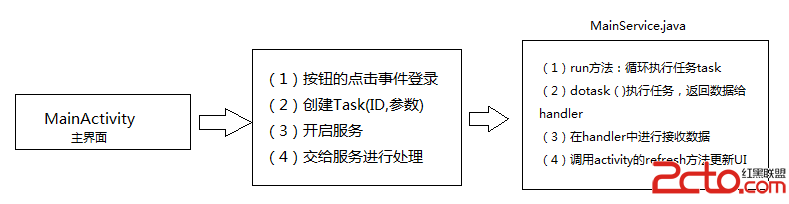
整體思路:所有任務統一丟給 Service 排隊,Service 內部開一條線程輪詢佇列,任務完成後透過 Handler 通知對應的 Activity 刷新介面。
任務實體 Task:用 taskId 區分任務類型,taskParams 攜帶參數。
public class Task {
    private int taskId;
    private Map<String, Object> taskParams;
    public static final int USER_LOGIN = 1;

    public Task(int taskId, Map<String, Object> taskParams) {
        this.taskId = taskId;
        this.taskParams = taskParams;
    }

    public int getTaskId() { return taskId; }
    public Map<String, Object> getTaskParams() { return taskParams; }
}
MainService:任務佇列 + 工作線程 + Handler 回呼 + Activity 註冊表。
public class MainService extends Service implements Runnable {
    private static Queue<Task> tasks = new LinkedList<Task>();
    private static ArrayList<Activity> appActivities = new ArrayList<Activity>();
    private boolean isRun;

    private Handler handler = new Handler() {
        public void handleMessage(android.os.Message msg) {
            switch (msg.what) {
                case Task.USER_LOGIN:
                    MainActivityInter activity =
                            (MainActivityInter) getActivityByName("MainActivity");
                    activity.refresh(msg.obj.toString());
                    break;
                default:
                    break;
            }
        }
    };

    /** 對外暴露:新增一個任務 */
    public static void newTask(Task t) {
        tasks.add(t);
    }

    @Override
    public void onCreate() {
        isRun = true;
        new Thread(this).start();
        super.onCreate();
    }

    /** 線程主體:不停撈取佇列中的任務 */
    public void run() {
        while (isRun) {
            if (!tasks.isEmpty()) {
                Task task = tasks.poll();
                if (null != task) {
                    doTask(task);
                }
            }
            try {
                Thread.sleep(1000);
            } catch (Exception e) {
                // ignore
            }
        }
    }

    private void doTask(Task task) {
        Message msg = handler.obtainMessage();
        msg.what = task.getTaskId();
        switch (task.getTaskId()) {
            case Task.USER_LOGIN:
                HashMap<String, Object> paramsHashMap =
                        (HashMap<String, Object>) task.getTaskParams();
                String url = "https://172.23.252.89:8080/igouServ/userlogin.action";
                BaseHttpClient httpClient = new BaseHttpClient();
                try {
                    msg.obj = httpClient.post(url, paramsHashMap);
                } catch (Exception e) {
                    e.printStackTrace();
                }
                break;
            default:
                break;
        }
        handler.sendMessage(msg);
    }

    @Override
    public IBinder onBind(Intent intent) {
        return null;
    }

    /** 把 Activity 登記進來,Service 才能回頭操作 UI */
    public static void addActivity(Activity activity) {
        appActivities.add(activity);
    }

    private Activity getActivityByName(String name) {
        for (Activity activity : appActivities) {
            if (null != activity
                    && activity.getClass().getName().indexOf(name) > 0) {
                return activity;
            }
        }
        return null;
    }

    /** 一鍵退出:關掉所有 Activity 並停掉自己 */
    public static void appExit(Context context) {
        for (Activity activity : appActivities) {
            if (!activity.isFinishing()) activity.finish();
        }
        context.stopService(new Intent(context, MainService.class));
    }
}
MainActivityInter:讓 Service 有辦法反過來刷新介面。
public interface MainActivityInter {
    void init();
    void refresh(Object... params);
}
public class MainActivity extends Activity implements MainActivityInter {
    private Button btn_login;
    private TextView textView;

    @Override
    protected void onCreate(Bundle savedInstanceState) {
        super.onCreate(savedInstanceState);
        setContentView(R.layout.activity_main);
        btn_login = (Button) findViewById(R.id.btn_login);
        textView = (TextView) findViewById(R.id.textView1);

        startService(new Intent(this, MainService.class));  // 啟動服務
        MainService.addActivity(this);                      // 把自己登記進去

        btn_login.setOnClickListener(new View.OnClickListener() {
            public void onClick(View v) {
                Map<String, Object> paramsHashMap = new HashMap<String, Object>(2);
                paramsHashMap.put("userName", "xuliugen");
                paramsHashMap.put("password", "123456");
                MainService.newTask(new Task(Task.USER_LOGIN, paramsHashMap));
            }
        });
    }

    public void init() { }

    public void refresh(Object... params) {
        textView.setText(params[0].toString());
    }
}
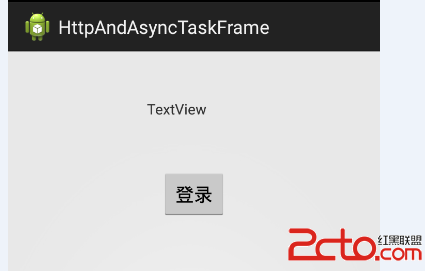
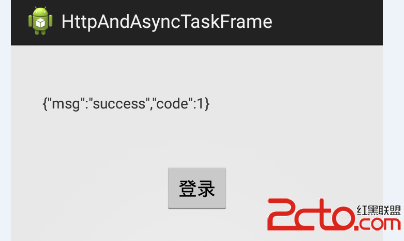
能跑,但用今天的標準看有幾個明顯缺陷,值得一併記住:
 Android 自學日記(一):從地鐵專業到程序員的兩個月
Android 自學日記(一) 說起日記,記憶還停留在小學的作業上。那時候通篇都是流水賬:幾點起床、去哪裡玩、做了什麼壞事(額,這條不能寫……),反正都是為了應付老師胡
 標題欄的公共抽取:兩種 BaseActivity 封裝思路與取捨
為什麼要抽標題欄 一個 App 裡絕大多數頁面都長得差不多:左邊返回鍵、中間標題、右邊一兩個操作入口。如果每個 Activity 都自己寫一份標題欄佈局,日後改配色、改高
 Android TableLayout 表格邊框實作:Shape Drawable 快速套用
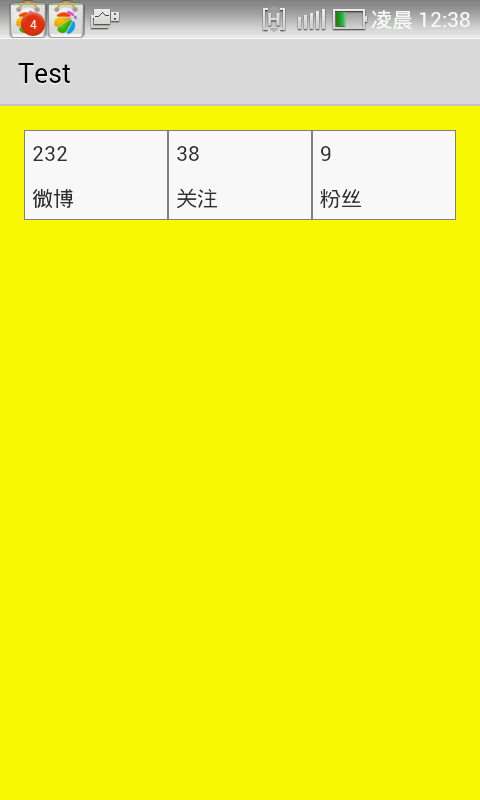
用背景畫出表格線TableLayout 本身不一定自帶格線,若需要像表格一樣的邊框,可以透過 Shape Drawable 建立一個矩形背景,再套用到各個儲存格或列容器中
 Android Studio 使用 Gradle 打包與簽名全解析
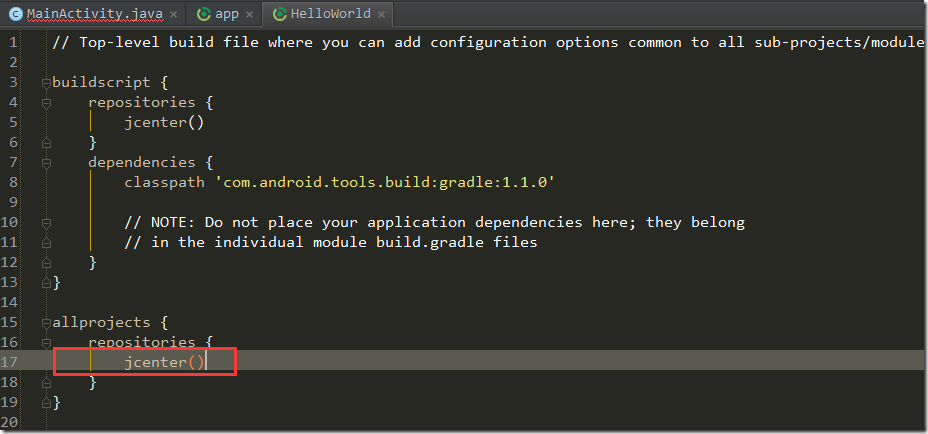
1、Gradle 導入 jar 包的特點(與手動放 libs 文件夾的區別) Gradle 導入 jar 包更方便,一行代碼即可搞定,不像後者還要自己去官網下載。如果官方