

編輯:關於 Android 程式設計
在電商、音樂、影片這類應用裡,「打分」幾乎是標配的互動。Android 為此提供了現成的 RatingBar 控件,它以一排星星的形式呈現,用戶點擊或拖動即可給出評價,開發者則可以透過監聽器即時拿到分數。
wrap_content,一旦寫成 fill_parent,實際顯示的星星數量很可能與你設定的值不符。setStepSize(0.5f) 表示最小只能以半顆星為單位調整。onRatingChanged()。MainActivity.java:
public class MainActivity extends Activity {
    private RatingBar bar;

    @Override
    public void onCreate(Bundle savedInstanceState) {
        super.onCreate(savedInstanceState);
        setContentView(R.layout.activity_main);

        bar = (RatingBar) findViewById(R.id.rat);
        bar.setNumStars(5);        // 五顆星
        bar.setMax(100);           // 滿分 100
        bar.setRating(1.5f);       // 初始 1.5 分
        bar.setStepSize(0.5f);     // 最小步長半顆星

        bar.setOnRatingBarChangeListener(new RatingBar.OnRatingBarChangeListener() {
            @Override
            public void onRatingChanged(RatingBar ratingBar, float rating, boolean fromUser) {
                Toast.makeText(MainActivity.this, "當前得分:" + rating * 20,
                        Toast.LENGTH_SHORT).show();
            }
        });
    }
}
activity_main.xml:
<LinearLayout xmlns:android="https://schemas.android.com/apk/res/android"
    xmlns:tools="https://schemas.android.com/tools"
    android:layout_width="match_parent"
    android:layout_height="match_parent"
    android:orientation="vertical"
    tools:context="${relativePackage}.${activityClass}">

    <RatingBar
        android:id="@+id/rat"
        android:layout_width="wrap_content"
        android:layout_height="wrap_content" />
</LinearLayout>
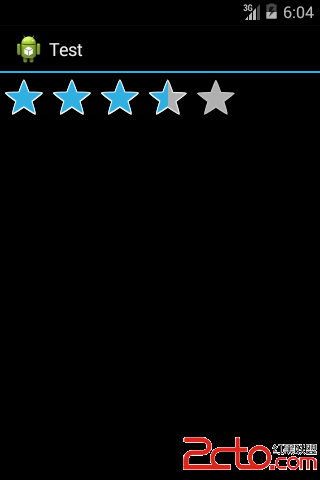
運行效果如下:
 免權限實現檔案存取:Android 快取與應用目錄全攻略
在 Android 中,Context 提供了四個便捷的目錄方法,讓你能免開權限就完成檔案存取: getCacheDir、getFilesDir、getExternalC
 CoordinatorLayout 使用指南
CoordinatorLayout 是 Material Design 中非常重要的佈局容器,可協調子 View 之間的互動行為。它常被視為增強版 FrameLayout
 Android 自定義 View 入門:實作圖片加載進度條
自定義 View 是 Android 開發中常見需求。若要製作一個環形圖片加載進度條,只要熟悉 Paint 與 Canvas 的基本用法,就能完成。自定義屬性為了讓進度條
 Android 廣播接收器監聽電話狀態與來電攔截
監聽機制的概念Android 的事件處理有監聽與回呼兩種常見模式。若要監聽電話狀態,通常會使用 BroadcastReceiver。系統在撥打電話、來電、接聽與掛斷時,會