

編輯:關於 Android 程式設計
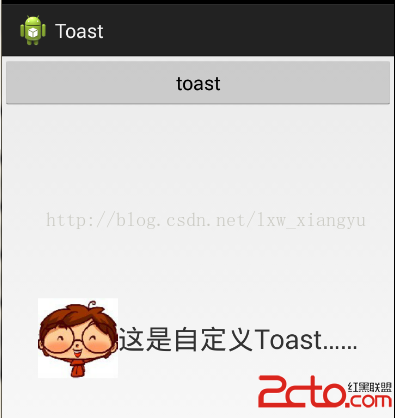
系統默認的 Toast 只有一行灰底白字,想放個圖標或換個配色就得自定義。做法並不複雜,照著 API 走兩步就好:先寫一個布局,再用 setView() 塞進 Toast。
效果圖:
<LinearLayout xmlns:android="https://schemas.android.com/apk/res/android"
    android:layout_width="match_parent"
    android:layout_height="wrap_content"
    android:orientation="horizontal">

    <ImageView
        android:layout_width="wrap_content"
        android:layout_height="wrap_content"
        android:src="@drawable/toast" />

    <TextView
        android:id="@+id/text"
        android:layout_width="wrap_content"
        android:layout_height="wrap_content"
        android:layout_gravity="center_vertical"
        android:textSize="25sp" />
</LinearLayout>
public class MyToast extends Toast {

    public MyToast(Context context, String msg) {
        super(context);
        LayoutInflater inflater =
                (LayoutInflater) context.getSystemService(Context.LAYOUT_INFLATER_SERVICE);
        View layout = inflater.inflate(R.layout.toast, null);

        TextView text = (TextView) layout.findViewById(R.id.text);
        text.setText(msg);

        setGravity(Gravity.CENTER_VERTICAL, 0, 0);
        setDuration(LENGTH_SHORT);
        setView(layout);
    }
}
使用時直接 new MyToast(this, "提示內容").show(); 即可。
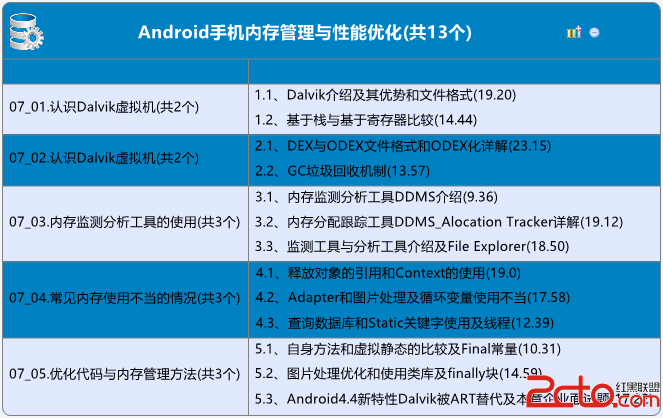 Android 內存管理與性能優化視頻教程(34 課時)
Android 應用一旦涉及大量圖片、常駐後台或複雜列表,內存與性能問題就會浮出水面。本套視頻課程圍繞「內存管理與性能優化」這一主線展開,從基礎機制一路講到 JNI/ND
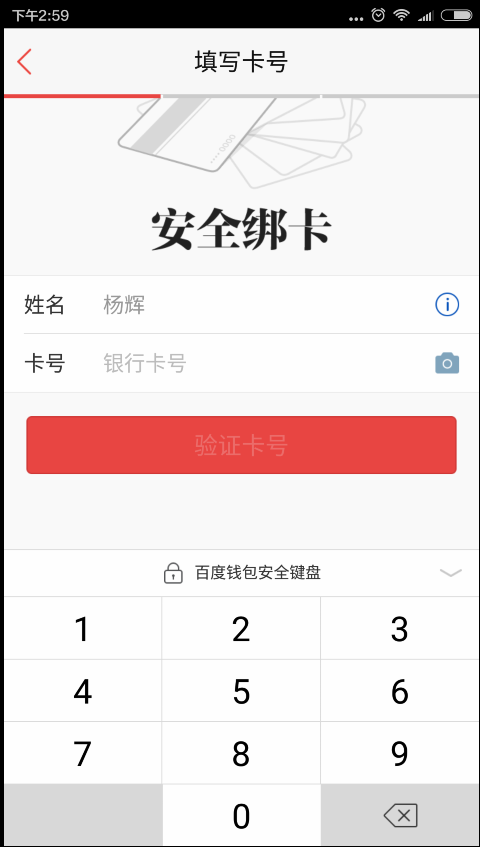 Android 自定義軟鍵盤:打造屬於你的安全輸入面板
前不久項目需要一個自定義軟鍵盤,我上網翻了翻,覺得大多數方案都偏繁瑣,於是決定自己動手實現一個以備不時之需。這裡參考的是百度錢包的軟鍵盤,看著還不錯: 一、SoftIn
 Android MediaMetadataRetriever:讀取音訊與影片媒體資訊
MediaMetadataRetriever 的作用 MediaMetadataRetriever 是 Android 提供的媒體中繼資料讀取工具,可用來取得音訊或影片的
 百度派有什麼用?百度派和知乎一樣嗎
近來關注百度的使用者應該都發現了,百度推出了一款名為「百度派」的應用,主打隨時進行深度話題討論,並能第一時間掌握熱點再細分探討。這個設定和知乎相當接近,難免讓人好奇:百度