

編輯:關於 Android 程式設計
這個練習項目實現了學生與教師的注冊登錄、選課、成績修改等基礎功能,主要目的是把 Dialog 的各種形態用熟。
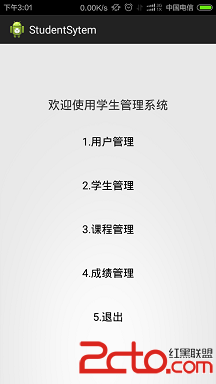
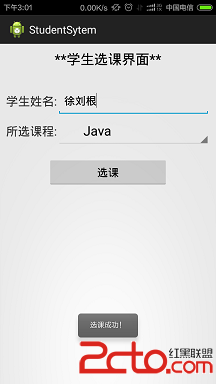
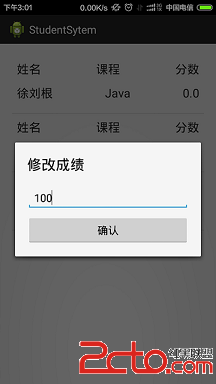
界面如下:
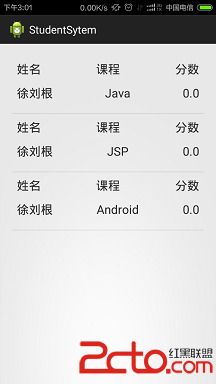
適配器負責給 ListView 的每一項灌數據,這裡繼承 BaseAdapter 並在 getView 中複用 convertView:
public class CourseAdapter extends BaseAdapter {
    private Context context;
    private List<Course> courseList;

    public CourseAdapter(Context context, List<Course> courseList) {
        this.context = context;
        this.courseList = courseList;
    }

    @Override
    public int getCount() {
        return courseList.size();
    }

    @Override
    public Object getItem(int position) {
        return courseList.get(position);
    }

    @Override
    public long getItemId(int position) {
        return position;
    }

    @Override
    public View getView(int position, View convertView, ViewGroup parent) {
        if (convertView == null) {
            // 每一項的佈局只在沒有可複用對象時才 inflate
            convertView = LayoutInflater.from(context)
                    .inflate(R.layout.student_score_item, null);
        }

        TextView tv_name = convertView.findViewById(R.id.tv_name);
        TextView tv_course = convertView.findViewById(R.id.tv_course);
        TextView tv_score = convertView.findViewById(R.id.tv_score);

        Course course = courseList.get(position);
        tv_name.setText(course.getStudentName() + ":");
        tv_course.setText(course.getCourseName() + ":");
        tv_score.setText(course.getCourseScore() + ":");
        return convertView;
    }
}
這裡其實有個可改進點:每次 getView 都調 findViewById 是有成本的,更好的做法是把三個 TextView 收進一個 ViewHolder,配合 convertView.setTag 複用。數據變動後調 notifyDataSetChanged() 通知刷新即可。
學生和教師的登錄、選課邏輯有大量重疊,用接口抽象行為,再由工廠負責創建實現類:
public class PersonFactory {

    /** 按類名創建對象:純反射 */
    public PersonInter getPersonByClass(String className) {
        try {
            return (PersonInter) Class.forName(className).newInstance();
        } catch (InstantiationException | IllegalAccessException
                | ClassNotFoundException e) {
            e.printStackTrace();
        }
        return null;
    }

    /** 按類型字符串分派 */
    public PersonInter getPerson(String key) {
        if ("student".equals(key)) {
            return new StudentImpl();
        } else if ("teacher".equals(key)) {
            return new TeacherImpl();
        }
        return null;
    }

    /** 按配置文件的鍵創建對象:反射 + 映射表 */
    public PersonInter getPersonByClassKey(String key) {
        try {
            Map<String, String> map = new PropertiesReader().getProperties();
            return (PersonInter) Class.forName(map.get(key)).newInstance();
        } catch (InstantiationException | IllegalAccessException
                | ClassNotFoundException e) {
            e.printStackTrace();
        }
        return null;
    }
}
三個方法體現了同一個意圖的三種實現強度:第三種最靈活——把「鍵到類名」的映射外置到配置文件,新增角色時不必改代碼,只改配置,這正是工廠模式配合反射的核心價值。代價是編譯期失去了類型檢查,配置寫錯只會在運行時拋 ClassNotFoundException,因此配置項必須有健壯的異常處理與默認值兜底。
完整代碼見文末的免費下載。
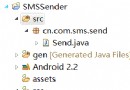 Android開發:發送短信的小程式實作與廣播回調
用程式發簡訊是 Android 的經典入門練習,因為它同時涵蓋了權限申請、Intent、PendingIntent 與廣播接收四個觀念。本文從最基礎的版本開始,再補上發送
 Android基於ImageSwitcher實現圖片左右切換
左右切換圖片的控件,大家平時用得比較多的應該是ViewPager和ViewFipper。筆者之前也用ViewPager實現過左右循環滑動圖片,有興趣的可以自行了解。今天要
 Android 6.0 Fragment 申請權限無法回調的解法
在 Android 6.0 之後,應用需要在執行時動態申請危險權限。若在 Fragment 中申請權限卻無法收到回調,常見原因是使用了錯誤的請求方式。 問題原因 如果在
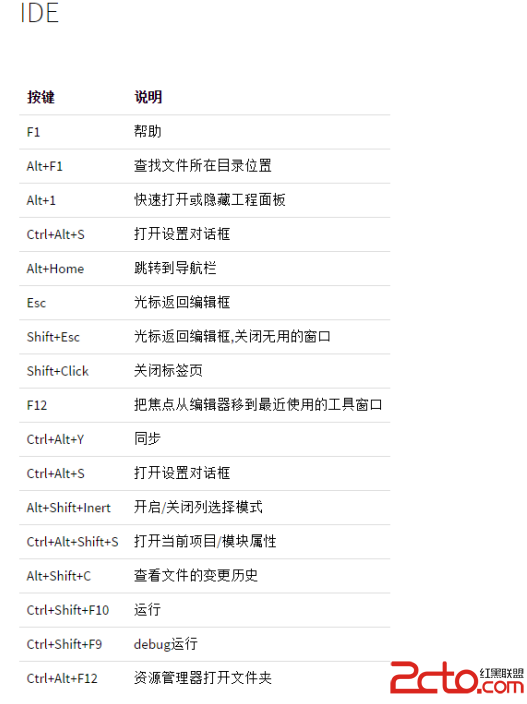 Android Studio 快捷鍵大全(附完整圖表)
熟練使用快捷鍵,是提升 Android Studio 開發效率最直接的方式。下面按常用場景整理了一份完整的快捷鍵圖表,涵蓋編輯、導航、重構、調試與版本控制等各類操作。 建