

編輯:關於 Android 程式設計
Font Awesome 最迷人的地方在於:它是字型,不是圖片。因此 CSS 能做的所有事情——調整大小、換顏色、加陰影、套任何支援的效果——都能直接套用到這些圖示上。僅靠一個字型檔,就涵蓋了與網頁相關的絕大多數形象圖示;而因為是向量輪廓,無論放大到任何尺寸都依然銳利。
這也是為什麼它在 Retina 級的高解析度螢幕上特別討喜:不會有鋸齒,不會因為切圖而模糊。
那麼,這套網頁界的字型圖示庫能不能用在 Android 上?完全可以。
fonts 目錄中找到 fontawesome-webfont.ttf。assets 目錄下。res/values 下的 string 資源檔,方便在版面中直接引用。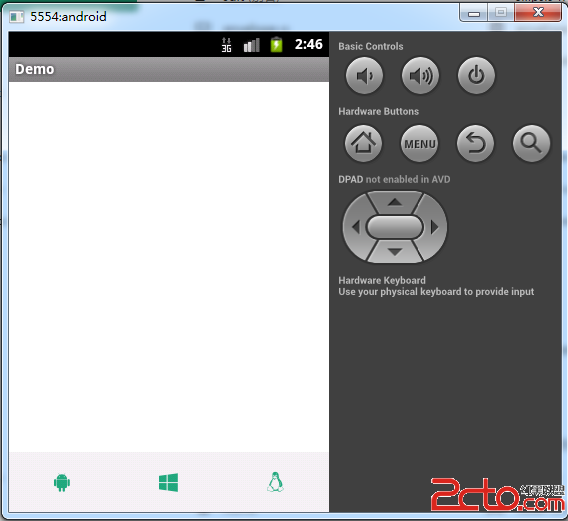
如圖所示,整組效果沒有用到任何一張圖片,全部來自同一個字型檔。
Typeface font = Typeface.createFromAsset(getAssets(), "fontawesome-webfont.ttf");
Typeface.createFromAsset() 會從 assets 讀取字型並建立 Typeface 物件。建議把這行放在 onCreate 早期並重複使用同一個實例,避免同一頁面內多次載入同一個字型檔造成浪費。
<LinearLayout
    xmlns:android="https://schemas.android.com/apk/res/android"
    xmlns:tools="https://schemas.android.com/tools"
    android:layout_width="match_parent"
    android:layout_height="match_parent"
    android:orientation="vertical"
    tools:context="${relativePackage}.${activityClass}">

    <TextView
        android:id="@+id/tab1"
        android:layout_width="wrap_content"
        android:layout_height="wrap_content" />

    <TextView
        android:id="@+id/tab2"
        android:layout_width="wrap_content"
        android:layout_height="wrap_content" />

    <TextView
        android:id="@+id/tab3"
        android:layout_width="wrap_content"
        android:layout_height="wrap_content" />
</LinearLayout>
private void initView() {
    Typeface font = Typeface.createFromAsset(getAssets(), "fontawesome-webfont.ttf");

    TextView tab1 = (TextView) findViewById(R.id.tab1);
    TextView tab2 = (TextView) findViewById(R.id.tab2);
    TextView tab3 = (TextView) findViewById(R.id.tab3);

    tab1.setTypeface(font);
    tab2.setTypeface(font);
    tab3.setTypeface(font);
}
接著把 TextView 的文字設成對應的圖示碼位即可,例如 tab1.setText("\uf015")(Home 圖示)。也可以直接在 XML 寫成 android:text="\uf015"。
因為它是文字,所以想改大小就改 textSize,想改顏色就改 textColor——就這麼簡單。這也是字型圖示相對於 PNG 切圖最大的優勢:一份資源,無限種呈現。
contentDescription,或將純裝飾性圖示標記為 importantForAccessibility="no"。掌握這個技巧後,介面裡那些琳瑯滿目的小圖示就不再需要設計師逐個切圖了。更多玩法就留給你去發揮。
 徹底搞懂 Android Activity 的四種 launchMode
Activity 是 Android 設計中相當精彩的一塊。正因為它在內存管理上的克制與周到,多任務才能在移動系統上跑得游刃有餘。但 Activity 絕不只是「啟動並顯
 Android 貪吃蛇實戰:虛擬方向鍵三角形按鈕點擊變色
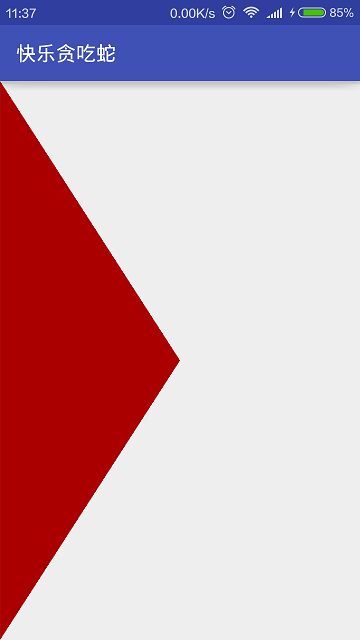
在自定義方向鍵中,除了繪製三角形之外,還需要讓按鈕在按下時產生視覺回饋。本篇以 DirectionKeys 為例,說明如何透過 onTouchEvent 與 invali
 Android 開發入門實戰:打造一個拼圖遊戲
為學習 Android 應用開發,筆者嘗試實現了一個簡單的拼圖遊戲。本文記錄了核心的實現流程,希望能為其他入門開發者提供參考。 一、界面設計 首先要規劃各界面(Activ
 OpenGL ES 2.0 for Android 實戰:從三角形到彩色立方體
前面幾篇都在處理 OpenGL ES 2.0 的二維繪製,現在該邁進三維世界了。三維远比二維有趣,但複雜度也高出不少——在 Unity3D 裡拖一下就有一個立方體,而在