

編輯:關於 Android 程式設計
表單裡需要讓使用者挑日期和時間,Android 內建的 DatePickerDialog 與 TimePickerDialog 是最省事的做法。點一下文字欄位就彈出對話框,選完再把結果寫回畫面。
畫面上有兩個可點擊的 TextView,分別顯示日期與時間。
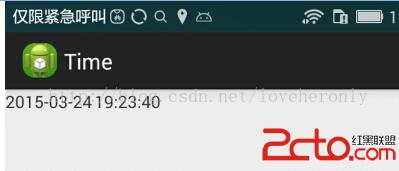
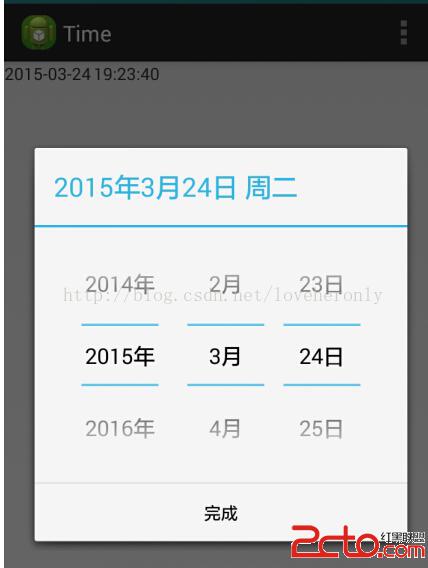
點擊日期(例如 2015-03-24)會彈出日期選擇對話框:
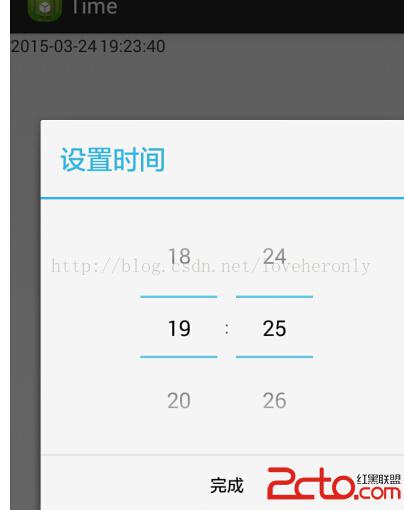
點擊時間則彈出時間選擇對話框:
XML 很單純,兩個 TextView 加上可點擊屬性即可:
<LinearLayout xmlns:android="https://schemas.android.com/apk/res/android"
    android:layout_width="match_parent"
    android:layout_height="match_parent"
    android:orientation="vertical"
    android:padding="16dp">

    <TextView
        android:id="@+id/txtDate"
        android:layout_width="match_parent"
        android:layout_height="wrap_content"
        android:clickable="true"
        android:focusable="true"
        android:textSize="18sp" />

    <TextView
        android:id="@+id/txtTime"
        android:layout_width="match_parent"
        android:layout_height="wrap_content"
        android:layout_marginTop="12dp"
        android:clickable="true"
        android:focusable="true"
        android:textSize="18sp" />
</LinearLayout>package com.example.time;
import java.text.DateFormat;
import java.text.SimpleDateFormat;
import java.util.Calendar;
import java.util.Locale;
import android.os.Bundle;
import android.app.Activity;
import android.app.DatePickerDialog;
import android.app.TimePickerDialog;
import android.util.Log;
import android.view.View;
import android.view.View.OnClickListener;
import android.widget.DatePicker;
import android.widget.TextView;
import android.widget.TimePicker;
public class MainActivity extends Activity {
private final static String TAG = "TimeDate";
// 日期與時間的格式化器
DateFormat fmtDate = new SimpleDateFormat("yyyy-MM-dd");
DateFormat fmtTime = new SimpleDateFormat("HH:mm:ss");
private TextView txtDate = null;
private TextView txtTime = null;
// 一個共用的日曆物件,作為資料來源
Calendar dateAndTime = Calendar.getInstance(Locale.CHINA);
// 按下 DatePickerDialog 的確定鈕時呼叫
DatePickerDialog.OnDateSetListener d = new DatePickerDialog.OnDateSetListener() {
@Override
public void onDateSet(DatePicker view, int year, int monthOfYear, int dayOfMonth) {
// year / monthOfYear / dayOfMonth 與對話框上的最新值一致
dateAndTime.set(Calendar.YEAR, year);
dateAndTime.set(Calendar.MONTH, monthOfYear);
dateAndTime.set(Calendar.DAY_OF_MONTH, dayOfMonth);
upDateDate();
}
};
// 時間的邏輯與日期相同
TimePickerDialog.OnTimeSetListener t = new TimePickerDialog.OnTimeSetListener() {
@Override
public void onTimeSet(TimePicker view, int hourOfDay, int minute) {
dateAndTime.set(Calendar.HOUR_OF_DAY, hourOfDay);
dateAndTime.set(Calendar.MINUTE, minute);
upDateTime();
}
};
@Override
protected void onCreate(Bundle savedInstanceState) {
super.onCreate(savedInstanceState);
setContentView(R.layout.activity_main);
Log.d(TAG, "onCreate");
txtDate = (TextView) findViewById(R.id.txtDate);
txtDate.setClickable(true);
txtDate.setFocusable(true);
txtTime = (TextView) findViewById(R.id.txtTime);
txtTime.setClickable(true);
txtTime.setFocusable(true);
txtDate.setOnClickListener(new OnClickListener() {
@Override
public void onClick(View v) {
Log.d(TAG, "txtDate click start");
DatePickerDialog dateDlg = new DatePickerDialog(
MainActivity.this, d,
dateAndTime.get(Calendar.YEAR),
dateAndTime.get(Calendar.MONTH),
dateAndTime.get(Calendar.DAY_OF_MONTH));
dateDlg.show();
Log.d(TAG, "Date show");
}
});
txtTime.setOnClickListener(new OnClickListener() {
@Override
public void onClick(View v) {
Log.d(TAG, "txtTime click start");
TimePickerDialog timeDlg = new TimePickerDialog(
MainActivity.this, t,
dateAndTime.get(Calendar.HOUR_OF_DAY),
dateAndTime.get(Calendar.MINUTE),
true); // true = 24 小時制
timeDlg.show();
Log.d(TAG, "Time show");
}
});
upDateDate();
upDateTime();
}
private void upDateDate() {
txtDate.setText(fmtDate.format(dateAndTime.getTime()));
}
private void upDateTime() {
txtTime.setText(fmtTime.format(dateAndTime.getTime()));
}
}Calendar.MONTH 是 0 起始,1 月是 0。要顯示月份時記得 +1,格式化器 SimpleDateFormat 會自動處理這件事,但自己拼字串時很容易出錯。Calendar 物件,開啟對話框時再從它取值當初始狀態,使用者反覆開關也不會跳回預設值。TimePickerDialog 最後一個 boolean 參數決定 12 或 24 小時制,正式環境建議依 DateFormat.is24HourFormat(this) 判斷,尊重系統設定。兩個內建對話框加上一個共用的 Calendar,就足夠應付絕大多數「選個時間」的需求了。
 Android App 實現向右滑動銷毀 Activity 的要點解析
今天給大家帶來一個向右滑動銷毀 Activity 的效果:Activity 會隨著手指的移動而移動。這種效果在 Android 應用中還比較少見,在 iOS 中卻很常見,
 MSM8909 移植記錄:改動 UART0 時鐘頻率導致無法下載的搶救過程
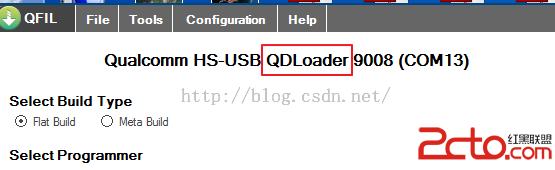
調高通 QFIL 下載工具時,正常情況下連上設備後會顯示如下界面: 圖 1 正常的下載模式 此時顯示的是 QDLoader(高通 Emergency Download
 Android 對稱加密與非對稱加密入門詳解
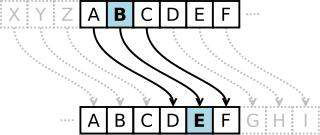
凱撒密碼1. 介紹凱撒密碼是最古老的對稱加密體制之一,在古羅馬時期就已流行。基本思想是透過把字母移動固定位數來實現加解密。例如偏移量為 3 時,A 變 D、B 變 E,而
 手機怎麼定位找人?手機定位軟件使用教學
智慧型手機的發展越來越成熟,幾乎人人手上都有一支,對應的手機安全與定位類軟體也越來越多。其中定位功能的實用性,相當契合現代人的需求。那麼手機怎麼定位找人?又該怎麼設定?本