

編輯:關於 Android 程式設計
本文記錄如何在Android中實現App的版本檢測與更新下載安裝。整體思路是:獲取本地版本號 → 向服務器查詢最新版本 → 若有更新則彈出提示框 → 下載新APK → 下載完成後觸發安裝。
首先是一個簡易的Activity布局:
下載與安裝的工具類。這個類裡需要特別注意的是intent.addCategory("android.intent.category.DEFAULT")這行——有時使用它會出現找不到合適Activity的現象,可以酌情決定是否添加:
package cnjoanthan.updata; import java.io.File; import android.app.Activity; import android.content.Context; import android.content.Intent; import android.content.pm.PackageInfo; import android.content.pm.PackageManager; import android.net.Uri; import android.os.Environment; import android.util.Log; import android.widget.Toast; /* * 2016年8月19日 星期五 * jonathan * 獲取版本號和安裝apk */ public class MyUtils { /* * 獲取版本號 * return 版本號 */ public static String getVersion(Context context){ PackageManager manager = context.getPackageManager();//PackageManager可以獲取文件的信息 Log.i("VersionUpdateUtils", "manager:" + manager); try { PackageInfo packageInfo = manager.getPackageInfo(context.getPackageName(), 0); Log.i("VersionUpdateUtils", "packageInfo:" + packageInfo); return packageInfo.versionName; } catch (Exception e) { // TODO Auto-generated catch block e.printStackTrace(); Log.i("VersionUpdateUtils", "MyUtilsTryAbnormal :" + e.getMessage()); return ""; } } /* * 安裝新版本 */ public static void installApk(Activity activity){ Log.i("VersionUpdateUtils", "install activity:"+activity); try { String path = Environment.getExternalStorageDirectory().getAbsolutePath()+ File.separator+"mobilesafe"+File.separator+"mobilesafe.apk"; // String path = "/sdcard/mobilesafe/mobilesafe.apk"; Intent intent = new Intent(); intent.setAction(Intent.ACTION_VIEW); //添加默認分類 // intent.addCategory("android.intent.category.DEFAULT"); //設置數據類型 intent.setDataAndType(Uri.fromFile(new File(path)), "application/vnd.android.package-archive");/* Uri.fromFile(new File(path))*///Uri.parse("file://"+path) intent.setFlags(Intent.FLAG_ACTIVITY_NEW_TASK); activity.startActivity(intent); // activity.startActivityForResult(intent, 0); } catch (Exception e) { // TODO: handle exception Log.i("VersionUpdateUtils", "install Excepyion:"+e.getMessage()); } } }
接下來是連接下載與解析的邏輯,其中下載用到了xUtils,解析JSONObject也需要相應的jar包支持:
package cnjoanthan.updata; import java.io.BufferedReader; import java.io.DataOutputStream; import java.io.File; import java.io.IOException; import java.io.InputStreamReader; import java.net.HttpURLConnection; import java.net.MalformedURLException; import java.net.URL; import java.net.URLEncoder; import org.json.JSONException; import org.json.JSONObject; import android.annotation.SuppressLint; import android.app.Activity; import android.app.AlertDialog; import android.app.ProgressDialog; import android.content.DialogInterface; import android.os.Environment; import android.os.Handler; import android.util.Log; import android.widget.Toast; import cnjoanthan.updata.DownLoadUtils.MyCallBack; import com.lidroid.xutils.exception.HttpException; import com.lidroid.xutils.http.ResponseInfo; /* * 更新更新類 */ public class VersionUpdateUtils { private static final String TAG = "VersionUpdateUtils"; private static final int MESSAGE_NET_ERROR = 101; private static final int MESSAGE_IO_ERROR = 102; private static final int MESSAGE_JSON_ERROR = 103; private static final int MESSAGE_SHOW_DIALOG = 104; private static final int MESSAGE_ENTERHOME = 105; /* 本地版本號 */ private String mVersion; private Activity context; private VersionEntity versionEntity; private ProgressDialog mProgressDialog; // private Version VersionUpdateUtils(String Version, Activity activity) { mVersion = Version; this.context = activity; Log.i(TAG, "VersionUpdateUtils已重構"); } /* 用於更新的UI */ private Handler handler = new Handler() { public void handleMessage(android.os.Message msg) { Log.i(TAG, "handleMessage啟動"); switch (msg.what) { case MESSAGE_IO_ERROR: Toast.makeText(context, "IO異常", Toast.LENGTH_SHORT).show(); enterHome(); break; case MESSAGE_JSON_ERROR: Toast.makeText(context, "JSON異常", Toast.LENGTH_SHORT).show(); enterHome(); break; case MESSAGE_NET_ERROR: Toast.makeText(context, "網絡異常", Toast.LENGTH_SHORT).show(); enterHome(); break; case MESSAGE_SHOW_DIALOG: Log.i(TAG, "接收到message:"+MESSAGE_SHOW_DIALOG); showUpdateDialog(versionEntity); break; case MESSAGE_ENTERHOME: Toast.makeText(context, "即將跳轉", Toast.LENGTH_LONG).show(); break; default: break; } } /** * 彈出提示框 * * @param versionEntity */ private void showUpdateDialog(final VersionEntity versionEntity) { // TODO Auto-generated method stub Log.i(TAG, "showUpdateDialog啟動構建"); /** * 創建dialog */ AlertDialog.Builder builder = new AlertDialog.Builder(context); builder.setTitle("檢測到新版本:" + versionEntity.versioncode); builder.setMessage(versionEntity.descripting); /** 服務器返回的描述信息 */ builder.setCancelable(false); /** 設置手機不能點擊返回鍵 */ builder.setPositiveButton("立即升級", new DialogInterface.OnClickListener() { @Override public void onClick(DialogInterface dialog, int which) { // TODO Auto-generated method stub initProgressDialog(); downloadNewAPK(versionEntity.apkurl); } /** 下載APK */ @SuppressLint("SdCardPath") private void downloadNewAPK(String apkurl) { Log.i(TAG, "downloadApkurl:"+apkurl); // TODO Auto-generated method stub String fileName = Environment.getExternalStorageDirectory().getAbsolutePath()+ File.separator+"mobilesafe"+File.separator+"mobilesafe.apk";//getExternalStorageDirectory // String fileName = "/sdcard/mobilesafe/mobilesafe.apk"; Log.i(TAG, "fileName:"+fileName); DownLoadUtils dowLoadUtils = new DownLoadUtils(); dowLoadUtils.downapk(apkurl, fileName, new MyCallBack() { @Override public void onSuccess( ResponseInfo arg0) { // TODO Auto-generated method stub mProgressDialog.dismiss(); Log.i(TAG, "Dialog關閉"); MyUtils.installApk(context); } @Override public void onLoadding(long total, long current, boolean isUploading) { // TODO Auto-generated method stub mProgressDialog.setMax((int) total); mProgressDialog .setMessage("正在下載..."); mProgressDialog .setProgress((int) current); Log.i(TAG, "onLoadding"); } @Override public void onFailure( HttpException arg0, String arg1) { // TODO Auto-generated method stub mProgressDialog.setMessage("下載失敗"); mProgressDialog.dismiss(); enterHome(); Log.i(TAG, "onFailure->arg0:"+arg0+" arg1:"+ arg1); } }); } private void initProgressDialog() { // TODO Auto-generated method stub Log.i(TAG, "initProgressDialog開始運行"); mProgressDialog = new ProgressDialog(context); mProgressDialog.setMessage("准備下載..."); mProgressDialog .setProgressStyle(ProgressDialog.STYLE_HORIZONTAL); mProgressDialog.show(); } }); builder.setNegativeButton("暫不升級", new DialogInterface.OnClickListener() { @Override public void onClick(DialogInterface dialog, int which) { // TODO Auto-generated method stub dialog.dismiss(); enterHome(); } }); builder.show(); }; }; /* * 獲取服務器版本 */ public void getCloudVersion() { try { new Thread(postThread).start(); } catch (Exception e) { // TODO: handle exception e.printStackTrace(); Log.i(TAG, "線程異常:" + e.getMessage()); } } private Thread postThread = new Thread() { public void run() { Log.i(TAG, "postThread線程啟動"); String target = "要提交的服務器的URL"; URL url; try { url = new URL(target); HttpURLConnection urlConn = (HttpURLConnection) url .openConnection(); urlConn.setRequestMethod("POST"); urlConn.setDoInput(true); urlConn.setDoOutput(true); urlConn.setUseCaches(true);// 禁止緩存 urlConn.setInstanceFollowRedirects(true); urlConn.setRequestProperty("Content-Type", "application/x-www-form-urlencoded"); DataOutputStream out = new DataOutputStream( urlConn.getOutputStream()); String param = "字段=" + URLEncoder.encode("字段值", "UTF-8") + "&" + "第二個字段=" + URLEncoder.encode("字段值", "UTF-8"); out.writeBytes(param); out.flush(); out.close(); if (urlConn.getResponseCode() == HttpURLConnection.HTTP_OK) { InputStreamReader in = new InputStreamReader( urlConn.getInputStream(), "UTF-8"); BufferedReader buffer = new BufferedReader(in); String inputLine = null; while ((inputLine = buffer.readLine()) != null) { Log.i(TAG, "inputLine:" + inputLine); try { JSONObject jsonObject = new JSONObject(inputLine); Log.i(TAG, "result_code:" + jsonObject .getString("result_code")); if ((jsonObject.getString("result_code")) .equalsIgnoreCase("2")) {/* 服務器是否返回成功 */ JSONObject request = jsonObject .getJSONObject("data"); versionEntity = new VersionEntity(); String code = request.getString("code"); Log.i(TAG, "code:"+code); versionEntity.versioncode = code; String des = request.getString("des"); Log.i(TAG, "des:"+des); versionEntity.descripting = des; String apkurl = request.getString("apkurl"); Log.i(TAG, "apkurl:"+apkurl); versionEntity.apkurl = apkurl; if (!mVersion .equalsIgnoreCase(versionEntity.versioncode)) { /* 版本號不一致的時候 */ handler.sendEmptyMessage(MESSAGE_SHOW_DIALOG); Log.i(TAG, "進入版本不一致模式"); } else { enterHome(); } } } catch (JSONException e) { // TODO Auto-generated catch block e.printStackTrace(); } } } } catch (MalformedURLException e) { // TODO Auto-generated catch block e.printStackTrace(); } catch (IOException e) { // TODO Auto-generated catch block e.printStackTrace(); } }; }; /* end */ private void enterHome() { handler.sendEmptyMessageDelayed(MESSAGE_ENTERHOME, 2000); } }
下載的工具類:
package cnjoanthan.updata; import java.io.File; import com.lidroid.xutils.HttpUtils; import com.lidroid.xutils.exception.HttpException; import com.lidroid.xutils.http.ResponseInfo; import com.lidroid.xutils.http.callback.RequestCallBack; /* * 下載工具類 * jonathan 2016年8月19日 星期五 */ public class DownLoadUtils { public void downapk(String url,String targerFile, final MyCallBack myCallBack){ //創建HttpUtils對象 HttpUtils httpUtils = new HttpUtils(); //調用HttpUtils 下載的方法下載指定文件 httpUtils.download(url, targerFile,new RequestCallBack(){ @Override public void onFailure(HttpException arg0, String arg1) { // TODO Auto-generated method stub myCallBack.onFailure(arg0, arg1); } @Override public void onSuccess(ResponseInfo arg0) { // TODO Auto-generated method stub myCallBack.onSuccess(arg0); } @Override public void onLoading(long total, long current, boolean isUploading) { // TODO Auto-generated method stub super.onLoading(total, current, isUploading); myCallBack.onLoadding(total, current, isUploading); } }); } interface MyCallBack{ /* 下載成功時調用*/ void onSuccess(ResponseInfo arg0); /*下載失敗時調用*/ void onFailure(HttpException arg0,String arg1); /*下載中調用*/ void onLoadding(long total, long current, boolean isUploading); } }
信息實體類:
package cnjoanthan.updata; import android.widget.TextView; public class VersionEntity { /* 服務器版本號*/ public String versioncode; /*版本描述*/ public String descripting; /*apk 下載地址*/ public String apkurl; }
主函數:
package cnjoanthan.updata; import android.app.Activity; import android.os.Bundle; import android.util.Log; import android.view.Menu; import android.view.MenuItem; import android.view.Window; import android.widget.TextView; public class MainActivity extends Activity { private String mVersion;//本地版本號 private TextView mVersionTv;//應用版本號 @Override protected void onCreate(Bundle savedInstanceState) { super.onCreate(savedInstanceState); setContentView(R.layout.activity_main); Log.i("VersionUpdateUtils", "正常"); mVersion = MyUtils.getVersion(getApplicationContext()); initView(); } private void initView() { // TODO Auto-generated method stub mVersionTv = (TextView) findViewById(R.id.tv_editin_edit); mVersionTv.setText(mVersion); Log.i("VersionUpdateUtils", "mVersion:"+mVersion); final VersionUpdateUtils updateUtils = new VersionUpdateUtils(mVersion,MainActivity.this); Log.i("VersionUpdateUtils", "子線程啟動"); new Thread(){ @Override public void run() { // TODO Auto-generated method stub // super.run(); Log.i("VersionUpdateUtils", "匿名子線程運行"); updateUtils.getCloudVersion(); } }.start(); } }
manifest配置(記得添加網絡與存儲相關權限):
需要補充的是,代碼中的存儲路徑是寫死的固定值,實際使用時可根據需求自行修改。此外,在較新的Android版本上,外部存儲讀寫與安裝未知來源應用都需要相應的動態權限申請,這一點在實戰中務必留意。
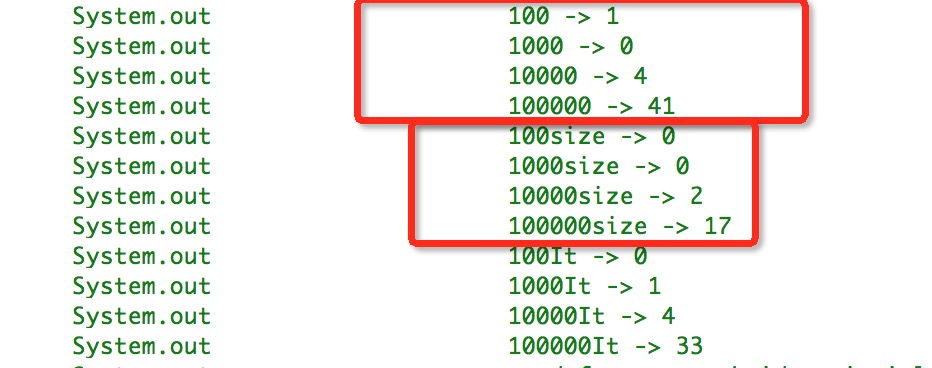 Android 中 List 循環遍歷效能對比:三種寫法的實測分析
在 Android 開發中,只要是列表風格的介面,幾乎都要用 List 來存放資料。當資料量很少時,任何一種循環遍歷方式的整體效能都看不出差別;但當資料量變大時,選對遍歷
 Android Studio 效率插件推薦:從接口調試到模擬器加速
工欲善其事,必先利其器。Android Studio 本身已經足夠強大,但裝上幾個合適的插件之後,日常開發的效率會有明顯提升。以下按使用頻次由高到低整理,前面幾個是幾乎每
 自訂齒輪轉動動畫:Recycler 刷新時的 GearView 實作
齒輪轉動動畫常用於刷新或載入狀態。本文以自訂 GearView 為例,說明如何用 Canvas 繪製多個齒輪,並透過旋轉、平移與縮放模擬機械咬合效果。 基本結構 Gear
 Android ListView 字母排序:實現字母擠壓、右側快速定位與關鍵字搜索
本文將講解如何自定義 EditText 實現搜索框的自定義樣式,以及字母擠壓效果的實現思路,並最終完成一個具備字母排序、右側快速選取與關鍵字搜索功能的通訊錄列表。 自定義