

編輯:關於 Android 程式設計
Service 若採用非綁定式(unbound)的方式啟動,建立之後就無法再與它取得聯繫——不能傳遞參數、不能取得回傳值,只能單向下指令。
如果你希望在服務啟動後仍能與它雙向溝通,那需要走綁定式的路子,可參考筆者前面幾篇關於 Service 綁定與 Activity 通訊的文章。
好消息是,非綁定式的建立非常簡單,和啟動 Activity 幾乎一樣:呼叫 startService() 建立,呼叫 stopService() 停止。
先看生命週期圖:
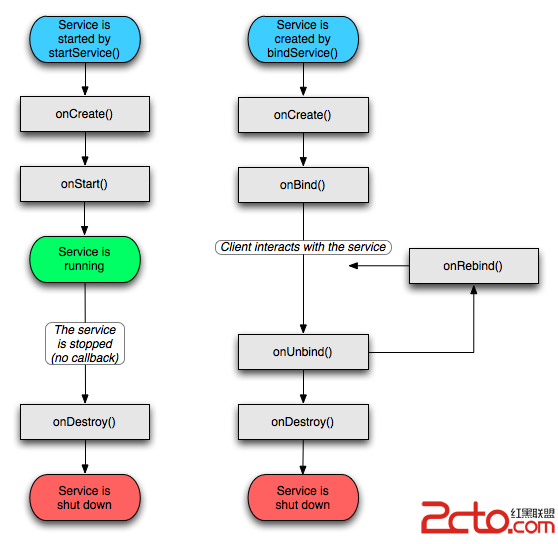
圖的左半部是非綁定式啟動的生命週期,右半部是綁定式的生命週期。
logcat 的實測結果如下:

歸納出四點:
MainActivity.java:
package activity.wyc.com.service;

import android.content.Intent;
import android.support.v7.app.ActionBarActivity;
import android.os.Bundle;
import android.view.View;
import android.widget.Button;
import android.widget.Toast;

public class MainActivity extends ActionBarActivity {

    private Button btnObj, btn02Obj;
    private Intent intent;

    @Override
    protected void onCreate(Bundle savedInstanceState) {
        super.onCreate(savedInstanceState);
        setContentView(R.layout.activity_main);

        btnObj = (Button) findViewById(R.id.btnObj);
        btn02Obj = (Button) findViewById(R.id.btn02Obj);
        intent = new Intent(MainActivity.this, MyService.class);

        btnObj.setOnClickListener(new View.OnClickListener() {
            @Override
            public void onClick(View v) {
                startService(intent);
                Toast.makeText(MainActivity.this, "startService", Toast.LENGTH_SHORT).show();
            }
        });

        btn02Obj.setOnClickListener(new View.OnClickListener() {
            @Override
            public void onClick(View v) {
                stopService(intent);
                Toast.makeText(MainActivity.this, "stopService", Toast.LENGTH_LONG).show();
            }
        });
    }
}
MyService.java:
package activity.wyc.com.service;

import android.app.Service;
import android.content.Intent;
import android.os.IBinder;
import android.util.Log;

public class MyService extends Service {
    private String MyTag = "MyTag";

    public MyService() { }

    @Override
    public IBinder onBind(Intent intent) {
        Log.i(MyTag, "onBind");
        // 非綁定式不需要通訊通道
        throw new UnsupportedOperationException("Not yet implemented");
    }

    @Override
    public void onCreate() {
        super.onCreate();
        Log.i(MyTag, "onCreate");
    }

    @Override
    public int onStartCommand(Intent intent, int flags, int startId) {
        Log.i(MyTag, "onStartCommand");
        return super.onStartCommand(intent, flags, startId);
    }

    @Override
    public void onDestroy() {
        Log.i(MyTag, "onDestroy");
        super.onDestroy();
    }

    @Override
    public boolean onUnbind(Intent intent) {
        Log.i(MyTag, "onUnbind");
        return super.onUnbind(intent);
    }
}
activity_main.xml:
<LinearLayout xmlns:android="https://schemas.android.com/apk/res/android"
    xmlns:tools="https://schemas.android.com/tools"
    android:layout_width="match_parent"
    android:layout_height="match_parent"
    android:orientation="vertical"
    android:paddingBottom="@dimen/activity_vertical_margin"
    android:paddingLeft="@dimen/activity_horizontal_margin"
    android:paddingRight="@dimen/activity_horizontal_margin"
    android:paddingTop="@dimen/activity_vertical_margin"
    tools:context=".MainActivity">

    <Button
        android:id="@+id/btnObj"
        android:layout_width="match_parent"
        android:layout_height="wrap_content"
        android:text="啟動Service"
        android:textSize="20sp" />

    <Button
        android:id="@+id/btn02Obj"
        android:layout_width="match_parent"
        android:layout_height="wrap_content"
        android:text="停止Service"
        android:textSize="20sp" />
</LinearLayout>
AndroidManifest.xml:
Service 與 Activity 同屬四大核心元件,因此也必須在 manifest 中註冊:
<?xml version="1.0" encoding="utf-8"?>
<manifest xmlns:android="https://schemas.android.com/apk/res/android"
    package="activity.wyc.com.service">

    <application
        android:allowBackup="true"
        android:icon="@mipmap/ic_launcher"
        android:label="@string/app_name"
        android:theme="@style/AppTheme">

        <activity android:name=".MainActivity">
            <intent-filter>
                <action android:name="android.intent.action.MAIN" />
                <category android:name="android.intent.category.LAUNCHER" />
            </intent-filter>
        </activity>

        <service android:name=".MyService" />
    </application>
</manifest>
非綁定式的價值在於「簡單」。它適合那種「交辦一件事,做完就結束」的情境,例如上傳一次日誌、同步一次資料。Service 會 independently 依自己的步調執行,不受 Activity 存亡影響——這一點比在 Activity 裡開子執行緒可靠,因為 Activity 被系統回收時,非同步任務也會跟著消失。
但限制也很鮮明。既然沒有 Binder 通道,客戶端就無法知道服務何時完成、也無法把結果取回來。若需要回報,通常得靠其他手段繞道:發送廣播、寫入共用資料、或使用 ResultReceiver。
還有一個容易忽略的細節:onStartCommand 的回傳值。元件預設回傳 super 的結果,實務上通常會改成 START_STICKY(被系統回收後自動重建)或 START_NOT_STICKY(不重建),這會直接影響服務在記憶體吃緊時的存活行為,值得依需求明確指定。
最後提醒版本差異:Android 8.0(API 26)之後,背景應用啟動 Service 會受限,長時間的背景工作應改用 startForegroundService() 並顯示常駐通知,或直接改用 WorkManager。本文的寫法在今日主要作為理解生命週期的入門範例。
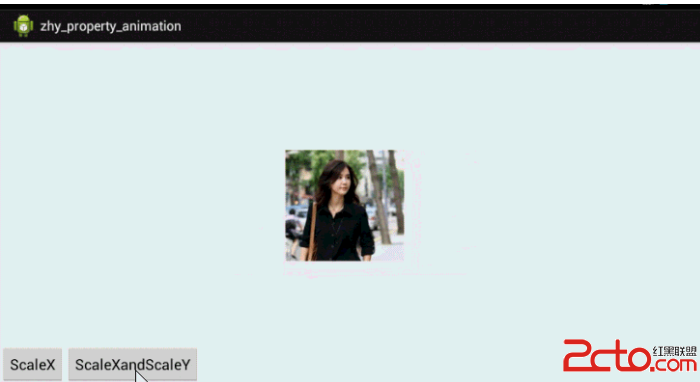 Android 屬性動畫完全解析(下):XML 宣告、LayoutTransition 與 View.animate
上一篇我們已經掌握了屬性動畫的核心用法:以 ObjectAnimator 與 ValueAnimator 實現動畫、透過 AnimatorSet 組合動畫等。本篇則會補齊
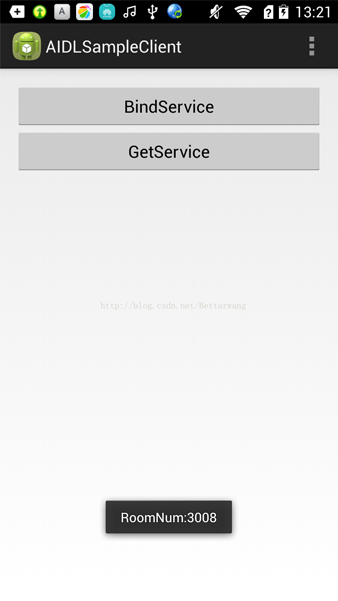 Android 進程間通信總整理:Activity、ContentProvider、Broadcast 與 Service
Android 的應用程式元件在設計上強調隔離,不同應用或不同進程之間不能直接共享記憶體,因此需要一套跨進程通信機制。Android SDK 主要提供 Activity、
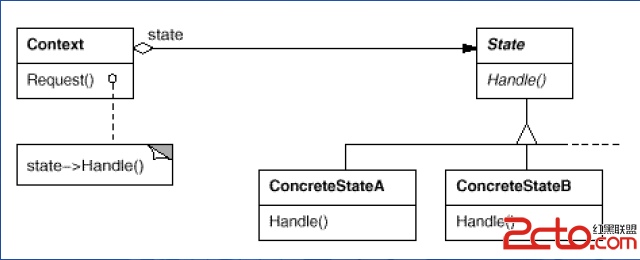 設計模式之狀態模式,以及 Android StateMachine 源碼透視
定義 「狀態模式允許一個對象在其內部狀態改變時改變其行為,這個對象看起來就像換了個類。」——《JAVA與模式》 管理者持有多個狀態對象,狀態切換後再調用同一個方法,會
 Android JNI/NDK 入門:從 Java 到 C++ 的第一步
前言NDK 讓 Android 開發者能用 C/C++ 實作效能敏感或需重用原生庫的功能。本文從環境建置開始,完成一個由 Java 傳入兩個整數、由 C++ 比較大小並回