

編輯:關於 Android 程式設計
原文翻譯整理自 Android 官方訓練課程「傳送請求到背景服務」。上一節我們學會了如何建立 IntentService,這一節則要學習如何透過 Intent 讓 IntentService 执行工作請求。
Intent 可以把任何資料交給 IntentService 處理,你可以在 Activity 或 Fragment 的任意方法中送出 Intent 給 IntentService。
要建立一個工作請求並送給 IntentService,首先需要建立一個顯式的 Intent 物件,向其加入請求資料,最後透過 startService() 送達。
第一步,為名為 RSSPullService 的 IntentService 建立一個顯式 Intent,並把 URI 放進 Intent 的 data 欄位:
/*
 * Creates a new Intent to start the RSSPullService
 * IntentService. Passes a URI in the
 * Intent's "data" field.
 */
mServiceIntent = new Intent(getActivity(), RSSPullService.class);
mServiceIntent.setData(Uri.parse(dataUrl));
第二步,呼叫 startService():
// Starts the IntentService
getActivity().startService(mServiceIntent);
要注意的是,你可以在 Activity 或 Fragment 的任何地方送出工作請求。舉例來說,如果你需要先取得使用者的輸入資料,就可以把送出請求的程式碼放在按鈕的點擊回呼裡。
一旦呼叫了 startService(),IntentService 便會在 onHandleIntent() 方法中執行工作請求,並在任務完成後自動停止。這正是 IntentService 的便利之處——它為你打理好背景執行緒與生命週期,不必手動管理。
下一個步驟,是如何把工作完成的結果回饋給請求的來源。這可以透過 BroadcastReceiver 來達成,也就是官方課程的下一節內容。
 RecyclerView 全面解析:從 ListView 思維到可配置列表
RecyclerView 是什麼RecyclerView 是 Android 在較高版本中推出的列表控件,常用來取代 ListView 與 GridView。它在整體使用
 Android 解析 GML 數據並用地圖顯示:XmlPullParser + SVG 完整實現
本例目標:在 App 中解析 GML 並展示為地圖 GML(Geography Markup Language,地理標記語言)由開放式地理信息系統協會(OGC)於 199
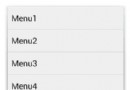 用 Android MenuInflater 建立選單項的步驟教學
建立選單項若全靠 menu.add() 逐一手動新增,不僅效率低落、維護不易。Android 提供了更優雅的方式——MenuInflater,透過 XML 佈局檔來定義選
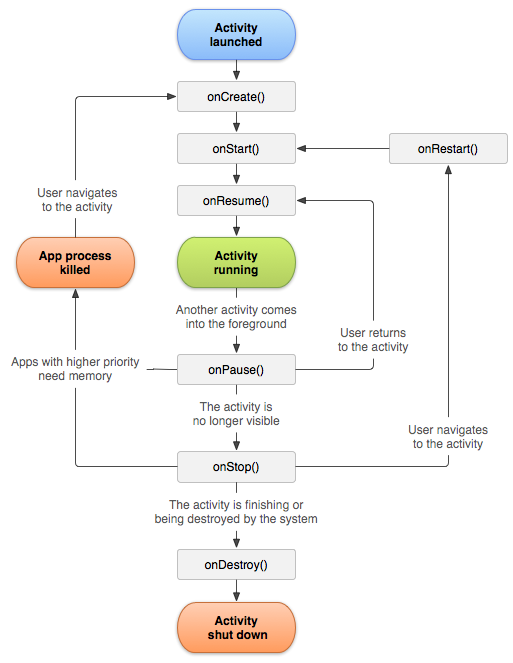 Android Activity 基礎全解:從生命周期到狀態保存
一、Activity 簡介Activity 是一種應用組件,用戶可以與它所提供的屏幕進行交互,從而完成撥打電話、拍攝照片、發送郵件或查看地圖等操作。每個 Activity