

編輯:關於 Android 程式設計
在正常情況下,用 NestedScrollView 嵌套 RecyclerView 往往會遇到兩個問題:一是列表只顯示一行,二是滑動異常,也就是所謂的事件衝突。
下面提供兩種解決思路:
1. 最簡單的方法,是把 design 庫與 V7 庫升級到 23.2 以上版本,並加上以下程式碼:
mLinearLayoutManager.setSmoothScrollbarEnabled(true);
mLinearLayoutManager.setAutoMeasureEnabled(true);
cardslist_view.setLayoutManager(mLinearLayoutManager);
cardslist_view.setHasFixedSize(true);
cardslist_view.setNestedScrollingEnabled(false);
這樣問題即可解決。
2. 麻煩一些的方法,是重寫 LinearLayoutManager 與 NestedScrollView。
public class CustomLinearLayoutManager extends LinearLayoutManager {
    public CustomLinearLayoutManager(Context context, int orientation, boolean reverseLayout) {
        super(context, orientation, reverseLayout);
    }
    private int[] mMeasuredDimension = new int[2];
    @Override
    public void onMeasure(RecyclerView.Recycler recycler, RecyclerView.State state, int widthSpec, int heightSpec) {
        final int widthMode = View.MeasureSpec.getMode(widthSpec);
        final int heightMode = View.MeasureSpec.getMode(heightSpec);
        final int widthSize = View.MeasureSpec.getSize(widthSpec);
        final int heightSize = View.MeasureSpec.getSize(heightSpec);
        int width = 0;
        int height = 0;
        for (int i = 0; i < getItemCount(); i++) {
            if (getOrientation() == HORIZONTAL) {
                measureScrapChild(recycler, i, View.MeasureSpec.makeMeasureSpec(i, View.MeasureSpec.UNSPECIFIED), heightSpec, mMeasuredDimension);
                width = width + mMeasuredDimension[0];
                if (i == 0) {
                    height = mMeasuredDimension[1];
                }
            } else {
                measureScrapChild(recycler, i, widthSpec, View.MeasureSpec.makeMeasureSpec(i, View.MeasureSpec.UNSPECIFIED), mMeasuredDimension);
                height = height + mMeasuredDimension[1];
                if (i == 0) {
                    width = mMeasuredDimension[0];
                }
            }
        }
        switch (widthMode) {
            case View.MeasureSpec.EXACTLY:
                width = widthSize;
            case View.MeasureSpec.AT_MOST:
            case View.MeasureSpec.UNSPECIFIED:
        }
        switch (heightMode) {
            case View.MeasureSpec.EXACTLY:
                height = heightSize;
            case View.MeasureSpec.AT_MOST:
            case View.MeasureSpec.UNSPECIFIED:
        }
        setMeasuredDimension(width, height);
    }
    private void measureScrapChild(RecyclerView.Recycler recycler, int position, int widthSpec, int heightSpec, int[] measuredDimension) {
        View view = recycler.getViewForPosition(position);
        recycler.bindViewToPosition(view, position);
        if (view != null) {
            RecyclerView.LayoutParams p = (RecyclerView.LayoutParams) view.getLayoutParams();
            int childWidthSpec = ViewGroup.getChildMeasureSpec(widthSpec, getPaddingLeft() + getPaddingRight(), p.width);
            int childHeightSpec = ViewGroup.getChildMeasureSpec(heightSpec, getPaddingTop() + getPaddingBottom(), p.height);
            view.measure(childWidthSpec, childHeightSpec);
            measuredDimension[0] = view.getMeasuredWidth() + p.leftMargin + p.rightMargin;
            measuredDimension[1] = view.getMeasuredHeight() + p.bottomMargin + p.topMargin;
            recycler.recycleView(view);
        }
    }
}
public class MyNestedScrollView extends NestedScrollView {
    private int downX;
    private int downY;
    private int mTouchSlop;
    public MyNestedScrollView(Context context) {
        super(context);
        mTouchSlop = ViewConfiguration.get(context).getScaledTouchSlop();
    }
    public MyNestedScrollView(Context context, AttributeSet attrs) {
        super(context, attrs);
        mTouchSlop = ViewConfiguration.get(context).getScaledTouchSlop();
    }
    public MyNestedScrollView(Context context, AttributeSet attrs, int defStyleAttr) {
        super(context, attrs, defStyleAttr);
        mTouchSlop = ViewConfiguration.get(context).getScaledTouchSlop();
    }
    @Override
    public boolean onInterceptTouchEvent(MotionEvent e) {
        int action = e.getAction();
        switch (action) {
            case MotionEvent.ACTION_DOWN:
                downX = (int) e.getRawX();
                downY = (int) e.getRawY();
                break;
            case MotionEvent.ACTION_MOVE:
                int moveY = (int) e.getRawY();
                if (Math.abs(moveY - downY) > mTouchSlop) {
                    return true;
                }
        }
        return super.onInterceptTouchEvent(e);
    }
}
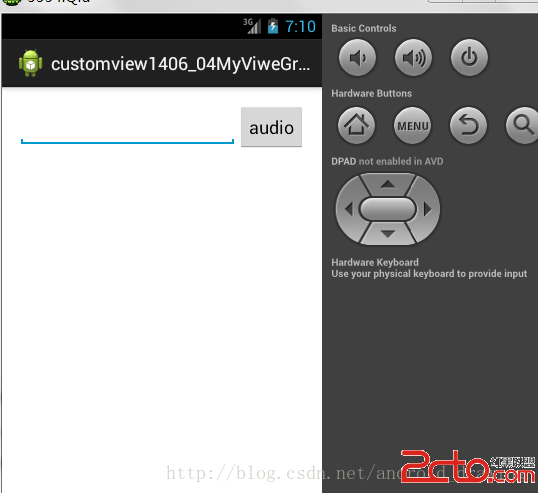 Android 自定義 ViewGroup 佈局:onMeasure 與 onLayout 的實作要點
當系統內建的 LinearLayout、RelativeLayout 都無法滿足排列需求時,就得自己繼承 ViewGroup 寫一個佈局。自定義 ViewGroup 的核
 動手做一個圖片快取框架:DrySister 圖片載入優化(SisterLoader)
1. 開場 上一節我們把妹子圖片的資料來源從本地資源改成解析 Gank 的介面。但目前的載入方式完全沒有快取——同一張圖看過一次,下次還是要重新發請求、重新解析串流,白耗
 Android 進程信息查看與內存線索分析
在 Android 中,adb shell 的 ps 指令可快速查看目前執行的行程。這對效能分析、記憶體排查與應用除錯都很實用。使用 ps 查看行程透過 adb shel
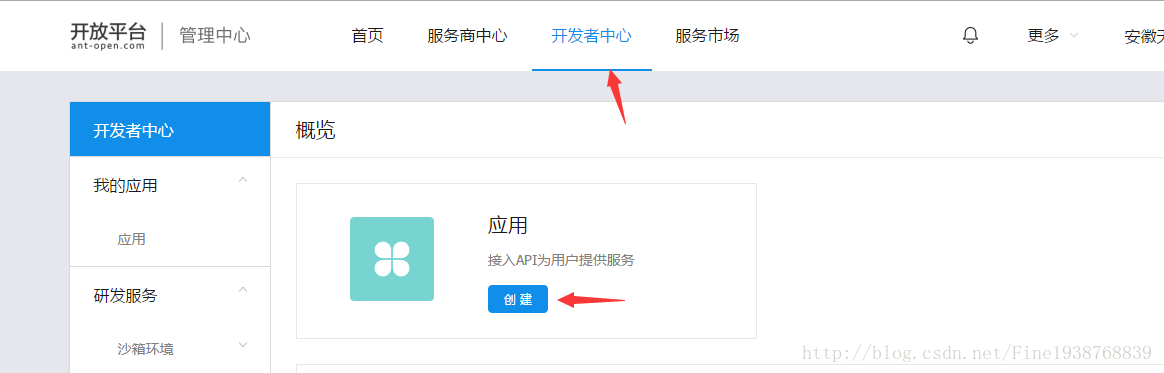 Android 接入支付寶支付:客戶端集成步驟與踩坑筆記
前言 緊接上一篇微信支付,這次來集成支付寶。實際動手會發現,支付寶的客戶端集成比微信簡單不少——主要工作都在服務端,App 端真的就是幾句程式碼的事。 第一步:在開放