

編輯:關於 Android 程式設計
獲取手機 IP 地址的程式碼如下:
public static String getLocalIpAddress(){ try{ for (Enumeration<NetworkInterface> en = NetworkInterface.getNetworkInterfaces(); en.hasMoreElements();) { NetworkInterface intf = en.nextElement(); for (Enumeration<InetAddress> enumIpAddr = intf .getInetAddresses(); enumIpAddr.hasMoreElements();) { InetAddress inetAddress = enumIpAddr.nextElement(); if (!inetAddress.isLoopbackAddress()) { return inetAddress.getHostAddress().toString(); } } } }catch (SocketException e) { // TODO: handle exception Utils.log("WifiPreference IpAddress---error-" + e.toString()); } return null; }
然而在 Android 4.0 系統下,這段程式碼可能會回傳類似 fe80::b607:f9ff:fee5:487e 這樣的位址。這其實是 IPv6 位址,而我們真正需要的是 IPv4 位址。因此,需要在上述程式碼中加上一個判斷:InetAddressUtils.isIPv4Address(inetAddress.getHostAddress())。
完整程式碼如下:
public static String getLocalIpAddress(){ try{ for (Enumeration<NetworkInterface> en = NetworkInterface.getNetworkInterfaces(); en.hasMoreElements();) { NetworkInterface intf = en.nextElement(); for (Enumeration<InetAddress> enumIpAddr = intf .getInetAddresses(); enumIpAddr.hasMoreElements();) { InetAddress inetAddress = enumIpAddr.nextElement(); if (!inetAddress.isLoopbackAddress() && InetAddressUtils.isIPv4Address(inetAddress.getHostAddress())) { return inetAddress.getHostAddress().toString(); } } } }catch (SocketException e) { // TODO: handle exception Utils.log("WifiPreference IpAddress---error-" + e.toString()); } return null; }
透過加上這個判斷,就能確保只回傳 IPv4 格式的 IP 位址,避免誤取到 IPv6 位址。
 自定義 Switch 組件過程詳解
前段時間,我看到了一篇關於 Android 動畫的文章,十分喜歡作者的筆風,可惜每個人的筆風都不同。不過我倒是實現了一個類似的 Switch 組件,項目地址為 https
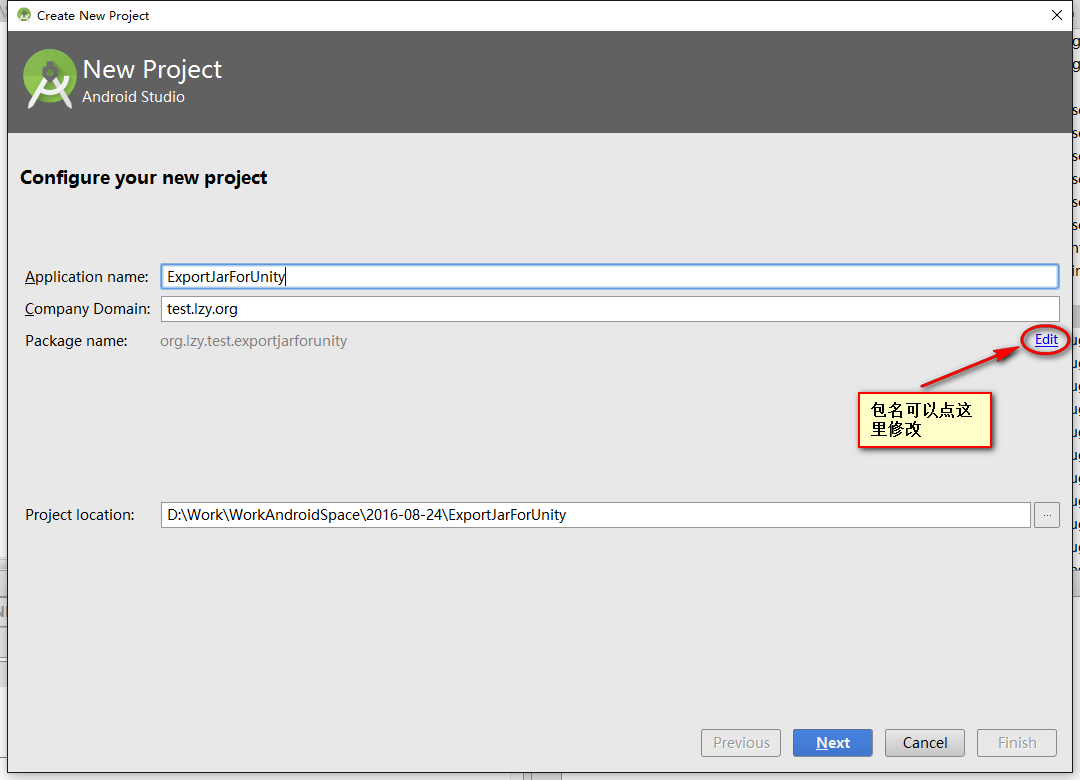 Unity 整合篇:用 Android Studio 打包 Jar 並導入 Unity 的完整流程
本文以 Android Studio 2.1.1 搭配 Unity 5.4.0f1 為例,示範如何把 Android 原生功能封裝成 Jar 檔,再導入 Unity 專案
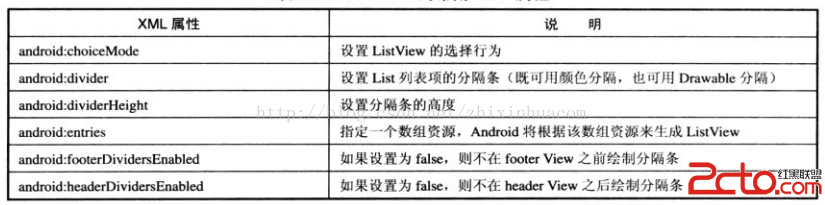 Android 開發入門:ListView 與 ListActivity 列表實戰
列表控件的核心概念 在 Android 介面開發裡,ListView 與 ListActivity 和 AutoComplete、Spinner 屬於同一類型的元件,它們
 Android 學習筆記(032):資料儲存之檔案讀寫
在 Android OS 中一共提供了五種資料儲存方式:ContentProvider、檔案儲存、SharedPreference、SQLite 資料庫與網絡儲存。Con