

編輯:關於 Android 程式設計
在自訂控制項時,如果我們想額外加入一些屬性,就會用到 TypedArray 這個類別。那麼這個類別是怎麼取得的、又該怎麼使用?本文將詳細說明。以下是我以前自訂控制項的一段程式碼。
TypedArray typedArray = context.obtainStyledAttributes(attrs,R.styleable.myaccount_item_style);我們可以看到 TypedArray 是透過 Context 的方法取得的,但要記住,使用完畢後一定要呼叫 recycle() 方法進行回收。我們點進去找最終的實作:
public TypedArray obtainStyledAttributes(AttributeSet set, int[] attrs, int defStyleAttr, int defStyleRes) { final int len = attrs.length; final TypedArray array = TypedArray.obtain(Resources.this, len); // XXX note that for now we only work with compiled XML files. // To support generic XML files we will need to manually parse // out the attributes from the XML file (applying type information // contained in the resources and such). final XmlBlock.Parser parser = (XmlBlock.Parser)set; AssetManager.applyStyle(mTheme, defStyleAttr, defStyleRes, parser != null ? parser.mParseState : 0, attrs, array.mData, array.mIndices); array.mTheme = this; array.mXml = parser; ………………………… return array; }
我們先看下面 AssetManager 的 applyStyle 方法,它是 native 方法,也就是以 C++ 實現的,它會把自訂控制項屬性的值擷取出來,存進 TypedArray 的 mData 陣列中。這個陣列的大小由你定義的控制項屬性個數決定,是其 6 倍;上面的 attrs 其實就是你自訂屬性的個數。我們來看一下:
static TypedArray obtain(Resources res, int len) { final TypedArray attrs = res.mTypedArrayPool.acquire(); if (attrs != null) { attrs.mLength = len; attrs.mRecycled = false; final int fullLen = len * AssetManager.STYLE_NUM_ENTRIES; if (attrs.mData.length >= fullLen) { return attrs; } attrs.mData = new int[fullLen]; attrs.mIndices = new int[1 + len]; return attrs; } return new TypedArray(res, new int[len*AssetManager.STYLE_NUM_ENTRIES], new int[1+len], len); }
它首先會從 TypedArray 池中取得,若有就取出,且 mData 的大小不能小於屬性個數的 6 倍,因為 STYLE_NUM_ENTRIES 的值為 6;若沒有就 new 一個再回傳。把屬性的值擷取出來之後,我們就可以著手操作了。先來看 View 類別初始化中的一段程式碼:
final int N = a.getIndexCount(); for (int i = 0; i < N; i++) { int attr = a.getIndex(i); switch (attr) { case com.android.internal.R.styleable.View_background: background = a.getDrawable(attr); break; ………………………… } }
它會把 TypedArray 中的資料取出來,對 View 的屬性賦值。我們來看 TypedArray 類別的建構方法:
/*package*/ TypedArray(Resources resources, int[] data, int[] indices, int len) { mResources = resources; mMetrics = mResources.mMetrics; mAssets = mResources.mAssets; mData = data; mIndices = indices; mLength = len; }
程式碼很簡單,其中 mData 就是從 XML 檔案中擷取到的資料,其大小是自訂屬性個數的 6 倍,所以這裡每 6 個作為一組。我們可以回看上面的 obtain 方法,data 陣列的大小正是乘以 6(STYLE_NUM_ENTRIES)。這 6 種類型如下,定義在 AssetManager 類別中,下面第一個表示每組 6 個:
/*package*/ static final int STYLE_NUM_ENTRIES = 6; /*package*/ static final int STYLE_TYPE = 0; /*package*/ static final int STYLE_DATA = 1; /*package*/ static final int STYLE_ASSET_COOKIE = 2; /*package*/ static final int STYLE_RESOURCE_ID = 3; /*package*/ static final int STYLE_CHANGING_CONFIGURATIONS = 4; /*package*/ static final int STYLE_DENSITY = 5;它們對應著 TypedValue 類別中的這 7 種欄位,其中 string 是依據 type 取得的:
/** The type held by this value, as defined by the constants here. * This tells you how to interpret the other fields in the object. */ public int type; /** If the value holds a string, this is it. */ public CharSequence string; /** Basic data in the value, interpreted according to {@link #type} */ public int data; /** Additional information about where the value came from; only * set for strings. */ public int assetCookie; /** If Value came from a resource, this holds the corresponding resource id. */ public int resourceId; /** If Value came from a resource, these are the configurations for which * its contents can change. */ public int changingConfigurations = -1; /** * If the Value came from a resource, this holds the corresponding pixel density. * */ public int density;
如果仔細看的話就會發現,obtain 方法在初始化 mIndices 陣列時是加 1 的,因為 mIndices 陣列的第一個位置保存的是我們所使用的屬性個數——注意是「使用」而非「定義」。我們來看其中一些程式碼:
/** * Return the number of values in this array. */ public int length() { if (mRecycled) { throw new RuntimeException("Cannot make calls to a recycled instance!"); } return mLength; } /** * Return the number of indices in the array that actually have data. */ public int getIndexCount() { if (mRecycled) { throw new RuntimeException("Cannot make calls to a recycled instance!"); } return mIndices[0]; }
第一個 length 回傳的是我們所定義屬性的個數,因為這個參數是在建構方法中賦值的,傳入的是 int[] attrs 的長度,而這個 attrs 就是我們在 attrs 檔案中自訂屬性時,R 檔案自動產生的一個陣列。下面的 getIndexCount() 方法回傳的則是我們所使用的屬性個數,因為 mIndices 的資料是從 XML 檔案中擷取的,第一個位置保存我們使用屬性的個數,後面的位置就是我們使用的自訂屬性在 R 檔案中產生的 id。再看一個自訂時常用的方法:
public int getIndex(int at) { if (mRecycled) { throw new RuntimeException("Cannot make calls to a recycled instance!"); } return mIndices[1+at]; }
這個取得的就是自訂屬性在 R 檔案中產生的 id,剩下的一些方法就是從 TypedArray 中取值了,主要有以下幾種類型:
TypedArray 的方法很多,這裡就挑幾個常用的來分析。在分析之前,先看下面這個方法:
private CharSequence loadStringValueAt(int index) { final int[] data = mData; final int cookie = data[index+AssetManager.STYLE_ASSET_COOKIE]; if (cookie < 0) { if (mXml != null) { return mXml.getPooledString( data[index+AssetManager.STYLE_DATA]); } return null; } return mAssets.getPooledStringForCookie(cookie, data[index+AssetManager.STYLE_DATA]); }
前面提到的每 6 個一組,其中每組下標為 STYLE_ASSET_COOKIE(2)的,是用來標記快取的,而且只針對 String 類型。我們來看:
private boolean getValueAt(int index, TypedValue outValue) { final int[] data = mData; final int type = data[index+AssetManager.STYLE_TYPE]; if (type == TypedValue.TYPE_NULL) { return false; } outValue.type = type; outValue.data = data[index+AssetManager.STYLE_DATA]; outValue.assetCookie = data[index+AssetManager.STYLE_ASSET_COOKIE]; outValue.resourceId = data[index+AssetManager.STYLE_RESOURCE_ID]; outValue.changingConfigurations = data[index+AssetManager.STYLE_CHANGING_CONFIGURATIONS]; outValue.density = data[index+AssetManager.STYLE_DENSITY]; outValue.string = (type == TypedValue.TYPE_STRING) ? loadStringValueAt(index) : null; return true; }
上面這個方法把 mData 指定範圍的 6 個資料擷取到 outValue 中,其中 string 值是透過 type 類型取得的。我們再來看 assetCookie 的註解:
/** Additional information about where the value came from; only * set for strings. */ public int assetCookie;所以它只針對 String 類型。我們再來看 String 類型的註解:
/** The string field holds string data. In addition, if * data is non-zero then it is the string block * index of the string and assetCookie is the set of * assets the string came from. */ public static final int TYPE_STRING = 0x03;所以它只針對 string 類型的資料進行擷取,比如 text、String、color 等;color 可以是 string 類型也可以是 int 類型。再回看上面的 loadStringValueAt 方法,如果 cookie 小於 0,表示沒有快取,就會從 XML 中解析,否則就從快取中取:
/*package*/ final CharSequence getPooledStringForCookie(int cookie, int id) { // Cookies map to string blocks starting at 1. return mStringBlocks[cookie - 1].get(id);
我們來看它是怎麼從 XML 中解析的。回看上面的 obtainStyledAttributes 方法,會發現這樣一段程式碼 array.mXml = parser,其中 parser 就是 View 及其子類在初始化時傳入的 AttributeSet。我們在前面探討 LayoutInflater 時談到,View 及其子類的建立是透過反射來初始化的,這裡再複習一下:
public final View createView(String name, String prefix, AttributeSet attrs) throws ClassNotFoundException, InflateException { Constructor constructor = sConstructorMap.get(name); Class clazz = null; try { ………………………… constructor = clazz.getConstructor(mConstructorSignature); ………………………… Object[] args = mConstructorArgs; args[1] = attrs; constructor.setAccessible(true); final View view = constructor.newInstance(args); ………………………… return view; } catch (NoSuchMethodException e) { ………………………… } finally { Trace.traceEnd(Trace.TRACE_TAG_VIEW); } }
其中 attrs 是透過 Resource 的 loadXmlResourceParser 方法載入的,我們看一下:
/*package*/ XmlResourceParser loadXmlResourceParser(int id, String type) throws NotFoundException { synchronized (mAccessLock) { TypedValue value = mTmpValue; if (value == null) { mTmpValue = value = new TypedValue(); } getValue(id, value, true); if (value.type == TypedValue.TYPE_STRING) { return loadXmlResourceParser(value.string.toString(), id, value.assetCookie, type); } throw new NotFoundException( "Resource ID #0x" + Integer.toHexString(id) + " type #0x" + Integer.toHexString(value.type) + " is not valid"); } }
剩下的就涉及 XML 的解析,這裡不再深入探討。言歸正傳,回到剛才的 loadStringValueAt 方法:若快取中存在就從快取取,若不存在就透過 XML 解析取得。下面再看一些常用方法。其中 getText(int index) 與 getString(int index) 差不多,我們來看 getString(int index):
public String getString(int index) { if (mRecycled) { throw new RuntimeException("Cannot make calls to a recycled instance!"); } index *= AssetManager.STYLE_NUM_ENTRIES; final int[] data = mData; final int type = data[index+AssetManager.STYLE_TYPE]; if (type == TypedValue.TYPE_NULL) { return null; } else if (type == TypedValue.TYPE_STRING) { return loadStringValueAt(index).toString(); } TypedValue v = mValue; if (getValueAt(index, v)) { Log.w(Resources.TAG, "Converting to string: " + v); CharSequence cs = v.coerceToString(); return cs != null ? cs.toString() : null; } Log.w(Resources.TAG, "getString of bad type: 0x" + Integer.toHexString(type)); return null; }
上面的 index 要乘以 6(STYLE_NUM_ENTRIES),因為是每 6 個一組。若 type 為 null 就回傳空,若為 String 類型便呼叫 loadStringValueAt 方法取得我們設定的值。有一點要特別注意:如果我們在 attrs 中設定的 format 類型與自訂設定的參數不符,運行時是會報錯的,必須設為相符並 clean 才能解決。否則就會執行下面的方法,強制轉換為字串,程式碼較簡單,這裡不再貼出。再看下一個 bool 與 int 類型,由於兩者差不多,就隨便挑一個:
public int getInt(int index, int defValue) { index *= AssetManager.STYLE_NUM_ENTRIES; final int[] data = mData; final int type = data[index+AssetManager.STYLE_TYPE]; if (type == TypedValue.TYPE_NULL) { return defValue; } else if (type >= TypedValue.TYPE_FIRST_INT && type <= TypedValue.TYPE_LAST_INT) { return data[index+AssetManager.STYLE_DATA]; } TypedValue v = mValue; if (getValueAt(index, v)) { Log.w(Resources.TAG, "Converting to int: " + v); return XmlUtils.convertValueToInt( v.coerceToString(), defValue); } Log.w(Resources.TAG, "getInt of bad type: 0x" + Integer.toHexString(type)); return defValue; }
上面的類型如果大於 TYPE_FIRST_INT 並且小於 TYPE_LAST_INT,就從 mData 中取值。從它的範圍來看,也就 int、Boolean、color 三種是這樣取值的:
/** Identifies the start of integer values that were specified as * color constants (starting with '#'). */ public static final int TYPE_FIRST_COLOR_INT = 0x1c; /** The data field holds a color that was originally * specified as #aarrggbb. */ public static final int TYPE_INT_COLOR_ARGB8 = 0x1c; /** The data field holds a color that was originally * specified as #rrggbb. */ public static final int TYPE_INT_COLOR_RGB8 = 0x1d; /** The data field holds a color that was originally * specified as #argb. */ public static final int TYPE_INT_COLOR_ARGB4 = 0x1e; /** The data field holds a color that was originally * specified as #rgb. */ public static final int TYPE_INT_COLOR_RGB4 = 0x1f; /** Identifies the end of integer values that were specified as color * constants. */ public static final int TYPE_LAST_COLOR_INT = 0x1f; /** Identifies the end of plain integer values. */ public static final int TYPE_LAST_INT = 0x1f;如果範圍不在 TYPE_FIRST_INT 和 TYPE_LAST_INT 之間,就會把 mData 指定位置上的值擷取到 TypedValue 中,再強制轉化,若沒有擷取到則回傳一個預設值——因為如果在 attrs 中定義卻沒有用到,就會回傳預設值。我們來看它是怎麼轉化的:
public static final int convertValueToInt(CharSequence charSeq, int defaultValue) { if (null == charSeq) return defaultValue; String nm = charSeq.toString(); // XXX This code is copied from Integer.decode() so we don't // have to instantiate an Integer! int value; int sign = 1; int index = 0; int len = nm.length(); int base = 10; if ('-' == nm.charAt(0)) { sign = -1; index++; } if ('0' == nm.charAt(index)) { // Quick check for a zero by itself if (index == (len - 1)) return 0; char c = nm.charAt(index + 1); if ('x' == c || 'X' == c) { index += 2; base = 16; } else { index++; base = 8; } } else if ('#' == nm.charAt(index)) { index++; base = 16; } return Integer.parseInt(nm.substring(index), base) * sign; }
這個很好理解,轉化為 int 類型時有 0 開頭的 8 進制、0x 開頭的 16 進制,還有 # 開頭的 color 值;如果轉化前是負數,轉化後還要乘以 -1(sign)。再來看一個:
public int getColor(int index, int defValue) { index *= AssetManager.STYLE_NUM_ENTRIES; final int[] data = mData; final int type = data[index+AssetManager.STYLE_TYPE]; if (type == TypedValue.TYPE_NULL) { return defValue; } else if (type >= TypedValue.TYPE_FIRST_INT && type <= TypedValue.TYPE_LAST_INT) { return data[index+AssetManager.STYLE_DATA]; } else if (type == TypedValue.TYPE_STRING) { final TypedValue value = mValue; if (getValueAt(index, value)) { ColorStateList csl = mResources.loadColorStateList( value, value.resourceId); return csl.getDefaultColor(); } return defValue; } throw new UnsupportedOperationException("Can't convert to color: type=0x" + Integer.toHexString(type)); }
這個就不多說了,因為 color 有 String 和 int 兩種類型,如果是 String 類型就會回傳 ColorStateList 的預設值。因為 ColorStateList 可能有多種類型,但必須所有狀態都是 false 的才是預設。下面隨便看一個,以下這些擷取之後預設的就是 green,因為只有它的所有狀態都是 false。
下面再看最後一個方法:
public int getLayoutDimension(int index, String name) { index *= AssetManager.STYLE_NUM_ENTRIES; final int[] data = mData; final int type = data[index+AssetManager.STYLE_TYPE]; if (type >= TypedValue.TYPE_FIRST_INT && type <= TypedValue.TYPE_LAST_INT) { return data[index+AssetManager.STYLE_DATA]; } else if (type == TypedValue.TYPE_DIMENSION) { return TypedValue.complexToDimensionPixelSize( data[index+AssetManager.STYLE_DATA], mResources.mMetrics); } throw new RuntimeException(getPositionDescription() + ": You must supply a " + name + " attribute."); }
看方法名大概就知道是取得 layout 尺寸的。大致看一下 ViewGroup 中的:
protected void setBaseAttributes(TypedArray a, int widthAttr, int heightAttr) { width = a.getLayoutDimension(widthAttr, "layout_width"); height = a.getLayoutDimension(heightAttr, "layout_height"); }
其中取得的值有 3 種:一種是我們精確指定的大於 0 的值,一種是 -1(MATCH_PARENT),另一種是 -2(WRAP_CONTENT)。XML 屬性除了寬和高以外,初始化時基本上都能擷取到,但寬和高不行,因為它是最終計算出來的。如果大家自訂 View 繼承 View 時,必須重寫 onMeasure 方法,重新計算它的寬和高。如果我們不計算,當使用 MATCH_PARENT 或 WRAP_CONTENT 屬性時,結果會完全一樣,尺寸都是填滿剩下的螢幕。若不重寫 onMeasure,也可以直接在 XML 中把寬高寫死,但這樣不夠靈活。我們來看為什麼要重寫:
public static int getDefaultSize(int size, int measureSpec) { int result = size; int specMode = MeasureSpec.getMode(measureSpec); int specSize = MeasureSpec.getSize(measureSpec); switch (specMode) { case MeasureSpec.UNSPECIFIED: result = size; break; case MeasureSpec.AT_MOST: case MeasureSpec.EXACTLY: result = specSize; break; } return result; }
我們看到 View 中的 getDefaultSize 方法,AT_MOST 和 EXACTLY 回傳的結果都一樣。如果想深入了解,建議看一下 ViewGroup 的 getChildMeasureSpec 方法,這裡就不再貼出,大家可以自行查閱。至此,TypedArray 中剩下的方法基本也都非常相似,這裡就不再一一講述了。
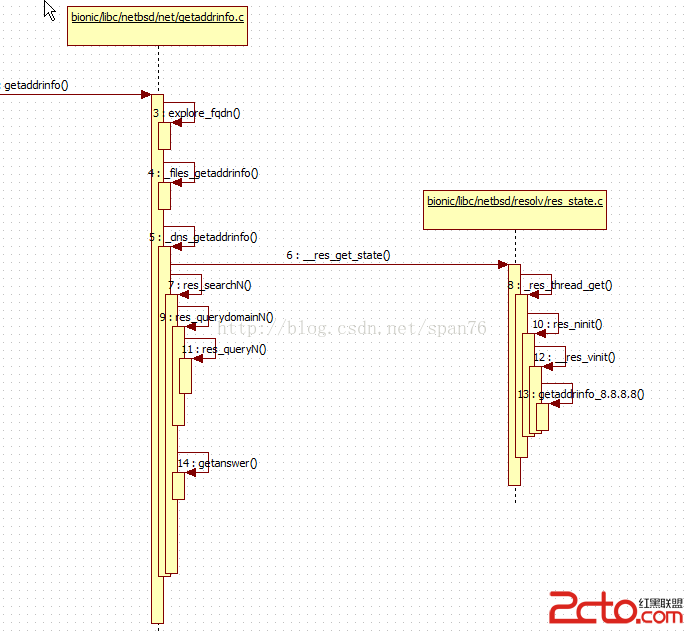 Android DNS 解析流程簡析
Android 的 DNS 相關程式碼主要位於 bionic/libc/netbsd 目錄中。雖然 netbsd 已不是活躍專案,但其中的 DNS 解析部分仍被 Andr
 Android 圖像處理:黑白濾鏡實作
黑白濾鏡是最經典的圖像效果之一。它會去除色彩資訊,只保留明暗層次,使照片呈現出紀錄片、街拍或復古影像般的氛圍。在 Android 中,這類效果同樣可以透過 Bitmap
 Android網路收音機:Vitamio串流播放與狀態處理
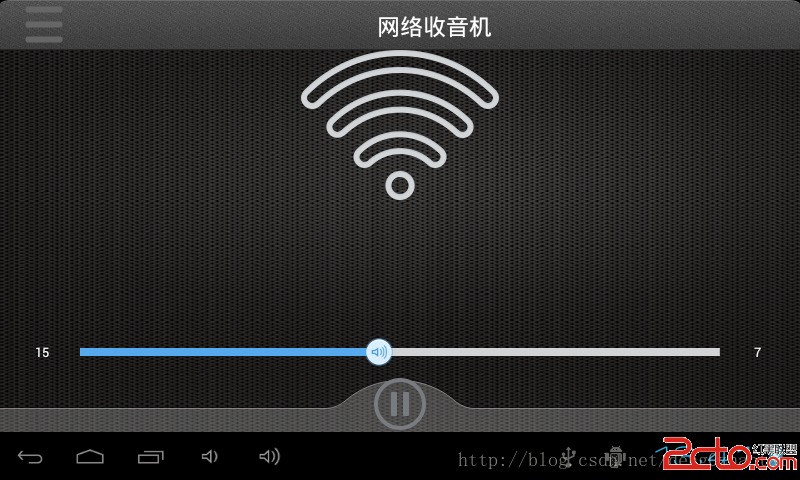
本文以Vitamio實作網路收音機,重點在串流播放與狀態處理。播放流程選擇曲目後,MediaPlayer會先reset,再設定資料來源並呼叫prepareAsync,避免
 高仿 To 圈註冊錄音界面:自定義 View 全解析
先看一眼 To 圈(QQ、微信等大部分 IM 也是大同小異)註冊頁的錄音效果: 為了還原這個效果,確實花了不少功夫。回頭總結,主要難點有三處: 難點一:隨音量變化的話筒