

編輯:關於 Android 程式設計
日常開發中,總有一些高頻用到的小功能值得沉澱成工具方法,隨取隨用。本文精選了一批Android開發中常見的實用方法,涵蓋格式化、驗證、圖片處理、網絡判斷等多個場景,並附上完整代碼,方便直接收藏借鑒。
在計算費用精度時經常會用到,可將價格字符串格式化成保留兩位小數的形式。
public static String getFloatDotStr(String argStr) { float arg = Float.valueOf(argStr); DecimalFormat fnum = new DecimalFormat("##0.00"); return fnum.format(arg); }
public static int getVerCode(Context context) { int verCode = 0; try { verCode = context.getPackageManager().getPackageInfo(context.getPackageName(), 0).versionCode; } catch (NameNotFoundException e) { e.printStackTrace(); } return verCode; }
public static int[] ScreenSize(Context context) { DisplayMetrics metrics = new DisplayMetrics(); ((WindowManager) context.getSystemService(Context.WINDOW_SERVICE)).getDefaultDisplay().getMetrics(metrics); return new int[] { metrics.widthPixels, metrics.heightPixels }; }
public static boolean judgeSDCard() { String status = Environment.getExternalStorageState(); return status.equals(Environment.MEDIA_MOUNTED); }
public static boolean validName(String name) { String pattern = "[\u4e00-\u9fa5]"; if (isNull(name)) return false; return name.matches(pattern); }
public static boolean validateIdCard(String idCard) { if (isNull(idCard)) return false; String pattern = "^[0-9]{17}[0-9|xX]{1}$"; return idCard.matches(pattern); }
public static boolean validatePhone(String phone) { if (isNull(phone)) return false; String pattern = "^1[3,4,5,6,8]\\d{9}$"; return phone.matches(pattern); }
public static boolean isZipNO(String zipString) { String str = "^[1-9][0-9]{5}$"; return Pattern.compile(str).matcher(zipString).matches(); }
public static boolean validateBankCard(String bankCard) { if (isNull(bankCard)) return false; String pattern = "^\\d{13,19}$"; return bankCard.matches(pattern); }
public static boolean validateEmail(String email) { if (isNull(email)) return false; String pattern = "^([a-zA-Z0-9_\\.\\-])+\\@(([a-zA-Z0-9\\-])+\\.)+([a-zA-Z0-9]{2,4})+$"; return email.matches(pattern); }
public static Bitmap toRoundCorner(Bitmap bitmap, int pixels) { try { if (bitmap != null) { Bitmap output = Bitmap.createBitmap(bitmap.getWidth(), bitmap.getHeight(), Config.ARGB_8888); Canvas canvas = new Canvas(output); final int color = 0xff424242; final Paint paint = new Paint(); final Rect rect = new Rect(0, 0, bitmap.getWidth(), bitmap.getHeight()); final RectF rectF = new RectF(rect); final float roundPx = pixels; paint.setAntiAlias(true); canvas.drawARGB(0, 0, 0, 0); paint.setColor(color); canvas.drawRoundRect(rectF, roundPx, roundPx, paint); paint.setXfermode(new PorterDuffXfermode(Mode.SRC_IN)); canvas.drawBitmap(bitmap, rect, rect, paint); return output; } } catch (Exception e) { } return bitmap; } public static Bitmap toRoundBitmap(Bitmap bitmap) { if (bitmap != null) { bitmap = cutSquareBitmap(bitmap); return toRoundCorner(bitmap, bitmap.getWidth() / 2); } return bitmap; }
public static boolean checkNetworkInfo(Context mContext) { ConnectivityManager conMan = (ConnectivityManager) mContext.getSystemService(Context.CONNECTIVITY_SERVICE); State mobile = conMan.getNetworkInfo(ConnectivityManager.TYPE_MOBILE).getState(); State wifi = conMan.getNetworkInfo(ConnectivityManager.TYPE_WIFI).getState(); if (mobile == State.CONNECTED || mobile == State.CONNECTING) return true; if (wifi == State.CONNECTED || wifi == State.CONNECTING) return true; return false; }
private static boolean isWifi(Context mContext) { ConnectivityManager connectivityManager = (ConnectivityManager) mContext.getSystemService(Context.CONNECTIVITY_SERVICE); NetworkInfo activeNetInfo = connectivityManager.getActiveNetworkInfo(); if (activeNetInfo != null && activeNetInfo.getType() == ConnectivityManager.TYPE_WIFI) { return true; } return false; }
public static String getSIMCardExist(Context context) { manager = (TelephonyManager) context.getSystemService(context.TELEPHONY_SERVICE); String state = ""; switch (manager.getSimState()) { case TelephonyManager.SIM_STATE_READY: state = "良好"; break; case TelephonyManager.SIM_STATE_ABSENT: state = "無SIM卡"; break; default: state = "SIM卡被鎖定或未知狀態"; break; } return state; }
public static String getBase64FromBitmap(Bitmap bitmap, int bitmapQuality) { ByteArrayOutputStream bStream = new ByteArrayOutputStream(); bitmap.compress(CompressFormat.JPEG, bitmapQuality, bStream); byte[] bytes = bStream.toByteArray(); return Base64.encode(bytes); } public static Bitmap getBitmapFromBase64(String string) { byte[] bitmapArray = null; try { bitmapArray = Base64.decode(string); } catch (Exception e) { e.printStackTrace(); } return BitmapFactory.decodeByteArray(bitmapArray, 0, bitmapArray.length); }
public static byte[] getByteFromStream(InputStream inStream) { byte[] data = new byte[1024]; byte[] buffer = new byte[1024]; int len = -1; ByteArrayOutputStream outStream = new ByteArrayOutputStream(); try { while ((len = inStream.read(buffer)) != -1) { outStream.write(buffer, 0, len); } data = outStream.toByteArray(); } catch (IOException e) { e.printStackTrace(); } finally { try { outStream.close(); inStream.close(); } catch (IOException e) { e.printStackTrace(); } } return data; }
public static Bitmap getBitmapFromBytes(byte[] bytes, BitmapFactory.Options opts) { if (bytes != null) if (opts != null) return BitmapFactory.decodeByteArray(bytes, 0, bytes.length, opts); else return BitmapFactory.decodeByteArray(bytes, 0, bytes.length); return null; }
public static String convertStreamToString(InputStream is) { BufferedReader reader = new BufferedReader(new InputStreamReader(is)); StringBuilder sb = new StringBuilder(); String line = null; try { while ((line = reader.readLine()) != null) { sb.append(line + "/n"); } } catch (IOException e) { e.printStackTrace(); } finally { try { is.close(); } catch (IOException e) { e.printStackTrace(); } } return sb.toString(); }
private static long lastClickTime; public static boolean isFastDoubleClick() { long time = System.currentTimeMillis(); long timeD = time - lastClickTime; if (0 < timeD && timeD < 500) { return true; } lastClickTime = time; return false; }
public static void savePhotoToSDCard(Bitmap photoBitmap, String path) { File photoFile = new File(path); FileOutputStream fileOutputStream = null; try { fileOutputStream = new FileOutputStream(photoFile); if (photoBitmap != null) { if (photoBitmap.compress(Bitmap.CompressFormat.JPEG, 70, fileOutputStream)) { fileOutputStream.flush(); } } } catch (FileNotFoundException e) { photoFile.delete(); e.printStackTrace(); } catch (IOException e) { photoFile.delete(); e.printStackTrace(); } finally { try { fileOutputStream.close(); } catch (IOException e) { e.printStackTrace(); } } }
private static int QR_WIDTH = 300; private static int QR_HEIGHT = 300; public static Bitmap createQRImage(String url) { try { if (url == null || "".equals(url) || url.length() < 1) { return null; } Hashtable hints = new Hashtable(); hints.put(EncodeHintType.CHARACTER_SET, "utf-8"); BitMatrix bitMatrix = new QRCodeWriter().encode(url, BarcodeFormat.QR_CODE, QR_WIDTH, QR_HEIGHT); int[] pixels = new int[QR_WIDTH * QR_HEIGHT]; for (int y = 0; y < QR_HEIGHT; y++) { for (int x = 0; x < QR_WIDTH; x++) { if (bitMatrix.get(x, y)) { pixels[y * QR_WIDTH + x] = 0xff000000; } else { pixels[y * QR_WIDTH + x] = 0xffffffff; } } } Bitmap bitmap = Bitmap.createBitmap(QR_WIDTH, QR_HEIGHT, Bitmap.Config.ARGB_8888); bitmap.setPixels(pixels, 0, QR_WIDTH, 0, 0, QR_WIDTH, QR_HEIGHT); return bitmap; } catch (Exception e) { e.printStackTrace(); } return null; }
public static Dialog createLoadingDialog(Context context, String msg, boolean bCancel) { LayoutInflater inflater = LayoutInflater.from(context); View v = inflater.inflate(R.layout.loading_dialog, null); LinearLayout layout = (LinearLayout) v.findViewById(R.id.dialog_view); ImageView spaceshipImage = (ImageView) v.findViewById(R.id.img); TextView tipTextView = (TextView) v.findViewById(R.id.tipTextView); Animation hyperspaceJumpAnimation = AnimationUtils.loadAnimation(context, R.anim.loading_animation); spaceshipImage.startAnimation(hyperspaceJumpAnimation); tipTextView.setText(msg); Dialog loadingDialog = new Dialog(context, R.style.loading_dialog); loadingDialog.setCancelable(bCancel); loadingDialog.setCanceledOnTouchOutside(false); loadingDialog.setContentView(layout, new LinearLayout.LayoutParams(LinearLayout.LayoutParams.MATCH_PARENT, LinearLayout.LayoutParams.MATCH_PARENT)); return loadingDialog; }
以上方法覆盖了Android開發中相當常見的需求場景,建議收錄進自己的工具類,日後隨取隨用,能省下不少重複造輪子的時間。
 安卓手機必備軟體推薦:11 個分類精選清單
用安卓手機也有一段時間了。買來之後最常待的地方就是電子市場——和新電腦一樣,我最愛折騰的就是軟體。前前後後裝了 85 個 App,有驚喜也有失望。趁這機會把真正值得留下的
 Android 打造酷炫頂部欄:Toolbar 到 AppBarLayout 實戰
AppBarLayout 是繼承自 LinearLayout 的 ViewGroup 容器,為 Material Design 的 App Bar 而生,支援手勢滑動,實
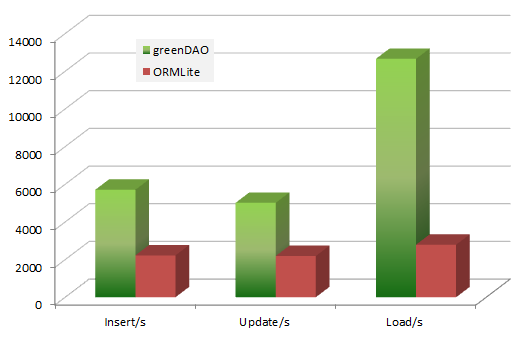 GreenDao 深度解析:從 ORM 選型、專案配置到四大核心類源碼
為什麼需要 ORM 做 Android 開發,遲早會碰到 SQLite。問題是它要求你親手寫 SQL、自己解析 Cursor、手動把欄位對應到物件——樣板程式碼多,出錯機
 Android NDK 開發指南:JNI、環境配置與除錯心得
前言本文整理 NDK 開發中 JNI 的用途、環境建置、型別對應、函式簽名、JNIEnv 概念,以及常見除錯技巧。JNI 的價值JNI 一方面可承擔高效能演算法,另一方面