

編輯:關於 Android 程式設計
在 Android 開發中,經常需要將數據持久化到外部存儲。下面通過兩個方法演示如何向 SD 卡寫入數據,以及如何從 SD 卡讀取數據。
// 向 SD 卡寫入數據
private void writeSDcard(String str) {
try {
// 判斷是否存在 SD 卡
if (Environment.getExternalStorageState().equals(Environment.MEDIA_MOUNTED)) {
// 獲取 SD 卡的目錄
File sdDire = Environment.getExternalStorageDirectory();
FileOutputStream outFileStream = new FileOutputStream(sdDire.getCanonicalPath() + "/test.txt");
outFileStream.write(str.getBytes());
outFileStream.close();
Toast.makeText(this, "數據保存到 text.txt 文件了", Toast.LENGTH_LONG).show();
}
} catch (Exception e) {
e.printStackTrace();
}
}
// 從 SD 卡中讀取數據
private void readSDcard() {
StringBuffer strsBuffer = new StringBuffer();
try {
// 判斷是否存在 SD
if (Environment.getExternalStorageState().equals(Environment.MEDIA_MOUNTED)) {
File file = new File(Environment.getExternalStorageDirectory().getCanonicalPath() + "/test.txt");
// 判斷是否存在該文件
if (file.exists()) {
// 打開文件輸入流
FileInputStream fileR = new FileInputStream(file);
BufferedReader reads = new BufferedReader(new InputStreamReader(fileR));
String st = null;
while ((st = reads.readLine()) != null) {
strsBuffer.append(st);
}
fileR.close();
} else {
Toast.makeText(this, "該目錄下文件不存在", Toast.LENGTH_LONG).show();
}
}
} catch (Exception e) {
e.printStackTrace();
}
Toast.makeText(this, "讀取到的數據是:" + strsBuffer.toString() + "", Toast.LENGTH_LONG).show();
}
寫入時,先用 Environment.getExternalStorageState() 判斷外部存儲是否已掛載,再通過 getExternalStorageDirectory() 獲取根目錄,最後以文件輸出流寫入內容。讀取時邏輯相反,用文件輸入流配合 BufferedReader 逐行讀取並拼接。使用時別忘了在 AndroidManifest 中申請 WRITE_EXTERNAL_STORAGE 權限。
 Android 定位實戰:Service 取得經緯度並以廣播更新 UI
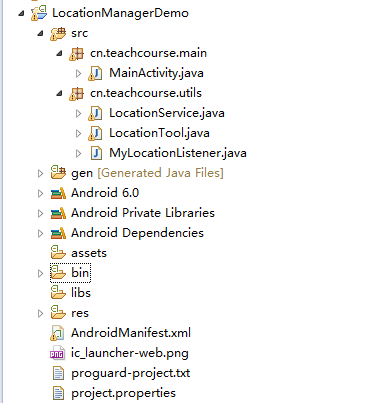
本文示範一個完整的定位流程:由 Service 在背景取得 GPS 座標,透過廣播發送出去,Activity 註冊接收器取得資料後,用 Handler 更新畫面;位置一改
 樂視pro3支持NFC嗎?功能與用途介紹
樂視pro3支持NFC嗎? 答案是支持。根據樂視官方的說法,樂視pro3 搭載的是全功能 NFC,覆蓋讀卡、寫卡、卡模擬以及 P2P 模式等多種應用場景。有了它,公交卡
 Android View 框架總結(九):KeyEvent 按鍵事件分發機制
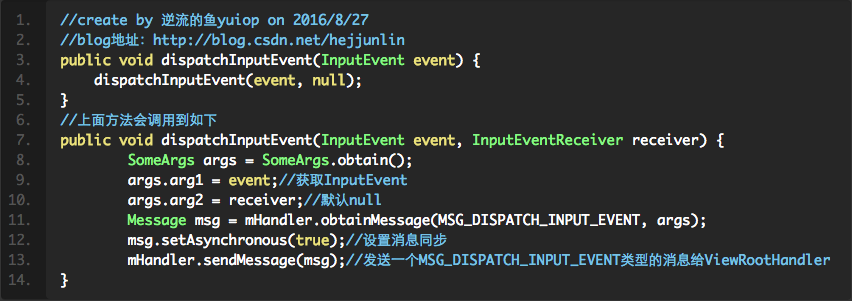
本篇開始分析按鍵事件的分發流程(提醒:本文源碼基於 Android 6.0)。先列出要談的內容: ViewRootImpl 的 dispatchInputEvent →
 RecyclerView 從入門到「寫一次處處用」的通用適配器改造
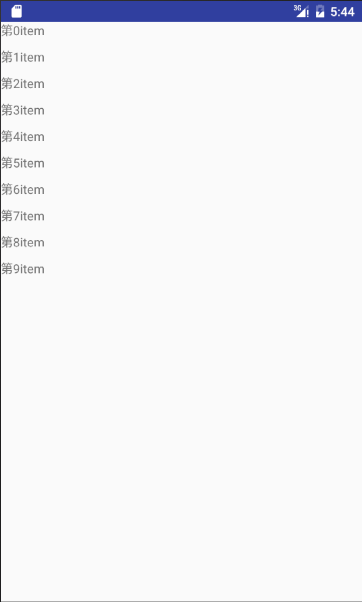
說到 RecyclerView,大家應該都不陌生,它是經典 ListView 的升級版,靈活性大幅提升,內部直接封裝了 ViewHolder,不用自己定義就能實現 ite