

編輯:關於 Android 程式設計
最近用上了印象筆記,覺得它 Android 版的底部導航欄挺有意思,好多應用裡面都有類似設計,於是動手實作了一個。不多說,先上圖:

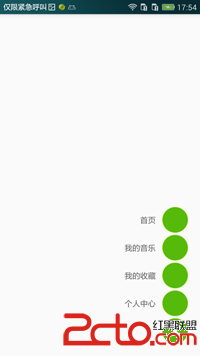
要完成這樣的效果,需要自訂一個 ViewGroup,主要涉及三件事:
1、onMeasure(測量過程)
2、onLayout(布局)
3、添加動畫
@Override protected void onMeasure(int widthMeasureSpec, int heightMeasureSpec) { int count = getChildCount(); for (int i = 0; i @Override protected void onLayout(boolean changed, int l, int t, int r, int b) { View btn_main = getChildAt(getChildCount()-1); int left = 0;int top = 0; if (changed){ for (int i = getChildCount()-1 ;i >= 0;i--){ View viewChild = getChildAt(i); int width = viewChild.getMeasuredWidth(); int height = viewChild.getMeasuredHeight(); left = getMeasuredWidth()- width; top = getMeasuredHeight() - height-distance; viewChild.layout(left,top,getMeasuredWidth(),getMeasuredHeight()); distance += getDisension(100); } btn_main.setOnClickListener(this); changeState(currentState); } } public void openTranslateAnimation(View view){ distance = 0; RotateAnimation animation = new RotateAnimation(0f,45f, Animation.RELATIVE_TO_SELF, 0.5f,Animation.RELATIVE_TO_SELF,0.5f); animation.setDuration(500); animation.setFillAfter(true); view.startAnimation(animation); for (int i = getChildCount()-2;i>= 0; i--){ View childView = getChildAt(i); view.setVisibility(View.VISIBLE); TranslateAnimation translate = new TranslateAnimation( Animation.RELATIVE_TO_SELF, 0, Animation.RELATIVE_TO_SELF, 0, Animation.RELATIVE_TO_SELF, 0.35f, Animation.RELATIVE_TO_SELF, 0); translate.setDuration(100); translate.setStartOffset(10*offset); translate.setFillAfter(true); childView.startAnimation(translate); offset++; } } public void closeTranslateAnimation(View view){ distance = 0; RotateAnimation animation = new RotateAnimation(45f,0, Animation.RELATIVE_TO_SELF, 0.5f,Animation.RELATIVE_TO_SELF,0.5f); animation.setDuration(500); animation.setFillAfter(true); view.startAnimation(animation); for (int i = getChildCount()-2;i>= 0; i--){ View childView = getChildAt(i); view.setVisibility(View.VISIBLE); TranslateAnimation translate = new TranslateAnimation( Animation.RELATIVE_TO_SELF, 0, Animation.RELATIVE_TO_SELF, 0, Animation.RELATIVE_TO_SELF, 0, Animation.RELATIVE_TO_SELF, 0.35f); translate.setDuration(100); translate.setStartOffset(50*offset); childView.startAnimation(translate); offset++; } } 整體不複雜,附上 git 地址:StackMenu。
 Android 消息機制深度解析:Handler、Looper 與 MessageQueue 原理
Android 的消息處理相關類別包括:Looper、Handler、MessageQueue、Message、ThreadLocal、ThreadLocal.Value
 Android 嵌套 Fragment 實戰:FrameLayout 外層切模塊、ViewPager 內層切頁籤
前言 之前介紹 ActivityGroup 時,不少人問到嵌套使用的問題。同樣的需求在 Fragment 上自然也會出現,好消息是當時最新的 Android suppor
 Android Service 全面解析:分類、生命週期與使用方式
一、Service 的分類 依執行位置:本地服務與遠程服務 本地服務(Local)依附在主進程上,因此不必 IPC、也不用寫 AIDL,bindService 相對簡單,
 Android BLE 基礎框架使用詳解(ViseBluetooth)
前言 研究了一段時間的藍牙開發後,我發現網上相關資料比較貧乏,不像其他 Android 資料那麼齊全,大部分內容都得從藍牙聯盟 SIG 官網(https://www.bl