

編輯:關於 Android 程式設計
Android 的消息處理相關類別包括:Looper、Handler、MessageQueue、Message、ThreadLocal、ThreadLocal.Values 以及 HandlerThread。本文將逐一剖析它們的原理。
線程預設是沒有消息循環的。要為一個線程建立消息循環,需先呼叫 prepare(),再呼叫 loop() 進入循環(這意味著線程將持續在此方法中循環)。例如:
class LooperThread extends Thread {
    public Handler mHandler;
    public void run() {
        Looper.prepare();
        mHandler = new Handler() {
            public void handleMessage(Message msg) {
                // 在這裡處理收到的消息
            }
        };
        Looper.loop();
    }
}
這裡你可能會疑惑:主線程並沒有呼叫 prepare 與 loop,卻也能建立 Handler、處理消息循環。這是因為 Android 在建立主線程時已經幫我們加好了消息循環。
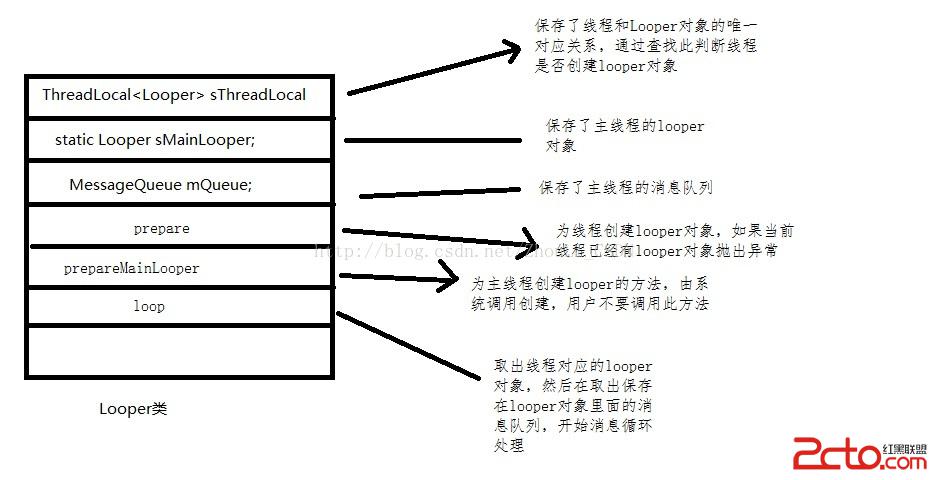
那麼 Looper 是如何管理每個線程對應的 Looper 的呢?關鍵在於 ThreadLocal:
public final class Looper {
    // sThreadLocal.get() 會返回 null,除非你呼叫過 prepare()
    static final ThreadLocal<Looper> sThreadLocal = new ThreadLocal<Looper>();
    private static Looper sMainLooper; // 由 Looper.class 加鎖保護
    final MessageQueue mQueue;
    final Thread mThread;

    public static void prepare() {
        prepare(true);
    }

    private static void prepare(boolean quitAllowed) {
        if (sThreadLocal.get() != null) {
            throw new RuntimeException("Only one Looper may be created per thread");
        }
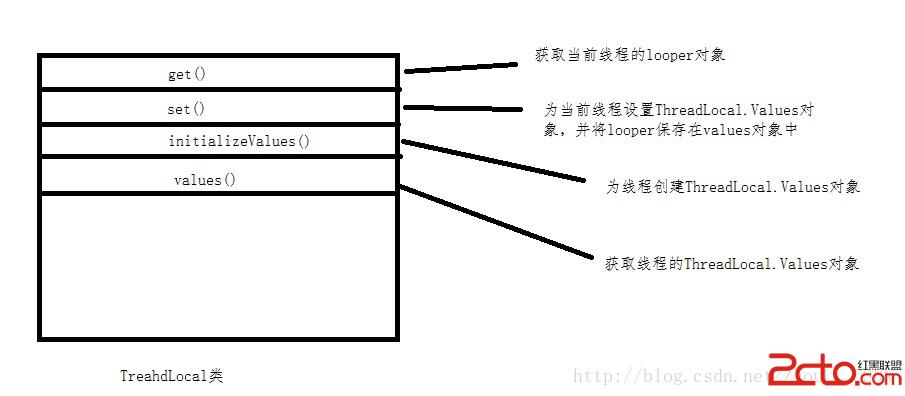
        sThreadLocal.set(new Looper(quitAllowed));
    }

    public static void loop() {
        final Looper me = myLooper();
        if (me == null) {
            throw new RuntimeException("No Looper; Looper.prepare() wasn't called on this thread.");
        }
        final MessageQueue queue = me.mQueue;
        for (;;) {
            Message msg = queue.next(); // 沒有消息時可能阻塞
            if (msg == null) {
                // 返回 null 表示消息隊列正在退出
                return;
            }
            msg.target.dispatchMessage(msg);
            msg.recycle();
        }
    }

    public static Looper myLooper() {
        return sThreadLocal.get();
    }
}
下圖說明了上述過程(prepare 呼叫 ThreadLocal 的 set 方法):
構造函數:
1)Handler handler = new Handler(),內部會呼叫 public Handler(Callback callback, boolean async),把 Handler 的成員變數 mLooper 與 mQueue 賦值為當前線程的 Looper 及對應的消息隊列;若當前線程沒有 Looper 會拋出異常。
2)Handler handle = new Handler(Looper looper),內部會呼叫 public Handler(Looper looper, Callback callback, boolean async),把參數的 Looper 傳給 mLooper,並據此取得 mQueue。透過這種方式,可以在其他線程中為主線程建立 Handler,例如 new Handler(Looper.getMainLooper())。
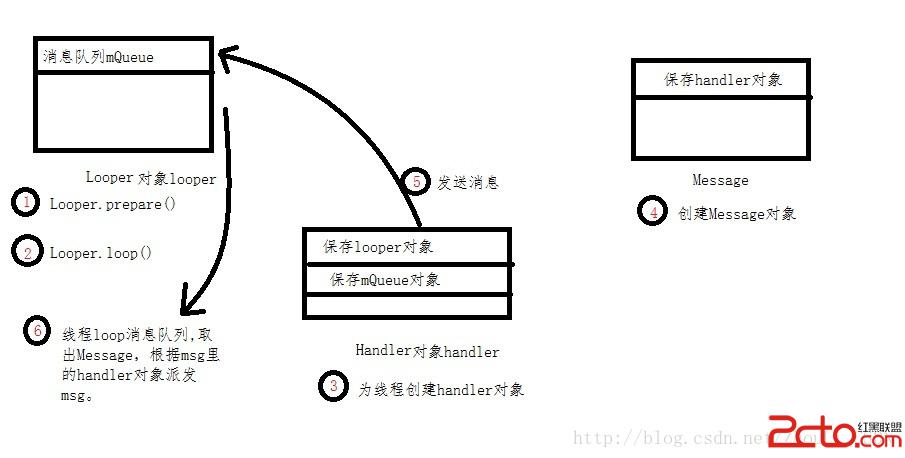
呼叫 handler.sendMessage() 時,內部會把 handler 自身賦值給 Message 的 mTarget,然後透過 mQueue 把消息發送到線程的消息隊列中。
Message 內部會保存一個 Handler 物件 mTarget。Looper 的 loop 方法取出消息後,呼叫 Message 中 handler 的 dispatchMessage 方法,而 dispatchMessage 會依 callback 是否為空來決定是否執行 handleMessage。
流程圖如下:
此外,HandlerThread 是一個能便捷地建立「帶消息處理能力的線程」的類別。
1)一個 Thread 最多與一個 Looper 建立聯繫;
2)一個 Looper 有且僅有一個 MessageQueue;
3)一個 Handler 只能與一個 Looper 關聯;
4)一個 Message 只能與一個 Handler 關聯。
這四組「一對一」的關係,正是消息發送與處理能夠正確對應的根本保障。
 自定義控件(二):多點觸控、Matrix 變換與 FlowLayout 流式布局
多點觸控事件簡單介紹最關鍵的是 onTouchEvent 這個方法。接下來還會介紹更多與事件相關的知識(比如事件分發),這裡先聚焦最簡單的觸控事件。單指有四個動作,再加上
 Android 仿新浪微博 OAuth2.0 授權界面的完整實作教學(下篇)
OAuth2.0 授權流程看似繁瑣,但只要理清各環節的職責,就能輕鬆在 Android 中還原新浪微博的登入體驗。整體流程大致如下圖所示: 動手前的準備工作 首先前往新
 淘淘商城 8.6:Maven 多模塊工程搭建、MyBatis 逆向工程與 SSM 整合實戰
這一篇記錄的是淘淘商城後台管理系統(taotao-manager)從零跑通的完整過程:先驗證 Maven 聚合工程能不能起來,再建庫、跑逆向工程生成代碼,然後把 Spri
 SwipeListView 實現微信、QQ 風格的列表滑動刪除
微信和 QQ 的最近联系人列表都支持左滑唤出刪除按鈕,操作直覺、反饋順滑,是很值得借鑒的交互。自己實現並不難,開源庫 SwipeListView 已經把大部分工作封裝好了