

編輯:關於 Android 程式設計
先想一個情境:A 應用存了一份資料,B 應用也需要用。要怎麼共享?
解法有很多,比如丟到 SD 卡、放到網路上,但這些方案要嘛缺乏統一介面,要嘛需要額外的權限與同步機制。Android 提供的標準答案是 ContentProvider。
其實系統裡的相簿、聯絡人,本質上都是 Google 為 Android 寫的 App,它們各自對外暴露了一組 API 供我們讀取資料——這就是 ContentProvider 的由來。它的核心思想是:把資料的存取與儲存統一封裝在一組標準介面後面,並以 Uri 作為定址方式。
它的三個主要優點:
系統自帶的 Provider 都在 android.provider 套件下,可以直接查閱。
ContentProvider 用 Uri 來定址,格式如下:
content://com.camnter.content.provider/message/6
content://:Scheme,固定寫法com.camnter.content.provider:Authority,也就是這個 Provider 的唯一標識(在 manifest 中宣告)message:Table,表名6:Id,單筆記錄的編號幾個對照例子:
content://com.camnter.content.provider/message → 操作 message 表的所有記錄content://com.camnter.content.provider/message/6 → 操作 Id 為 6 的那筆記錄content://com.camnter.content.provider/message/6/content → 操作 Id 為 6 記錄中的 content 欄位UriMatcher:用來把 Uri 比對成一個自訂的整數代碼,避免在 query/insert/update/delete 裡寫一大串 if-else。
addURI(String authority, String path, int code):註冊 URI 與對應代碼,其中 # 代表數字、* 代表任意文字match(Uri uri):比對並回傳註冊時指定的代碼,未命中回傳 -1ContentUris:處理帶 Id 的 Uri。
parseId(Uri contentUri):從 Uri 中取出 IdwithAppendedId(Uri contentUri, long id):在 Uri 後面附加 IdUriMatcher 的運作原理並不複雜:內部維護一棵樹,每個節點對應路徑中的一段。註冊時按段建立節點,比對時逐段下降,遇到 # 就要求該段是數字、遇到 * 則任意接受。典型用法如下:
private static final int PEOPLE = 1;
private static final int PEOPLE_ID = 2;
private static final int PHONES = 9;

private static final UriMatcher sURIMatcher = new UriMatcher(UriMatcher.NO_MATCH);
static {
    sURIMatcher.addURI("contacts", "people", PEOPLE);
    sURIMatcher.addURI("contacts", "people/#", PEOPLE_ID);
    sURIMatcher.addURI("contacts", "phones", PHONES);
    // ...
}

public String getType(Uri url) {
    switch (sURIMatcher.match(url)) {
        case PEOPLE:
            return "vnd.android.cursor.dir/person";
        case PEOPLE_ID:
            return "vnd.android.cursor.item/person";
        default:
            return null;
    }
}
自訂時通常會抽出一個抽象基底類別,把 MIME 型別常數集中管理:
public abstract class BaseContentProvider extends ContentProvider {

    // 單筆資料的 MIME 型別前綴
    protected static final String MIME_SINGLE = "vnd.android.cursor.item/";
    // 資料集的 MIME 型別前綴
    protected static final String MIME_MULTIPLE = "vnd.android.cursor.dir/";

    @Override
    public abstract boolean onCreate();

    @Override
    public abstract Cursor query(Uri uri, String[] projection, String selection,
                                String[] selectionArgs, String sortOrder);

    @Override
    public abstract String getType(Uri uri);

    @Override
    public abstract Uri insert(Uri uri, ContentValues values);

    @Override
    public abstract int delete(Uri uri, String selection, String[] selectionArgs);

    @Override
    public abstract int update(Uri uri, ContentValues values, String selection,
                               String[] selectionArgs);
}
實作 onCreate() 時有個重要原則:不要在此做耗時初始化。開資料庫、掃描檔案這類工作應該延後到第一次真正被呼叫時才做,否則會拖慢整個 App 的啟動速度。若使用 SQLite,SQLiteOpenHelper 本身就是延遲初始化的,但要注意別在 onCreate() 裡呼叫 getReadableDatabase() 或 getWritableDatabase()。
public class MessageSQLiteHelper extends SQLiteOpenHelper {

    private static final String DB_NAME = "message.db";
    private static final int VERSION = 1;

    public static final String TB_MESSAGE = "tb_message";
    public static final String TB_MESSAGE_SQL =
            "CREATE TABLE IF NOT EXISTS " + TB_MESSAGE +
            "(_id INTEGER NOT NULL PRIMARY KEY AUTOINCREMENT, content TEXT)";

    private static MessageSQLiteHelper ourInstance;

    public static MessageSQLiteHelper getInstance(Context context) {
        if (ourInstance == null) {
            ourInstance = new MessageSQLiteHelper(context);
        }
        return ourInstance;
    }

    private MessageSQLiteHelper(Context context) {
        super(context, DB_NAME, null, VERSION);
    }

    @Override
    public void onCreate(SQLiteDatabase db) {
        db.execSQL(TB_MESSAGE_SQL);
    }

    @Override
    public void onUpgrade(SQLiteDatabase db, int oldVersion, int newVersion) {
        // 依需求處理版本升級
    }
}
public class MessageContentProvider extends BaseContentProvider {

    private static final String AUTHORITY = "com.camnter.content.provider";
    public static final Uri MESSAGE_URI =
            Uri.parse("content://" + AUTHORITY + "/message");

    private static final String TOPIC_SINGLE = MIME_SINGLE + "message";
    private static final String TOPIC_MULTIPLE = MIME_MULTIPLE + "message";

    private static final int MESSAGE = 6;   // 帶 id
    public static final int MESSAGES = 7;   // 不帶 id

    private MessageSQLiteHelper messageSQLiteHelper;

    private static final UriMatcher messageUriMatcher =
            new UriMatcher(UriMatcher.NO_MATCH);
    static {
        messageUriMatcher.addURI(AUTHORITY, "message", MESSAGES);
        messageUriMatcher.addURI(AUTHORITY, "message/#", MESSAGE);
    }

    @Override
    public boolean onCreate() {
        this.messageSQLiteHelper = MessageSQLiteHelper.getInstance(getContext());
        return true;
    }

    @Override
    public String getType(Uri uri) {
        switch (messageUriMatcher.match(uri)) {
            case MESSAGE:  return TOPIC_SINGLE;
            case MESSAGES: return TOPIC_MULTIPLE;
            default:       return null;
        }
    }

    @Override
    public Uri insert(Uri uri, ContentValues values) {
        SQLiteDatabase db = messageSQLiteHelper.getWritableDatabase();
        switch (messageUriMatcher.match(uri)) {
            case MESSAGE:
            case MESSAGES: {
                long id = db.insert(MessageSQLiteHelper.TB_MESSAGE, "content", values);
                getContext().getContentResolver().notifyChange(uri, null);
                return ContentUris.withAppendedId(MESSAGE_URI, id);
            }
            default:
                throw new IllegalArgumentException("Unknown URI " + uri);
        }
    }

    @Override
    public int delete(Uri uri, String selection, String[] selectionArgs) {
        SQLiteDatabase db = messageSQLiteHelper.getWritableDatabase();
        int count;
        switch (messageUriMatcher.match(uri)) {
            case MESSAGE: {
                long id = ContentUris.parseId(uri);
                String where = "_id=" + id;
                if (!TextUtils.isEmpty(selection)) {
                    where += " and (" + selection + ")";
                }
                count = db.delete(MessageSQLiteHelper.TB_MESSAGE, where, selectionArgs);
                break;
            }
            case MESSAGES:
                count = db.delete(MessageSQLiteHelper.TB_MESSAGE, selection, selectionArgs);
                break;
            default:
                throw new IllegalArgumentException("Unknown URI " + uri);
        }
        getContext().getContentResolver().notifyChange(uri, null);
        return count;
    }

    @Override
    public int update(Uri uri, ContentValues values, String selection, String[] selectionArgs) {
        SQLiteDatabase db = messageSQLiteHelper.getWritableDatabase();
        int count;
        switch (messageUriMatcher.match(uri)) {
            case MESSAGE: {
                long id = ContentUris.parseId(uri);
                String where = "_id=" + id;
                if (!TextUtils.isEmpty(selection)) {
                    where += " and (" + selection + ")";
                }
                count = db.update(MessageSQLiteHelper.TB_MESSAGE, values, where, selectionArgs);
                break;
            }
            case MESSAGES:
                count = db.update(MessageSQLiteHelper.TB_MESSAGE, values, selection, selectionArgs);
                break;
            default:
                throw new IllegalArgumentException("Unknown URI " + uri);
        }
        getContext().getContentResolver().notifyChange(uri, null);
        return count;
    }

    @Override
    public Cursor query(Uri uri, String[] projection, String selection,
                        String[] selectionArgs, String sortOrder) {
        SQLiteDatabase db = messageSQLiteHelper.getReadableDatabase();
        Cursor cursor;
        switch (messageUriMatcher.match(uri)) {
            case MESSAGE: {
                long id = ContentUris.parseId(uri);
                String where = "_id=" + id;
                if (!TextUtils.isEmpty(selection)) {
                    where += " and (" + selection + ")";
                }
                cursor = db.query(MessageSQLiteHelper.TB_MESSAGE, projection,
                        where, selectionArgs, null, null, sortOrder);
                break;
            }
            case MESSAGES:
                cursor = db.query(MessageSQLiteHelper.TB_MESSAGE, projection,
                        selection, selectionArgs, null, null, sortOrder);
                break;
            default:
                throw new IllegalArgumentException("Unknown URI " + uri);
        }
        cursor.setNotificationUri(getContext().getContentResolver(), uri);
        return cursor;
    }
}
getContentResolver().notifyChange(uri, null),訂閱方(例如 Cursor 綁定的 ListView 或 RecyclerView)才會自動刷新。vnd.android.cursor.item/ 開頭,集合用 vnd.android.cursor.dir/ 開頭,這不是風格問題,而是 ContentResolver.getType() 的約定。
// 新增
ContentValues values = new ContentValues();
values.put("content", "Save you from anything");
getContentResolver().insert(MessageContentProvider.MESSAGE_URI, values);

// 查詢全部
Cursor cursor = getContentResolver().query(
        MessageContentProvider.MESSAGE_URI, null, null, null, null);

// 更新指定 id
ContentValues update = new ContentValues();
update.put("content", UUID.randomUUID().toString());
getContentResolver().update(
        Uri.parse("content://com.camnter.content.provider/message/1"),
        update, null, null);

// 監聽資料變化
getContentResolver().registerContentObserver(
        MessageContentProvider.MESSAGE_URI, true, observer);
寫完這一輪你會發現,ContentProvider 在本質上就是「在 SQLite 之上包了一層以 Uri 定址的統一介面」。真正花時間的不是 CRUD 本身,而是 Uri 的比對規則、MIME 型別約定,以及通知機制的正確串接——這幾點做對了,你的資料就能被任何其他 App 安心取用。
 Android GridView 九宮格實作入門
GridView 的九宮格能力 GridView 與 ListView 同屬多元件版面,最常見用途是製作九宮格。每個格子可放置圖示與文字,透過 Adapter 綁定資料。
 AlertDialog 自定義風格的兩種實現:setView 與 getIdentifier
一、問題從哪裡來 對話框在任何一款 App 裡幾乎都少不了,Android 也提供了相當容易上手的 AlertDialog。但真正進入專案就會碰到一些尷尬的需求:想改 N
 Android 基礎第六篇(上):網路請求、Handler 消息機制與自定義列表
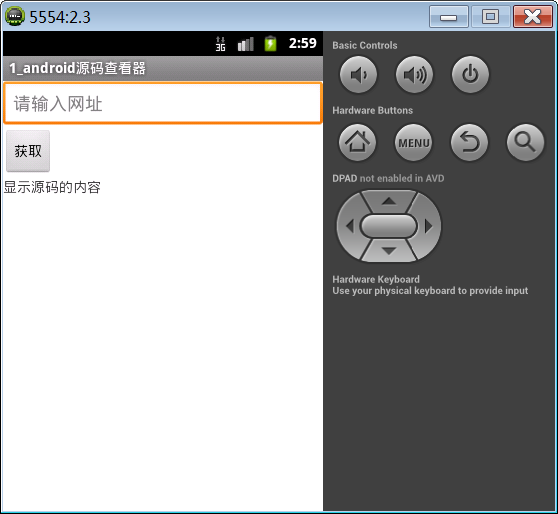
這一篇把幾個繞不開的基礎知識串起來:用 HttpURLConnection 抓網路資料、為什麼不能在主線程連網、Handler 消息機制怎麼用、以及在此之上延伸出的圖片查
 Android 開發之單元測試(一)
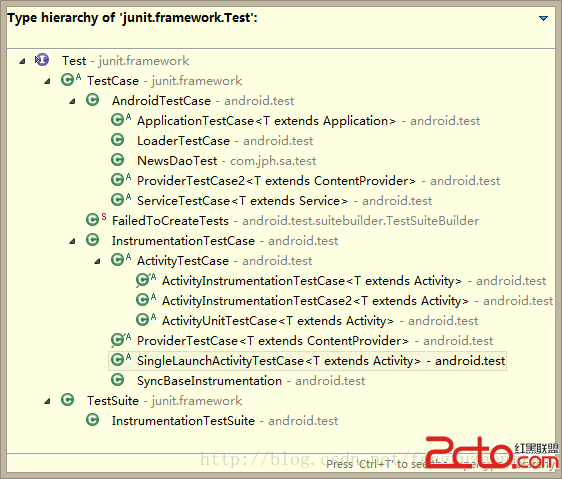
在實際開發中,Android 軟件的開發過程需要不斷測試。進行 Android 單元測試是正規開發的必經步驟,它可以嵌入到項目中,也可以作為一個單獨的項目針對某個具體項目