

編輯:關於 Android 程式設計
GET 提交最直觀,參數用 ? 起頭、以 & 分隔,直接接在網址後方。
final String path = "https://192.168.1.104/Web/servlet/CheckLogin?name=" + name + "&pass=" + pass;送出請求的寫法和一般 GET 沒有兩樣:
URL url = new URL(path);
HttpURLConnection conn = (HttpURLConnection) url.openConnection();
conn.setRequestMethod("GET");
conn.setReadTimeout(5000);
conn.setConnectTimeout(5000);
if (conn.getResponseCode() == 200) {
    // 處理回應
}
但有一個細節容易忽略:瀏覽器送出請求時會自動對參數做 URL 編碼,我們自己拼字串時不會。一旦欄位裡出現中文或空白,就必須手動編碼,否則伺服器收到的會是亂碼。
String path = "https://192.168.1.104/Web/servlet/CheckLogin?name="
        + URLEncoder.encode(name) + "&pass=" + pass;
另外提醒,GET 的長度受網址限制,密碼直接暴露在網址上也不安全,正式環境不建議用 GET 傳敏感資料。
POST 把參數放進 request body,以串流方式寫出。跟 GET 相比,通訊協定標頭多出兩個必填欄位:
Content-Type: application/x-www-form-urlencoded——說明 body 的 MIME 類型。Content-Length——說明 body 的位元組長度。這兩個標頭必須自己補上,方法是先組好要送的字串:
String data = "name=" + URLEncoder.encode(name) + "&pass=" + pass;
conn.setRequestProperty("Content-Type", "application/x-www-form-urlencoded");
conn.setRequestProperty("Content-Length", data.length() + "");
接著要主動打開寫入的通道,預設情況下 HttpURLConnection 是不允許輸出資料的:
conn.setDoOutput(true);然後取得輸出串流,把資料寫進去:
OutputStream os = conn.getOutputStream();
os.write(data.getBytes());GET 走的是網址,參數攤在明面上,適合查詢類、可快取、可被書籤收藏的請求;POST 走的是 body,容量不受網址長度限制,適合新增資料、上傳較長內容或傳送敏感欄位。兩者本質上都是 HTTP 請求,差別在資料放哪裡、以及伺服器端怎麼解讀。
最後别忘了:寫完 OutputStream 記得關閉,並在 Content-Length 上填「位元組數」而非「字元數」。若參數含中文,用 data.getBytes("UTF-8").length 才是正確長度。
 Android 使用 Fragment 實現底部導航欄的實踐
效果說明 本文以 Fragment 為基礎,實作常見的底部導航欄。每個底部選項對應一個 Fragment,點擊後切換中央內容區域。 整體布局 畫面可分為三部分:頂部標
 關於 Android Button 響應頁面跳轉的常見問題解析
在 Android 應用中,Button 的點擊事件通常有兩種寫法,本文將說明這兩種方式,並釐清初學者最常遇到的頁面跳轉錯誤。 一、兩種常見的監聽寫法 第一種是使用具名的
 Android 外部庫引用:把 Library 項目接入主工程的完整步驟
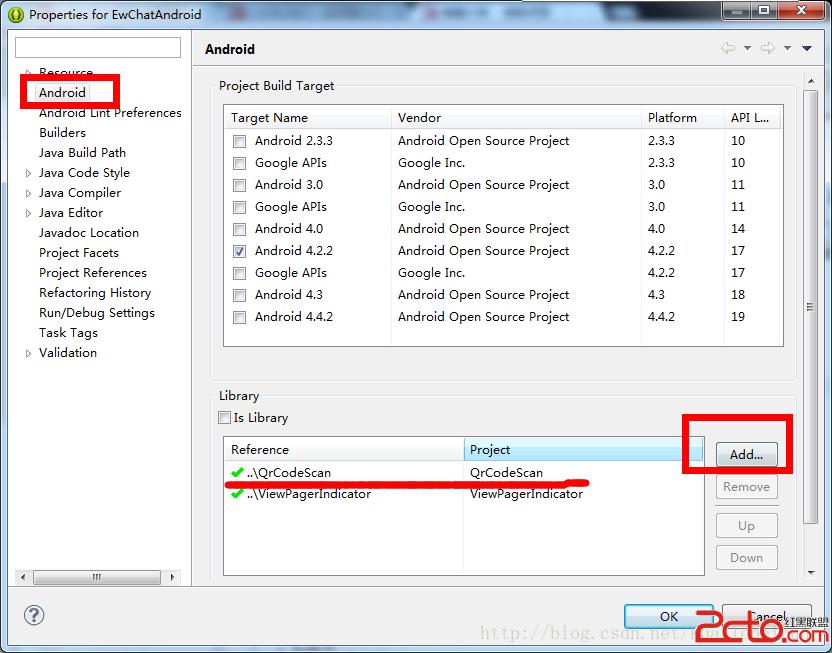
Android 的庫項目(Library Project)是一個包含源碼和資源的項目,它可以被其他項目引用,讓引用方使用其中的代碼和資源。多個應用可以引用同一個庫,一個應
 Cocos2d-x 3.2 Lua 範例:ClickAndMoveTest(點擊移動測試)
本篇介紹 Cocos2d-x 3.2 Lua 範例中的「點擊移動」實作。透過這個例子,你可以學到如何創建單點觸摸事件,以及註冊事件監聽的回呼方法。 範例程式碼 --[[