

編輯:關於 Android 程式設計
在做電子雜志類項目時,因為需要每天刷新出最新的文章,所以每次點擊都重新創建 XML 文件的方式並不合適。電子雜志不同於時時更新的新聞,它每天更新一次,因此更合理的做法是每天下載一份 RSS 源的 XML 文件到項目中,並以「日期 + 雜志名」的格式命名。這些文件可以創建在 files 或 cache 目錄下,本文選擇放在 files 中。
第一步:在項目 files 目錄下創建當天的 XML 文件
放在第一個 Activity 中進行判斷,若文件不存在則創建:
File file1 = null, file2 = null, file3 = null, file4 = null;
Date date2 = new Date();
SimpleDateFormat format2 = new SimpleDateFormat("yyyyMMdd");

// 獲取項目文件files的目錄
File tempFile = this.getFilesDir();
String yygypathstr = tempFile.toString();

// 文件命名格式為以時間(年月日)+資源名
file1 = new File(yygypathstr, (format2.format(date2) + "VICE中國" + ".xml"));
file2 = new File(yygypathstr, (format2.format(date2) + "設計癖" + ".xml"));
file3 = new File(yygypathstr, (format2.format(date2) + "知乎" + ".xml"));
file4 = new File(yygypathstr, (format2.format(date2) + "豆瓣一刻" + ".xml"));

// 如果文件不存在,才創建
if (!file1.exists() && !file2.exists() && !file3.exists() && !file4.exists()) {
    try {
        file1.createNewFile();
        file2.createNewFile();
        file3.createNewFile();
        file4.createNewFile();
    } catch (IOException e) {
        e.printStackTrace();
    }
}
第二步:找到當天對應的 XML 文件
點擊某份雜志時,根據命名規則定位到當天的文件:
Date date = new Date();
SimpleDateFormat format = new SimpleDateFormat("yyyyMMdd");
String paperTitleName = format.format(date) + title + ".xml";

File file = null;
File fileXml = new File(xmlPath.toString());
File[] tempList = fileXml.listFiles();

// 點擊那一份雜志,找到這份雜志的當天xml賦給file
for (int i = 0; i < tempList.length; i++) {
    if (paperTitleName.equals(tempList[i].getName())) {
        file = tempList[i];
    }
}
第三步:從 RSS 源下載內容並寫入文件
如果文件不為空且能連上 RSS 源,就寫入數據(若文件已有內容則跳過):
HttpClient client = new DefaultHttpClient();
HttpGet get = new HttpGet(RSS_URL);
try {
    HttpResponse response = client.execute(get);
    if (response.getStatusLine().getStatusCode() == 200 && file.length() == 0) {
        InputStream inputStream = response.getEntity().getContent();
        FileOutputStream fos = new FileOutputStream(file);
        int byteread = 0;
        byte[] buffer = new byte[1024];
        while ((byteread = inputStream.read(buffer)) != -1) {
            fos.write(buffer, 0, byteread);
        }
        fos.flush();
        fos.close();
        inputStream.close();
    }
} catch (ClientProtocolException e) {
    e.printStackTrace();
} catch (IOException e) {
    e.printStackTrace();
}
數據寫入完成後,就可以像讀取普通 XML 一樣解析文件並展示內容了。這樣每天只需下載並緩存一份最新的 RSS 數據,既減少了重複網絡請求,也保證了內容的時效性。
 每位 Android 開發者都該知道的系統架構與開發庫
Android 的架構從設計之初就鼓勵元件重用:你可以發布自己的 Activity、Service,也能存取其他應用程式的資料,並透過開發者自訂的安全限制加以管理。以下整
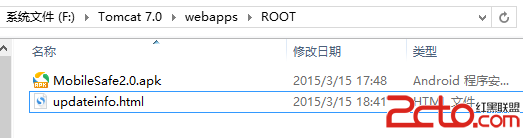 Android App 線上更新的完整實作流程
線上更新是幾乎每個 App 都需要的功能。本文以一個完整的 Splash 啟動頁為例,把「檢查版本 → 提示更新 → 下載 APK → 觸發安裝」這條鏈路走一遍。 一、
 研究稱 Android 4.4 比 iOS 7.1 更穩定
根據 Crittercism 發布的《移動體驗基準測試報告》,研究人員在 2582 款設備上測試了 106 種操作系統與 691 個網路運營商。結果顯示,Android
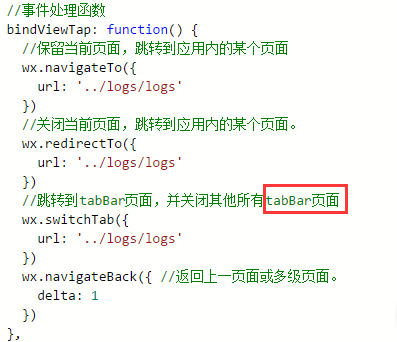 微信小程序頁面跳轉:navigator 與 wx.navigateTo 用法
頁面跳轉的兩種方式 微信小程序可以透過 WXML 中的 navigator 元件進行跳轉,也可以在 JavaScript 中呼叫導航 API。兩種方式各有適用情境,開發者