

編輯:關於 Android 程式設計
線上更新是幾乎每個 App 都需要的功能。本文以一個完整的 Splash 啟動頁為例,把「檢查版本 → 提示更新 → 下載 APK → 觸發安裝」這條鏈路走一遍。
要做線上更新,手邊必須有一個已簽名的 APK。把簽過名的更新版 APK 放上伺服器,再準備一份描述版本資訊的檔案。
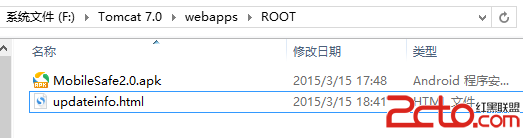
其中 apk 就是已簽名的更新版本。updateinfo 檔案的內容如下:
{
    "version": "2.0",
    "description": "有全新版本,請下載!",
    "apkurl": "https://172.23.252.89:8080/MobileSafe2.0.apk"
}
簽名這一點是關鍵,後面會再回來說明原因。
專案結構如下:
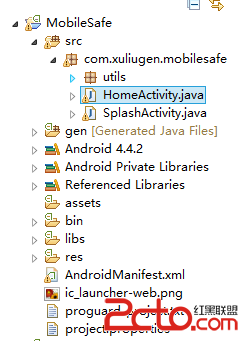
主要業務邏輯集中在 SplashActivity.java。Splash 啟動頁通常肩負四項任務:展示產品 Logo、執行初始化、檢查版本、驗證應用是否合法註冊。本文聚焦在版本檢查這一段。
package com.xuliugen.mobilesafe;

import java.io.ByteArrayOutputStream;
import java.io.File;
import java.io.IOException;
import java.io.InputStream;
import java.net.HttpURLConnection;
import java.net.MalformedURLException;
import java.net.URL;

import net.tsz.afinal.FinalHttp;
import net.tsz.afinal.http.AjaxCallBack;

import org.json.JSONException;
import org.json.JSONObject;

import android.app.Activity;
import android.app.AlertDialog;
import android.app.AlertDialog.Builder;
import android.content.DialogInterface;
import android.content.Intent;
import android.content.DialogInterface.OnCancelListener;
import android.content.DialogInterface.OnClickListener;
import android.content.pm.PackageInfo;
import android.content.pm.PackageManager;
import android.content.pm.PackageManager.NameNotFoundException;
import android.net.Uri;
import android.os.Bundle;
import android.os.Environment;
import android.os.Handler;
import android.os.Message;
import android.view.View;
import android.view.animation.AlphaAnimation;
import android.widget.TextView;
import android.widget.Toast;

public class SplashActivity extends Activity {

    protected static final int SHOW_UPDATE_DIALOG = 0;
    protected static final int ENTER_HOME = 1;
    protected static final int URL_ERROR = 2;
    protected static final int NETWORK_ERROR = 3;
    protected static final int JSON_ERROR = 4;

    private TextView tv_splash_version;
    private TextView tv_update_info;   // 升級進度
    private String description;        // 版本資訊描述
    private String apkurl;             // 更新檔下載位址

    @Override
    protected void onCreate(Bundle savedInstanceState) {
        super.onCreate(savedInstanceState);
        setContentView(R.layout.activity_splash);

        tv_splash_version = (TextView) this.findViewById(R.id.tv_splash_version);
        tv_update_info = (TextView) findViewById(R.id.tv_update_info);
        tv_splash_version.setText("版本號:" + getVersionName());

        checkUpdate();

        AlphaAnimation alphaAnimation = new AlphaAnimation(0.2f, 1.0f);
        alphaAnimation.setDuration(3000);
        findViewById(R.id.rl_root_splash).startAnimation(alphaAnimation);
    }

    /**
     * 更新介面的操作都在主執行緒上進行,
     * 因此可以用 Handler 讓子執行緒在結束時通知主執行緒接手
     */
    private Handler handler = new Handler() {
        @Override
        public void handleMessage(Message msg) {
            super.handleMessage(msg);
            switch (msg.what) {
                case SHOW_UPDATE_DIALOG:
                    showUpdateDialog();
                    break;
                case ENTER_HOME:
                    enterHome();
                    break;
                case URL_ERROR:
                    enterHome();
                    Toast.makeText(getApplicationContext(), "URL錯誤", 0).show();
                    break;
                case NETWORK_ERROR:
                    enterHome();
                    Toast.makeText(SplashActivity.this, "網絡異常", 0).show();
                    break;
                case JSON_ERROR:
                    enterHome();
                    Toast.makeText(SplashActivity.this, "JSON解析出錯", 0).show();
                    break;
                default:
                    break;
            }
        }
    };

    /**
     * 檢查是否有新版本。需要联网,因此放在子執行緒中
     */
    private void checkUpdate() {
        new Thread() {
            public void run() {
                Message message = Message.obtain();
                long startTime = System.currentTimeMillis();

                try {
                    URL url = new URL(getString(R.string.serverurl));
                    HttpURLConnection httpURLConnection = (HttpURLConnection) url.openConnection();
                    httpURLConnection.setRequestMethod("GET");
                    httpURLConnection.setConnectTimeout(4000);

                    int code = httpURLConnection.getResponseCode();
                    if (code == 200) {
                        InputStream inputStream = httpURLConnection.getInputStream();

                        // 把串流組裝成字串
                        ByteArrayOutputStream baos = new ByteArrayOutputStream();
                        byte[] buffer = new byte[1024];
                        int len = 0;
                        while ((len = inputStream.read(buffer)) != -1) {
                            baos.write(buffer, 0, len);
                        }
                        inputStream.close();
                        String result = baos.toString();
                        baos.close();

                        // 解析 JSON
                        JSONObject jsonObj = new JSONObject(result);
                        String version = (String) jsonObj.get("version");
                        description = (String) jsonObj.get("description");
                        apkurl = (String) jsonObj.get("apkurl");

                        // 比對版本
                        if (getVersionName().equals(version)) {
                            message.what = ENTER_HOME;
                        } else {
                            message.what = SHOW_UPDATE_DIALOG;
                        }
                    }
                } catch (MalformedURLException e) {
                    message.what = URL_ERROR;
                    e.printStackTrace();
                } catch (IOException e) {
                    message.what = NETWORK_ERROR;
                    e.printStackTrace();
                } catch (JSONException e) {
                    message.what = JSON_ERROR;
                    e.printStackTrace();
                } finally {
                    long dTime = System.currentTimeMillis() - startTime;
                    // 讓啟動畫面至少停留 3 秒
                    if (dTime < 3000) {
                        try {
                            Thread.sleep(3000 - dTime);
                        } catch (InterruptedException e) {
                            e.printStackTrace();
                        }
                    }
                    handler.sendMessage(message);
                }
            }
        }.start();
    }

    /**
     * 取得應用程式的版本名稱
     */
    private String getVersionName() {
        PackageManager packageManager = getPackageManager();
        try {
            PackageInfo packageInfo = packageManager.getPackageInfo(getPackageName(), 0);
            return packageInfo.versionName;
        } catch (NameNotFoundException e) {
            e.printStackTrace();
            return "";
        }
    }

    /**
     * 彈出升級對話框
     */
    protected void showUpdateDialog() {
        AlertDialog.Builder builder = new Builder(this);
        builder.setTitle("提示升級");
        // 若要強制升級,可取消下面這行的註解讓使用者無法取消
        // builder.setCancelable(false);
        builder.setMessage(description);

        builder.setOnCancelListener(new OnCancelListener() {
            @Override
            public void onCancel(DialogInterface dialog) {
                enterHome();
                dialog.dismiss();
            }
        });

        builder.setNegativeButton("下次再說", new OnClickListener() {
            @Override
            public void onClick(DialogInterface dialog, int which) {
                enterHome();
                dialog.dismiss();
            }
        });

        builder.setPositiveButton("立刻升級", new OnClickListener() {
            @Override
            public void onClick(DialogInterface dialog, int which) {
                // 下載 APK 並觸發安裝
                if (Environment.getExternalStorageState().equals(Environment.MEDIA_MOUNTED)) {
                    FinalHttp finalhttp = new FinalHttp();
                    String SDCARD_PATH = Environment.getExternalStorageDirectory().getAbsolutePath()
                            + "/mobilesafe2.0.apk";

                    finalhttp.download(apkurl, SDCARD_PATH, new AjaxCallBack<File>() {
                        @Override
                        public void onFailure(Throwable t, int errorNo, String strMsg) {
                            t.printStackTrace();
                            Toast.makeText(getApplicationContext(), "下載失敗", 1).show();
                            super.onFailure(t, errorNo, strMsg);
                        }

                        /**
                         * count 為總大小,current 為當前已下載大小
                         */
                        @Override
                        public void onLoading(long count, long current) {
                            super.onLoading(count, current);
                            tv_update_info.setVisibility(View.VISIBLE);
                            int progress = (int) (current * 100 / count);
                            tv_update_info.setText("下載進度:" + progress + "%");
                        }

                        /**
                         * @param t 下載完成的檔案
                         */
                        @Override
                        public void onSuccess(File t) {
                            super.onSuccess(t);
                            installAPK(t);
                        }

                        /**
                         * 安裝 APK
                         *
                         * @param t 檔案下載後的路徑
                         */
                        private void installAPK(File t) {
                            Intent intent = new Intent();
                            intent.setAction(Intent.ACTION_VIEW);
                            intent.addCategory(Intent.CATEGORY_DEFAULT);
                            intent.setDataAndType(Uri.fromFile(t),
                                    "application/vnd.android.package-archive");
                            startActivity(intent);
                        }
                    });
                } else {
                    Toast.makeText(getApplicationContext(), "沒有sdcard,請安裝上在試", 0).show();
                }
            }
        });

        builder.show();
    }

    /**
     * 進入主介面
     */
    protected void enterHome() {
        Intent intent = new Intent(this, HomeActivity.class);
        startActivity(intent);
        finish();
    }
}
上面那段「把 InputStream 讀成 String」的邏輯到處都會用到,值得抽成獨立工具類:
package com.xuliugen.mobilesafe.utils;

import java.io.ByteArrayOutputStream;
import java.io.IOException;
import java.io.InputStream;

/**
 * 把串流轉換為字串
 */
public class StreamTools {

    /**
     * @param is 輸入流
     * @return 讀取後的字串
     * @throws IOException
     */
    public static String readFromStream(InputStream is) throws IOException {
        ByteArrayOutputStream baos = new ByteArrayOutputStream();
        byte[] buffer = new byte[1024];
        int len = 0;
        while ((len = is.read(buffer)) != -1) {
            baos.write(buffer, 0, len);
        }
        is.close();
        String result = baos.toString();
        baos.close();
        return result;
    }
}
Android 判定「新版本是否為同一個 App 的升級」依據的是簽章,而不是版本號。簽章一致,才能覆蓋安裝。一旦簽名對不上,安裝就會失敗。
如果簽章真的遺失或被改動,只剩下兩條路,兩者都有代價:
改簽名:套件名稱不變但簽章不同,使用者必須先手動解除安裝舊版才能裝新版。資料會全數遺失,體驗極差。
改套件名稱:重新簽名並換一個 package name。這相當於手機上裝了兩個 App, although 可以技術性地先幫使用者移除舊的那個,但本質上仍是把問題丟給使用者承擔。
所以結論很樸實:keystore 檔案與其密碼務必妥善備份,且對外發布的 App 永遠只能用它簽名。這件事的代價實在太高,沒有僥倖的空間。
本文寫法在當年是標準做法,但以今日的標準來看有幾處值得改進。一是版本比對用字串 equals,遇到 2.10 與 2.9 這種情況會判錯,應該拆解為數值逐一比較。二是 FinalHttp 已停止維護,建議改用 OkHttp 或直接用 DownloadManager 交給系統代管下載與進度通知。三是 FileProvider 的問題:Android 7.0 之後 Uri.fromFile() 傳給其他應用會觸發 FileUriExposedException,必須改用 FileProvider 並授予讀取權限。四是安裝未知來源的 APK 需要 REQUEST_INSTALL_PACKAGES 權限,且 Android 8.0 起改為逐個應用授權,使用者引導流程不可省略。
 Android 簡易音樂播放器:兩種音源的完整實作教學
做一個能用的音樂播放器,其實只需要掌握 MediaPlayer 的生命週期加上一個會走的進度條。本文提供兩份可直接執行的完整程式碼,分別對應「播放 App 內建音樂」與「
 Android 自定義 View 實作:彎曲滑桿指示器完整解析
Android 自定義 View:彎曲滑桿指示器實作 本文說明如何實作一個弧形滑桿指示器。它包含圓弧軌道、可拖動小球、文字標籤,以及點擊文字後自動移動小球的能力。 整體
 Android 中獲取 sdcard 路徑的幾種實用方式
在早期版本(Android 4.1 之前)中,SD 卡路徑通常以「/sdcard」或「/mnt/sdcard」表示;而到了 JellyBean(Android 4.1)之
 自定義 ViewGroup 實戰:打造標簽流式布局 FlowLayout
做過內容類應用的同學大概都遇過這樣的需求:熱門標簽、用戶自選標籤,控件要從左往右自動排布,一行放不滿就換行。系統並沒有現成的組件,於是我們需要自己動手寫一個 ViewGr