

編輯:關於 Android 程式設計
「取得手機目前的方向」聽起來是個簡單需求,實際上卻要看你面對的是哪個情境。如果使用者已經開啟了系統設定裡的螢幕自動旋轉,用 Configuration 就足夠;如果使用者關閉了旋轉,Configuration 永遠只會回報同一個值,這時就得靠方向監聽器。
處理橫豎屏切換的傳統做法是先在 AndroidManifest.xml 中宣告:
android:configChanges="orientation|keyboardHidden"
這樣旋轉時 Activity 不會被重建,改由 onConfigurationChanged 接手。而判斷方向本身很直接:
if (this.getResources().getConfiguration().orientation
        == Configuration.ORIENTATION_LANDSCAPE) {
    Log.i("info", "landscape");   // 橫屏
} else if (this.getResources().getConfiguration().orientation
        == Configuration.ORIENTATION_PORTRAIT) {
    Log.i("info", "portrait");    // 豎屏
}
但請注意前提:使用者若在系統設定中禁止了螢幕旋轉,這個值就固定不會變。此路不通。
OrientationEventListener 是一個輔助類別,當裝置方向改變時會從 SensorManager 接收通知。它的優點是無論使用者是否開啟自動旋轉,只要實際上把手機轉了,它就會回報。
@Override
protected void onCreate(Bundle savedInstanceState) {
    super.onCreate(savedInstanceState);

    mAlbumOrientationEventListener =
            new AlbumOrientationEventListener(this, SensorManager.SENSOR_DELAY_NORMAL);

    if (mAlbumOrientationEventListener.canDetectOrientation()) {
        mAlbumOrientationEventListener.enable();
    } else {
        Log.d("chengcj1", "Can't Detect Orientation");
    }
}

@Override
protected void onDestroy() {
    mAlbumOrientationEventListener.disable();
    super.onDestroy();
}

private class AlbumOrientationEventListener extends OrientationEventListener {

    public AlbumOrientationEventListener(Context context) {
        super(context);
    }

    public AlbumOrientationEventListener(Context context, int rate) {
        super(context, rate);
    }

    @Override
    public void onOrientationChanged(int orientation) {
        if (orientation == OrientationEventListener.ORIENTATION_UNKNOWN) {
            return;
        }
        // 只保留四個正方向
        int newOrientation = ((orientation + 45) / 90 * 90) % 360;
        if (newOrientation != mOrientation) {
            mOrientation = newOrientation;
            // mOrientation 為 0°、90°、180°、270° 之一
        }
    }
}
只要手機稍稍傾斜,onOrientationChanged 就會被觸發,回傳值是 0~359 的連續角度。但實務上我們通常只關心四個正方向,因此需要把它「吸附」到最近的 90 度倍數。
換算邏輯是這樣的:偏移角小於 45° 一律當作 0°;45° 到 90° 之間當作 90°;90° 到 135° 之間當作 90°;135° 到 180° 當作 180°,依此類推。程式碼中 ((orientation + 45) / 90 * 90) % 360 就是這個規則的簡寫——先加 45 做四捨五入,除以 90 取整數倍,再乘回去,最後取模把 360 折回 0。
如果你關心的是「版面配置是否需要切換」,用 Configuration 就好,簡單可靠。如果你關心的是「使用者實際拿著手機的姿態」(例如相機、水平儀、遊戲操控),那麼必须用 OrientationEventListener,因為它的取樣頻率與精度都遠高於 Configuration。
無論哪一種,都要記得在 onDestroy 中 disable() 或取消註冊。OrientationEventListener 背後註冊了 SensorManager 的監聽,忘記釋放在Activity 銷毀後仍會持續回呼,是常見的記憶體洩漏來源。
 Android 畫板實作:使用 SurfaceView 與 Path 繪圖
想製作簡單的 Android 畫板,可以使用 SurfaceView 搭配 Path 與 Paint。它適合需要持續繪圖的場景,能減少主檢視繪製壓力。 核心元件 Sur
 Android 拼圖小遊戲實作筆記:圖片切割、方塊交換與手勢操作
這篇記錄的是一個跟著影片教學完成的拼圖小遊戲,也是我第一次真正動手處理「圖片切割」與「補間動畫」這兩件事,因此把整個實作思路整理下來,方便日後回顧。 先看成品:應用圖示、
 Android 四大組件總結:註冊、激活、關閉與生命週期一網打盡
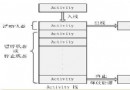
一、註冊 四大組件都必須先註冊才能使用。Activity、Service、Content Provider 一律在 AndroidManifest.xml 中聲明;未在清
 Android 首次啟動的滑動引導介面實作
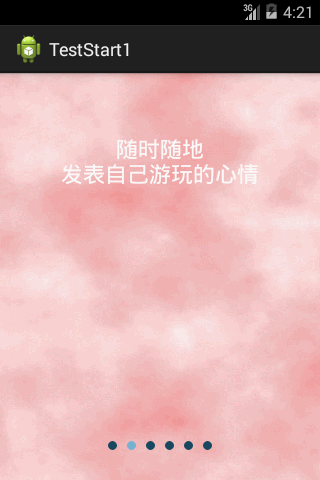
一、滑動引導介面 除了啟動動畫之外,首次啟動時往往還會搭配一組滑動式功能介紹介面。本文記錄這種介面的實作方式,並接在上一篇啟動動畫的基礎上加以延伸。 效果圖: 介面實