

編輯:關於 Android 程式設計
當今的 App 幾乎無法離開網路生存,無論是請求資料還是傳遞資料都離不開網路連線。因此,妥善掌握網路狀態變得格外重要。本文將示範如何透過 BroadcastReceiver 監聽網路連線的變化,並提供一套完整的網路工具類,用來判斷當前網路類型與連線品質。
想像使用者在操作 App 時突然掉線,如果我們能即時給出提示;等網路恢復後再通知一聲,使用者便能繼續使用。由於系統在斷網與連網時都會發送廣播,我們只要註冊接收器並攔截 android.net.conn.CONNECTIVITY_CHANGE 這個 action,就能掌握網路是否可用。
下面這個接收器採用了單例寫法,收到廣播後比對網路狀態,並透過 Toast 提示使用者:
public class NetWorkReceiver extends BroadcastReceiver {
    private static Boolean networkAvailable = false;
    private final static String ANDROID_NET_CHANGE_ACTION = "android.net.conn.CONNECTIVITY_CHANGE";

    public void onReceive(Context context, Intent intent) {
        if (intent.getAction().equalsIgnoreCase(ANDROID_NET_CHANGE_ACTION)) {
            if (!NetWorkUtil.isNetworkAvailable(context) && networkAvailable) {
                networkAvailable = false;
                Toast.makeText(context, "網路不可用", 1).show();
            } else if (NetWorkUtil.isNetworkAvailable(context) && !networkAvailable) {
                networkAvailable = true;
                Toast.makeText(context, "網路連線成功", 1).show();
            }
        }
    }
}
在需要監聽時註冊,記得加上 IntentFilter:
private void registerMessageReceiver() {
    NetWorkReceiver receiver = NetWorkReceiver.getNetWorkReceiver();
    IntentFilter filter = new IntentFilter();
    filter.addAction("android.net.conn.CONNECTIVITY_CHANGE");
    registerReceiver(receiver, filter);
}
而在不再需要時,別忘了取消註冊,避免記憶體洩漏:
unregisterReceiver(NetWorkReceiver.getNetWorkReceiver());
當 App 透過使用者點擊或其他事件觸發網路操作前,最好先判斷網路是否可用、當前是否為 WiFi、連線類型以及網速是否足以支撐該操作。下面的工具類提供了這些判斷能力:
public class NetWorkUtil {
    public enum netType { wifi, CMNET, CMWAP, noneNet }

    // 網路是否可用
    public static boolean isNetworkAvailable(Context context) {
        ConnectivityManager mgr = (ConnectivityManager) context.getSystemService(Context.CONNECTIVITY_SERVICE);
        NetworkInfo[] info = mgr.getAllNetworkInfo();
        if (info != null) {
            for (int i = 0; i < info.length; i++) {
                if (info[i].getState() == NetworkInfo.State.CONNECTED) {
                    return true;
                }
            }
        }
        return false;
    }

    // 判斷 WiFi 是否可用
    public static boolean isWifiConnected(Context context) {
        ConnectivityManager m = (ConnectivityManager) context.getSystemService(Context.CONNECTIVITY_SERVICE);
        NetworkInfo info = m.getNetworkInfo(ConnectivityManager.TYPE_WIFI);
        return info != null && info.isAvailable();
    }

    // 取得當前網路類型
    public static netType getAPNType(Context context) {
        ConnectivityManager connMgr = (ConnectivityManager) context.getSystemService(Context.CONNECTIVITY_SERVICE);
        NetworkInfo networkInfo = connMgr.getActiveNetworkInfo();
        if (networkInfo == null) return netType.noneNet;
        int nType = networkInfo.getType();
        if (nType == ConnectivityManager.TYPE_MOBILE) {
            return networkInfo.getExtraInfo().toLowerCase().equals("cmnet") ? netType.CMNET : netType.CMWAP;
        } else if (nType == ConnectivityManager.TYPE_WIFI) {
            return netType.wifi;
        }
        return netType.noneNet;
    }
}
類中還包含 isNetworkConnected、isMobileConnected、getConnectedType 等方法,以及透過下載測試檔來估算網速的 textSpeed 方法(搭配 Handler 回報進度與速度)。使用時別忘了在清單中加入 ACCESS_NETWORK_STATE 等網路相關權限。
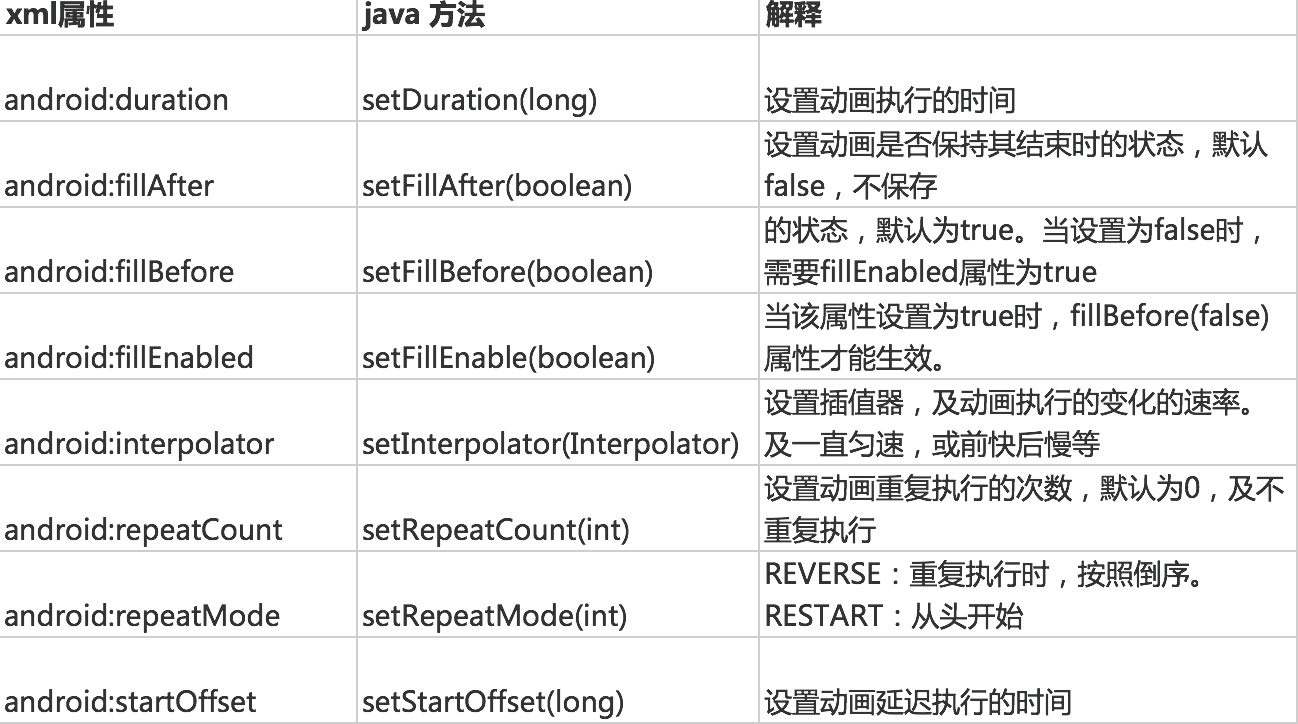 Android 動畫全解:變換動畫、幀動畫與佈局動畫
面試中經常被問到的一個問題是:Android 一共有哪幾類動畫?先記住這份清單——變換動畫(透明度、縮放、平移、旋轉)、逐幀動畫、佈局動畫、屬性動畫。 一、變換動畫(V
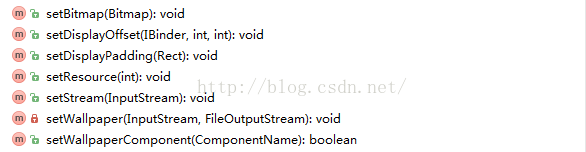 Launcher3 壁紙機制解析:從選擇、裁切到動態壁紙
壁紙是系統能力 Launcher 的壁紙設定並非 Launcher 獨有,而是透過系統 WallpaperManager 完成。因此,不只是 Launcher,許多第三方
 高仿微信圖片選擇器:Android 海量圖片的掃描、加載與流暢體驗
一、為什麼要認真對待圖片加載 手機鏡頭的像素輕鬆破千萬,一張照片解釋成 Bitmap 之後所佔的內存往往相當可觀。如果直接把幾千張原圖一股腦塞進列表,閃退與卡頓幾乎是必然
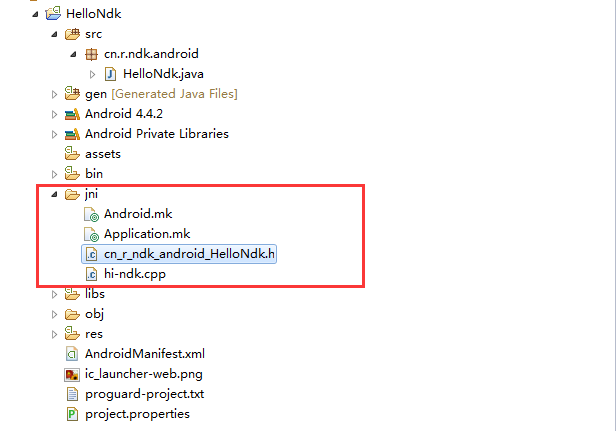 Android JNI/NDK 入門:從 Java 到 C++ 的第一步
前言NDK 讓 Android 開發者能用 C/C++ 實作效能敏感或需重用原生庫的功能。本文從環境建置開始,完成一個由 Java 傳入兩個整數、由 C++ 比較大小並回