

編輯:關於 Android 程式設計
照著《第一行代碼》第八章做「從相冊選擇圖片」,執行後卻發現選完圖直接返回,根本沒跳出裁切視窗。這個坑值得記錄下來。
先檢查線索:SD 卡根目錄下的 output_image.jpg 是個 0 位元組的檔案,說明圖片確實沒被寫入。既然接收端沒收到東西,問題應該出在發送端——也就是那個「選擇照片」的 Intent。
翻了一下系統圖庫的清單檔,意圖過濾器是這樣寫的:
<intent-filter>
    <category android:name="android.intent.category.DEFAULT" />
    <data android:mimetype="image/*" />
    <data android:mimetype="video/*" />
</intent-filter>
關鍵差異在這裡:書中用的是 android.intent.action.GET_CONTENT,而系統圖庫登記的是 android.intent.action.PICK。改用 PICK 之後,裁切視窗立刻正常跳轉。
另一個問題隨之浮現:用 data.getData() 取到的並不是絕對路徑。拿這樣的 URI 去設定 ImageView 或上傳網路,都會出錯。
版面很簡單,一個按鈕加一個 ImageView:
<LinearLayout xmlns:android="https://schemas.android.com/apk/res/android"
    xmlns:tools="https://schemas.android.com/tools"
    android:layout_width="match_parent"
    android:layout_height="match_parent"
    android:orientation="vertical"
    android:paddingBottom="@dimen/activity_vertical_margin"
    android:paddingLeft="@dimen/activity_horizontal_margin"
    android:paddingRight="@dimen/activity_horizontal_margin"
    android:paddingTop="@dimen/activity_vertical_margin"
    tools:context="com.example.selectfromgallery.MainActivity">

    <Button
        android:id="@+id/choose_from_album"
        android:layout_width="match_parent"
        android:layout_height="wrap_content"
        android:text="相冊" />

    <ImageView
        android:id="@+id/View"
        android:layout_width="wrap_content"
        android:layout_height="wrap_content"
        android:layout_gravity="center_horizontal" />

</LinearLayout>
MainActivity 的核心邏輯只有兩段。
第一步,發出選擇照片的意圖:
/** 從相冊選擇照片(不裁切) */
private void selectPicture() {
    Intent intent = new Intent();
    intent.setAction(Intent.ACTION_PICK);   // 從資料中挑一項
    intent.setType("image/*");              // 限定圖片
    startActivityForResult(intent, 1);
}
第二步,在 onActivityResult 中把 URI 換成絕對路徑:
@Override
protected void onActivityResult(int requestCode, int resultCode, Intent data) {
    super.onActivityResult(requestCode, resultCode, data);
    if (resultCode != RESULT_OK) return;

    try {
        Uri selectedImage = data.getData();
        String[] filePathColumn = { MediaStore.Images.Media.DATA };

        Cursor cursor = getContentResolver().query(
                selectedImage, filePathColumn, null, null, null);
        cursor.moveToFirst();
        int columnIndex = cursor.getColumnIndex(filePathColumn[0]);
        String picturePath = cursor.getString(columnIndex);   // 這才是絕對路徑
        cursor.close();

        Bitmap bitmap = BitmapFactory.decodeFile(picturePath);
        picImageView.setImageBitmap(bitmap);
    } catch (Exception e) {
        e.printStackTrace();
    }
}
原理不難:系統回傳的是一條 content:// 風格的 URI,而 MediaStore.Images.Media.DATA 這一列存的正是檔案的實際路徑。用 ContentResolver 查一次,就能把它換回來。
第一,記得 close Cursor,這是常見的洩漏來源。第二,在 Android 4.4 之後,如果使用者從文件選擇器挑選雲端或 Google Drive 上的圖片,DATA 欄位可能為 null——因為那檔案根本沒有本地路徑。較穩健的做法是改用 ContentResolver 開啟 InputStream 直接讀內容,或搭配新版的 Storage Access Framework。第三,若只是要顯示,其實不必執著於絕對路徑,把 URI 交給成熟圖片框架即可。
 Android 多線程:IntentService 完全詳解
上一篇聊了 HandlerThread,本篇就來看看它在 IntentService 中的實際應用。閱讀前建議先了解 HandlerThread,有助於更好地掌握 Int
 Android 中 SparseArray 性能優化的使用方法
之前在研究橫向二級菜單的那篇文章時,發現其中用 SparseArray 替代了 HashMap。於是筆者查了一些相關資料,也親自對性能做了測試。先說說 SparseArr
 微信電腦版誤發訊息怎麼辦?撤回功能操作教學
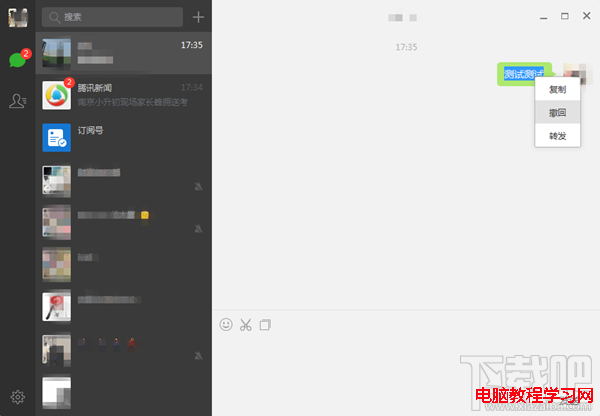
微信電腦版可撤回誤發訊息。在聊天視窗中找到訊息,按右鍵選擇撤回,對話中會顯示已撤回提示。 此功能可減少打錯字或傳錯檔案的困擾。
 樂2卡屏進不了系統怎麼辦?樂2 Pro救磚教程
樂2與樂2 Pro卡屏無法進入系統的解法 若樂2或樂2 Pro X620出現卡屏、循環開機或無法進入系統,可嘗試使用線刷救磚包恢復。 準備線刷包 下載適用於樂2與樂2 P