

編輯:關於 Android 程式設計
上一篇中介紹了單執行緒的斷點續傳,本篇進一步升級:讓單一下載任務同時使用多條執行緒,並且支援多個任務並行下載。
整體架構與前一篇相近,但多執行緒引入了執行緒安全的問題。最直接的處理方式是讓資料庫相關物件全域唯一,也就是採用單例模式:DBHelper 只保留一個實例,所有對資料庫的操作都透過同一個物件、同一個連線存取同一張表,如此一來就能避開 SQLite 的並發衝突。
import android.content.Context;
import android.database.sqlite.SQLiteDatabase;
import android.database.sqlite.SQLiteOpenHelper;

public class DBHelper extends SQLiteOpenHelper {
    private static final String DB_NAME = "download.db";
    private static final int VERSION = 1;

    private static final String SQL_CREATE = "create table thread_info(_id integer primary key autoincrement,"
            + "thread_id integer,url text,start integer,end integer,finished integer)";

    private DBHelper(Context context) {
        super(context, DB_NAME, null, VERSION);
    }

    private static DBHelper sHelper = null;

    /** 雙重檢查鎖的單例模式 */
    public static DBHelper getInstanceDBHelper(Context context) {
        if (sHelper == null) {
            synchronized (DBHelper.class) {
                if (sHelper == null) {
                    sHelper = new DBHelper(context);
                }
            }
        }
        return sHelper;
    }

    @Override
    public void onCreate(SQLiteDatabase db) {
        db.execSQL(SQL_CREATE);
    }

    @Override
    public void onUpgrade(SQLiteDatabase db, int oldVersion, int newVersion) {
    }
}
thread_info 表的增刪改查方法都必須宣告為 synchronized,否則在多執行緒環境下極易出現資料錯亂。
public class ThreadDBService {
    private DBHelper mHelper = null;

    public ThreadDBService(Context context) {
        mHelper = DBHelper.getInstanceDBHelper(context);
    }

    /** 插入執行緒資訊 */
    public synchronized void insertThread(ThreadInfo threadInfo) {
        SQLiteDatabase db = mHelper.getWritableDatabase();
        db.execSQL("insert into thread_info(thread_id,url,start,end,finished) values(?,?,?,?,?)",
                new Object[] { threadInfo.getId(), threadInfo.getUrl(), threadInfo.getStart(),
                        threadInfo.getEnd(), threadInfo.getFinished() });
        db.close();
    }

    /** 刪除某個任務的所有執行緒資訊 */
    public synchronized void deletetThread(String url) {
        SQLiteDatabase db = mHelper.getWritableDatabase();
        db.execSQL("delete from thread_info where url=?", new Object[] { url });
        db.close();
    }

    /** 更新單條執行緒的完成進度 */
    public synchronized void updateThread(String url, int thread_id, int finished) {
        SQLiteDatabase db = mHelper.getWritableDatabase();
        db.execSQL("update thread_info set finished=? where url=? and thread_id=?",
                new Object[] { finished, url, thread_id });
        db.close();
    }

    /** 讀取某個任務的所有執行緒資訊 */
    public synchronized List getThreads(String url) {
        SQLiteDatabase db = mHelper.getReadableDatabase();
        Cursor cursor = db.rawQuery("select * from thread_info where url=?", new String[] { url });
        List list = new ArrayList();
        while (cursor.moveToNext()) {
            ThreadInfo info = new ThreadInfo();
            info.setId(cursor.getInt(cursor.getColumnIndex("thread_id")));
            info.setUrl(cursor.getString(cursor.getColumnIndex("url")));
            info.setStart(cursor.getInt(cursor.getColumnIndex("start")));
            info.setEnd(cursor.getInt(cursor.getColumnIndex("end")));
            info.setFinished(cursor.getInt(cursor.getColumnIndex("finished")));
            list.add(info);
        }
        cursor.close();
        db.close();
        return list;
    }

    /** 判斷某條執行緒是否已存在 */
    public synchronized boolean isExists(String url, int thread_id) {
        SQLiteDatabase db = mHelper.getReadableDatabase();
        Cursor cursor = db.rawQuery("select * from thread_info where url=? and thread_id=?",
                new String[] { url, thread_id + "" });
        boolean exists = cursor.moveToNext();
        cursor.close();
        db.close();
        return exists;
    }
}
DownloadService 用一個 Map 集合管理所有下載任務,負責暫停指定任務,並透過初始化執行緒取得檔案總長度。
public class DownloadService extends Service {

    /** 下載任務集合 */
    private Map mTasks = new LinkedHashMap();

    @Override
    public int onStartCommand(Intent intent, int flags, int startId) {
        if (Constant.ACTION_START.equals(intent.getAction())) {
            FileInfo fileInfo = (FileInfo) intent.getSerializableExtra("fileInfo");
            new InitThread(fileInfo).start();
        } else if (Constant.ACTION_STOP.equals(intent.getAction())) {
            FileInfo fileInfo = (FileInfo) intent.getSerializableExtra("fileInfo");
            DownLoadTask task = mTasks.get(fileInfo.getId());
            if (task != null) {
                task.setPause(true);
                stopSelf();
            }
        }
        return super.onStartCommand(intent, flags, startId);
    }

    @Override
    public IBinder onBind(Intent intent) {
        return null;
    }

    /** 接收子執行緒回傳的初始化訊息 */
    @SuppressLint("HandlerLeak")
    private Handler mHandler = new Handler() {
        public void handleMessage(android.os.Message msg) {
            if (msg.what == Constant.MSG_INIT) {
                FileInfo fileInfo = (FileInfo) msg.obj;
                DownLoadTask task = new DownLoadTask(DownloadService.this, fileInfo, 3);
                task.download();
                mTasks.put(fileInfo.getId(), task);
            }
        }
    };

    /** 初始化執行緒:取得遠端檔案長度並預先建立本地檔案 */
    class InitThread extends Thread {
        private FileInfo mFileInfo = null;

        public InitThread(FileInfo mFileInfo) {
            this.mFileInfo = mFileInfo;
        }

        @Override
        public void run() {
            HttpURLConnection conn = null;
            RandomAccessFile raf = null;
            try {
                URL url = new URL(mFileInfo.getUrl());
                conn = (HttpURLConnection) url.openConnection();
                conn.setReadTimeout(3000);
                conn.setRequestMethod("GET");
                int length = -1;
                if (conn.getResponseCode() == 200) {
                    length = conn.getContentLength();
                }
                if (length <= 0) {
                    return;
                }
                File dir = new File(Constant.DOWNLAOD_PATH);
                if (!dir.exists()) {
                    dir.mkdirs();
                }
                File file = new File(dir, mFileInfo.getFileName());
                raf = new RandomAccessFile(file, "rwd");
                raf.setLength(length);
                mFileInfo.setLength(length);
                mHandler.obtainMessage(Constant.MSG_INIT, mFileInfo).sendToTarget();
            } catch (Exception e) {
                e.printStackTrace();
            } finally {
                conn.disconnect();
                if (raf != null) {
                    try { raf.close(); } catch (IOException e) { e.printStackTrace(); }
                }
            }
        }
    }
}
download() 方法先讀資料庫,取出該任務已存在的執行緒資訊;若集合長度為 0 代表首次下載,則依指定的執行緒數量切分段落並寫入資料庫。接著逐一啟動 DownloadThread,真正的工作在 run() 中完成,每約一秒發送一次廣播更新 UI。
public class DownLoadTask {
    private ThreadDBService mDBService = null;
    private Context mContext;
    private FileInfo mFileInfo;
    private int mFinished = 0;
    private boolean isPause = false;
    private int mThreadCount = 1;
    private List mThreadList = null;

    public DownLoadTask(Context mContext, FileInfo mFileInfo, int mThreadCount) {
        this.mContext = mContext;
        this.mFileInfo = mFileInfo;
        mDBService = new ThreadDBService(mContext);
        this.mThreadCount = mThreadCount;
    }

    public boolean isPause() { return isPause; }

    /** 任務的所有執行緒共用同一個暫停旗標 */
    public void setPause(boolean isPause) { this.isPause = isPause; }

    public void download() {
        List threads = mDBService.getThreads(mFileInfo.getUrl());
        if (threads.size() == 0) {
            int length = mFileInfo.getLength() / mThreadCount;
            for (int i = 0; i < mThreadCount; i++) {
                ThreadInfo info = new ThreadInfo(i, mFileInfo.getUrl(), length * i, (i + 1) * length - 1, 0);
                mDBService.insertThread(info);
                if (i + 1 == mThreadCount) {
                    info.setEnd(mFileInfo.getLength());
                }
                threads.add(info);
            }
        }
        mThreadList = new ArrayList();
        for (Object obj : threads) {
            ThreadInfo info = (ThreadInfo) obj;
            DownloadThread thread = new DownloadThread(info);
            thread.start();
            mThreadList.add(thread);
        }
    }

    /** 檢查是否所有執行緒都已完成 */
    private synchronized void checkAllThreadFinished() {
        boolean allFinished = true;
        for (Object obj : mThreadList) {
            DownloadThread thread = (DownloadThread) obj;
            if (!thread.isFinished) {
                allFinished = false;
                break;
            }
        }
        if (allFinished) {
            mDBService.deletetThread(mFileInfo.getUrl());
            Intent intent = new Intent(Constant.ACTION_FINISH);
            intent.putExtra("fileInfo", mFileInfo);
            mContext.sendBroadcast(intent);
        }
    }

    /** 真正的下載執行緒 */
    class DownloadThread extends Thread {
        private ThreadInfo mThreadInfo;
        public boolean isFinished = false;

        public DownloadThread(ThreadInfo mThreadInfo) {
            this.mThreadInfo = mThreadInfo;
        }

        @Override
        public void run() {
            HttpURLConnection conn = null;
            RandomAccessFile raf = null;
            InputStream input = null;
            try {
                conn = (HttpURLConnection) new URL(mThreadInfo.getUrl()).openConnection();
                conn.setRequestMethod("GET");
                conn.setConnectTimeout(3000);

                int start = mThreadInfo.getStart() + mThreadInfo.getFinished();
                conn.setRequestProperty("Range", "bytes=" + start + "-" + mThreadInfo.getEnd());

                File file = new File(Constant.DOWNLAOD_PATH, mFileInfo.getFileName());
                raf = new RandomAccessFile(file, "rwd");
                raf.seek(start);

                Intent intent = new Intent(Constant.ACTION_UPDATE);
                mFinished += mThreadInfo.getFinished();

                // 斷點續傳回應碼是 206,不是 200
                if (206 == conn.getResponseCode()) {
                    input = conn.getInputStream();
                    byte[] buffer = new byte[1024];
                    int len;
                    long time = System.currentTimeMillis();
                    while ((len = input.read(buffer)) != -1) {
                        raf.write(buffer, 0, len);
                        mFinished += len;
                        mThreadInfo.setFinished(mThreadInfo.getFinished() + len);

                        if (System.currentTimeMillis() - time > 1000) {
                            time = System.currentTimeMillis();
                            // 先轉 float 再計算百分比,避免整數除法恆為 0
                            intent.putExtra("finished", (int) (((float) mFinished / mFileInfo.getLength()) * 100));
                            intent.putExtra("id", mFileInfo.getId());
                            mContext.sendBroadcast(intent);
                        }

                        if (isPause) {
                            mDBService.updateThread(mThreadInfo.getUrl(), mThreadInfo.getId(),
                                    mThreadInfo.getFinished());
                            return;
                        }
                    }
                }
                isFinished = true;
                checkAllThreadFinished();
            } catch (Exception e) {
                e.printStackTrace();
            } finally {
                conn.disconnect();
                if (input != null) { try { input.close(); } catch (IOException e) { } }
                if (raf != null) { try { raf.close(); } catch (IOException e) { } }
            }
        }
    }
}
當檔案很大時,mFinished * 100 / length 這種寫法可能發生整數溢出。有兩種解法:
1、先轉成浮點數再計算:((float) mFinished / length) * 100。之所以必須轉型,是因為已下載長度永遠小於或等於總長度,若不轉型整數除法結果會一直是 0。
2、把 ProgressBar 的最大值直接設為檔案總長度,每次發送已下載的位元組數。這種做法最簡單,也最直觀。
Adapter 部分沿用標準的 ViewHolder 複用寫法,每個項目上放檔名、ProgressBar 以及開始/暫停兩個按鈕,點擊時以不同 Action 啟動 DownloadService。
holder.start.setOnClickListener(new OnClickListener() {
    @Override
    public void onClick(View v) {
        Intent intent = new Intent(mContext, DownloadService.class);
        intent.putExtra("fileInfo", mFileInfo);
        intent.setAction(Constant.ACTION_START);
        mContext.startService(intent);
    }
});

holder.stop.setOnClickListener(new OnClickListener() {
    @Override
    public void onClick(View v) {
        Intent intent = new Intent(mContext, DownloadService.class);
        intent.putExtra("fileInfo", mFileInfo);
        intent.setAction(Constant.ACTION_STOP);
        mContext.startService(intent);
    }
});

/** 更新進度條 */
public void setProgressbar(int id, int progress) {
    FileInfo info = mDatas.get(id);
    info.setFinished(progress);
    notifyDataSetChanged();
}
MainActivity 負責註冊廣播接收器,收到 ACTION_UPDATE 時更新對應項目的進度,收到 ACTION_FINISH 時彈出 Toast 提示下載完成。別忘了在 onDestroy 中呼叫 unregisterReceiver。
BroadcastReceiver mReceiver = new BroadcastReceiver() {
    @Override
    public void onReceive(Context context, Intent intent) {
        if (intent.getAction().equals(Constant.ACTION_UPDATE)) {
            int finished = intent.getIntExtra("finished", 0);
            int id = intent.getIntExtra("id", -1);
            mAapter.setProgressbar(id, finished);
        } else if (Constant.ACTION_FINISH.equals(intent.getAction())) {
            FileInfo fileInfo = (FileInfo) intent.getSerializableExtra("fileInfo");
            mAapter.setProgressbar(fileInfo.getId(), 0);
            Toast.makeText(getApplicationContext(), fileInfo.getFileName() + " 下載完成", 0).show();
        }
    }
};
public class Constant {
    public static final String ACTION_FINISH = "ACTION_FINISH";
    public static final String ACTION_UPDATE = "ACTION_UPDATE";
    public static final String ACTION_START = "ACTION_START";
    public static final String ACTION_STOP = "ACTION_STOP";
    public static final int MSG_INIT = 0;
    public static final String DOWNLAOD_PATH = Environment.getExternalStorageDirectory()
            .getAbsolutePath() + "/liweijie/downloads/";
}
最後提醒三件事:ThreadInfo 與 FileInfo 這兩個實體類需要實作 Serializable;記得在 AndroidManifest 中加入網路與外部儲存空間的權限;以及別忘了註冊 DownloadService。
 Android JNI 進階:從 C 語言呼叫 Java 方法更新介面
C 與 Java 雙向呼叫 JNI 不只可以讓 Java 呼叫 C,也可以讓 C 回呼 Java 方法。這種能力常用於底層感測器、硬體監控或跨語言資料回報。若 C 端取得
 Android 菊花圈加載動畫
菊花圈原理 Android 中常見的圓形加載動畫,可利用幀動畫實作。將多張連續圖片依序播放,即可形成旋轉效果。 啟動畫面 可在啟動頁顯示加載動畫,並使用 Timer
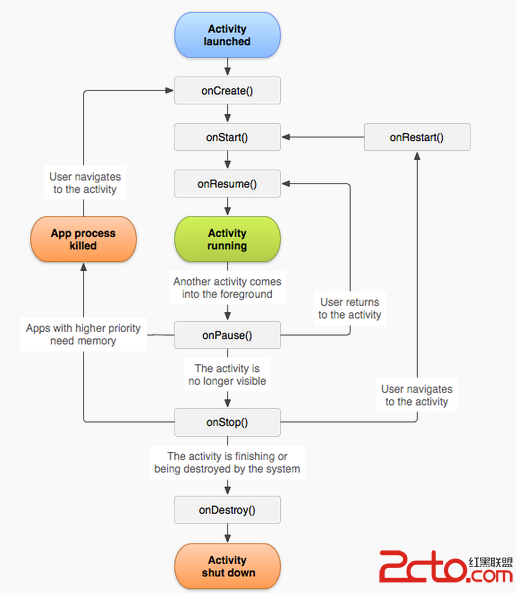 Android Activity 生命週期:從 onCreate 到 onDestroy
Activity 是 Android 中最重要的元件之一。理解 Activity 的生命週期,有助於正確管理資源、避免記憶體洩漏,並處理畫面切換時的狀態保存與恢復。生命週
 Android 開發學習之 Camera:調用系統相機拍照
隨著手機硬件能力大幅提升,各種依賴硬件的應用層出不窮,其中相機功能無疑是最常用的之一。本篇就來做一個簡單的相機範例——這個模式在很多場景都用得到,例如在手機上拍照後分享給