

編輯:關於 Android 程式設計
專案中常需要下載文件(視頻及各類文檔),下載完成後再調用系統應用打開。以下整理關鍵代碼片段。
思路是:用 ProgressBar 搭配 HTTP 協議下載,本地不存在就先下載,已存在則直接打開。
 private void playMeida() {
    file2 = new File(savePAth + "/" + filename);
    if (!file2.exists()) {
        new Thread() {
            public void run() {
                try {
                    down_file(path, savePAth);
                } catch (ClientProtocolException e) {
                    e.printStackTrace();
                } catch (IOException e) {
                    e.printStackTrace();
                }
            }
        }.start();
    } else {
        Intent intent = new Intent(Intent.ACTION_VIEW);
        Uri data = Uri.parse(savePAth + "/" + filename);
        if (type.equals("video")) {
            intent.setDataAndType(data, "video/*");
        } else {
            intent.setDataAndType(data, "application/*");
        }
        startActivity(intent);
    }
}
下載方法:讀取文件總大小,循環讀取字節寫入本地文件,並透過 sendMsg 通知進度。
 public void down_file(String url, String path) throws IOException {
    URL myURL = new URL(url);
    URLConnection conn = myURL.openConnection();
    conn.connect();
    InputStream is = conn.getInputStream();
    this.fileSize = conn.getContentLength();
    if (this.fileSize <= 0)
        throw new RuntimeException("can not know the file's size");
    if (is == null)
        throw new RuntimeException("stream is null");
    FileOutputStream fos = new FileOutputStream(path + "/" + filename);
    byte buf[] = new byte[1024];
    downLoadFileSize = 0;
    sendMsg(0);
    do {
        int numread = is.read(buf);
        if (numread == -1) {
            break;
        }
        fos.write(buf, 0, numread);
        downLoadFileSize += numread;
        sendMsg(1);
    } while (true);
    sendMsg(2);
    is.close();
}
控制 ProgressBar 的 Handler:
 private Handler handler = new Handler() {
    @Override
    public void handleMessage(Message msg) {
        if (!Thread.currentThread().isInterrupted()) {
            switch (msg.what) {
                case 0:
                    mPbImage.setMax(fileSize);
                    mPbTv.setMax(fileSize);
                    break;
                case 1:
                    mPbImage.setProgress(downLoadFileSize);
                    mPbTv.setProgress(downLoadFileSize);
                    break;
                case 2:
                    Toast.makeText(getActivity(), "download is completed", 1).show();
                    break;
                case -1:
                    String error = msg.getData().getString("error");
                    Toast.makeText(getActivity(), error, 1).show();
                    break;
            }
        }
        super.handleMessage(msg);
    }
};
注意事項:由於 url 由服務端傳來,通常不含 .doc、.xlsx 這類副檔名,因此要根據 MIME 類型反查副檔名。可維護一張 MIME 對照表,用 mineType 比對取得對應的 productType(即副檔名):
 for (int i = 0; i < MIME_MapTable.length; i++) {
    if (mineType != null && mineType.equals(MIME_MapTable[i][1])) {
        productTpye = MIME_MapTable[i][0];
    }
}

// 對照表示例(部分)
private String[][] MIME_MapTable = {
    {".3gp", "video/3gpp"},
    {".avi", "video/x-msvideo"},
    {".doc", "application/msword"},
    {".pdf", "application/pdf"},
    {".mp3", "audio/x-mpeg"},
    {".mp4", "video/mp4"},
    {".png", "image/png"},
    {".zip", "application/x-zip-compressed"},
    {"", "*/*"}
};
這樣得到的 productTpye 就是文件副檔名(如 .jpg),後續即可據此正確命名並交給系統打開。
 Android 自定義折線圖控件
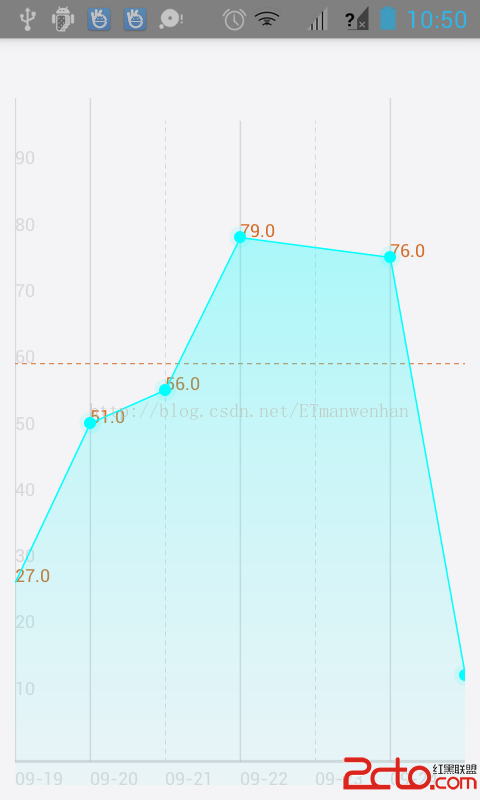
折線圖是數據可視化中非常常見的一種圖表。下面通過一個自定義的 BrokenLine 控件,展示如何繪製帶網格線、虛線標示、漸變填充和數據點的折線圖。 BrokenLine
 Android 序列化完整解析:Serializable 與 Parcelable 的儲存、讀取與實作
序列化在 Android 中的意義在 Android 開發裡,序列化並不是一個只在面試中出現的名詞,而是經常出現在資料保存、頁面跳轉、跨進程溝通等場景中的實用技術。簡單來
 微信電腦版誤發訊息怎麼辦?撤回功能操作教學
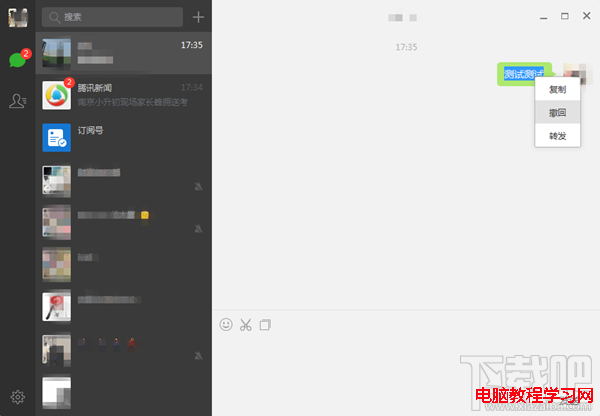
微信電腦版可撤回誤發訊息。在聊天視窗中找到訊息,按右鍵選擇撤回,對話中會顯示已撤回提示。 此功能可減少打錯字或傳錯檔案的困擾。
 自定義 View 實戰(二):用複合控件封裝一個可復用的 TopBar
複合控件:把「一組控件」變成「一個控件」 自定義 View 的第二條路徑是創建複合控件。它的核心思路並不複雜:挑一個合適的 ViewGroup 作為父容器,把若干功能明確