

編輯:關於 Android 程式設計
先看效果圖。
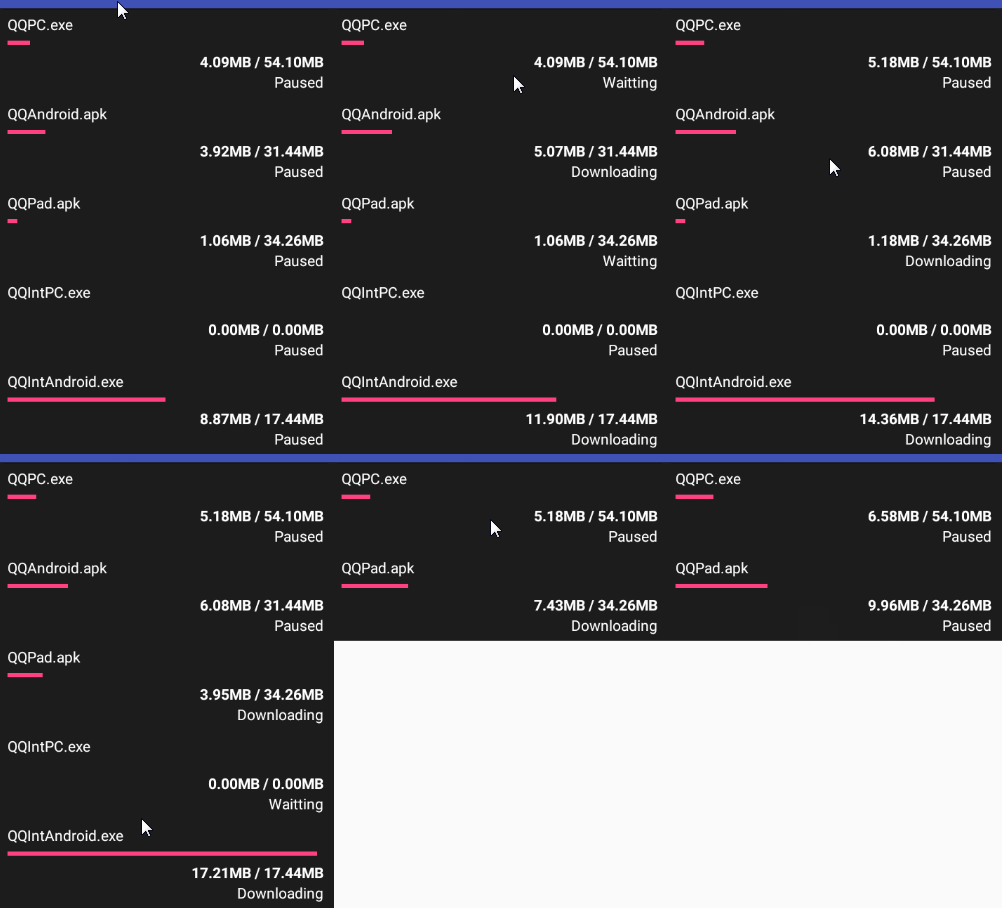
預覽圖中把同時最大下載數限制為 2。
其實下載管理器的實現並不複雜,把幾個要點想清楚就行:
先創建 Service,並通過 Binder 把服務實例暴露給 Activity:
public class OCDownloadService extends Service {

    @Nullable
    @Override
    public IBinder onBind(Intent intent) {
        // 綁定時返回一個攜帶服務對象的 Binder
        return new GetServiceClass();
    }

    /** 傳遞服務對象的類 */
    public class GetServiceClass extends Binder {
        public OCDownloadService getService() {
            return OCDownloadService.this;
        }
    }
}
別忘了在 AndroidManifest.xml 中註冊:
<service android:name=".OCDownloader.OCDownloadService"></service>
我用 HashMap 而不是 List 來存放任務,理由有兩個:查找任務時可以直接用 URL 作 key,不必遍歷;對外暴露時給一份 copy 就行,不用把自己傳出去。
public class OCDownloadService extends Service {

    static final int MAX_DOWNLOADING_TASK = 2; // 最大同時下載數

    private LocalBroadcastManager broadcastManager;
    private HashMap<String, DLBean> allTaskList;
    private OCThreadExecutor threadExecutor;
    private int runningThread = 0;

    @Override
    public void onCreate() {
        super.onCreate();
        if (threadExecutor == null) {
            threadExecutor = new OCThreadExecutor(MAX_DOWNLOADING_TASK, "downloading");
        }
        if (allTaskList == null) {
            allTaskList = new HashMap<>();
        }
        if (broadcastManager == null) {
            broadcastManager = LocalBroadcastManager.getInstance(this);
        }
    }

    /** 下載請求從這裡進來 */
    @Override
    public int onStartCommand(Intent intent, int flags, int startId) {
        if (intent != null && intent.getAction() != null
                && intent.getAction().equals("NewTask")) {
            String url = intent.getExtras().getString("url");
            String title = intent.getExtras().getString("title");
            String path = intent.getExtras().getString("path");

            // 三個參數缺一不可
            if (TextUtils.isEmpty(url) || TextUtils.isEmpty(title) || TextUtils.isEmpty(path)) {
                Toast.makeText(this, "Invail data", Toast.LENGTH_SHORT).show();
                return super.onStartCommand(intent, flags, startId);
            } else {
                checkTask(new DLBean(title, url, path));
            }
        }
        return super.onStartCommand(intent, flags, startId);
    }

    /** 檢查新的下載任務 */
    private synchronized void checkTask(@Nullable DLBean requestBean) {
        if (requestBean == null) return;

        // 1. 同名文件是否已存在
        if (new File(requestBean.getPath() + "/" + requestBean.getTitle()).exists()) {
            Toast.makeText(this, "File is already downloaded", Toast.LENGTH_SHORT).show();
            return;
        }

        // 2. 是否已在總表中
        if (allTaskList.containsKey(requestBean.getUrl())) {
            DLBean bean = allTaskList.get(requestBean.getUrl());
            switch (bean.getStatus()) {
                case DOWNLOADING:
                    Toast.makeText(this, "Task is downloading", Toast.LENGTH_SHORT).show();
                    return;
                case WAITTING:
                    Toast.makeText(this, "Task is in the queue", Toast.LENGTH_SHORT).show();
                    return;
                case PAUSED:
                case FAILED:
                    // 暫停或失敗的任務,當作新任務重新開始
                    requestBean.setStatus(OCDownloadStatus.WAITTING);
                    startTask(requestBean);
                    break;
            }
        } else {
            requestBean.setStatus(OCDownloadStatus.WAITTING);
            allTaskList.put(requestBean.getUrl(), requestBean);
            startTask(requestBean);
        }
    }

    /** 加入下載隊列 */
    private void startTask(DLBean requestBean) {
        if (runningThread < MAX_DOWNLOADING_TASK) {
            requestBean.setStatus(OCDownloadStatus.DOWNLOADING);
            runningThread += 1;
            threadExecutor.submit(new FutureTask<>(new DownloadThread(requestBean)),
                    requestBean.getUrl());
        }
        // 否則保持 WAITTING,等前面的任務結束再調起
        updateList();
    }

    /** 返回總表的一份拷貝 */
    public ArrayList<DLBean> getTaskList() {
        return new ArrayList<>(allTaskList.values());
    }

    private void updateList() { /* 廣播整體刷新 */ }
    private void updateItem(DLBean bean, long totalSize, long downloadedSize) { /* 廣播單項刷新 */ }
}
流程梳理一遍:
1. 收到新的任務請求
2. 判斷任務信息是否完整
3. 檢查任務是否已在總表中,並檢查狀態
4. 若不在總表中,或之前處於暫停/失敗狀態,則當作新任務;否則提示已存在
5. 若已達最大下載數,標記為等待;否則立即開始下載
斷點續傳的前提是服務端支持 Range 請求。做法是在下載過程中先寫入一個 .octmp 臨時文件,下載完成後再改名為正式文件。網上也有人把已下載字節數記到數據庫裡,這樣確實避免了臨時文件,但頻繁寫庫的效率實在不敢恭維。
private class DownloadThread implements Callable<String> {

    private DLBean bean;
    private File downloadFile;
    private String fileSize = null;

    public DownloadThread(DLBean bean) {
        this.bean = bean;
    }

    @Override
    public String call() throws Exception {
        // 檢查是否存在上次的臨時文件
        downloadFile = new File(bean.getPath() + "/" + bean.getTitle() + ".octmp");
        if (downloadFile.exists()) {
            fileSize = "bytes=" + downloadFile.length() + "-";
        }

        OkHttpClient client = new OkHttpClient();
        Request request;
        if (!TextUtils.isEmpty(fileSize)) {
            // 有臨時文件 → 帶 Range 頭,從斷點續傳
            request = new Request.Builder().url(bean.getUrl()).header("Range", fileSize).build();
        } else {
            request = new Request.Builder().url(bean.getUrl()).build();
        }

        Call call = client.newCall(request);
        try {
            bytes2File(call);
        } catch (IOException e) {
            Log.e("OCException", "" + e);
            if (e.getMessage().contains("interrupted")) {
                downloadPaused();   // 主動取消
            } else {
                downloadFailed();   // 真正的失敗
            }
            return null;
        }
        downloadCompleted();
        return null;
    }

    /** 寫盤過程中回報進度 */
    public void onDownload(long downloadedSize) {
        bean.setDownloadedSize(downloadedSize);
        updateItem(bean, bean.getTotalSize(), downloadedSize);
    }

    private void downloadCompleted() {
        runningThread -= 1;
        // 臨時文件改名為正式文件
        downloadFile.renameTo(new File(bean.getPath() + "/" + bean.getTitle()));
        allTaskList.remove(bean.getUrl());
        updateList();
        if (allTaskList.size() > 0) {
            checkTask(startNextTask()); // 撿起下一個等待任務
        }
        threadExecutor.removeTag(bean.getUrl());
    }

    private void downloadFailed() {
        runningThread -= 1;
        bean.setStatus(OCDownloadStatus.FAILED);
        if (allTaskList.size() > 0) checkTask(startNextTask());
        updateList();
        threadExecutor.removeTag(bean.getUrl());
    }

    private void downloadPaused() {
        runningThread -= 1;
        bean.setStatus(OCDownloadStatus.PAUSED);
        if (allTaskList.size() > 0) checkTask(startNextTask());
        updateList();
        threadExecutor.removeTag(bean.getUrl());
    }

    /** 找一個等待中的任務 */
    private DLBean startNextTask() {
        for (DLBean dlBean : allTaskList.values()) {
            if (dlBean.getStatus() == OCDownloadStatus.WAITTING) {
                dlBean.setStatus(OCDownloadStatus.PAUSED); // 先改狀態,避免重複調起
                return dlBean;
            }
        }
        return null;
    }

    /** 把響應數據寫入本地文件 */
    private void bytes2File(Call call) throws IOException {
        OutputStream outPutStream;
        Response response = call.execute();
        ResponseBody responseBody = response.body();
        String responeRange = response.headers().get("Content-Range");

        if (responeRange == null
                || !responeRange.contains(Long.toString(downloadFile.length()))) {
            // 服務端不支持續傳 → 覆寫
            outPutStream = new FileOutputStream(downloadFile, false);
        } else {
            // 支持 → 追加
            outPutStream = new FileOutputStream(downloadFile, true);
        }

        InputStream inputStream = responseBody.byteStream();

        if (TextUtils.isEmpty(fileSize)) {
            bean.setTotalSize(responseBody.contentLength());
        } else {
            // 續傳時總大小 = 剩餘長度 + 已下載長度
            bean.setTotalSize(responseBody.contentLength() + downloadFile.length());
        }

        int length;
        byte[] buffer = new byte[1024];
        while ((length = inputStream.read(buffer)) != -1) {
            outPutStream.write(buffer, 0, length);
            onDownload(downloadFile.length());
        }

        outPutStream.flush();
        outPutStream.close();
        inputStream.close();
    }
}
關鍵步驟:
1. 檢測本地臨時文件,据此設置請求頭的 Range
2. 請求後檢查響應頭 Content-Range,判斷服務端是否真的支持續傳,決定覆蓋還是追加
3. 讀取輸入流並持續寫入
4. 捕獲異常:若為 interrupted 則視為暫停,否則視為失敗
5. 無論失敗還是完成,都會自動撿起隊列中的下一個等待任務
Service 這邊什麼都不用管,把數據廣播出去就行:
/** 更新整個列表 */
private void updateList() {
    broadcastManager.sendBroadcast(new Intent("update_all"));
}

/** 更新單項進度 */
private void updateItem(DLBean bean, long totalSize, long downloadedSize) {
    int progressBarLength = (int) (((float) downloadedSize / totalSize) * 100);
    Intent intent = new Intent("update_singel");
    intent.putExtra("progressBarLength", progressBarLength);
    intent.putExtra("downloadedSize",
            String.format("%.2f", downloadedSize / (1024.0 * 1024.0)));
    intent.putExtra("totalSize",
            String.format("%.2f", totalSize / (1024.0 * 1024.0)));
    intent.putExtra("item", bean);
    broadcastManager.sendBroadcast(intent);
}
Service 就緒之後,再來做展示界面。RecyclerView 的 Adapter 點擊回調、ServiceConnection 這些常規內容不再贅述,唯一要留心的是:退出時務必解除廣播註冊與服務綁定,否則內存洩露。
public class OCDownloadManagerActivity extends AppCompatActivity
        implements OCDownloadAdapter.OnRecycleViewClickCallBack {

    RecyclerView downloadList;
    OCDownloadAdapter downloadAdapter;
    OCDownloadService downloadService;
    LocalBroadcastManager broadcastManager;
    UpdateHandler updateHandler;
    ServiceConnection serviceConnection;

    @Override
    protected void onCreate(@Nullable Bundle savedInstanceState) {
        super.onCreate(savedInstanceState);
        setContentView(R.layout.activity_download_manager);

        downloadAdapter = new OCDownloadAdapter();
        downloadAdapter.setRecycleViewClickCallBack(this);

        downloadList = (RecyclerView) findViewById(R.id.download_list);
        downloadList.setLayoutManager(
                new LinearLayoutManager(this, LinearLayoutManager.VERTICAL, false));
        downloadList.setHasFixedSize(true);
        downloadList.setAdapter(downloadAdapter);

        IntentFilter intentFilter = new IntentFilter();
        intentFilter.addAction("update_all");    // 整體更新
        intentFilter.addAction("update_singel"); // 單項更新

        updateHandler = new UpdateHandler();
        broadcastManager = LocalBroadcastManager.getInstance(this);
        broadcastManager.registerReceiver(updateHandler, intentFilter);

        serviceConnection = new ServiceConnection() {
            @Override
            public void onServiceConnected(ComponentName name, IBinder service) {
                downloadService = ((OCDownloadService.GetServiceClass) service).getService();
                downloadAdapter.updateAllItem(downloadService.getTaskList());
            }

            @Override
            public void onServiceDisconnected(ComponentName name) {
                if (broadcastManager != null && updateHandler != null) {
                    broadcastManager.unregisterReceiver(updateHandler);
                }
            }
        };

        startService(new Intent(this, OCDownloadService.class));
        bindService(new Intent(this, OCDownloadService.class),
                serviceConnection, BIND_AUTO_CREATE);
    }

    @Override
    public void onRecycleViewClick(DLBean bean) {
        if (downloadService != null) downloadService.clickTask(bean.getUrl(), false);
    }

    @Override
    public void onRecycleViewLongClick(DLBean bean) {
        if (downloadService != null) downloadService.clickTask(bean.getUrl(), true);
    }

    @Override
    protected void onDestroy() {
        super.onDestroy();
        broadcastManager.unregisterReceiver(updateHandler);
        unbindService(serviceConnection);
    }
}
為什麼要分成「整體更新」和「單項更新」兩條通道?因為下載過程中的進度回調頻率極高,如果每次都 notifyDataSetChanged,列表項一多就會明顯掉幀。只有幾項時勉強能用,上千條時基本卡死。
(這個思路最早是 1 年前 QQ 上一位好友 @eprendre 提點我的。如果各位有更好的方案,歡迎交流。)
class UpdateHandler extends BroadcastReceiver {
    @Override
    public void onReceive(Context context, Intent intent) {
        switch (intent.getAction()) {
            case "update_all":
                downloadAdapter.updateAllItem(downloadService.getTaskList());
                break;

            case "update_singel":
                DLBean bean = intent.getExtras().getParcelable("item");
                String downloadedSize = intent.getExtras().getString("downloadedSize");
                String totalSize = intent.getExtras().getString("totalSize");
                int progressLength = intent.getExtras().getInt("progressBarLength");

                if (bean != null) {
                    // 只定位到具體那一項,避免全表刷新
                    View itemView = downloadList.getChildAt(downloadAdapter.getItemPosition(bean));
                    if (itemView != null) {
                        TextView textProgress =
                                (TextView) itemView.findViewById(R.id.textView_download_length);
                        ProgressBar progressBar =
                                (ProgressBar) itemView.findViewById(R.id.progressBar_download);
                        TextView status =
                                (TextView) itemView.findViewById(R.id.textView_download_status);

                        textProgress.setText(downloadedSize + "MB / " + totalSize + "MB");
                        progressBar.setProgress(progressLength);

                        switch (bean.getStatus()) {
                            case DOWNLOADING: status.setText("Downloading"); break;
                            case WAITTING:   status.setText("Waitting");    break;
                            case FAILED:     status.setText("Failed");      break;
                            case PAUSED:     status.setText("Paused");      break;
                        }
                    }
                }
                break;
        }
    }
}
這個下載器能跑,但離「生產可用」還有一段距離,順手列幾條:
call.cancel()。.octmp。downloadList.getChildAt(position) 依賴 position 是「可見 children 的下標」,當列表很長、目標項滾出屏幕時會取到錯誤的 View。更穩妥的做法是用 findViewHolderForAdapterPosition(),或者直接改用 DiffUtil + 局部刷新。整體來說,一個下載管理器真正的複雜度不在「怎麼下」,而在「怎麼管」:任務狀態機、併發調度、進度節流、異常恢復,這些才是需要反覆打磨的部分。
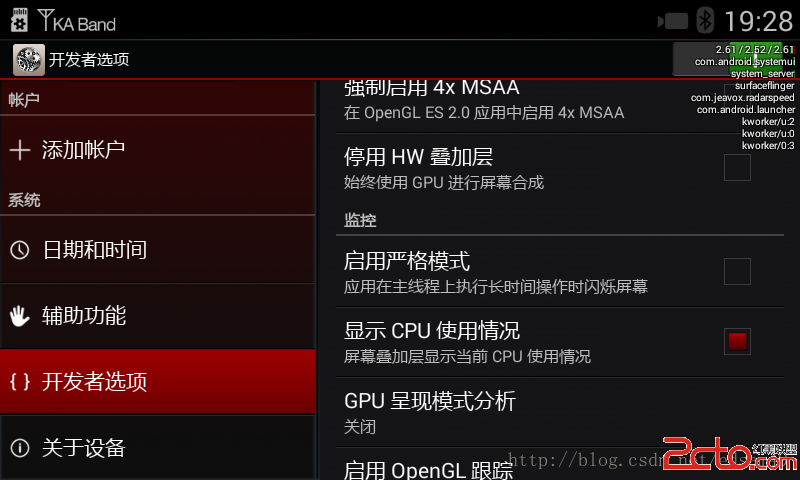 Android 系統 CPU 資源查詢與開發者選項解析
Android 基於 Linux 核心,因此在系統層面保留了許多熟悉的資源監控能力。例如命令列中的 top 可以查看 CPU 使用率、平均負載與行程資訊;在 Androi
 Android 圖像處理入門:Bitmap 與 BitmapDrawable 的關係與實作
在 Android 裡處理圖片,Bitmap 與 BitmapDrawable 這對搭檔幾乎無可迴避。理解兩者的分工,是寫好任何圖像相關功能的第一步。本文從最單純的載入方
 Android 實現 QQ 表情發送與接收的完整實例(附程式碼)
本文透過完整實例,講解如何在 Android 聊天應用中實現類似 QQ 的表情發送與接收功能。 在做一個聊天應用練習時,需要用到表情,於是就想著模仿一下 QQ 表情。圖片
 在 Eclipse 中使用 Android Studio Gradle AAR 庫的完整指南
為何需要在 Eclipse 中使用 AAR許多新的 Android 庫以 Android Studio 的 Gradle 專案形式發布,並以 AAR 形式進入公共倉庫。然