

編輯:關於 Android 程式設計
平常我們用 Intent 進行 Activity 跳轉時,通常都知道目標 Activity 的類別。但當目標不在同一個 App 內,甚至想跳到系統自帶的功能時,就得靠「匿名啟動」這套 Action 機制了。
Intent intent = new Intent(FirstActivity.this, SecondActivity.class);
startActivity(intent);
首先在被啟動的 SecondActivity 的 AndroidManifest.xml 中配置 intent-filter,加上 action 與 category:
<intent-filter>
    <action android:name="toSecondPage" />
    <category android:name="android.intent.category.DEFAULT" />
</intent-filter>
FirstActivity 便能透過 action 名稱找到它:
Intent intent = new Intent();
intent.setAction("toSecondPage");
startActivity(intent);
如此一來,即使目標 Activity 不屬於本 App,也能透過 ActionName 成功跳轉。
原理相同,只要使用系統預先定義好的 ActionName,就能跳到系統的功能頁面,還能一併帶上資料:
package testIntent;

import android.app.Activity;
import android.content.Intent;
import android.net.Uri;
import android.os.Bundle;
import android.view.View;
import android.view.View.OnClickListener;
import android.widget.Button;

public class FirstActivity extends Activity implements OnClickListener {
    private Button toWeBButton, toPicButton, toMesButton, toPhoneButton;

    @Override
    protected void onCreate(Bundle savedInstanceState) {
        super.onCreate(savedInstanceState);
        setContentView(R.layout.first_activity_main);
        toWeBButton = (Button) findViewById(R.id.toWeb);
        toPicButton = (Button) findViewById(R.id.toPic);
        toMesButton = (Button) findViewById(R.id.toMes);
        toPhoneButton = (Button) findViewById(R.id.toPhone);
        toWeBButton.setOnClickListener(this);
        toPicButton.setOnClickListener(this);
        toMesButton.setOnClickListener(this);
        toPhoneButton.setOnClickListener(this);
    }

    @Override
    public void onClick(View v) {
        Intent intent = new Intent();
        if (v.equals(toWeBButton)) {          // 開啟網頁
            intent.setAction(Intent.ACTION_VIEW);
            intent.setData(Uri.parse("https://www.baidu.com"));
        } else if (v.equals(toPicButton)) {   // 打開系統圖片
            intent.setAction(Intent.ACTION_GET_CONTENT);
            intent.setType("image/*");
        } else if (v.equals(toMesButton)) {   // 發送訊息
            intent.setAction(Intent.ACTION_SEND);
            intent.setType("text/plain");
            intent.putExtra(Intent.EXTRA_TEXT, "這是我第一次這樣發信息");
        } else if (v.equals(toPhoneButton)) { // 撥打電話
            intent.setAction(Intent.ACTION_VIEW);
            intent.setData(Uri.parse("tel:1839860592"));
        }
        startActivity(intent);
    }
}
透過這些系統 Action,就能輕鬆實現開網頁、選圖片、發訊息、撥電話等常見操作。
 Android 取得手機螢幕解析度的方法
在某些 Android 應用中,開發者可能需要取得裝置螢幕的寬度與高度,例如進行版面調整或顯示裝置資訊。本文示範如何透過 DisplayMetrics 取得手機螢幕解析度
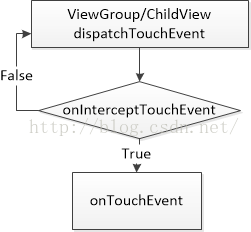 Android 事件分發機制學習筆記
事件分發是 Android 中非常重要的知識體系,本文結合源碼梳理其整體流程與關鍵方法。 整體事件流向 事件流向大致是 Activity → ViewGroup → Vi
 Glide 加載圖片實戰教程:網絡圖、本地圖與自定義數據源
和其他圖片加載庫一樣,Glide 除了網絡圖,也能加載本地圖,甚至能從各種意想不到的數據源取圖。本文按「網絡 → 本地 → 自定義數據源 → 異常調試」四個場景走一遍。
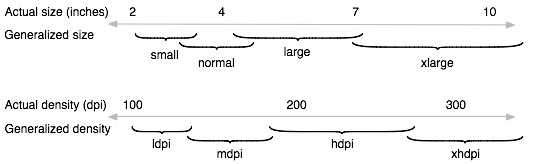 Android 解析度適配完全指南:dp、dpi 與資源目錄怎麼用
解析度適配是 Android 長年被詬病的問題之一。本文依官方文件 Supporting Multiple Screens 的脈絡,把核心概念與實務技巧整理成一份可操作的