

編輯:關於 Android 程式設計
AndroidAnnotations 是相當好用的注解框架,能大幅精簡樣板程式碼。要在 Android Studio(Gradle)中啟用它,需要修改兩個地方的 build.gradle,以下是我的完整配置。
參考官方文件:
https://github.com/excilys/androidannotations/wiki/Building-Project-Gradle
在 buildscript 的 dependencies 中加入 android-apt 插件:
buildscript {
    repositories { jcenter() }
    dependencies {
        classpath 'com.android.tools.build:gradle:1.2.2'
        // 應用依賴請放在各模組的 build.gradle,不要寫在這裡
        classpath 'com.neenbedankt.gradle.plugins:android-apt:1.4+'
    }
}
allprojects {
    repositories { jcenter() }
}
套用 android-apt 插件、加入依賴,並配置 apt 參數:
apply plugin: 'com.android.application'
apply plugin: 'android-apt'

def AAVersion = '3.2+'

android {
    compileSdkVersion 22
    buildToolsVersion "22.0.1"

    defaultConfig {
        applicationId "com.sondon.mayi.hii"
        minSdkVersion 15
        targetSdkVersion 22
        versionCode 1
        versionName "1.0"
    }

    buildTypes {
        release {
            minifyEnabled false
            proguardFiles getDefaultProguardFile('proguard-android.txt'), 'proguard-rules.pro'
        }
    }
}

dependencies {
    compile fileTree(dir: 'libs', include: ['*.jar'])
    apt "org.androidannotations:androidannotations:$AAVersion"
    compile "org.androidannotations:androidannotations-api:$AAVersion"
    compile 'com.android.support:appcompat-v7:22.1.1'
    compile 'com.android.support:support-v4:22.1.1'
}

apt {
    arguments {
        androidManifestFile variant.outputs[0].processResources.manifestFile
        // 若使用 splits 有多個輸出,可調整索引
        // 也可設定其他注解處理選項,例如:
        // logLevel 'INFO'
        // logFile '/var/log/aa.log'
    }
}
完成這兩處配置後,重新編譯即可開始享受注解開發的便利。apt 負責編譯期生成程式碼,而 androidannotations-api 則是執行期所需的依賴,兩者缺一不可。
 Android 開發技巧:大圖裁剪與旋轉圖處理
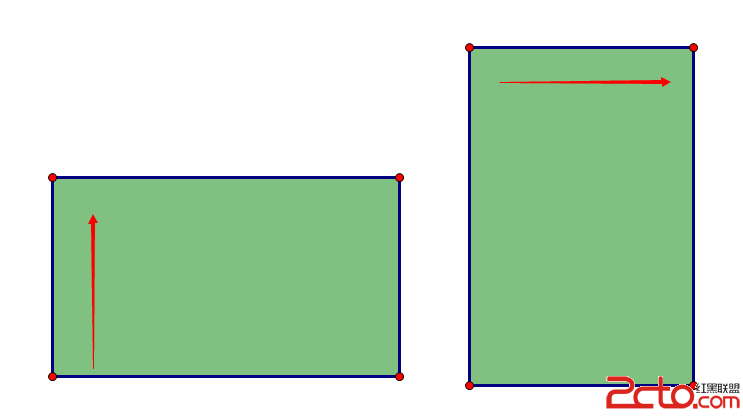
本文接續仿微信圖片裁剪控件,說明如何進行大圖裁剪,並處理圖片旋轉問題。裁剪控件可先在布局中直接使用,支持的屬性包括裁剪框比例、提示文字、遮罩顏色、邊距等。普通小圖可直接設
 OpenGL ES 2.0 for Android:用三角形扇畫出正圓與寬高比修正
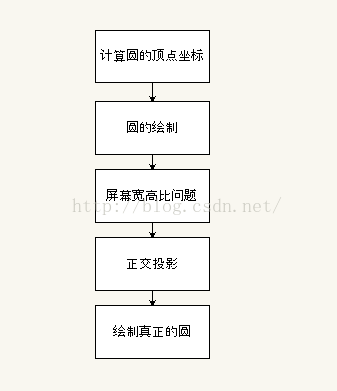
用三角形扇畫圓OpenGL ES 沒有直接畫圓的指令,但可以把它視為許多三角形組成的扇形。每一個三角形都以圓心為共同頂點,外圈則是圓周上的點。當分割數量足夠多,視覺上就會
 Android 螢幕解析度工具類:dp 與 px 轉換及螢幕尺寸取得
Android 開發中幾乎每個專案都會需要 dp 與 px 互轉、取得螢幕寬高、取得狀態列高度這些基礎操作。與其到處寫重複的計算式,不如集中成一個工具類。 packag
 深入認識 Android 中的 Handler 機制
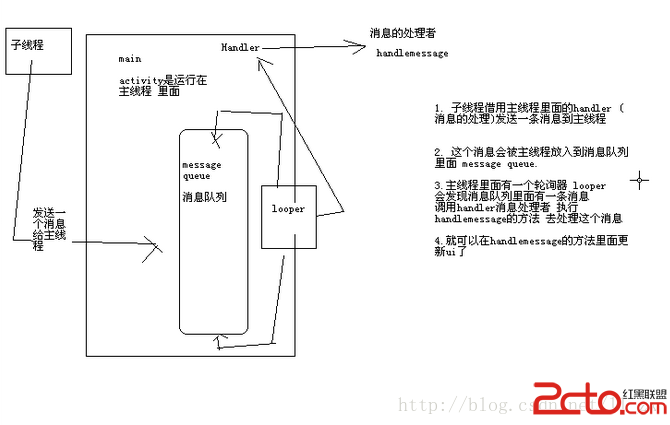
當我們處理下載或其他耗時任務時,若直接把處理函式放在 Activity 的 onCreate 或 onStart 中,會導致執行期間整個 Activity 無回應,時間一