

編輯:關於 Android 程式設計
最近用網路上找到的 gprinter.jar 做藍牙與收銀機的對接打印,結果一跑就拋出這樣的錯誤:
x + width must be <= bitmap.width()
一整排類似錯誤,追根溯源都指向了同一處——矩陣的邊界檢測:
/**
 * Shared code to check for illegal arguments passed to getPixels() or setPixels()
 */
private void checkPixelsAccess(int x, int y, int width, int height, int offset, int stride, int pixels[]) {
    checkXYSign(x, y);
    if (width < 0) {
        throw new IllegalArgumentException("width must be >= 0");
    }
    if (height < 0) {
        throw new IllegalArgumentException("height must be >= 0");
    }
    if (x + width > getWidth()) {
        throw new IllegalArgumentException("x + width must be <= bitmap.width()");
    }
    if (y + height > getHeight()) {
        throw new IllegalArgumentException("y + height must be <= bitmap.height()");
    }
    ...
}
翻來覆去研究了半天源碼,才發現問題出在 resizeImage(mBitmap, width, height) 這個方法的呼叫上。原始方法長這樣:
public static Bitmap resizeImage(Bitmap bitmap, int w, int h) {
    Bitmap BitmapOrg = bitmap;
    int width = BitmapOrg.getWidth();
    int height = BitmapOrg.getHeight();
    int newWidth = w;
    int newHeight = h;
    float scaleWidth = newWidth / width;
    float scaleHeight = newHeight / height;
    Matrix matrix = new Matrix();
    matrix.postScale(scaleWidth, scaleHeight);
    Bitmap resizedBitmap = Bitmap.createBitmap(BitmapOrg, 0, 0, width, height, matrix, true);
    return resizedBitmap;
}
真正的病根在這兩行:float scaleWidth = newWidth / width;。這裡是 int / int 的整數除法,先做完除法再轉 float,結果往往被截斷成 0 或極小的值,導致後續 createBitmap 計算出的尺寸越界,於是便拋出了那個惱人的 x + width must be <= bitmap.width()。
解決辦法很簡單,把運算順序調整一下,讓其中一個操作數先變成浮點數:float = int * 1.0f / int,這樣就不會再報錯了。這個坑在平板上尤其容易踩到,改完之後藍牙打印一切正常。
 秒拍影片無法載入?更新、網路與相容性排查
秒拍影片無法載入,可先更新到最新版,再切換Wi-Fi確認是否為行動網路問題。 若只有特定影片失敗,可能是影片本身或伺服器問題;若多數影片都無法播放,可嘗試恢復原廠設定或更
 Android SQLite 入門:DbHelper、CRUD 與 Spinner 資料綁定
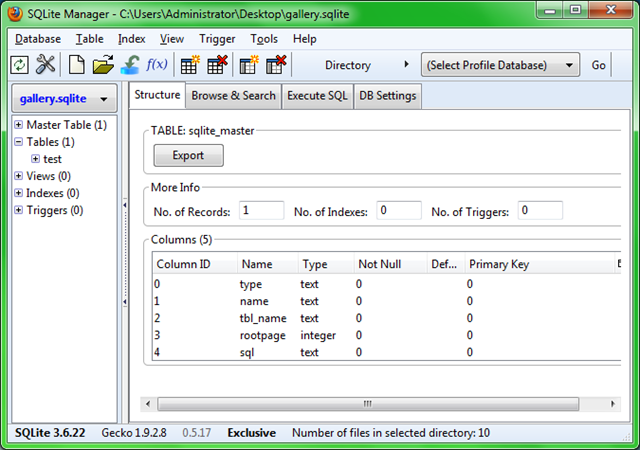
SQLite 是 Android 內建的輕量級關聯式資料庫,適合儲存本地結構化資料。開發時通常會建立 SQLiteOpenHelper,負責建立與升級資料表。 建立資料
 Android 設計模式之觀察者模式
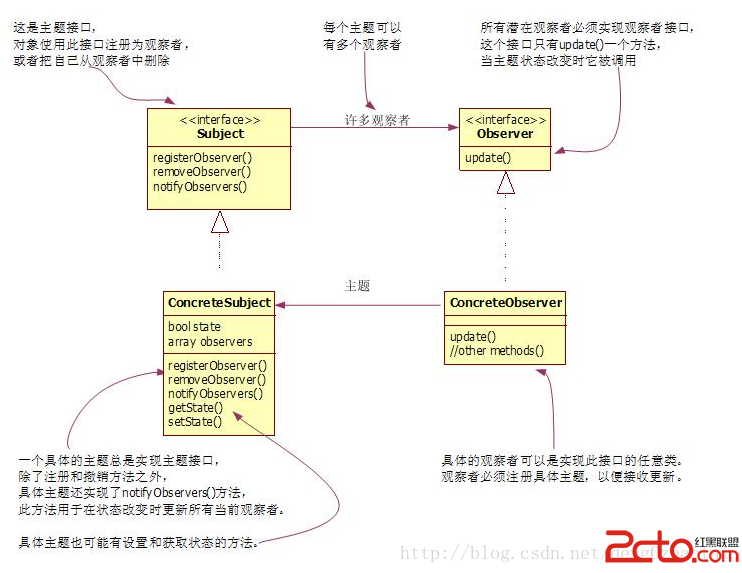
定義:觀察者模式定義了物件之間的一對多依賴關係——當一個物件改變狀態時,所有依賴它的物件都會收到通知並自動更新。 對應的設計原則:為交互物件之間的鬆耦合設計而努力。 實務
 Android 學習筆記(36):兩種事件處理機制詳解
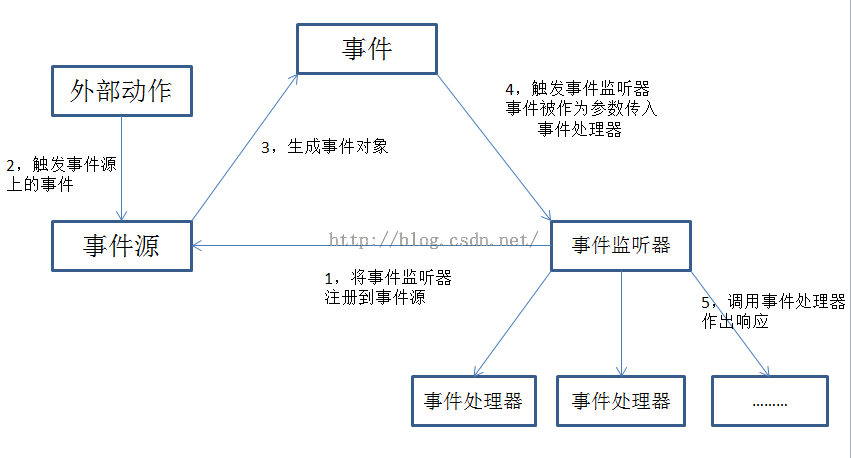
在 Android 中,事件處理主要分為兩大類:基於回調(callback)的事件處理,以及基於監聽(listener)的事件處理。兩者各有適用場景,理解其差異是打好 U