

編輯:關於 Android 程式設計
官方文檔開宗明義:Service 是應用程序的四大組件之一。當你的應用需要執行一些耗時的後台邏輯、又不需要與使用者直接互動時,Service 就是那個合適的搬運工。
A Service is an application component representing either an application's desire to perform a longer-running operation while not interacting with the user or to supply functionality for other applications to use. Services can be started with Context.startService() and Context.bindService().
歸納一下,Service 有這幾個鮮明的特點:
通常分為兩類:
本地服務(Local Service):用於應用程式內部,透過 Context.startService() 啟動,Context.stopService() 結束,內部也可呼叫 Service.stopSelf() 自行停止。無論呼叫多少次 startService,只需一次 stopService 即可停止。
遠程服務(Remote Service):用於系統內部的跨應用通信,可定義接口供其他應用調用。客戶端透過 Context.bindService() 建立連接並啟動,Context.unbindService() 關閉連接。
Service 主要用到 onCreate()、onStartCommand() 和 onDestroy() 三個方法。第一次啟動時依次呼叫 onCreate() 與 onStartCommand();停止時執行 onDestroy();若 Service 已在運行,再次啟動則只執行 onStartCommand()。(可在手機的應用程式管理器查看自己的 Service 是否在運行。)
在 Activity 中啟動 Service 之後,兩者如何建立通訊?核心在於 IBinder。先看 Service 端:
public class MyService extends Service {
    public static final String M_TAG = "MyService";
    private MyBinder m_binder = new MyBinder();

    @Override
    public void onCreate() {
        super.onCreate();
        Log.i(M_TAG, "onCreate() executed");
    }

    @Override
    public int onStartCommand(Intent intent, int flags, int startId) {
        Log.i(M_TAG, "onStartCommand() executed");
        return super.onStartCommand(intent, flags, startId);
    }

    @Override
    public void onDestroy() {
        super.onDestroy();
        Log.i(M_TAG, "onDestroy() executed");
    }

    @Override
    public IBinder onBind(Intent intent) {
        return m_binder;
    }

    class MyBinder extends Binder {
        public void MyMethod() {
            Log.i(M_TAG, "Start MyMethod()");
            // ...
        }
    }
}
這裡的 IBinder 是什麼呢?它是遠程物件的一個基本接口,是為進程內和跨進程調用設計的輕量級遠程調用機制的核心。我們自定義了一個 MyBinder,並在其中加入了自己的 MyMethod 方法。
接著修改啟動它的 MainActivity,透過 ServiceConnection 建立連接:
public class MainActivity extends Activity {
    private MyService.MyBinder m_binder;

    private ServiceConnection connection = new ServiceConnection() {
        @Override
        public void onServiceConnected(ComponentName name, IBinder service) {
            m_binder = (MyService.MyBinder) service;
            m_binder.MyMethod();
        }

        @Override
        public void onServiceDisconnected(ComponentName name, IBinder service) {
            // ...
        }
    };
    // ...
}
ServiceConnection 是一個監控應用服務狀態的接口,其方法會在 Activity 與 Service 建立和解除連接時被呼叫。透過 IBinder,Activity 便能調用 Service 內部的 MyMethod。
當然,綁定還需要呼叫 bindService(Intent, ServiceConnection, int),第三個參數是一組標誌位,常見的有:
BIND_AUTO_CREATE:只要綁定存在就自動創建服務;BIND_IMPORTANT:此服務對客戶端很重要,應隨客戶端一起提升到前台進程;BIND_DEBUG_UNBIND:為不匹配的 unbind 調用提供調試幫助;BIND_NOT_FOREGROUND:不允許此綁定提升目標服務的進程優先級;BIND_WAIVE_PRIORITY:不影響目標服務宿主進程的調度或記憶體優先級。
解除連接只需呼叫 unbindService(connection) 即可。值得一提的是,Service 不僅能與創建它的 Activity 建立連接,也能與應用內其他 Activity 建立連接,並取得相同的 IBinder 實例。
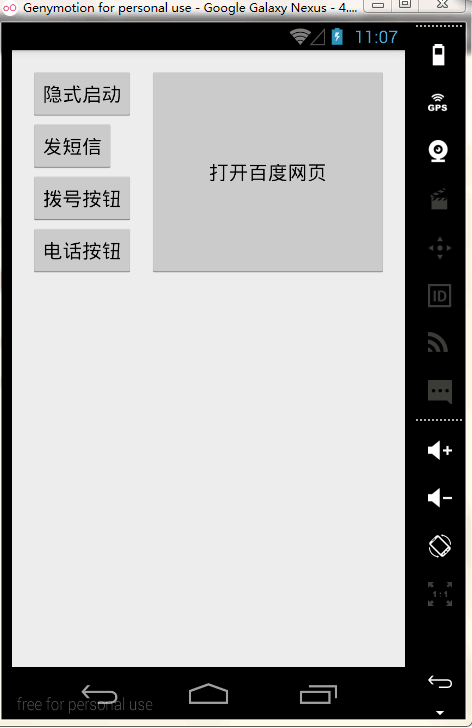 Android Studio Intent 隱式啟動實戰:發短信、撥號、打電話與開啟網頁
Intent 的隱式啟動是 Android 四大元件解耦的關鍵。只要正確宣告 action 與 data,就能把工作交給系統或其他 App 完成,不必關心對方是誰。本文用
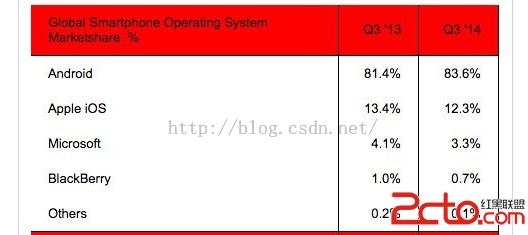 Android 系統介紹:開源紅利、碎片化,以及它為什麼能贏
Android 是什麼 Android(安卓)是以 Linux 核心為基礎的開源行動作業系統,主要用於智慧型手機與平板電腦,由 Google 成立的開放手持設備聯盟(Op
 Android 的 SeekBar 與 RatingBar 使用詳解
SeekBar 簡介 SeekBar 允許用戶拖動以進行調節,常用於音量、亮度等場景。通過 android:thumb 可以設置表示拖動滑塊的 drawable;通過 s
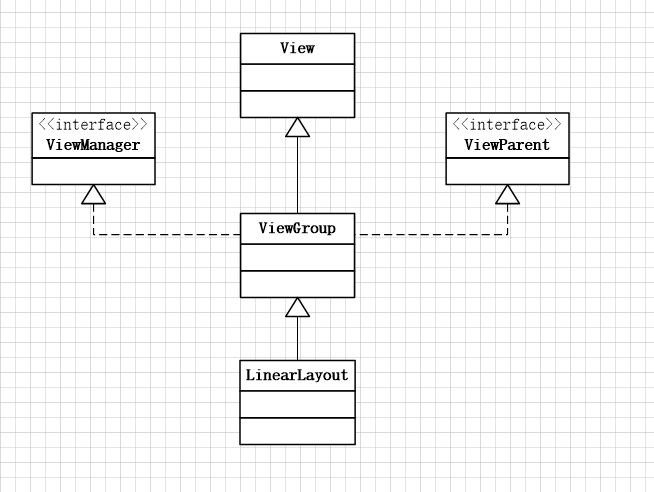 Android UI 元件:LinearLayout 線性布局詳解
什麼是線性布局 LinearLayout 會把子元件排成一條線,可設定為垂直或水平。垂直時由上而下排列,水平時由左而右排列。它適合用於表單、按鈕列或簡單的資訊堆疊。 方