

編輯:關於 Android 程式設計
RadioButton 需要和 RadioGroup 搭配使用才能發揮作用:RadioGroup 負責管理「同一組只能選一個」的互斥邏輯,RadioButton 則是具體的選項。取值時有兩種常見思路,一是遍歷分組的子控件找出被選中的那個,二是用 getCheckedRadioButtonId() 直接拿 ID。下面用最直觀的遍歷方式演示。
import android.app.Activity;
import android.os.Bundle;
import android.view.View;
import android.view.View.OnClickListener;
import android.widget.Button;
import android.widget.RadioButton;
import android.widget.RadioGroup;
import android.widget.Toast;

/**
 * RadioButton 示例
 */
public class MainActivity extends Activity implements OnClickListener {

    private Button button;
    private RadioGroup group;

    @Override
    protected void onCreate(Bundle savedInstanceState) {
        super.onCreate(savedInstanceState);
        setContentView(R.layout.activity_main);
        group = (RadioGroup) this.findViewById(R.id.sex);
        button = (Button) this.findViewById(R.id.button);
        button.setOnClickListener(this);
    }

    @Override
    public void onClick(View v) {
        // 獲得單選按鈕組的選項個數
        int len = group.getChildCount();
        String msgsString = "";
        for (int i = 0; i < len; i++) {
            RadioButton radioButton = (RadioButton) group.getChildAt(i);
            if (radioButton.isChecked()) {
                msgsString = radioButton.getText().toString();
                break;
            }
        }
        Toast.makeText(MainActivity.this, msgsString, 1).show();
    }
}
代碼邏輯很樸素:拿到 RadioGroup 的所有子 View,逐個判斷 isChecked(),命中後取出 text 並跳出循環,最後用 Toast 彈出結果。
如果選項是靜態寫在佈局裡的,用 group.getCheckedRadioButtonId() 會更乾淨,不必遍歷:
int checkedId = group.getCheckedRadioButtonId();
if (checkedId != -1) {
    RadioButton rb = (RadioButton) findViewById(checkedId);
    String text = rb.getText().toString();
}
另外兩個場景中也常用到的 API:
setOnCheckedChangeListener,在 onCheckedChanged(group, checkedId) 裡即時響應用戶切換。android:checked="true",或在代碼裡調用 group.check(R.id.xxx)。順帶一提,Toast 的第三個參數是時長常量,應該傳 Toast.LENGTH_SHORT 或 Toast.LENGTH_LONG,示例裡直接寫 1 並不規範,實際開發時別照抄。
 ButterKnife 使用詳談:優勢、區別與實踐注意點
一、ButterKnife 是什麼 寫 Android 的都知道,findViewById 加 setOnClickListener 這套組合拳一天要敲幾十遍。初始化視圖
 Android ViewFlipper 實作左右滑動輪播與轉場動畫
要做左右滑動切換畫面,可用的元件不少:ViewPager、Gallery、自行繼承 ViewGroup 都是選項。本文示範用 ViewFlipper 搭配手勢偵測與補間動
 深入認識 Android 中的 Handler 機制
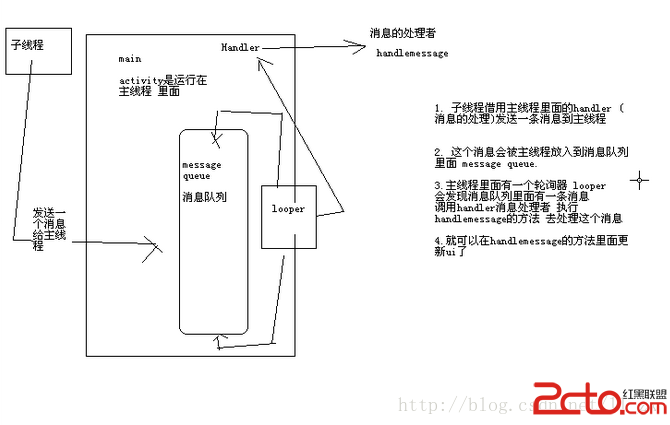
當我們處理下載或其他耗時任務時,若直接把處理函式放在 Activity 的 onCreate 或 onStart 中,會導致執行期間整個 Activity 無回應,時間一
 Android 插值器 Interpolator 全解:九種系統實現與自定義玩法
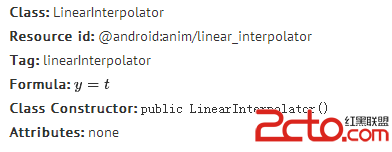
動畫的「手感」幾乎全由 Interpolator 決定。它是一個把 0~1 的時間進度映射成另一個數值的函數,映射曲線不同,位移、縮放、透明度看起來的加速節奏就完全不同。