

編輯:關於 Android 程式設計
把 txt 文件放進 res/raw 或 assets 目錄,是很多教程會提到的做法。兩者的讀取方式略有不同:
// res/raw 下的文件,可以直接通過 R 文件拿到資源 ID
InputStream is = getResources().openRawResource(R.raw.fileName);

// assets 下的文件,通過 AssetManager 打開
AssetManager am = getAssets();
InputStream is2 = am.open("FileName");
raw 與 assets 的區別在於:raw 會在 R 文件中生成資源 ID,便於引用;assets 不會生成 ID,只能靠字符串路徑訪問,好處是可以建立任意深度的子目錄結構。
但這種方式有一個致命限制:只讀,不能寫。這些文件打包在 apk 裡,apk 安裝後是只讀的,任何寫入嘗試都會失敗。所以需要動態保存數據時,必須換用第二種方式。
先在 AndroidManifest.xml 中加入權限:
<uses-permission android:name="android.permission.WRITE_EXTERNAL_STORAGE" />
然後把文件操作封裝到一個獨立的類裡,這裡命名為 FileOption:
package com.example.littleapplication;

import java.io.BufferedReader;
import java.io.File;
import java.io.FileInputStream;
import java.io.FileNotFoundException;
import java.io.IOException;
import java.io.InputStreamReader;
import java.io.RandomAccessFile;
import java.util.Vector;

import android.os.Environment;
import android.util.Log;

public class FileOption {

    private String fileName;
    private File targetFile;
    private File sdCardDir;

    public FileOption(String fileName) throws IOException {
        // 先判斷外部存儲是否已掛載
        boolean mark = Environment.getExternalStorageState().equals(Environment.MEDIA_MOUNTED);
        if (mark) {
            this.fileName = fileName;
            this.sdCardDir = Environment.getExternalStorageDirectory();
            this.targetFile = new File(this.sdCardDir.getCanonicalPath() + this.fileName);
            if (this.targetFile.exists() == false) {
                this.targetFile.createNewFile();
            }
        } else {
            Log.e("FileOption", "無內存卡");
        }
    }

    /** 逐行讀取,返回所有行 */
    public Vector<String> read() throws FileNotFoundException, IOException {
        FileInputStream fis = new FileInputStream(
                this.sdCardDir.getCanonicalPath() + this.fileName);
        BufferedReader br = new BufferedReader(new InputStreamReader(fis));
        Vector<String> res = new Vector<String>();
        String line = null;
        while ((line = br.readLine()) != null) {
            res.add(line);
        }
        br.close();
        return res;
    }

    /** 追加寫入一行 */
    public boolean write(String add) throws IOException {
        RandomAccessFile raf = new RandomAccessFile(this.targetFile, "rw");
        raf.seek(targetFile.length());   // 指針移到末尾,實現追加
        raf.write(add.getBytes());
        raf.writeChar('\n');             // 換行
        raf.close();
        return true;
    }

    /**
     * 返回一共有多少條記錄
     * 約定每 5 行代表一個數據項,分別是 id、title、content、data、level
     */
    public int size() throws FileNotFoundException, IOException {
        FileInputStream fis = new FileInputStream(
                this.sdCardDir.getCanonicalPath() + this.fileName);
        BufferedReader br = new BufferedReader(new InputStreamReader(fis));
        String line = null;
        int count = 0;
        while ((line = br.readLine()) != null) {
            count++;
        }
        br.close();
        return count / 5;
    }
}
構造時先判斷掛載狀態。外部存儲可能處於未掛載、被移除或僅充電模式,這時任何文件操作都會失敗,必須提前攔截。
RandomAccessFile 實現追加。seek(targetFile.length()) 把指針定位到文件末尾,寫入的內容自然接在原內容之後。這是實現「日誌式追加」最直接的方式。
原稿中的兩處筆誤已修正。一是 write 方法裡的 raf.writeChar(' ') 原本想表達換行,但空格並不能換行,應改為 '\n';二是 Log.e 的第一個參數原本寫成了未定義的 SDK,已改為類名標籤。
路徑拼接建議改用 File 構造函數。new File(dir, fileName) 比字符串相加更安全,能自動處理分隔符,也不容易在 dir 末尾恰好帶斜線時拼出雙斜線。
這份封裝的結構思路(判斷狀態、封裝讀寫、統計條數)至今仍然適用,但存儲位置需要調整:
getFilesDir()(內部存儲)或 getExternalFilesDir()(外部私有目錄),不需要任何存儲權限,卸载時自動清除。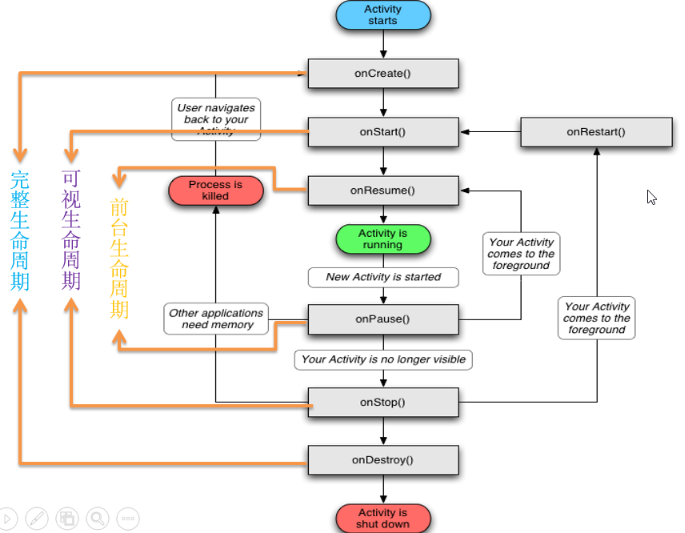 Activity 完全入門:創建、啟動、傳值與生命週期
一、Activity 是什麼 官方定義:Activity 是一個應用組件,用戶可與其提供的屏幕進行交互,以執行撥打電話、拍攝照片、發送電子郵件或查看地圖等操作。每個 A
 三星S7微信不提示怎麼辦?收不到消息推送的解決方法
三星S7收不到微信消息推送怎麼辦 三星S7出現微信、QQ等即時通訊軟件無法正常推送的情況,通常與自啟動、網絡休眠策略或系統設置有關。可按以下方向排查。 檢查微信自啟動
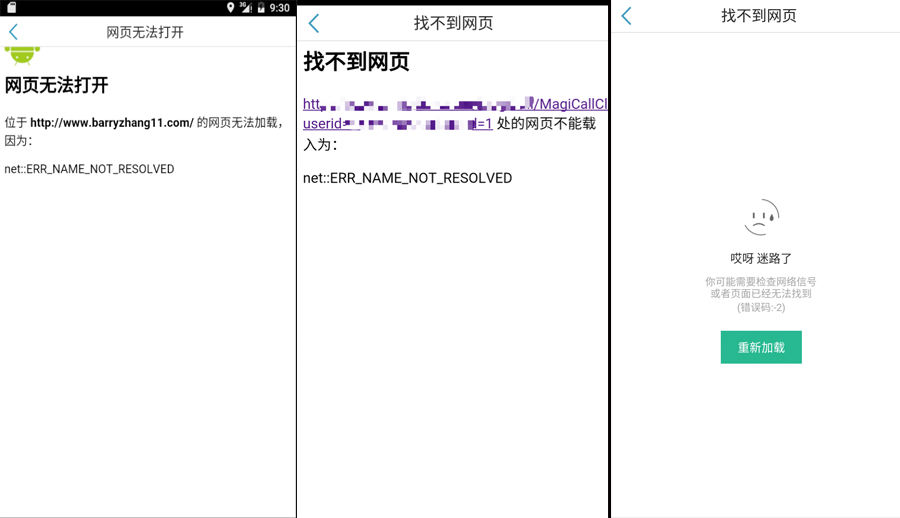 Android WebView:onReceivedError 的應用與版本變遷
WebView 的 onReceivedError 是處理網頁載入錯誤的重要 callback。不過它在不同 Android 版本中的行為有變化,若沒有妥善處理,可能會在
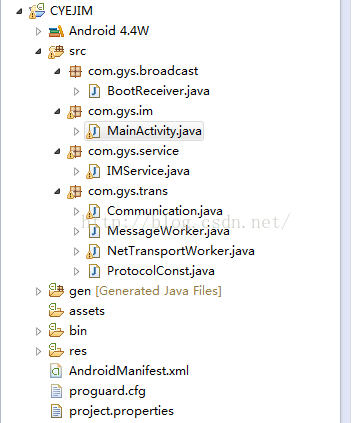 Android Socket 通訊實作:用常駐 Service 打造長連線客戶端
Android 與伺服器通訊主要有兩條路:HTTP 與 Socket。兩者最大的差異在連線模型。 HTTP 走的是「請求—回應」:客戶端發請求才建立通道,伺服器回應後連線