

編輯:關於 Android 程式設計
本文說明如何在 Android Studio 專案中整合 AndroidAnnotations 框架。整個設定分為兩個部分:專案層級與模組層級的 Gradle 配置。
在 project 的 build.gradle 檔案中,於 dependencies 區塊加入 android-apt 外掛:
dependencies {
    classpath 'com.android.tools.build:gradle:1.0.0'
    classpath 'com.neenbedankt.gradle.plugins:android-apt:1.4'

    // 注意:不要把應用程式本身的依賴放在這裡,
    // 它們屬於個別模組的 build.gradle 檔案。
}
在 module 的 build.gradle 檔案中,加入 AndroidAnnotations 相關依賴,並設定 apt 參數:
dependencies {
    compile fileTree(dir: 'libs', include: ['*.jar'])
    compile 'com.android.support:appcompat-v7:22.0.0'
    compile files('libs/wmqtt.jar')
    compile files('libs/gson-2.2.4.jar')
    compile files('libs/org.eclipse.paho.client.mqttv3-1.0.2.jar')

    apt "org.androidannotations:androidannotations:3.2"
    compile 'org.androidannotations:androidannotations-api:3.2'

    compile 'com.android.support:recyclerview-v7:21.0.3'
    compile 'com.android.support:cardview-v7:21.0.3'
    compile 'com.facebook.fresco:fresco:0.2.0'
}

apt {
    arguments {
        androidManifestFile variant.outputs[0].processResources.manifestFile
        resourcePackageName 'com.example'
    }
}
完成以上兩處設定後,同步 Gradle 即可在專案中使用 AndroidAnnotations 的註解功能,大幅簡化 View 綁定與事件處理等常見操作。
 淺談 Android 中加載高清大圖及圖片壓縮方式(二)
在 Android 中直接加載高清原圖往往會帶來兩個問題:一是解碼和顯示耗時較長,影響用戶體驗;二是大尺寸位圖會佔用大量內存,容易引發內存溢出甚至崩潰。因此,加載大圖時通
 微信小惱惱一次解決:小影片與全螢幕播放設定
微信小問題可用設定解決。Android版可到設定、通用,把朋友圈小影片設為關閉或僅Wi-Fi,避免浪費行動網路。 Windows Phone看影片無法全屏,可到設定、輔助
 Android Notification 通知機制實作
Notification 是 Android 用來在系統通知列顯示訊息的機制。開發者可透過 NotificationManager 發送通知,並設定圖示、提示文字、音效與
 Android 學習筆記:Drawable 完整整理
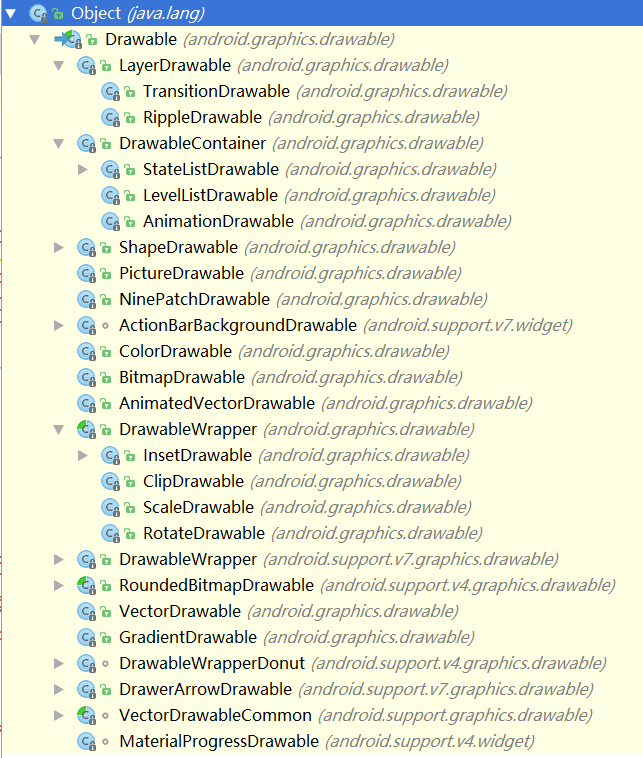
什麼是 DrawableDrawable 是 Android 中可繪製的抽象資源,常用於 View 背景、圖示或自定義繪圖。它可以是圖片,也可以是純色、漸層、形狀或多層組