

編輯:關於 Android 程式設計
以下整理 Android 中把資料存檔到應用內部與 SD 卡的常用寫法。
首先是權限宣告:
1.權限添加
接著是一組檔案讀寫的工具方法:
public static String getDataFolderPath(Context paramContext) { return Environment.getDataDirectory() + "/data/" + paramContext.getPackageName() + "/files"; } public static String getMyFileDir(Context context){ return context.getFilesDir().toString(); } public static String getMyCacheDir(Context context){ return context.getCacheDir().toString(); } /** @desc 保存內容到文件中 */ public static void save(Context context, String fileName, String content, int module) { try { FileOutputStream os = context.openFileOutput(fileName, module); os.write(content.getBytes()); os.close(); } catch (Exception e) { e.printStackTrace(); } } /** @desc 讀取文件內容 */ public static String read(Context context, String fileName){ try { FileInputStream fis = context.openFileInput(fileName); ByteArrayOutputStream bos = new ByteArrayOutputStream(); byte[] b = new byte[1024]; int len = 0; while((len = fis.read(b)) != -1){ bos.write(b, 0, len); } byte[] data = bos.toByteArray(); fis.close(); bos.close(); return new String(data); } catch (Exception e) { e.printStackTrace(); } return null; } /** @desc 將文本內容保存到 sd 卡的文件中 */ public static void saveToSDCard(Context context, String fileName, String content) throws IOException{ File file = new File(Environment.getExternalStorageDirectory(),fileName); FileOutputStream fos = new FileOutputStream(file); fos.write(content.getBytes()); fos.close(); } /** @desc 讀取 sd 卡文件內容 */ public static String readSDCard(String fileName) throws IOException { File file = new File(Environment.getExternalStorageDirectory(),fileName); FileInputStream fis = new FileInputStream(file); ByteArrayOutputStream bos = new ByteArrayOutputStream(); byte[] buffer = new byte[1024]; int len = 0; while((len = fis.read(buffer)) != -1) { bos.write(buffer, 0, len); } byte[] data = bos.toByteArray(); fis.close(); bos.close(); return new String(data); }
讀寫應用內部檔案時,用 openFileOutput / openFileInput 搭配不同的 mode;而存到 SD 卡時,則直接以 Environment.getExternalStorageDirectory() 取得路徑,再用 FileOutputStream 與 FileInputStream 處理。別忘了在 manifest 補上 WRITE_EXTERNAL_STORAGE 權限。
 Android 網絡編程:用 GET 把數據送到伺服器(一)
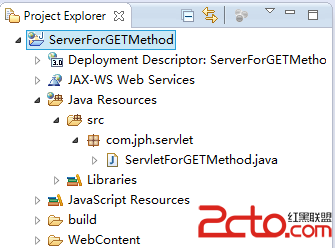
Android 應用常需要與伺服器通訊,這就必須有伺服器端的配合。本文先談最基礎的 GET 方式。 GET 上傳數據適用於資料量不超過 2KB、對安全性要求不高的場景。
 Android 應用開發中的單元測試分析
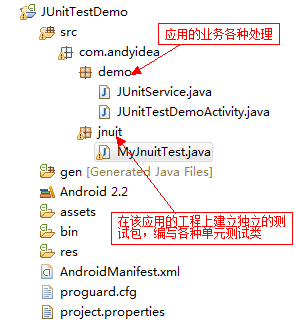
單元測試是確保程式品質的重要方法。在 Android 開發中,適當的單元測試可以幫助開發者及早發現問題,也能降低後期維護成本。本文說明單元測試的基本概念,以及 Andro
 Android Studio 非 Gradle 專案:調整 SDK 版本
適用情境若專案不是使用 Gradle 建置,例如直接從伺服器取得舊式專案,或從 Eclipse 匯入 Android Studio,就可能需要在 Android Stud
 Android 音樂播放器實戰(十二):網絡歌單列表與搜索結果展示
本系列的目標是做一個既能播本地音樂、也能播網絡音樂的播放器。前面已經搞定了本地掃描與播放,這一篇要解決的是「網絡這一頭」:怎麼把遠程數據抓回來、解析成音樂對象、再渲染到列