

編輯:關於 Android 程式設計
為什麼要繞過上層的 ConnectivityService,改用 shell 命令直接操作網路介面?因為這樣可以做 ConnectivityService 沒有開放的操作(具體用途留待後續說明)。本文先驗證「做得到」這件事。
進入 adb shell 後 ping 一個外部主機:
ping 211.69.198.222
PING 211.69.198.222 (211.69.198.222) 56(84) bytes of data.
64 bytes from 211.69.198.222: icmp_seq=1 ttl=46 time=356 ms
64 bytes from 211.69.198.222: icmp_seq=2 ttl=46 time=294 ms
64 bytes from 211.69.198.222: icmp_seq=5 ttl=46 time=342 ms
^C
--- 211.69.198.222 ping statistics ---
9 packets transmitted, 6 received, 33% packet loss, time 8025ms
可以 ping 通,網路正常。
# ifconfig rmnet0
rmnet0: ip 172.22.39.243 mask 255.255.255.248 flags [up broadcast running multicast]

# ifconfig rmnet0 down
# ping 211.69.198.222
connect: Network is unreachable

# ifconfig rmnet0 up
# ping 211.69.198.222
connect: Network is unreachable

# ifconfig rmnet0
rmnet0: ip 172.22.39.243 mask 255.255.255.248 flags [up broadcast running multicast]
這裡出現了值得注意的现象:介面明明顯示為 up、IP 也還在,卻完全 ping 不通。
合理的解釋是:把介面 down 掉之後,原本配置在基站/路由器上的 IP 租約已經被釋放。雖然 ifconfig 仍顯示舊的 IP,但那是本機的快取資訊,實際上鏈路已經沒有有效的 IP 配置了。
於是重新透過 DHCP 申請一個 IP:
# netcfg rmnet0 dhcp
# ping 211.69.198.222
PING 211.69.198.222 (211.69.198.222) 56(84) bytes of data.
64 bytes from 211.69.198.222: icmp_seq=1 ttl=46 time=2743 ms
64 bytes from 211.69.198.222: icmp_seq=2 ttl=46 time=1747 ms
64 bytes from 211.69.198.222: icmp_seq=3 ttl=46 time=739 ms
64 bytes from 211.69.198.222: icmp_seq=4 ttl=46 time=98.9 ms
64 bytes from 211.69.198.222: icmp_seq=5 ttl=46 time=97.1 ms
^C
--- 211.69.198.222 ping statistics ---
5 packets transmitted, 5 received, 0% packet loss, time 4015ms
果然恢復正常,而且延遲逐次下降(739 → 98.9 → 97.1 ms),看得出前幾個封包還在建立 PDP 上下文。
透過 Android shell 命令,完全可以繞開上層的網路管理機制來控制網路介面的狀態。這也解釋了為什麼 ConnectivityService 有時會「顯示已連線但實際不通」——它依賴的狀態判斷與底層介面的真實狀況之間存在落差。
實務上要留意兩點:一是 netcfg 與 ifconfig 這類命令在較新版本的 Android 中已被淘汰或行為改變,需改用 ip 指令;二是這類操作通常需要 root 或 system 權限,普通 App 無法執行。
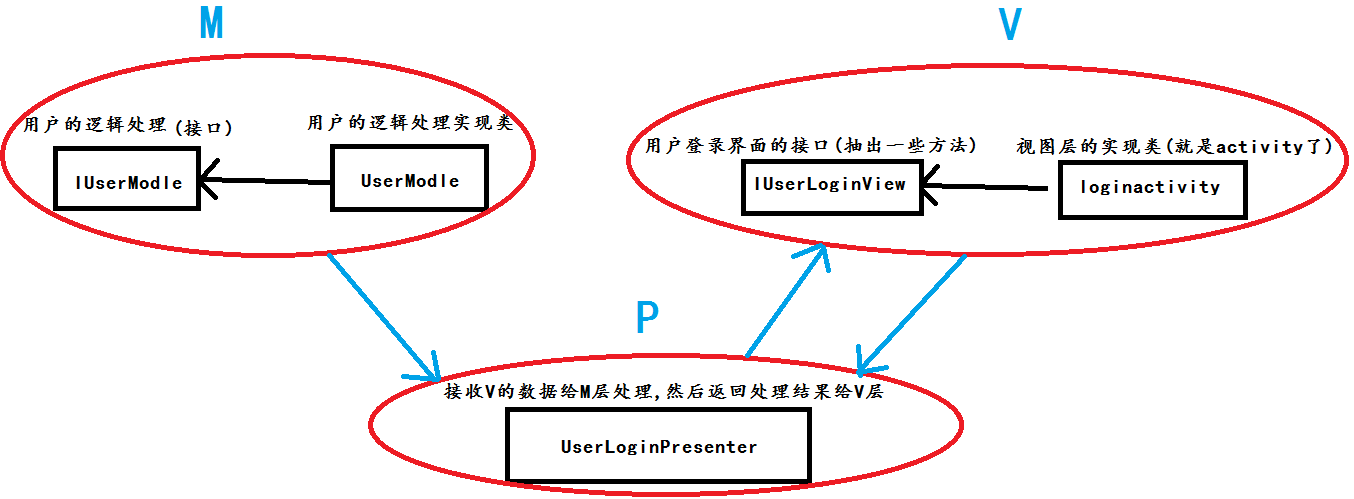 Android 進階實戰:MVP + Retrofit + RxJava 框架整合
一、前言 MVP 是當前比較主流的架構模式,它憑藉出色的解耦能力廣受青睞。本文把 MVP、Retrofit、RxJava 三大主流框架結合起來,從最簡單的「登錄」示例出發
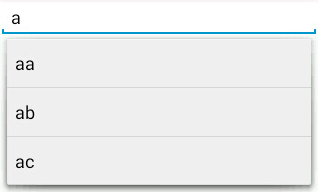 Android 界面編程探險(二):AdapterView、進度條、菜單與對話框
一、UI 組件之 AdapterView 及其子類(二) 1. 自動完成文本框 AutoCompleteTextView MultiAutoCompleteTextVie
 Android 手機無法連接無線網路的解決辦法大全
Android 手機連不上 Wi-Fi,是許多使用者都碰過的困擾。問題可能出在手機端、路由器端,或是 IP 設定上。以下依三種常見情境,整理了完整的排查思路。 一、手機
 微信公眾平台開發入門:從建立百度雲站到啟用開發模式(圖文詳解)
這篇入門教程假設你已經具備 PHP 程式基礎、MySQL 資料庫概念、電腦網路通訊常識與 XML 語言知識。如果還沒有,建議先補上這些前置知識,閱讀起來會順暢很多。 全文