

編輯:關於 Android 程式設計
本篇我們把目光投向 android/vendor/qcom/opensource/fm/fmapp2/src/com/caf/fmradio/PresetList.java,看看預設電台列表是如何組織與維護的。
類的開頭先聲明了一個用來存放電台的集合:
List<PresetStation> mPresetList = new ArrayList<PresetStation>();
整個類的方法幾乎都用 synchronized 修飾,以保證多線程訪問時的線程安全。下面按功能逐一梳理。
獲取電台數量,直接返回列表大小:
public synchronized int getStationCount(){
    return mPresetList.size();
}
按序號獲取電台名稱,越界時返回空串:
public synchronized String getStationName(int stationNum){
    String name = "";
    if (mPresetList.size() > stationNum){
        name = mPresetList.get(stationNum).getName();
    }
    return name;
}
按序號獲取電台頻率,越界時返回一個默認頻率:
public synchronized int getStationFrequency(int stationNum){
    int frequency = 102100;
    if (mPresetList.size() > stationNum){
        frequency = mPresetList.get(stationNum).getFrequency();
    }
    return frequency;
}
設置指定電台的頻率與名稱:
public synchronized void setStationFrequency(int stationNum, int frequency){
    PresetStation mStation = mPresetList.get(stationNum);
    mStation.setFrequency(frequency);
}

public synchronized void setStationName(int stationNum, String name){
    PresetStation mStation = mPresetList.get(stationNum);
    mStation.setName(name);
}
按下標取電台:
public synchronized PresetStation getStationFromIndex(int index){
    int totalPresets = mPresetList.size();
    PresetStation station = null;
    if (index < totalPresets) {
        station = mPresetList.get(index);
    }
    return station;
}
按頻率查找電台,遍歷列表逐一比對:
public synchronized PresetStation getStationFromFrequency(int frequency){
    int totalPresets = mPresetList.size();
    for (int presetNum = 0; presetNum < totalPresets; presetNum++ ) {
        PresetStation station = mPresetList.get(presetNum);
        if (station != null) {
            if(frequency == station.getFrequency()) {
                return station;
            }
        }
    }
    return null;
}
添加電台,既可以傳入名稱與頻率,也可以直接傳入一個現成的 PresetStation 對象(內部會複製一份):
public synchronized PresetStation addStation(String name, int freq){
    PresetStation addStation = new PresetStation(name, freq);
    if(addStation != null) {
        mPresetList.add(addStation);
    }
    return addStation;
}

public synchronized PresetStation addStation(PresetStation station){
    PresetStation addStation = null;
    if(station != null) {
        addStation = new PresetStation (station);
        mPresetList.add(addStation);
    }
    return addStation;
}
刪除電台(需先進行下標合法性校驗)與清空列表:
public synchronized void removeStation(int index){
    int totalPresets = mPresetList.size();
    if((index >= 0) && (index < totalPresets)) {
        mPresetList.remove(index);
    }
}

public synchronized void clear(){
    mPresetList.clear();
}
類中還用一個 mCurrentStation 記錄當前所選電台,圍繞它提供了多個方法。
當用戶選擇一個新電台時,會調用 setSelectedStation 更新當前下標,它同時提供了「傳對象」與「傳下標」兩個重載版本:
public synchronized boolean setSelectedStation(PresetStation selectStation){
    int totalPresets = mPresetList.size();
    if (selectStation != null) {
        for (int presetNum = 0; presetNum < totalPresets; presetNum++ ) {
            PresetStation station = mPresetList.get(presetNum);
            if (station != null) {
                if(selectStation.getFrequency() == station.getFrequency()) {
                    if(selectStation.getName().equalsIgnoreCase(station.getName())) {
                        mCurrentStation = presetNum;
                        return true;
                    }
                }
            }
        }
    }
    return false;
}

public synchronized boolean setSelectedStation(int stationIndex){
    boolean foundStation = false;
    int totalPresets = mPresetList.size();
    if (stationIndex < totalPresets) {
        mCurrentStation = stationIndex;
        foundStation = true;
    }
    return foundStation;
}
判斷列表中是否已存在相同頻率的電台,可用來避免重複添加:
public synchronized boolean sameStationExists(PresetStation compareStation){
    int totalPresets = mPresetList.size();
    if (compareStation != null) {
        for (int presetNum = 0; presetNum < totalPresets; presetNum++ ) {
            PresetStation station = mPresetList.get(presetNum);
            if (station != null) {
                if(compareStation.getFrequency() == station.getFrequency()) {
                    return true;
                }
            }
        }
    }
    return false;
}
選台與取當前電台,selectStation 依頻率定位並更新 mCurrentStation,getSelectedStation 則返回當前電台:
public synchronized void selectStation(PresetStation selectStation){
    int totalPresets = mPresetList.size();
    if (selectStation != null) {
        for (int presetNum = 0; presetNum < totalPresets; presetNum++ ) {
            PresetStation station = mPresetList.get(presetNum);
            if (station != null) {
                if(selectStation.getFrequency() == station.getFrequency()) {
                    mCurrentStation = presetNum;
                    return;
                }
            }
        }
    }
}

public synchronized PresetStation getSelectedStation(){
    int totalPresets = mPresetList.size();
    PresetStation station = null;
    if (mCurrentStation < totalPresets) {
        station = mPresetList.get(mCurrentStation);
    }
    return station;
}
上一台 / 下一台,通過對 mCurrentStation 做加減並配合邊界循環實現:
public synchronized PresetStation selectNextStation(){
    int totalPresets = mPresetList.size();
    PresetStation station = null;
    if(totalPresets > 0) {
        mCurrentStation ++;
        if ( (mCurrentStation) >= totalPresets) {
            mCurrentStation = 0;
        }
        station = mPresetList.get(mCurrentStation);
    }
    return station;
}

public synchronized PresetStation selectPrevStation(){
    int totalPresets = mPresetList.size();
    PresetStation station = null;
    if(totalPresets > 0) {
        mCurrentStation --;
        if ( mCurrentStation < 0) {
            mCurrentStation = totalPresets - 1;
        }
        station = mPresetList.get(mCurrentStation);
    }
    return station;
}
可以看到,PresetList 通過一個 ArrayList 加上同步關鍵字,把預設電台的增刪改查、去重以及前後切換等能力都封裝得井井有條,是 FM 應用中管理收藏電台的基礎數據結構。
 Android 話筒音頻採樣與應用
Android 手機話筒採樣的部分程式碼是從網上找到的,具體出處已不復記憶,這裡主要記錄使用採樣結果並整合進自身 App 功能的做法。1. 在一些 App 中會需要對話筒
 Unity 結合 Vuforia 實戰:原生層控制相機的踩坑全記錄
專案一直趕進度,能寫文的時間越來越少。真正投入 Unity 開發差不多兩個月,方向是 AR,用的是高通那家的 Vuforia。從工程融合一路折騰到 Unity 與 Vuf
 Activity 的界面是怎麼挂上窗口的:setContentView 源碼全流程追蹤
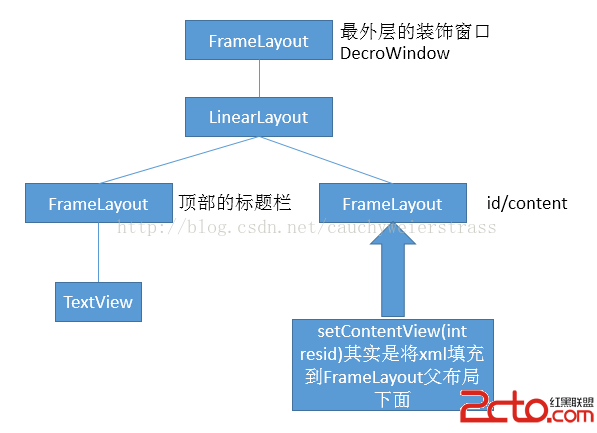
上一篇談 Handler 原理時,說到 Activity 啟動如何走到 onCreate。本篇接著從 onCreate 裡必寫的 setContentView 出發,把佈
 Volley 與 Retrofit 網路框架深度解析
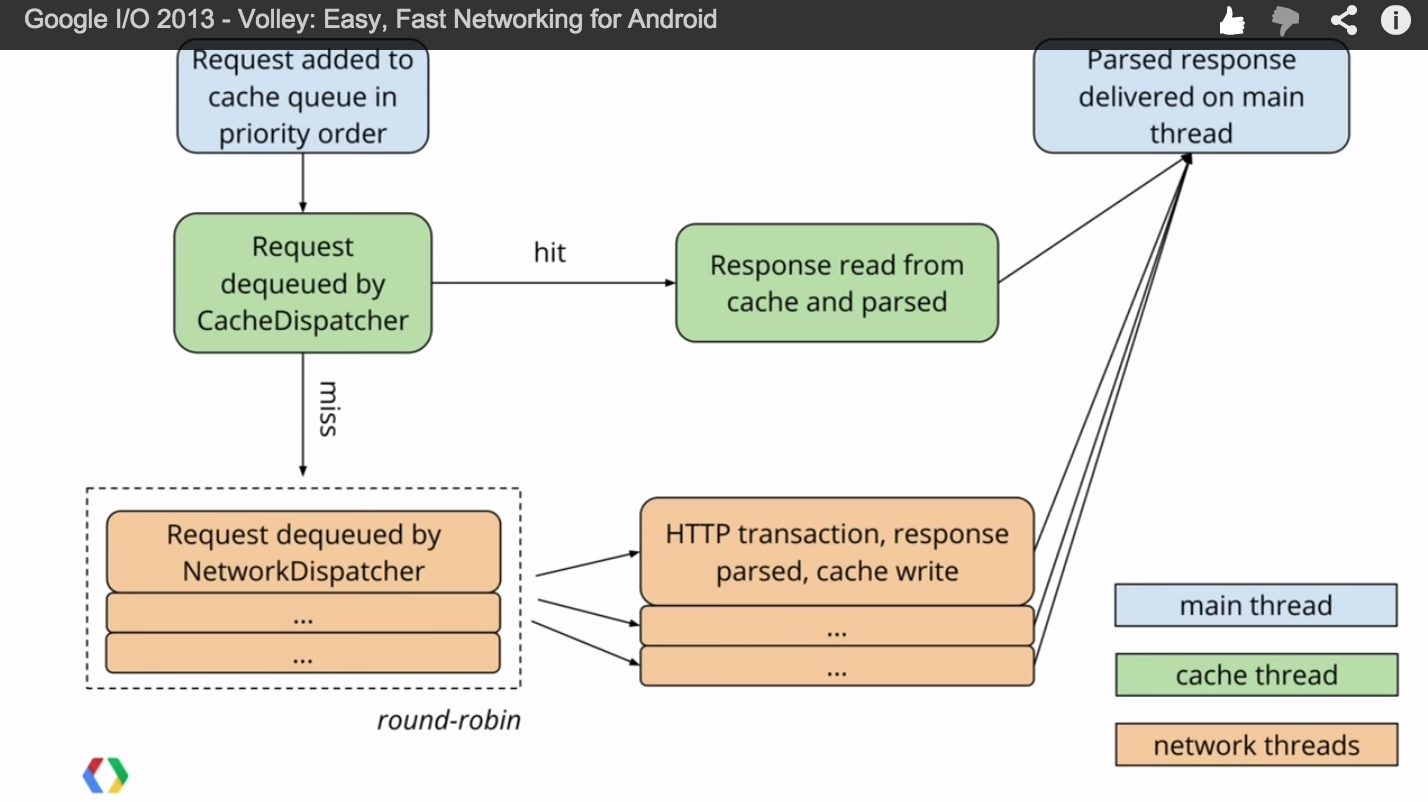
Request 處理流程 RequestQueue 類別內部有三個主要佇列。呼叫 RequestQueue.add(request) 加入的請求,會先進入 mCach